

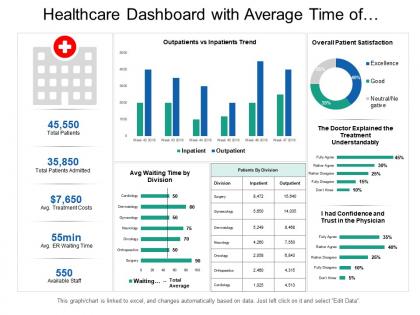
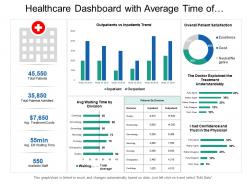
Healthcare dashboard with average time of division and patient satisfaction




Try Before you Buy Download Free Sample Product
 Impress Your
 Audience
 100%
100% Editable
 Save Hours
 of Time


Our Healthcare Dashboard With Average Time Of Division And Patient Satisfaction go beyond the obvious. Unearth their true worth with your probing thoughts.
People who downloaded this PowerPoint presentation also viewed the following :
Healthcare dashboard with average time of division and patient satisfaction with all 6 slides:
Get extensive coverage with our Healthcare Dashboard With Average Time Of Division And Patient Satisfaction. Your crusade will begin to bear fruit.
FAQs for Healthcare dashboard with average time of division
Here's what you need: real-time patient data, clinical alerts, and resource tracking stuff. Quality metrics too - like readmission rates and infection numbers. Role-based access is huge since nurses need different info than admin people. Make it mobile-friendly because everyone's constantly moving around the hospital. Honestly, I've seen way too many dashboards that look ancient and nobody uses them. Keep yours clean and focus on actionable insights instead of shoving every metric possible onto one screen. Oh, and start with your most critical KPIs first - you can always add more later.
Look, turning all that messy medical data into actual visuals will save your sanity. Color-coded charts and heat maps let staff spot patient risk levels instantly - way better than staring at spreadsheets during a 12-hour shift. Bar charts work perfectly for stuff like bed occupancy or readmission rates. The whole point? Make it so obvious that tired doctors don't have to think twice. I'd honestly start with your biggest KPIs first, then pick chart types that scream the patterns at you. Trust me, nobody's got time to decode numbers when patients are waiting.
Start with patient flow stuff - bed occupancy, wait times, length of stay. That's your foundation. Quality metrics come next: readmission rates, infections, patient satisfaction. Don't forget the money side either - cost per patient and revenue cycle data. Here's what I learned the hard way: cramming everything on one dashboard is a nightmare. Pick 5-7 metrics that actually affect your day-to-day decisions. Build separate views for when you need to dig deeper. Oh, and make sure it updates in real-time - there's nothing worse than making decisions with stale data from yesterday.
Oh man, real-time updates totally changed the game for healthcare dashboards. You can see patient vitals and bed availability as it's actually happening - no more refreshing pages constantly (which was honestly the worst). Decision-making gets way faster when seconds matter. But here's the thing - too many updates can overwhelm you if the design sucks. Alert fatigue is real. I'd look for dashboards where you can customize how often things update and filter out the noise from critical stuff. Some routine data changes just aren't worth interrupting your workflow, you know?
So dashboards basically give you real-time data on stuff like readmission rates and infection trends - way better than digging through endless spreadsheets. Your team can catch problems early, like when a patient's vitals start going south before it becomes an emergency. Everyone's looking at the same updated info, which honestly makes coordination so much smoother. They'll automatically flag high-risk patients too, so you're not just going off instinct. My advice? Pick your top 3-4 metrics first and build around those. Don't try to track everything at once or you'll go crazy.
Honestly, interoperability is make-or-break for healthcare dashboards. Your EHR probably can't talk to lab systems, imaging, pharmacy - the usual mess. Without proper data sharing, you're getting incomplete patient info which is pretty useless clinically. HL7 FHIR standards help a ton when systems actually use them. I'd start by figuring out what needs to connect first. Push for API integrations if you can - way cleaner than the janky workarounds most places end up with. Data silos are the worst part of healthcare tech right now, but good interoperability makes dashboards actually worth using.
Okay so you'll want validation rules at multiple points to catch stuff before it hits your dashboard. Automated checks are key - flag outliers, missing data, weird entries as everything flows in from different hospital systems. Trust me, I've seen dashboards showing negative patient ages because nobody was monitoring the data pipeline! Pull from solid sources like your EHR instead of those manually updated spreadsheets (we both know how those go). Regular audits help catch things too. Oh and assign data stewards from each department - people who actually know what normal numbers look like for their area.
Put the critical stuff up top - vital signs, alerts, anything urgent that can't be missed. Color coding helps tons (red for critical, yellow for watch out). Keep it clean though, don't cram everything on one screen. I swear, some of these dashboards look like they're designed for pilots, not doctors. Make navigation super intuitive and actually test it with real users, not just the tech people. Oh, and definitely design for mobile since everyone's always moving around the hospital. Short sentences work better than long explanations when people are in a hurry.
Dude, these dashboards are seriously clutch for hospital staffing. Real-time data shows you patient volumes, bed occupancy, staff ratios - the whole picture. You'll start noticing patterns, like when the ER always gets crushed on Friday nights or whatever. Then you can actually plan ahead instead of panicking when you're short-staffed. Wait times, equipment availability, nurse-to-patient ratios all live in one spot. Honestly, I'd focus on whatever's your biggest headache first and build the dashboard around tracking those specific problems. Game changer for sure.
Honestly, you're gonna hit two major walls. First is the data mess - hospitals have like 20 different systems that hate each other, so good luck getting them to play nice. Staff adoption is the other killer though. Doctors and nurses are already swamped, and the last thing they want is another dashboard to babysit. Oh, and don't forget all the privacy stuff with patient data - that's its own headache. I'd say pick one department to start with. Get them excited about it first. Make sure it actually makes their lives easier, not harder, or they'll just ignore it completely.
Oh man, compliance is such a headache but it controls literally everything about your dashboard. HIPAA means you need role-based access, audit trails, encryption - the whole nine yards. Can't just throw patient data up there either. Users only see what they're allowed to, so granular permissions are huge. You'll want de-identification for analytics too. Honestly, the biggest mistake? Trying to add security after you've already built everything. Build it into your wireframes from day one or you'll hate yourself later when you're rebuilding half the thing.
Mayo Clinic cut wait times 30% with real-time bed dashboards - pretty solid results. Johns Hopkins saw medication errors drop 40% using centralized monitoring. The Cleveland Clinic thing was interesting though - their ED dashboard actually found bottlenecks they had no clue about. Kaiser also killed it with sepsis response times through automated alerts. Honestly, the data feeds and user permissions are where most projects crash and burn, so definitely check out how these places handled that part. I'd say start with just one department first rather than going big right away.
Just integrate them right into your EMR so you're not constantly switching apps. Put monitors up at nursing stations or have them ready during rounds - seriously, if it takes extra clicks nobody will use it. Set alerts for the stuff that actually matters and customize what each role sees (ED docs don't need the same data as floor nurses). Honestly? Pick like 2-3 things you're already tracking by hand and start there. The whole point is making it feel as automatic as checking vitals. Once people get used to glancing at dashboards without thinking about it, you've won.
Hey! So for healthcare dashboards, I'd go with React or Vue.js on the frontend - they're solid for real-time updates and have good charting options. D3.js looks cool in demos but it's probably overkill unless you need something super custom. Backend wise, Node.js or Python with Flask work great for patient data APIs. Security's obviously huge since you're dealing with medical stuff. Honestly, I'd just start with React + Chart.js - super beginner friendly but won't box you in when things get complicated down the road. Way easier than overthinking it from the start.
Set up automated alerts that flag high-risk patients using their historical patterns - stuff like vitals, med compliance, lab trends. Display those risk scores front and center on your dashboard. When certain thresholds get hit, it'll ping your care teams automatically. Honestly, the predictive models work way better than I expected when you focus on specific patient populations first. Start with your most critical groups and build around their particular risk factors. It's basically like having early warning system that spots trouble before it happens. Pretty game-changing for patient outcomes.
-
Best way of representation of the topic.
-
It saves your time and decrease your efforts in half.