

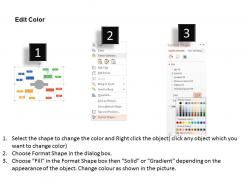
Hf mind mapping with three different colors flat powerpoint design




Try Before you Buy Download Free Sample Product
 Impress Your
 Audience
 100%
100% Editable
 Save Hours
 of Time


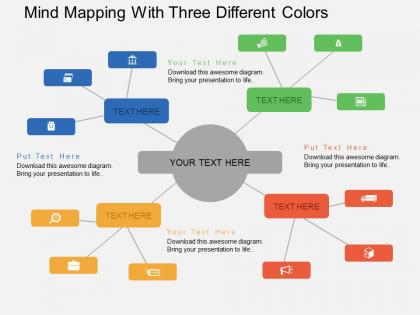
With the gaining popularity in schools, industries and even government, mind mapping is now widely accepted worldwide due to the way your brain sees and creates connections which can bring incredible simplicity and ease to any decision-making process. Therefore, our team has come up with hf mind mapping with three distinct colours flat PPT diagram which has a similar concept to propose your business details by utilising all of the ways your brain processes information such as text, image, logic, figure, colour and spatial mindfulness the data can be easily understood and memorised without putting much effort. Apart from this, these slides have the ability to display even the most complex information in a simple and well-arranged manner so that the aim of the business and the presentation gets through the mind of the audience without any misconceptions and doubts. Overall, to create meaningful presentations simply merge these unique patterns and templates with your reports. Deliver beneficial advice with our Hf Mind Mapping With Three Different Colors Flat Powerpoint Design. Guide them on acquiring better dividends.
People who downloaded this PowerPoint presentation also viewed the following :
Hf mind mapping with three different colors flat powerpoint design with all 4 slides:
Our Hf Mind Mapping With Three Different Colors Flat Powerpoint Design bring financial benefits. Earnings become faster and bigger.
FAQs for Hf mind mapping with three different colors
Okay so basically you put your main topic dead center, then branch out with related ideas. Use single keywords instead of whole sentences - trust me on this one. Colors and little drawings actually help tons because our brains eat up visual stuff way better than boring text. Make the branches curved and flowy, not all straight and corporate-looking. One keyword per branch keeps things clean. Oh, and maybe start with like 5-7 main branches? You can always add more later. The whole thing mimics how your brain already connects ideas anyway.
Honestly, mind mapping is so much better than staring at a blank PowerPoint slide. You just dump everything visually and your brain starts connecting dots you wouldn't normally see. Way more natural than forcing ideas into bullet points. I swear by doing this before any big presentation - like, just 10 minutes of scribbling branches and connections. You'll catch weird gaps in your thinking and find stories that actually tie everything together. Sometimes I get distracted drawing little doodles around the edges, but whatever. The creative mess works way better than linear planning.
Honestly, I'd probably start with MindMeister or XMind - they're both pretty user-friendly. MindMeister's great if you're working with a team since the real-time collaboration actually works well. XMind has way more formatting options though, and it's cheaper too. Lucidchart works fine if you're already using it for other stuff. For just personal brainstorming? Even SimpleMind does the job perfectly. My cousin swears by it, actually. I'd mess around with the free versions first to see what feels right - no point paying for features you won't use.
Mind mapping is seriously a game-changer for helping kids organize messy, complex stuff visually. Works great for brainstorming, note-taking, or when you're trying to break down those overwhelming topics. Students actually get excited about it - way more than boring traditional outlines anyway. The visual aspect helps them spot connections they'd totally miss otherwise. I'd start with one main topic in the center and just let them build out from there naturally. Oh, and definitely try it yourself first when you're planning your next lesson! Trust me, once you see how it works, you'll use it everywhere.
Honestly, mind maps are amazing for memory because they match how your brain actually works. Instead of boring linear notes, you're making visual connections and associations - which is way more natural. Your brain lights up differently when you use colors, images, and that branching structure. It's like... you're building the same pathways you'll use later when trying to remember stuff. I used to hate studying until I discovered this method - now I actually look forward to making those colorful maps! Way better than staring at walls of text. You should totally try it for your next exam.
Honestly, the best approach is getting everyone on Miro or XMind at the same time to build it together. Put your main goal smack in the middle, then let people add their own branches for tasks and deadlines. The visual thing is huge - you'll catch overlaps and gaps that would totally fly under the radar in a regular spreadsheet. Color-code different people or phases so it doesn't turn into chaos. When everyone can actually see how their stuff connects, those awkward "wait, what are you working on again?" conversations basically disappear. Way better than trying to figure it out solo.
So mind maps work best when you start with your main topic dead center, then branch out with your key themes. Use single words instead of whole sentences - way cleaner that way. Colors are clutch for grouping similar stuff together. Don't cram too much on each branch or it gets messy fast. Honestly, simple icons help more than you'd think for remembering concepts later. The whole point is being able to look at it and instantly get how everything connects. Short branches work better than long ones. Build it logically outward and you'll actually want to use the thing.
Honestly, mind mapping saved my life with complex data. Put your main topic dead center, then branch out to major categories - like a tree but way more useful. Add smaller branches for all the nitty-gritty details. I usually throw in colors and symbols to connect related stuff because my brain works better that way. Linear lists just turn into word soup after a while. The cool thing? You'll actually see patterns and missing pieces that you'd totally miss in regular formats. Seriously, try mapping out your next big project first before you even touch a spreadsheet.
Honestly, visualization is what makes mind mapping actually stick in your brain. Your visual cortex is crazy good at spotting patterns and forming memories - way better than just reading boring lists. Different colors for each topic? Game changer. You'll scan through everything so much faster later. Think about it - you remember someone's face but forget their name constantly, right? Same principle here. The shapes and spatial stuff help you catch connections between ideas that you'd completely miss otherwise. I swear, once you start color-coding themes, you won't go back to regular notes.
Dude, mind maps are seriously underrated for presentations. Stick your main topic dead center, then branch out to all your key points. Each branch? That's basically a slide or section right there. Way less soul-crushing than those bullet-point outlines everyone churns out. Same thing works for reports too - main branches turn into chapters, smaller ones become your paragraphs. The visual thing really helps you catch weird gaps in your argument before you're deep in the weeds. I swear, sketch one out next time before you dive in. You'll thank me when you're not scrambling to fix slide 15 because you forgot something obvious.
Just start with random single words - don't worry about making perfect phrases yet. Sometimes I'll switch to a different colored pen or move to my kitchen table when I'm stuck. Sounds weird but it actually works! Set a timer for like 5-10 minutes and brain dump everything, even stuff that seems totally unrelated. You can clean it up later. Oh, and try asking yourself "what if" questions about your main topic - that usually gets me going in new directions. The whole point is just getting momentum first.
Honestly, it's all about knowing your audience. Visual learners love those colorful maps with tons of images, but analytical people? They want clean, text-heavy structures. Most younger folks are cool with digital tools like Miro or XMind. Though I've noticed older professionals still prefer the traditional pen-and-paper approach - there's something about physically drawing it out. Cultural background plays a role too, especially with how people view hierarchical vs. networked layouts. My advice? Just try a few different styles with your group and see what sticks.
Honestly, the worst thing you can do is jam way too much text on each branch. Just use keywords or super short phrases - no full sentences. I see people basically writing paragraphs and it's like, what's the point then? Don't make it look like a boring outline either. That kills the whole visual thinking thing. Your brain works better when ideas can bounce around freely. Oh, and forget about making it Instagram-worthy - messy maps actually work way better than perfect ones. Just throw your main idea in the middle and let everything branch out naturally from there.
Honestly, mind mapping beats regular brainstorming by miles. Instead of everyone just throwing ideas around randomly, you stick your main problem in the middle and branch out from there. Different solutions, causes, whatever - it all connects visually. Way easier to spot patterns you'd totally miss otherwise. The visual thing really helps too because not everyone thinks the same way (some people are just wired differently, you know?). Keeps the group from wandering off into weird tangents every five minutes. When you're done, you've actually got something useful to look at instead of messy notes that make zero sense later.
Honestly, mind maps are perfect for this stuff. You put your main goal in the middle, then branch out into all the smaller steps, deadlines, resources - whatever. Way better than those endless to-do lists that make me want to hide under a blanket. Color-coding helps too if you're into that. The cool thing is your brain starts connecting dots you wouldn't normally see when everything's just written in boring lines. I always end up finding shortcuts or realizing some steps don't actually matter. Just pick one big goal and brainstorm outward for like 10 minutes - you'll be surprised what comes up.
-
Best way of representation of the topic.
-
Easily Understandable slides.