

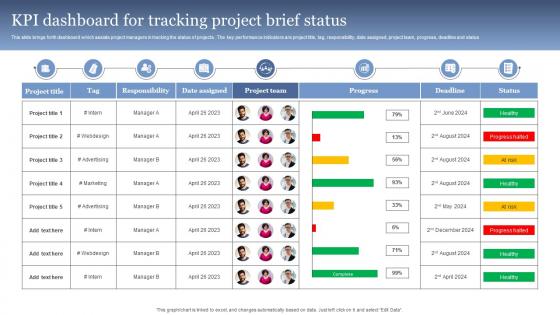
KPI Dashboard For Tracking Project Brief Status




Try Before you Buy Download Free Sample Product
 Impress Your
 Audience
 100%
100% Editable
 Save Hours
 of Time


This slide brings forth dashboard which assists project managers in tracking the status of projects . The key performance indicators are project title, tag, responsibility, date assigned, project team, progress, deadline and status
People who downloaded this PowerPoint presentation also viewed the following :
KPI Dashboard For Tracking Project Brief Status with all 7 slides:
Use our KPI Dashboard For Tracking Project Brief Status to effectively help you save your valuable time. They are readymade to fit into any presentation structure.






FAQs for KPI Dashboard For Tracking
Honestly, start with your top 5-7 KPIs that actually matter for decisions - don't try cramming everything in there. You'll want real-time data (or close to it) with clean visuals that make sense at a quick glance. I've seen too many dashboards that are just complete disasters to navigate. Keep the design simple and add context like targets so people know if numbers are good or bad. Make sure whoever needs access can actually get to it easily. The whole point is telling a story with your data, not creating some overwhelming spreadsheet nightmare that nobody wants to look at.
Start with your business goals and work backward to find metrics that actually matter. Skip the obvious stuff like revenue and traffic just because they look important - I've seen way too many messy dashboards that don't help anyone. Stick to maybe 5-7 KPIs that directly connect to what you're trying to accomplish this quarter. Simple test: if this number moves, does it actually affect our success? Get your team involved too since they'll be staring at this thing every day. Oh, and make sure you can actually do something about these metrics through your work.
Honestly, data viz is what saves your KPI dashboard from being a total nightmare to read. Instead of staring at endless rows of numbers, you get charts and graphs that actually make sense. Your brain picks up on trends and weird outliers instantly - way better than playing detective with spreadsheets. Makes those quarterly meetings less brutal too, since everyone can actually understand what's happening. The trick is matching the right chart type to each metric. Like, don't use a pie chart for everything just because it looks nice. Think about what story you're trying to tell first.
Dude, real-time data changes everything for dashboards. You're seeing what's happening NOW instead of last week's old stuff. Makes such a huge difference when you can catch problems as they pop up. Your team will actually trust the numbers and use them to make calls - nobody wants to base decisions on stale data, you know? It's kinda like... why would you drive looking backwards when you could see the road ahead? Though honestly, don't go crazy making EVERYTHING real-time. Figure out what truly needs instant updates vs what's fine refreshing once a day.
Focus on your top 3-5 KPIs first - nobody wants to stare at 20 different metrics right away. Group similar stuff together and give it room to breathe with white space. Colors should make sense, not just look pretty. Oh, and please don't use pie charts for everything - bar graphs exist for a reason! Speed matters too. If your dashboard takes forever to load, people will just skip it. Here's what really helped me though: test it with real users first. Hand it to someone and ask them to find specific info. You'll be shocked at what confuses them that seems obvious to you.
Honestly? Check them quarterly minimum, but it really depends on your industry pace. Business priorities shift constantly, so your dashboards should too. Ditch metrics that don't matter anymore and add ones that actually reflect what's happening now. I've seen too many teams obsessing over beautiful charts that tell them nothing useful - don't be those people. Make sure you're using the data for real decisions. Set calendar reminders to audit everything, and totally gut the dashboard when you pivot. It's worth the effort, trust me.
Honestly, the worst thing you can do is cram like 20 different metrics onto one screen. Nobody looks at that mess. Pick maybe 5-7 things that actually matter for decisions - not just stuff that looks cool in meetings. Vanity metrics are such a trap too. Like yeah, your page views might be through the roof, but so what? Does that help anyone do their job better? Also think about who's gonna see this thing. Your CEO doesn't need the same granular ops data your team does. Oh, and make sure the data updates often enough to be useful - nothing worse than making decisions off stale numbers.
Look, having a KPI dashboard is honestly a game changer. You get to see what's actually working in real-time instead of guessing or waiting months for reports. Customer costs going up? You'll catch it early. Revenue dipping? Same thing. It's way better than flying blind and then scrambling when things go sideways. I mean, gut instincts are fine but data doesn't lie, you know? My advice? Pick maybe 5-7 metrics that actually matter for your goals - don't go crazy with like 20 different charts. Start simple and add more later if you need to.
Manufacturing, healthcare, retail, and finance get the most out of custom dashboards. Generic ones are honestly pretty useless when you're dealing with production schedules, patient data, inventory cycles, compliance headaches - all that messy stuff. I've watched companies burn months trying to force basic templates to work. Your dashboard needs to match what actually drives your business. Focus on your 5-7 make-or-break metrics first. Everything else can wait. The whole point is getting real-time visibility into what matters for your specific industry, not some watered-down version that works for everyone and no one.
Dude, mobile optimization is clutch - you can literally check your dashboards from anywhere without wanting to throw your phone. Everything scales down properly so you're not squinting at tiny charts or doing that annoying pinch-zoom dance. Push notifications hit you when something's actually important, and the touch controls work way better than I expected. Real-time updates mean you're never out of the loop, even if you're commuting or whatever. Just make sure you test it on your actual phone first though - some dashboard tools say they're mobile-friendly but are total garbage on smaller screens.
Honestly, it comes down to where your data lives and how technical you want to get. Power BI and Tableau are great if you're dealing with Excel or Google Sheets - super user-friendly but can handle complex stuff too. Got a more technical team? Grafana's solid, or you could build something custom with Python tools like Dash. I've actually seen people create surprisingly good dashboards in plain Excel, though they're obviously not as dynamic. Oh, and figure out your data sources first - that'll save you from constantly importing stuff manually, which is such a pain.
Honestly, the best way to know if your dashboard works is seeing if people actually use the thing. Check if stakeholders are logging in regularly and spending real time there - not just popping in for 30 seconds. But here's what really matters: does it spark conversations? Does it change how people make decisions? I've watched so many beautiful dashboards get completely ignored after launch. Ask users straight up: "Did this help you decide something?" Also track if those KPIs you're showing actually get better over time. Monthly feedback sessions with key users will tell you everything you need to know.
Honestly, I'd start with the impact vs. effort thing - just map out which metrics actually matter for business results versus how much of a pain they are to track. The balanced scorecard approach is solid too if you want to get organized (financial stuff, customer metrics, internal processes, all that). MoSCoW method sounds super corporate but it's basically just "must have, should have, could have, won't have" - pretty simple when you break it down. Here's what I actually do though: ask your stakeholders which numbers tie directly to this quarter's goals, then rank those by how often people will genuinely look at them. No point tracking something nobody checks.
Honestly, KPI dashboards are total lifesavers - you'll get real-time updates instead of waiting around for those monthly reports that feel ancient by the time you see them. Pick maybe 5-7 metrics that actually move the needle for your business. Revenue, customer happiness, whatever matters most. Set up alerts so the system pings you when something's off instead of babysitting the numbers all day (learned that one the hard way). Share it with your team too. Everyone stays on the same page and can see how their work connects to the big picture. Trust me, spotting trends early makes all the difference.
Honestly, department-specific dashboards are a game changer. Marketing actually cares about conversion rates and CAC, while ops teams want efficiency metrics and downtime data. Makes total sense, right? No more people zoning out when you're showing irrelevant numbers. Each team can spot their own trends instead of drowning in company-wide stuff they don't need. Plus they'll actually USE the dashboards instead of pretending they don't exist. My advice? Ask each department what 3-5 metrics they check daily - boom, there's your customization plan. Way easier than guessing what they want.
-
Thank you for offering such fantastic custom design services. The team is really helpful and innovative. In a very short time, I received my personalized template.
-
It saves your time and decrease your efforts in half.