

HRMS Rollout Strategy Powerpoint Presentation Slides





Try Before you Buy Download Free Sample Product
 Impress Your
 Audience
 100%
100% Editable
 Save Hours
 of Time


The HRMS software improves numerous company processes. Check out our HRMS rollout strategy template. It helps automate the work processes of an HR department, networks company areas, and increases employee satisfaction. Our Human resource management system deck covers the current scenario of a company, including annual revenue and employee growth projections by the department. It also covers the introduction of new employee-friendly policies and HRMS implementation. Our HRM Software PPT covers an HRMS implementation plan along with various HRMS solutions like a Document management system, Applicant tracking and recruiting system, Employee onboarding and administration system, Employee performance appraisal and management design, Employee compensation management system, etc. It highlights the Timeline for HRMS implementation, followed by the Cost and budget plan, HR and Manager responsibilities, and Employee training plan. Lastly, Our HR technology adoption module also covers the Projected Overall Impact of implementing HRMS and the Impact of implementing HRMS on the organizational workforce. Get access now.
People who downloaded this PowerPoint presentation also viewed the following :
Content of this Powerpoint Presentation
Slide 1: This slide introduces HRMS rollout strategy. Commence by stating Your Company Name.
Slide 2: This slide depicts the Agenda of the presentation.
Slide 3: This slide incorporates the Table of contents.
Slide 4: This slide highlights the Title for the Topics to be discussed further.
Slide 5: This slide covers graphical representation of forecasted revenue growth.
Slide 6: This slide showcases the Growth in number of full time employees by department.
Slide 7: This slide mentions the Heading for the Components to be covered in the following template.
Slide 8: This slide presents the Company policies for employee-friendly workplace.
Slide 9: This slide elucidates the requirement of the new human resource management system.
Slide 10: This slide talks about Human resource management system implementation roll-out plan.
Slide 11: This slide reveals the Title for the Ideas to be discussed further.
Slide 12: This slide exhibits the Solutions provided by new human resource management system.
Slide 13: This slide deals with Employee document management system.
Slide 14: This slide portrays the Benefits of implementing employee document management system.
Slide 15: This slide covers use case of candidate tracking and hiring software.
Slide 16: This slide reveals the Benefits of implementing applicant tracking and recruiting system.
Slide 17: This slide mentions the Employee onboarding and administration system.
Slide 18: This slide states the Benefits of implementing employee onboarding and administration system.
Slide 19: This slide talks about Employee performance appraisal and management system.
Slide 20: This slide incorporates the Benefits of implementing performance appraisal and management system.
Slide 21: This slide covers major application of staff compensation management software.
Slide 22: This slide indicates the Benefits of employee compensation management system.
Slide 23: This slide talks about the Employee engagement management system.
Slide 24: This slide presents the Benefits of implementing employee engagement management system.
Slide 25: This slide displays the Workforce payroll management system.
Slide 26: This slide exhibits the Benefits of implementing payroll management system.
Slide 27: This slide covers application of workforce self-service management software.
Slide 28: This slide mentions the Benefits of implementing employee self service management system.
Slide 29: This slide illustrates the application of learning and professional development software.
Slide 30: This slide depicts the Benefits of implementing learning and professional development system.
Slide 31: This slide reveals the Time and attendance management system.
Slide 32: This slide exhibits the Benefits of implementing time and attendance management system.
Slide 33: This slide elucidates the Heading for the Ideas to be discussed in the upcoming template.
Slide 34: This slide reveals the Timeline for HRMS implementation.
Slide 35: This slide covers the budget, cost, and variance of Human resource management software.
Slide 36: This slide states the HR and manager’s responsibilities during HRMS implementation.
Slide 37: This slide showcases the HRMS implementation employee training plan.
Slide 38: This slide indicates the Title for the Components to be covered further.
Slide 39: This slide portrays the Impact of implementing HRMS on organizational workforce.
Slide 40: This slide reveals the Overall impact of implementing HRMS in organization.
Slide 41: This slide includes the Heading for the Topics to be discussed next.
Slide 42: This slide illustrates the Dashboard for tracking employee information through HRMS.
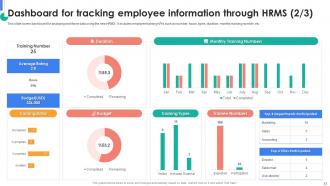
Slide 43: This slide continues the Dashboard for tracking employee information through HRMS.
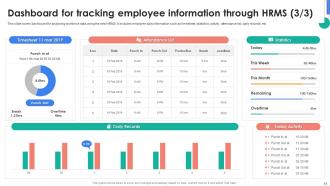
Slide 44: This is yet another slide continuing the Dashboard for tracking employee information through HRMS.
Slide 45: This slide is used for depicting some Additional information.
Slide 46: This slide elucidates the Title for the Topics to be covered in the forth-coming template.
Slide 47: This is the Puzzle slide with related imagery.
Slide 48: This slide is used for the purpose of Comparison.
Slide 49: This slide shows the Funnel filter icon with arrow.
Slide 50: This slide presents the firm's Roadmap.
Slide 51: This is the Venn diagram slide.
Slide 52: This slide exhibits the company Timeline.
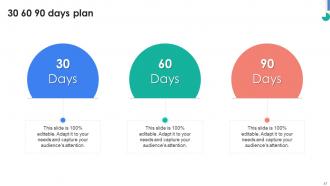
Slide 53: This is the 30 60 90 days plan slide for effective planning.
Slide 54: This is Meet our team slide. State your team-related information here.
Slide 55: This slide presents the Bar chart.
Slide 56: This slide showcases the Column chart.
Slide 57: This slide elucidates information related to the Financial topic.
Slide 58: This slide contains the Post it notes for reminders and deadlines.
Slide 59: This slide presents the company Roadmap.
Slide 60: This slide displays the Hiring funnel with related imagery.
Slide 61: This slide reveals the Pie chart.
Slide 62: This slide showcases the Area chart.
Slide 63: This is the About us slide. State your company-related information here.
Slide 64: This slide includes the organization's mission, vision, and values.
Slide 65: This is the Thank You slide for acknowledgement.
HRMS Rollout Strategy Powerpoint Presentation Slides with all 62 slides:
Use our HRMS Rollout Strategy Powerpoint Presentation Slides to effectively help you save your valuable time. They are readymade to fit into any presentation structure.
-

HRMS Rollout Strategy
-
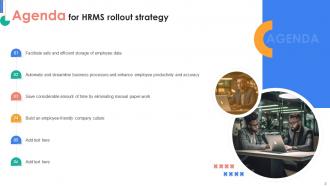
Agenda for HRMS rollout strategy
-
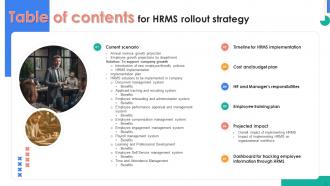
Table of contents for HRMS rollout strategy
-
Table of content for HRMS rollout strategy
-
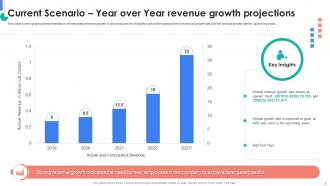
Current Scenario Year over Year revenue growth projections
-
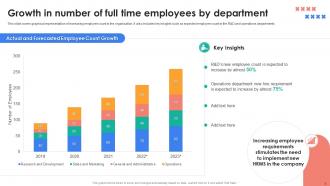
Growth in number of full time employees by department
-
Table of content for HRMS rollout strategy
-
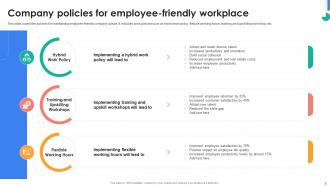
Company policies for employee friendly workplace
-
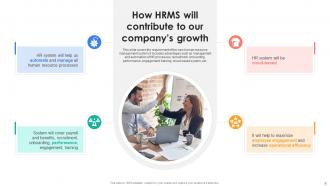
How HRMS will contribute to our company s growth
-
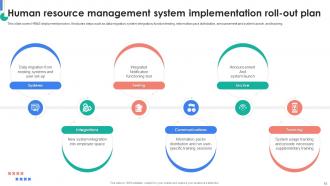
Human resource management system implementation roll out plan
-
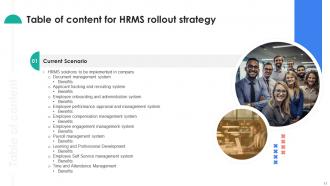
Table of content for HRMS rollout strategy
-
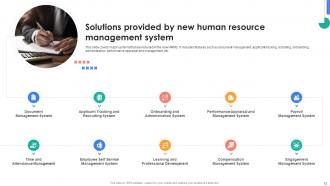
Solutions provided by new human resource management system
-
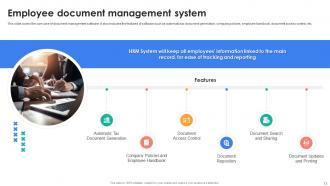
Employee document management system
-
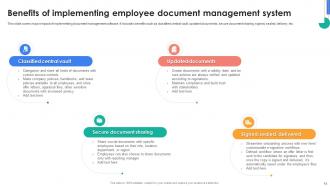
Benefits of implementing employee document management system
-

Applicant tracking and recruiting system
-
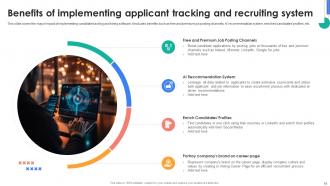
Benefits of implementing applicant tracking and recruiting system
-
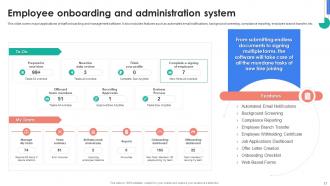
Employee onboarding and administration system
-
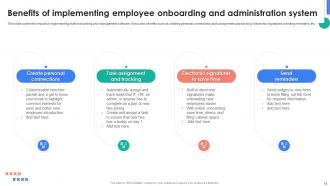
Benefits of implementing employee onboarding and administration system
-
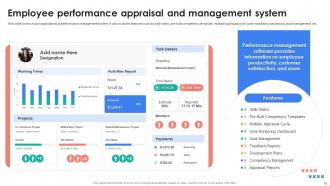
Employee performance appraisal and management system
-
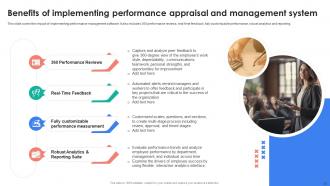
Benefits of implementing performance appraisal and management system
-
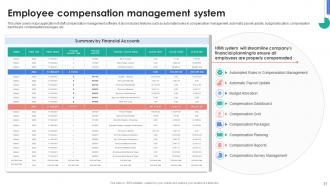
Employee compensation management system
-
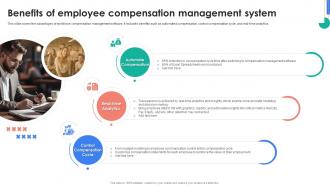
Benefits of employee compensation management system
-
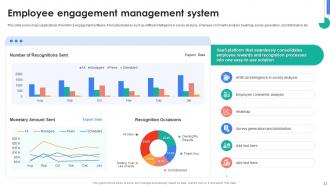
Employee engagement management system
-
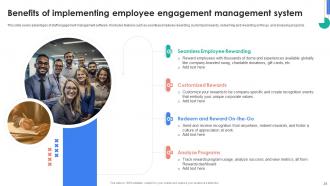
Benefits of implementing employee engagement management system
-
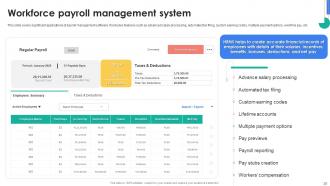
Workforce payroll management system
-
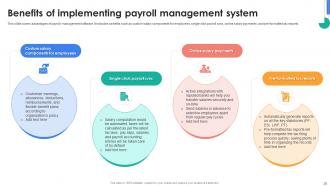
Benefits of implementing payroll management system
-
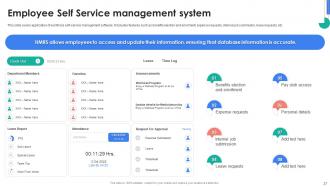
Employee Self Service management system
-
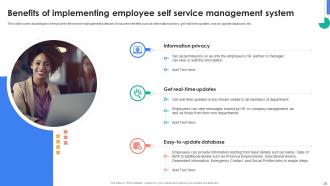
Benefits of implementing employee self service management system
-
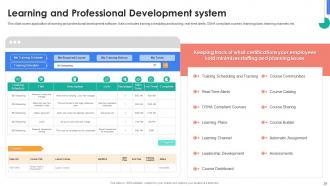
Learning and Professional Development System
-
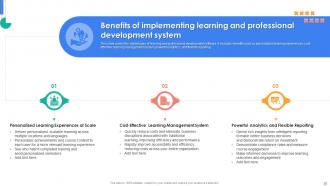
Benefits of implementing learning and professional development system
-
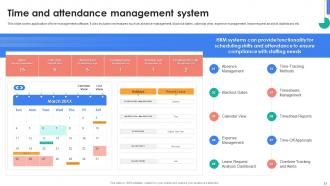
Time and attendance management system
-
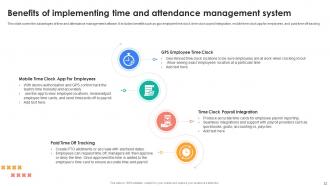
Benefits of implementing time and attendance management system
-
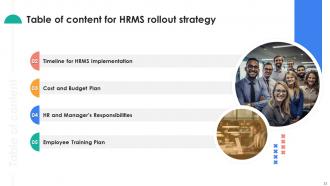
Table of content for HRMS rollout strategy
-
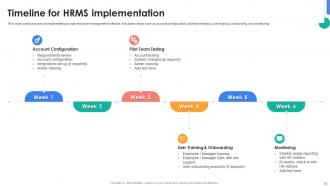
Timeline for HRMS implementation
-
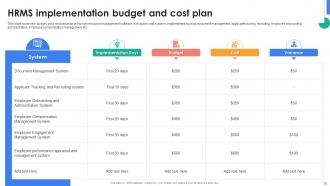
HRMS implementation budget and cost plan
-
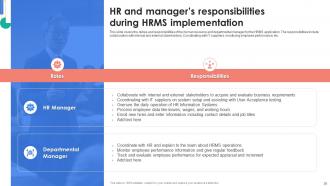
HR and manager s responsibilities during HRMS implementation
-
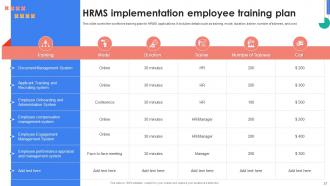
HRMS implementation employee training plan
-
Table of content for HRMS rollout strategy
-
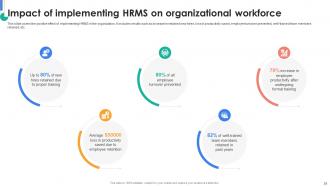
Impact of implementing HRMS on organizational workforce
-
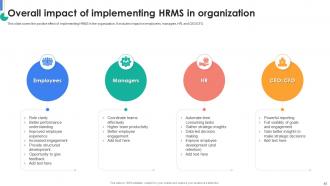
Overall impact of implementing HRMS in organization
-
Table of content for HRMS rollout strategy
-
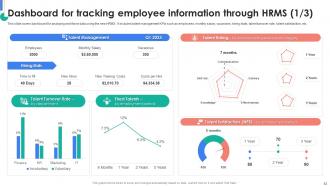
Dashboard for tracking employee information through HRMS 1 3
-
Dashboard for tracking employee information through HRMS 2 3
-
Dashboard for tracking employee information through HRMS 3 3
-
Icons slide for HRMS rollout strategy
-

Additional Slides
-
30 60 90 days plan
-
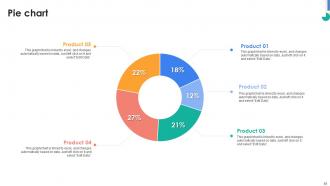
Pie chart
-
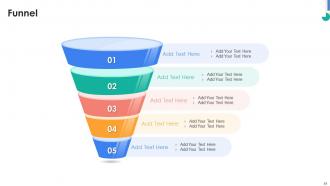
Funnel
-
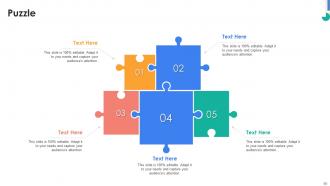
Puzzle
-
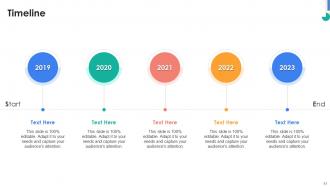
Timeline
-
Venn
-
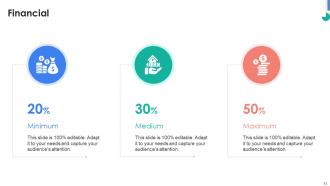
Financial
-
Thank You
-

-

-

-

-

-

-

-

FAQs for HRMS Rollout Strategy
Okay so before you dive into the HRMS rollout, figure out exactly what problems you're trying to fix first. Are you cutting down on paperwork? Making data more accurate? Giving employees better self-service options? Whatever it is, get specific. You'll also want solid metrics to track success - seriously, you'll thank yourself later when your boss asks how it's going. Timeline and resources are huge too. Who's responsible for what and when does stuff need to happen? I've seen too many of these projects go sideways because people skipped the planning phase. Get everyone on the same page about these basics before anything else.
Get your key people involved from day one - don't surprise them with finished plans. Map out who matters across departments and actually include them in planning, not just status emails. Weekly check-ins work well (or bi-weekly if things are moving slower). I've watched so many projects crash because IT assumed they knew what HR wanted... they never do. Build in real feedback opportunities where people can change direction. Oh, and be upfront about delays and roadblocks - nobody likes fake timelines. Show some quick wins early on so they don't lose interest halfway through.
Oh man, you're gonna hit three big walls: people hating change, data migration nightmares, and crappy training. Seriously, folks will resist new systems like crazy. Get leadership involved early and keep talking up the benefits - not just boring feature lists. Clean your old data first (learned this the hard way) and test migrations multiple times. Train some power users in each department to be your go-to helpers. Don't do everything at once either. Roll out in phases so you can fix problems before they blow up everywhere.
Honestly, go for your biggest headaches first - payroll and time tracking will save you SO much manual work right away. Don't try to do everything at once though (trust me on this one). Employee self-service stuff is pretty easy to roll out too. Stick with processes that are already pretty standardized - you don't want to be fixing broken workflows AND learning new software at the same time. Performance management and fancy analytics? Save that for later when everyone's actually comfortable with the basics. Quick wins are your friend here.
Honestly, change management can make or break your whole HRMS thing. People hate switching up their routine - like, suddenly they can't find where to request time off? That's panic mode. You'll get tons of pushback if you don't handle it right. Start by explaining why you're doing this mess in the first place. Train everyone properly, get the bosses to actually use it too. Find those coworkers who love new tech and let them convince everyone else how great it is. Without this stuff, your expensive new system just sits there unused.
Train your super users and managers first - they'll be your lifesavers when things go sideways. Do hands-on sessions, not death-by-PowerPoint (seriously, nobody retains that stuff). Roll out department by department, timing training right before each group goes live so it's actually fresh in their heads. Oh, and schedule those follow-up check-ins now while you're thinking about it. You'll totally forget once you're drowning in implementation chaos. Multiple touchpoints work best - initial training, quick reference guides, then circle back to see how people are doing.
Track the boring technical stuff first - uptime, response times, data accuracy. Your system needs to actually work, obviously. But here's what really matters: are people using it? Check login rates and which features get ignored (there's always a few). Count how many folks are sneaking around using the old way because they hate change. Measure how long common tasks take now vs before. Honestly, set up some kind of dashboard and check it weekly the first couple months. You'll catch problems early instead of hearing about them in angry emails later.
Definitely do this in phases - moving everything at once is a nightmare waiting to happen. First thing: clean up your existing data. Get rid of duplicates and fix inconsistent formats before you even touch the new system. Map out how fields translate from old to new, then test with small batches. Honestly, I always tell people to double their timeline estimates because data problems are weirdly stubborn and take forever. After each batch, validate everything worked properly. Catching issues early saves you from wanting to throw your laptop out the window later.
Definitely encrypt everything and only give access to people who actually need it. Role-based permissions are clutch from the start. Oh, and back up your data religiously - we got saved by this when things went sideways a few months ago. Your vendor better be SOC 2 compliant too. Document the whole migration process because you'll forget half of it otherwise. Train your HR folks on the new security stuff before launch day. Honestly, I'd do a security check halfway through just to catch anything you missed early on.
Definitely set up a few different ways to collect feedback from users. Monthly pulse surveys work great initially - you can switch to quarterly later. A help desk or feedback portal is essential because people will absolutely flood you with issues and suggestions (some helpful, some... not so much). User committees that meet regularly are solid too for discussing bigger problems. Here's the thing though - actually doing something with all that feedback matters way more than just gathering it. Focus on fixing the stuff that's breaking people's daily work first, then worry about the fancy extras.
Find your early adopters first - they'll be your best advocates. People hate being forced into new systems, so skip the mandates. Instead, show them stuff that actually saves time, like automatic time-off requests or easier performance reviews. Sarah from accounting saving 2 hours a week? Tell everyone about it. Quick wins like that sell themselves way better than any training session ever could. Check in regularly too - catching problems early beats dealing with full revolt later. Honestly, peer pressure works magic here. When coworkers see real benefits, they'll want in.
Okay so first thing - figure out what you absolutely need vs what would just be nice to have. Trust me, this saves so much time later. Write up a decent RFP covering functionality, integrations, how it'll scale, and total costs (not just the upfront price btw). Get your HR, IT and finance people involved in demos. I'd definitely check references from similar companies - size matters here. Also the vendor's support during implementation is honestly just as important as the actual software. Maybe create some kind of scoring system to compare everyone? Makes the decision way less subjective.
Honestly, starting with just a few departments is a lifesaver. You'll catch all the weird bugs and workflow problems before they mess up everyone's day. Real feedback from actual users beats any sales pitch - trust me on this one. Your pilot groups basically become your biggest supporters, which is clutch when other departments start getting nervous about changes. Testing performance under normal conditions gives you a realistic timeline too. Oh, and pick departments that either love tech stuff or are desperate for something better. Makes the whole process way smoother.
Honestly, don't just dump everything in at once - I've watched companies do this and it's a mess. Map out what you actually need first based on your goals. Growing fast? Hit recruiting and onboarding modules hard. Trying to cut costs? Payroll automation is your friend. Get leadership bought in early so they can tell you what winning looks like - faster hiring, better employee scores, whatever. Then build your rollout around those numbers. Makes measuring ROI way easier later. Oh, and configure everything around those specific metrics from day one. Trust me on this one.
Oh man, HRMS rollouts are brutal if you mess them up. Pilot groups first - never go company-wide right away, trust me on that one. Data migration will take forever (like seriously, double whatever timeline they give you). The biggest thing though? People will absolutely hate change unless you explain WHY you're doing this. Get your managers on board early or you're screwed. Training is huge - way more than you think you'll need. Find your power users beforehand too. I've seen so many companies crash and burn because they just assumed everyone would figure it out. Spoiler alert: they won't.
-
Huge collection of high-quality templates. Worth each penny.
-
I really liked their customized design services. I got my desired template made by their expert team. Thank You!