

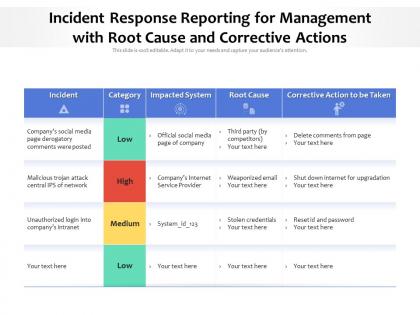
Incident response reporting for management with root cause and corrective actions




Try Before you Buy Download Free Sample Product
 Impress Your
 Audience
 100%
100% Editable
 Save Hours
 of Time


Our Incident Response Reporting For Management With Root Cause And Corrective Actions are topically designed to provide an attractive backdrop to any subject. Use them to look like a presentation pro.
People who downloaded this PowerPoint presentation also viewed the following :
Incident response reporting for management with root cause and corrective actions with all 2 slides:
Use our Incident Response Reporting For Management With Root Cause And Corrective Actions to effectively help you save your valuable time. They are readymade to fit into any presentation structure.
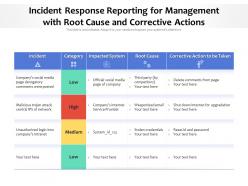

FAQs for Incident response reporting for management with root cause
So you'll need the basic timeline and what went wrong, plus your root cause analysis. The "who knew what when" section is honestly where most reports fall apart - nobody wants to admit they sat on info for three hours, you know? Document all the communication during the incident too, since that usually shows where your process broke down. Impact assessment and what you actually did to fix it are obvious ones. Oh, and concrete next steps with actual names and dates - not just "we'll do better." Lessons learned section is key. Keep it thorough but don't write a novel.
Track your mean time to detection and how fast you're resolving stuff - that's the bread and butter. But honestly? The real win is when incidents stop happening again. Are teams actually learning from your reports or just filing them away? Quick surveys help too - just ask stakeholders if they got what they needed. Don't ignore the basic metrics like completion rates, but focus on 3-4 things that match your biggest headaches. Oh, and watch for escalation patterns. If the same issues keep bubbling up to leadership, something's broken in your process.
Honestly, the biggest thing that'll save you is setting up clear thresholds for when to escalate stuff. Automate those notifications - seriously, it's a game changer. Pre-made templates for different incident types are clutch because nobody thinks straight when everything's breaking. Also, get backup reporters lined up. I swear, your main contact will always be MIA during the worst outages. Train people on what actually counts as "urgent" vs "this can wait" - that gray area kills you every time. Oh, and run through your whole process during practice drills. When the real chaos hits, you want it to be automatic.
Yeah, so every industry has completely different rules for incident reporting - it's honestly kind of insane. Healthcare has to deal with HIPAA, so you're scrubbing patient info from everything. Financial companies? They've got SOX breathing down their necks and need to report stuff to regulators like yesterday. Manufacturing cares more about how operations got hit and supply chain mess. Oh, and government contractors have this whole crazy security clearance thing going on. Point is, you can't just grab some generic template and call it done. Auditors will tear you apart if you don't know your industry's specific requirements and deadlines first.
Honestly, automation is a lifesaver for incident reporting. When alerts go off, it automatically pulls logs, creates tickets, and even updates stakeholders for you. Super helpful when you're already scrambling to fix whatever broke. I've seen teams completely forget to document stuff during major outages - totally understandable when everything's chaos, but automation doesn't forget. You just need decent templates set up beforehand. Then when incidents happen, the reporting basically handles itself. Frees you up to actually solve the problem instead of typing status updates every five minutes.
So real-time analytics basically flips incident response from "oh crap, what happened?" to actually seeing stuff as it goes down. You get live visibility instead of waiting around for someone to send a report later. Honestly, email chains for incident updates are the worst. With dashboards showing everything live, you can catch patterns and bottlenecks while they're happening. Set up automated alerts when things hit certain thresholds too. Nothing worse than finding out about an issue hours later. Start with the metrics that actually matter to your team - don't try to track everything at once.
Don't be vague about when stuff happened - actual timestamps matter. Same with explaining what broke and why. Skip the blame game though, nobody wants to get called out in writing. I always include lessons learned even when it feels painfully obvious. Keep it focused instead of writing War and Peace about every detail. Honestly, the best postmortems I've seen stick to facts and what we're actually gonna do differently. Oh, and definitely get a second pair of eyes on it before hitting send, especially if people were stressed during the whole mess.
Dude, you've gotta scrub that stuff before sending it around. Look for the obvious - passwords, customer info, internal system details, that kind of thing. Make different versions depending on who's reading it. I'd create placeholder text like "[REDACTED - CUSTOMER DATA]" so people know you removed something on purpose. Can't tell you how many times I've seen reports accidentally expose database schemas because someone was in a rush. Have another person look it over first. Short sentences work better than long ones for this stuff. Your security team gets the full version, management gets the cleaned-up one.
Check out NIST SP 800-61 first - it's free and covers everything you need for incident response reporting. ISO 27035 works too if your company's into that whole ISO thing. SANS has these templates that'll save you hours of work, trust me on that one. All of them hit the same basics: what happened when, how bad the damage was, why it went wrong, and what you learned. Honestly, I'd just grab the NIST guide since it won't cost you anything, then tweak their template however works for your team. Way better than building something from nothing.
So incident reports are basically your cheat sheet for next time something breaks. Document everything - timeline, what caused it, where you messed up. Trust me, you'll forget the details way faster than you think. The cool part is when you look at multiple incidents together, patterns start jumping out. You'll see the same weak spots keep biting you. Then you can actually fix your runbooks and train people on stuff they haven't seen before. Plus you'll know where to add better monitoring since you found those blind spots the hard way.
SOAR platforms like Phantom or Demisto are pretty solid for automating the boring documentation stuff. ServiceNow and Jira work great too for tracking everything end-to-end. Honestly though? A shared spreadsheet beats nothing if you're just starting out - don't overthink it. Templates are your friend here - capture timeline, impact, root cause, all that jazz. Oh, and whatever you choose, make sure everyone actually uses the damn thing consistently. I've seen too many teams with reports scattered across like five different systems because nobody agreed on one tool.
Get everyone involved right from the start and don't go radio silent on them. Hit your SLA deadlines for initial updates, then keep sending regular check-ins even when nothing's really happening - trust me, people get anxious and will bug you anyway. Executives just want the big picture stuff while your tech folks need all the messy details. Set up a dedicated channel for major incidents so people aren't hunting around for info. Oh, and definitely do a proper post-mortem with everyone afterward. You'll thank yourself later when the next incident hits.
Dude, post-incident reviews are where the magic happens - that's when you actually figure out what went wrong. While you're in crisis mode, you miss so much stuff like forgetting to loop in key people or having zero clue who to escalate to. One good retrospective can totally flip how a team handles their documentation. Ask the hard questions: did your updates actually help people make calls, or just add to the chaos? Oh, and schedule these within 48 hours max while it's all still fresh. Trust me on this one.
Look, incident response reporting is your lifeline when compliance audits roll around. It shows regulators you actually know what you're doing when shit hits the fan, not just making it up as you go. SOX, HIPAA, PCI-DSS - they all want documented proof of how you detect, respond to, and recover from incidents. Your reports need incident timelines, what you did to contain things, lessons learned, the whole deal. Seriously though, document everything in real-time because trying to piece together what happened months later? That's a special kind of hell you don't want to experience.
Trust me, visuals will save you so much headache with incident reports. Bar charts showing downtime, heat maps of affected systems, basic timelines - anything beats making people dig through pages of text when they're already stressed about an outage. Flowcharts work great for showing your response process too. I started doing this after watching executives' eyes glaze over during a post-mortem (ouch). Simple system diagrams tell the story way better than paragraphs ever could. You don't need anything fancy either - even basic timeline graphics make everything clearer and help surface those key lessons learned.
-
Graphics are very appealing to eyes.
-
Understandable and informative presentation.
-
Very unique, user-friendly presentation interface.