

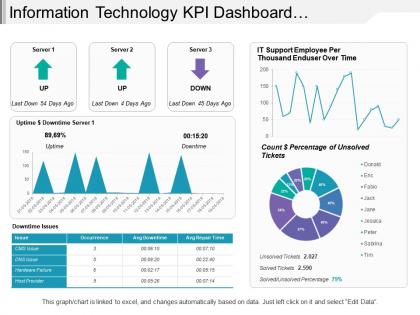
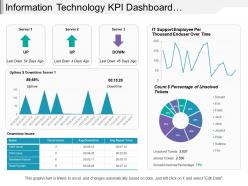
Information technology kpi dashboard showing downtime issues unsolved tickets




Try Before you Buy Download Free Sample Product
 Impress Your
 Audience
 100%
100% Editable
 Save Hours
 of Time


Alert them to likely errors with our Information Technology Kpi Dashboard Showing Downtime Issues Unsolved Tickets. Guard against any accidents happening.
People who downloaded this PowerPoint presentation also viewed the following :
Information technology kpi dashboard showing downtime issues unsolved tickets with all 6 slides:
Interact with the crowd through our Information Technology Kpi Dashboard Showing Downtime Issues Unsolved Tickets. Generate enthusiasm with your intelligent ideas.
FAQs for Information technology kpi dashboard showing downtime
Effective KPI dashboards should include revenue metrics, customer acquisition costs, conversion rates, operational efficiency measures, and employee productivity indicators. These metrics enable organizations to monitor financial performance, track customer engagement, and optimize resource allocation, with many businesses finding that strategic KPI combinations deliver enhanced decision-making and competitive advantage.
Businesses can customize KPI dashboards by selecting industry-relevant metrics, configuring visual layouts for sector-specific workflows, integrating with specialized software systems, and establishing role-based access controls. For example, healthcare organizations focus on patient outcomes and compliance metrics, while retail companies emphasize inventory turnover and customer acquisition costs, ultimately delivering targeted insights that enhance operational efficiency.
Common mistakes include overcrowding with too many metrics, using unclear visualizations, ignoring user requirements, lacking real-time data integration, and poor color schemes that hinder readability. These design flaws significantly impact decision-making effectiveness, with many organizations finding that streamlined dashboards featuring 5-7 key metrics, intuitive layouts, and role-specific customization ultimately deliver better strategic insights and faster business responses.
Visualizations in KPI dashboards enhance data comprehension by transforming complex datasets into intuitive charts, graphs, and visual indicators that enable rapid pattern recognition and trend identification. Through color-coded metrics, interactive charts, and real-time visual updates, organizations streamline decision-making processes, reduce analysis time, and improve strategic responses, with many executives finding that visual dashboards deliver faster insights and more effective performance monitoring across departments.
Real-time data transforms KPI dashboards from static reports into dynamic decision-making tools, enabling immediate visibility into performance trends, anomalies, and operational shifts across key metrics. This immediacy allows managers to respond quickly to emerging issues, capitalize on opportunities as they develop, and make data-driven adjustments that enhance operational efficiency and competitive advantage.
Companies ensure KPI dashboard relevance through regular reviews, stakeholder feedback collection, performance metric updates, and strategic goal alignment assessments. By conducting quarterly evaluations, incorporating user insights, and adapting metrics to evolving business priorities, organizations maintain dashboards that deliver actionable intelligence, ultimately supporting data-driven decision making and competitive advantage.
**INPUT**: What best practices exist for updating and maintaining a KPI dashboard? **OUTPUT**: Best practices include establishing automated data feeds, scheduling regular review cycles, maintaining clear data governance protocols, and ensuring stakeholder alignment on metrics relevance. Through consistent validation processes and performance benchmarking, organizations streamline reporting accuracy while enhancing decision-making capabilities, with many finding that proactive maintenance ultimately delivers sustained operational efficiency and competitive advantage.
User feedback improves KPI dashboard usability by identifying navigation pain points, highlighting confusing visualizations, and revealing which metrics matter most to specific roles. Through user testing and regular feedback sessions, organizations streamline dashboard layouts, enhance data clarity, and customize views for different departments, ultimately delivering more intuitive interfaces and faster decision-making capabilities.
Cloud-based KPI dashboard tools offer real-time accessibility, automatic updates, enhanced collaboration capabilities, reduced IT infrastructure costs, and seamless scalability across organizations. These platforms enable teams to access critical metrics from anywhere, facilitate instant data sharing among stakeholders, and deliver lower maintenance overhead compared to traditional software, ultimately providing greater operational flexibility and faster decision-making processes.
KPI dashboards facilitate better decision-making by providing real-time data visualization, trend analysis, and performance benchmarking against organizational goals. Through centralized metrics and automated reporting, executives and managers can quickly identify underperforming areas, allocate resources strategically, and respond to market changes, ultimately enabling faster, data-driven decisions that enhance operational efficiency and competitive advantage.
Data integrations that enhance KPI dashboard functionality include CRM systems, ERP platforms, marketing automation tools, financial software, and real-time analytics feeds. These integrations streamline reporting by consolidating disparate data sources, eliminating manual data entry, and providing comprehensive business insights, with many organizations finding that unified dashboards ultimately deliver faster decision-making and improved operational efficiency.
Predictive analytics can be incorporated into KPI dashboards through forecasting models, trend analysis, scenario planning, risk assessment algorithms, and automated alerts for performance deviations. These capabilities enable organizations to anticipate market changes, optimize resource allocation, and proactively address potential issues, with many companies finding that predictive insights ultimately deliver faster decision-making and competitive advantage.
Organizations measure KPI dashboard implementation success through user adoption rates, decision-making speed improvements, data accuracy enhancements, and reduced reporting time. Many companies track metrics like dashboard utilization frequency, stakeholder engagement levels, and operational efficiency gains, ultimately finding that successful implementations deliver faster insights, improved accountability, and enhanced strategic alignment across departments.
**INPUT**: What strategies can be employed to encourage team engagement with KPI dashboards? **OUTPUT**: Effective engagement strategies include interactive dashboard design, regular training sessions, personalized metrics relevant to individual roles, gamification elements, and collaborative review meetings. These approaches enhance adoption by making data accessible and actionable, while organizations increasingly find that connecting KPIs to performance incentives and celebrating achievements drives sustained engagement, ultimately delivering improved accountability and business outcomes.
KPI dashboards enable comprehensive employee performance tracking by consolidating metrics like productivity rates, goal completion, skill assessments, and development milestones into visual, real-time displays. Through automated data integration, managers can identify performance gaps, recognize top performers, and create targeted development plans, while employees gain transparency into their progress, ultimately enhancing engagement and accelerating professional growth across organizations.
-
Unique research projects to present in meeting.
-
Enough space for editing and adding your own content.