

Information technology kpi dashboard showing project issues server status




Try Before you Buy Download Free Sample Product
 Impress Your
 Audience
 100%
100% Editable
 Save Hours
 of Time


Interact with the experts through our Information Technology Kpi Dashboard Showing Project Issues Server Status. Impress them with your innate intelligence.
People who downloaded this PowerPoint presentation also viewed the following :
Content of this Powerpoint Presentation
Description:
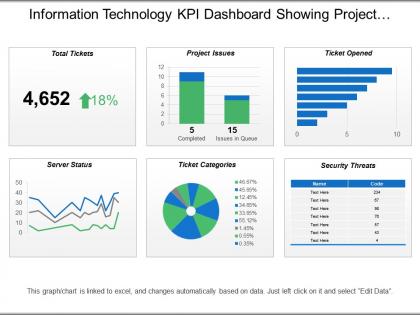
This image displays a comprehensive Information Technology (IT) Key Performance Indicator (KPI) Dashboard, which illustrates various metrics relevant to monitoring IT project performance and system status. The dashboard is designed to offer a quick snapshot of IT operations including total tickets, project issues, server status, ticket categories, and security threats.
1. Total Tickets:
This box highlights the total number of tickets at 4,652, with an 18% increase shown by an upward arrow.
2. Project Issues:
It breaks down project issues into 5 completed tasks and 15 tasks still in the queue.
3. Ticket Opened:
This horizontal bar chart details the number of tickets opened. Data labels would typically indicate specific categories or issues corresponding to each bar, but here
they're not specified.
4. Server Status:
A line graph shows server performance over time with two lines tracking different metrics—potentially uptime and downtime or other performance measures.
5. Ticket Categories:
The pie chart represents tickets distributed across various categories, with percentages that presumably correlate to each color-coded segment of the pie.
6. Security Threats:
A table lists potential security threats identified by name and code, with 'Text Here' indicating placeholders where specific threat names would be entered.
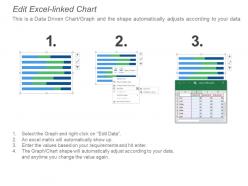
Below the charts, a note mentions that the graph/chart automatically updates based on linked Excel data, and it can be edited by right-clicking and selecting "Edit Data".
Use Cases:
Here are seven industries where these slides can be useful:
1. Information Technology:
Use: Performance tracking
Presenter: IT Managers
Audience: Non-technical stakeholders
2. Telecommunications:
Use: Network operations oversight
Presenter: Network Engineers
Audience: Executive Management
3. Banking and Finance:
Use: IT security and operations monitoring
Presenter: Security Analysts
Audience: Financial Analysts, Risk Managers
4. Healthcare:
Use: Healthcare IT system management
Presenter: Health Informatics Specialists
Audience: Hospital Administrators
5. Government:
Use: Public service IT infrastructure management
Presenter: Government IT Officers
Audience: Policy Makers, Public Officials
6. Retail:
Use: E-commerce platform performance assessment
Presenter: E-commerce Managers
Audience: Business Development Teams
7. Education:
Use: IT systems for educational institutions
Presenter: Technology Directors in Education
Audience: Faculty, Administrative Staff
Information technology kpi dashboard showing project issues server status with all 6 slides:
Identify baseless disputes with our Information Technology Kpi Dashboard Showing Project Issues Server Status. Expose errors in the essential arguments.
FAQs for Information technology kpi dashboard showing project
IT KPI dashboards should include system uptime and availability, response time metrics, security incident tracking, help desk resolution rates, and infrastructure performance indicators. These metrics enable IT teams to monitor operational efficiency, identify bottlenecks quickly, and maintain service quality, with many organizations finding that comprehensive dashboards ultimately deliver faster issue resolution and enhanced user experiences.
Real-time data integration enhances IT KPI dashboards by providing immediate visibility into system performance, eliminating delays in incident response, and enabling proactive decision-making through current metrics. This integration streamlines monitoring across networks, applications, and infrastructure while delivering faster problem resolution and improved operational efficiency, ultimately helping IT teams maintain optimal system performance and minimize costly downtime.
Visualizations transform complex IT metrics into intuitive charts, graphs, heat maps, and gauges that enable quick comprehension and faster decision-making. Through strategic visual design, IT teams can instantly identify performance trends, system bottlenecks, and critical alerts, while executives gain clear insights into operational efficiency, ultimately delivering enhanced user adoption and more effective IT governance.
Businesses can align their IT KPI dashboard with organizational goals by mapping technical metrics to strategic objectives, involving key stakeholders in dashboard design, and regularly reviewing performance indicators against business outcomes. Through collaborative workshops between IT and business leaders, organizations streamline goal alignment, enhance strategic visibility, and ultimately deliver measurable value that supports competitive advantage and operational efficiency.
Effective IT KPI dashboard tools include Tableau, Power BI, Grafana, Datadog, and SolarWinds, each offering robust visualization capabilities, real-time monitoring, and customizable metrics tracking. These platforms streamline IT performance analysis by integrating multiple data sources, automating report generation, and providing intuitive interfaces, with many organizations finding that cloud-based solutions like AWS CloudWatch and Azure Monitor deliver enhanced scalability and operational efficiency.
IT KPIs should be reviewed daily for operational metrics like system uptime and security incidents, weekly for performance trends, and monthly for strategic objectives and resource utilization. Many organizations find that automated real-time dashboards enable continuous monitoring while scheduled quarterly reviews ensure KPIs remain aligned with evolving business goals, ultimately delivering enhanced operational efficiency and proactive issue resolution.
Organizations face challenges including data integration complexity, selecting relevant metrics, ensuring real-time accuracy, managing stakeholder expectations, and maintaining dashboard relevance. Many IT departments find that initial setup requires significant resource investment and ongoing calibration, but ultimately streamlines monitoring processes, enhances decision-making transparency, and delivers measurable improvements in operational efficiency.
IT KPI dashboards help identify trends and improvement areas by aggregating real-time performance data, tracking metrics over time, and highlighting deviations from benchmarks through visual analytics. These dashboards enable IT teams to quickly spot patterns in system performance, resource utilization, and service delivery, ultimately streamlining decision-making and enhancing operational efficiency across organizations.
Essential network performance metrics include bandwidth utilization, latency, packet loss, network availability uptime, throughput rates, and error rates across critical connections. These indicators enable IT teams to proactively identify bottlenecks, optimize resource allocation, and maintain seamless connectivity, with many organizations finding that comprehensive network monitoring ultimately delivers faster troubleshooting and enhanced user experiences.
IT teams enhance incident response times through dashboards that provide real-time monitoring, automated alerting, visual status indicators, and centralized communication tools. These platforms streamline troubleshooting by displaying system health metrics, ticket queues, and escalation pathways in one interface, with many organizations finding that unified visibility reduces mean time to resolution by enabling faster identification, prioritization, and coordination of critical incidents.
End-user satisfaction metrics are critical indicators of IT service effectiveness, measuring user experience, service quality, support responsiveness, and overall technology adoption rates. These metrics enable IT teams to identify pain points, prioritize improvements, and align technology investments with business needs, ultimately delivering enhanced productivity, reduced support costs, and stronger user engagement across organizations.
Dashboards can be customized through role-based access controls, personalized metrics selection, adjustable visualization formats, and stakeholder-specific data filters. IT teams might focus on system performance and security metrics, while executives prefer high-level strategic indicators, with many organizations finding that tailored dashboard views enhance decision-making speed and improve cross-departmental collaboration significantly.
Mobile-friendly IT KPI dashboards enable real-time monitoring, instant incident response, enhanced team collaboration, improved decision-making flexibility, and seamless remote management capabilities for IT managers. Through responsive design and mobile optimization, managers can track system performance, resolve critical issues faster, and maintain operational oversight from anywhere, ultimately delivering greater agility and minimizing costly downtime across organizational infrastructure.
Historical data on IT KPI dashboards enables strategic planning by revealing performance trends, identifying recurring issues, and highlighting resource allocation patterns over time. Through trend analysis, organizations can forecast future infrastructure needs, budget requirements, and capacity planning decisions, while benchmarking past initiatives helps predict ROI for upcoming technology investments, ultimately delivering data-driven strategic direction.
IT KPI dashboard design best practices include prioritizing critical metrics at the top, using consistent color coding and visual hierarchy, ensuring mobile responsiveness, and maintaining clean white space for readability. These design principles enhance user adoption by streamlining data interpretation, minimizing cognitive load, and enabling faster decision-making, with many IT organizations finding that well-structured dashboards significantly improve operational efficiency and stakeholder engagement.
-
Innovative and attractive designs.
-
Colors used are bright and distinctive.