

Instagram Threads What It Is And How It Works Powerpoint Presentation Slides AI CD V




Try Before you Buy Download Free Sample Product
 Impress Your
 Audience
 100%
100% Editable
 Save Hours
 of Time


Instagram Threads is a text-based conversation application developed by Meta. Check out our professionally designed All about Instagram Threads PowerPoint is a great platform to stay connected with close friends and share updates about what is going on in your life. This Social network deck offers details about its developing company, Meta. Moreover, Text-based posts highlight critical features related to the platform regarding characters or post limit, account privacy, messaging interface, etc. Furthermore, the Social Conversations app template renders potential use cases of Threads, including expressive communication, branding or marketing, diverse future, content personalization, instant audience, etc. Also, the Blog post presentation showcases details about how to download the platform, how it works, best practices associated with it, public vs. private profiles, tools, and techniques used. Lastly, Messaging app PPT provides a detailed comparative analysis of Threads and its rival Twitter on various parameters such as app privacy, user engagement, etc. Download our 100 percent editable and customizable deck to know more in detail.
People who downloaded this PowerPoint presentation also viewed the following :
Content of this Powerpoint Presentation
Slide 1: The slide introduces Instagram Threads: What It Is and How It Works. Put your Company name and Begin.
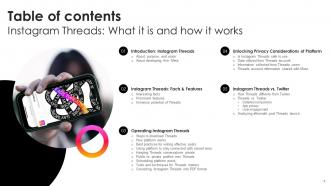
Slide 2: The slide displays Table of contents.
Slide 3: The slide again renders Table of contents.
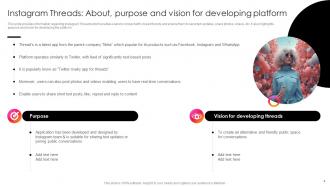
Slide 4: This slide provides information regarding Instagram Threads which enables users to connect with closed friends.
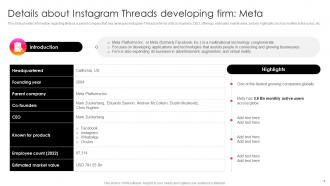
Slide 5: This slide contains information regarding Meta as a parent company that has developed Instagram Threads.
Slide 6: The slide displays Title of contents further.
Slide 7: This slide gives information regarding fun facts related to Instagram Threads.
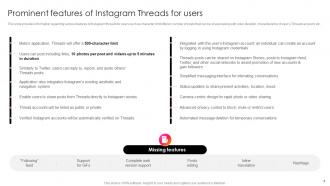
Slide 8: This slide illustrates information regarding various features of Instagram threads for users.
Slide 9: This slide provides information regarding potential use cases of Instagram Threads.
Slide 10: The slide highlights title of contents which is to be discussed further.
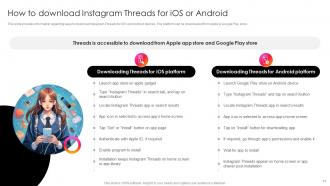
Slide 11: This slide exhibits information regarding ways to download Instagram Threads for iOS and Android devices.
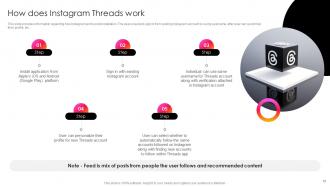
Slide 12: This slide highlights information regarding how Instagram works post installation.
Slide 13: This slide represents information regarding best practices that can be followed while writing effective Instagram Threads.
Slide 14: This slide presents information regarding various ways through Instagram Threads users can connect with closed ones.
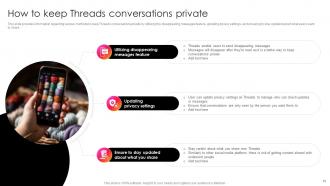
Slide 15: This slide contains information regarding various methods to keep Threads conversations private.
Slide 16: This slide shows information regarding comparative assessment of public and private profiles over Instagram Threads on parameters.
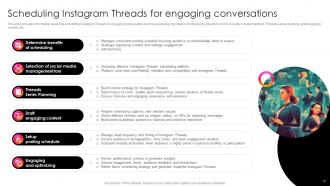
Slide 17: This slide presents information regarding scheduling Instagram Threads for engaging conversation.
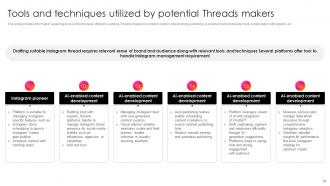
Slide 18: This slide highlights information regarding tools and techniques utilized by suitable Threads makers.
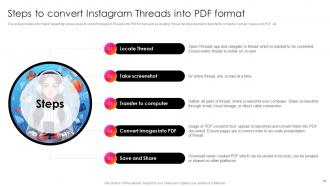
Slide 19: This slide exhibits information regarding various steps to convert Instagram Threads into PDF format.
Slide 20: The slide contains another title of contents.
Slide 21: This slide provides information regarding assessing whether the platform is safer to use.
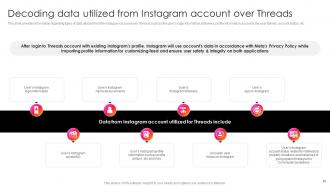
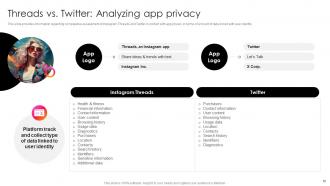
Slide 22: This slide presents information regarding types of data utilized from the Instagram account over Threads.
Slide 23: This slide describes information regarding type of information does Instagram Threads collect from users.
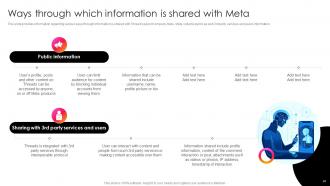
Slide 24: This slide renders information regarding various ways through information is shared with Thread’s parent company, Meta.
Slide 25: The slide exhibits title of contents further.
Slide 26: This slide provides information regarding comparative assessment of Instagram Threads and Twitter in terms of features.
Slide 27: This slide exhibits information regarding comparative assessment of Instagram Threads and Twitter in terms of features.
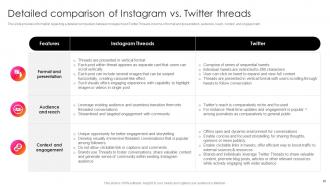
Slide 28: This slide displays information regarding a detailed comparison between Instagram and Twitter Threads.
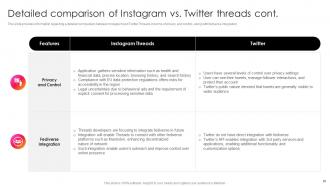
Slide 29: This slide presents information regarding a detailed comparison between Instagram and Twitter Threads.
Slide 30: This slide provides information regarding comparative assessment of Instagram Threads and Twitter.
Slide 31: This slide showcases information regarding comparative assessment of Instagram Threads and Twitter.
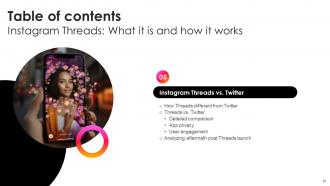
Slide 32: This slide describes information regarding aftermath assessment of Instagram Threads launch.
Slide 33: This slide shows all the icons included in the presentation.
Slide 34: This slide is titled as Additional Slides for moving forward.
Slide 35: This is About Us slide to show company specifications etc.
Slide 36: This slide provides 30 60 90 Days Plan with text boxes.
Slide 37: This is a Comparison slide to state comparison between commodities, entities etc.
Slide 38: This slide shows Post It Notes. Post your important notes here.
Slide 39: This is a Quotes slide to convey message, beliefs etc.
Slide 40: This is a Thank You slide with address, contact numbers and email address.
Instagram Threads What It Is And How It Works Powerpoint Presentation Slides AI CD V with all 48 slides:
Use our Instagram Threads What It Is And How It Works Powerpoint Presentation Slides AI CD V to effectively help you save your valuable time. They are readymade to fit into any presentation structure.






















FAQs for Instagram Threads What It Is And How It Works Powerpoint Presentation Slides
So Threads is like Twitter but connected to your Instagram. You get 500 characters for posts and can have actual conversations in threads. It automatically pulls your Instagram followers which is nice - saves you from starting over. The cool part? Your Threads stuff stays separate from your main Instagram feed. Way more casual than regular Instagram since you're just sharing thoughts instead of worrying about the perfect photo. Honestly, it's refreshing to just type whatever without stressing about aesthetics. Give it a shot if you miss having real discussions online.
Threads is way more about real conversations than polished posts - honestly, it reminds me of early Twitter before everything got so corporate. Jump into trending topics that actually relate to your brand. Behind-the-scenes stuff works great there. People expect quick responses, so it's perfect for customer service too. Don't just broadcast your usual marketing stuff - ask questions, let your team show some personality. The algorithm seems to favor genuine engagement over promotional content. Oh, and definitely respond fast to comments. The whole vibe is more casual than Instagram, which is refreshing.
Oh Threads is actually pretty solid for real-time stuff! The posting interface is super clean, way faster than regular Instagram posts - kinda feels like you're just texting honestly. What's cool is how it keeps conversations organized in threads so you can follow the back-and-forth without getting lost. It automatically connects you with your Instagram people too, which is convenient. I mean, the whole thing's built for quick thoughts and reactions rather than those perfect curated posts. Worth trying if you want something more spontaneous and conversational!
Honestly, consistency is everything on Threads. I'd aim for posting at least once daily - doesn't have to be groundbreaking, just genuine stuff like random thoughts or what you're working on. The platform feels way more chill than regular Instagram, so let your personality show through. Jump into conversations when you actually have something to say (not just generic comments). Your bio should be clear about who you are too. Oh, and actively reply to maybe 5-10 threads daily instead of just scrolling past everything. People really notice when you're genuinely engaging vs. just lurking around.
Yeah, Threads still doesn't have proper analytics which is honestly pretty annoying. I just keep a basic spreadsheet and manually check likes, replies, and reposts on each post. Follower count too - though that's more tedious than it should be. A few third-party tools are trying to track Threads but they're not great yet. My suggestion? Start logging your stuff now anyway. Note what content hits and what times your audience actually shows up. Super basic tracking beats having zero data when better tools finally drop. Plus you'll spot patterns way faster than waiting around.
Threads is way more casual than regular Instagram - polished content actually flops there. Quick thoughts and hot takes work best, plus jumping into conversations instead of just posting promotional stuff. Behind-the-scenes moments hit different too. It's honestly giving me early Twitter energy. Text posts do surprisingly well compared to other Meta platforms where everything's about visuals. Treat it like you're chatting with friends rather than performing for an audience. Oh and actually reply to people - don't just broadcast into the void. Start real conversations.
So basically, when people set their Threads accounts to private, your brand content becomes way harder to find. Like, it won't pop up in their recommendations or search at all - which honestly sucks for organic reach. You'll have to work harder at building real connections with followers instead of just hoping the algorithm does the work. The good news? Even private users can still share your stuff with their friends. Focus on making content that's actually worth sharing - that's your best bet for getting around the whole privacy wall thing.
So Threads is basically younger Instagram users who jumped over - mostly Gen Z and millennials who were already super active on IG. The crowd is heavy on early adopters, creatives, tech people, media folks. Reminds me of early Twitter honestly, like 2009 vibes. It's way more urban users and countries where Twitter was big before. Content-wise? These people grew up online so they can smell corporate BS from miles away. They want authentic, messy stuff over polished brand posts. Don't just broadcast at them - actually engage and have real conversations. Oh and definitely skip the formal business tone, it'll fall flat.
Honestly, I'd treat Threads like your casual backup to Instagram's polished vibe. Your Instagram followers are already there which is pretty sweet - no starting from scratch. Post your random thoughts, hot takes on industry stuff, whatever you'd normally tweet. Then just link back to your main content elsewhere. The whole text-first thing lets people actually see your personality beyond pretty photos, you know? I'd probably start by throwing some of your better Twitter content over there and see what happens. It's basically Twitter but without the chaos... well, less chaos anyway.
Okay so Threads is all about being real and conversational - that's what actually works. Keep posts short and ask questions to get people talking. The algorithm is obsessed with replies, so you gotta respond to comments (like, this part is huge). I'd stick to maybe 1-3 hashtags max because too many look spammy. Jump on trending topics when it fits your vibe. Oh and post regularly but don't stress about making everything perfect - they reward people who show up consistently with genuine stuff over super polished content. Honestly, just think of it like texting with your audience.
Threads is actually pretty solid for brand collabs since it's tied to Instagram. Your existing followers are already there, which is huge. You can cross-post between both platforms super easily - saves a ton of time honestly. Tagging brands in conversations feels way more natural than traditional sponsored posts too. The real-time format is perfect for jumping on trending stuff with brands. Oh, and disclosure is cleaner since you're just tagging directly in the thread. I'd definitely test some casual brand mentions first though - see how your audience responds before going full partnership mode. Way less risky that way.
Oh, Threads is actually pretty solid for building loyalty! The whole conversational thing lets you get real with customers instead of just posting random stuff. I've noticed brands can jump into conversations and actually help people out - way better than shouting into the void on regular posts. You can handle complaints super fast too, which is huge. Behind-the-scenes content works really well there. Honestly? People just want to feel heard, and Threads makes that easier since it's not as polished as Instagram. Just start commenting on industry stuff and be genuinely helpful, not salesy.
So Threads basically works like Instagram's feed - it's all about engagement. Posts with tons of likes, replies, and reposts get pushed harder to more people. Timing matters too since newer stuff gets priority. Here's the thing though - your post gets tested on a small group first. If it does well there, boom, it spreads wider. I've noticed asking questions or dropping controversial opinions (nothing too spicy lol) gets way more interaction than just posting random thoughts. The algorithm loves when people actually comment back and forth, so try to spark those conversations instead of just shouting into the void.
Dude, storytelling is everything on Threads. People scroll right past the polished promo stuff, but they'll stop for a good story every time. Just pretend you're texting me about something wild that happened - that's the vibe you want. Personal stuff works best. Behind-the-scenes moments, random thoughts, even just explaining how you figured something out. I swear it's like magic for engagement. Oh and mini-stories count too - you don't need to write a novel. Try it and you'll see what I mean.
Honestly, Threads is perfect for this since it's still pretty quiet compared to other platforms. Just post direct questions about your stuff - but make them specific, not those generic "thoughts?" posts that nobody answers. The conversational vibe means people actually respond instead of scrolling past like they would with a formal survey. Try quick polls or "option A vs option B" type questions for instant feedback. Also keep an eye out for when people mention your brand naturally - you can jump into those conversations without being weird about it. Way less competition for attention right now too.
-
They had the topic I was looking for in a readymade presentation…helped me meet my deadline.
-
A big thanks to SlideTeam! An incredible and diverse library of templates helped me with my business project presentation.