

Instant Messaging Powerpoint Ppt Template Bundles




Try Before you Buy Download Free Sample Product
 Impress Your
 Audience
 100%
100% Editable
 Save Hours
 of Time


Introducing our cutting edge Instant Messaging PPT an all encompassing presentation that unravels the power and potential of instant messaging platforms. Dive into the realm of seamless communication with cloud messaging and web messaging capabilities. Our meticulously crafted slides will unveil how businesses can leverage this dynamic technology to foster real time interactions, boost team collaboration, and enhance customer engagement. Discover the versatility of instant messaging, enabling swift and secure information exchange across devices and locations. Whether you re a tech enthusiast, a business professional, or a curious learner, our comprehensive PPT will equip you with invaluable insights into the ever evolving world of instant messaging. Embrace the future of communication with this enlightening presentation.
People who downloaded this PowerPoint presentation also viewed the following :
Instant Messaging Powerpoint Ppt Template Bundles with all 21 slides:
Use our Instant Messaging Powerpoint Ppt Template Bundles to effectively help you save your valuable time. They are readymade to fit into any presentation structure.








FAQs for Instant Messaging Powerpoint
Honestly, the speed is what hooked me first - no more waiting hours for email replies. Everyone sees updates as they happen, which is clutch for remote teams. The search function saves my butt constantly when I'm trying to remember what we decided last month (my memory is terrible). Threading keeps everything organized instead of one chaotic mess. Quick responses don't kill people's focus like phone calls do. Different channels for each project work best - trust me on this one. Way less noise, easier to track what's actually important.
Honestly, instant messaging is like having a virtual office hallway for remote teams. Quick conversations happen naturally instead of scheduling formal calls for every little thing. Got a blocker? Just ping someone. Random idea? Share it immediately. The threaded conversations are actually pretty genius - way better than scrolling through a million emails to find one decision. Channels keep project discussions organized too. Just set some boundaries though, or you'll be answering messages at 11 PM (learned that the hard way). But yeah, it definitely makes remote work feel less... remote.
Start with end-to-end encryption - only you and whoever you're texting can actually read your stuff. Strong passwords are obvious, but don't forget two-factor authentication either. I swear, half my friends just blast personal info in group chats like it's nothing. Always double-check you're messaging the right person, especially with work or money things. Keep updating your apps too since they patch security holes constantly. Oh, and here's the thing - treat chats like email. Nothing's ever really private, so encrypt anything important.
Honestly, switching to IM for quick stuff has been a game changer for my inbox. Instead of getting buried under "Can you approve this?" emails, people just ping me directly and boom - answered in 30 seconds. Group chats are clutch too because all the project talk stays in one thread instead of getting lost in reply-all hell. My old team cut email by like 40% once we started using Slack for daily check-ins. Save email for the formal documentation stuff. Quick questions? IM all the way. Your future self will thank you when you're not drowning in unnecessary emails.
Honestly, instant messaging is a game changer for making decisions fast. No more waiting around for email replies or trying to coordinate everyone's calendars for a quick call. You can just fire off a question and get answers right away. Group chats work really well for bouncing ideas around - like, I'm pretty sure we'd still be stuck in meeting hell without Slack lol. The best part is keeping that momentum going instead of everything grinding to a halt while you wait for feedback. Just don't get trapped in endless chat loops though! At some point you gotta actually pull the trigger on whatever you're deciding.
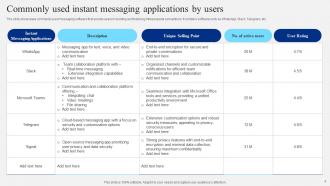
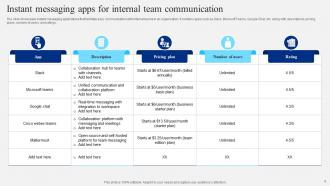
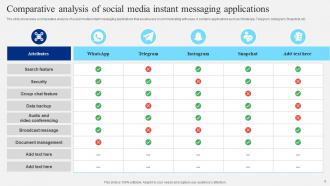
Teams is everywhere now since it just comes with Office 365 - makes the budget conversation way easier. Slack's still king with tech companies and startups though. Google Chat works if you're already using all their other stuff. Oh, and some creative places use Discord which is kinda weird but whatever works I guess. Honestly, figure out what apps your team actually connects with first. That usually ends up being more important than the chat features anyway. Those three main ones will cover like 90% of what you need.
Dude, you've got to try integrating your messaging with project tools. The constant app-switching is honestly exhausting - I didn't realize how much mental energy it was draining until I stopped doing it. Now I can create tasks and check deadlines right from Slack instead of bouncing around like a ping pong ball. Plus your whole team gets automatic updates when stuff gets done, which is clutch because nobody remembers to manually send those anyway. Just start with one connection first though - maybe your task manager or whatever you use most. You'll probably save like 20 minutes a day, no joke.
Oh man, miscommunication is the worst part honestly. Messages get misread without tone, and good luck finding anything important buried in chat history. Those notifications are distracting as hell too - completely ruins your flow. Complex stuff? Forget explaining it properly in quick messages. Plus people check their messages at totally different speeds, so you're always waiting around. I'd say use it for quick coordination and updates, but anything detailed or nuanced needs a call or email. Trust me on that one.
Definitely survey your team first - find out what's driving everyone crazy about messaging. Maybe it's people writing essays in chat or expecting replies in 5 minutes. Set some basic rules around response times (I'd say 2-4 hours unless it's urgent), plus when to message vs email vs actually call someone. The "thanks/got it" spam is real too, so address that. Different teams need different approaches though - sales probably can't wait 4 hours like engineering can. When you roll it out, give concrete examples of what to do and what not to do. Nobody reads policy docs anyway, so make it practical.
Honestly, instant messaging is a game-changer for customer service. Customers get that instant response they're craving, and your team can juggle multiple chats at once - way better than being stuck on one phone call. People can keep doing other stuff while they wait for responses too, which they love. Oh, and everything gets saved automatically, so you've got a paper trail if things get messy later. You can even throw in some chatbots for the simple questions and let humans handle the tricky stuff. Just make sure whatever platform you pick actually plays nice with your current setup.
Honestly, IM is a game-changer for team engagement. People can jump in with quick questions or random ideas without all that email formality - you know how stiff that gets. Response times are way faster too, which keeps everything flowing. I've seen this firsthand - teams that actually use chat well just click better than the email-only ones. There's something about that instant back-and-forth that builds real connections. Set up channels for work stuff but also let people share wins and joke around. A little friendly chaos never hurt anyone. The mix of serious discussions and casual banter is what makes it work.
Oh man, IM totally took over everything at work. Nobody sends those long email chains anymore, and we barely have face-to-face meetings now. The crazy part? Everyone wants instant replies instead of that old 24-hour email thing - honestly it's exhausting sometimes. Phone calls are basically dead unless something's super urgent. Quick decisions happen way faster though, which is great for remote teams. But your brain gets scattered from all the pings and notifications. My advice? Set some boundaries around when you're actually available vs when you need to focus. Otherwise you'll go nuts.
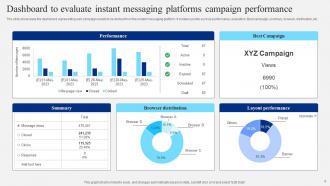
Dude, IM platform data is seriously underrated. You can see when customers hit you up most, what they're actually complaining about, how fast your team responds - all that good stuff. I'd start pulling weekly reports on your top customer questions because honestly, patterns jump out pretty quick. Like maybe everyone's confused about the same feature, or people keep asking about stuff you could totally upsell them on. Peak hours show you when to have more staff online. Response times tell you if you're being too slow. It's basically free market research sitting right there in your chat logs.
Security's gotta be your top priority - end-to-end encryption and admin controls are must-haves. Good file sharing saves tons of time, especially if it plays nice with whatever CRM or project tools you're already using. Mobile access is pretty much expected these days. Oh, and search functionality that actually works - there's nothing worse than hunting through weeks of old messages. User management for adding people is basic stuff but worth checking. Just make sure it won't crash when your whole team's online at once. Honestly, test the free trials with real work scenarios before you pay for anything.
IM is seriously a game-changer for getting more voices heard. People who'd never speak up in meetings will totally share their thoughts in chat. The hierarchy thing kinda melts away when everyone's just typing in the same channel, you know? Remote teams especially love it since you don't have to be online at the same time. I'd say create different channels for different groups and maybe set some basic rules about keeping language inclusive. Oh, and definitely let the quiet people know you actually want to hear from them - they often have the best insights but won't share unless you ask.
-
Kudos to SlideTeam for achieving the high success rate in delivering the top-notch slides.
-
Unique research projects to present in meeting.