

Intelligent Process Automation Framework Powerpoint Presentation Slides




Try Before you Buy Download Free Sample Product
 Impress Your
 Audience
 100%
100% Editable
 Save Hours
 of Time


SlideTeam presents you the content ready Intelligent Process Automation Framework PowerPoint Presentation Slides. Discuss a set of new technologies like robotic process automation, cognitive computing, artificial intelligence and so on using the professionally designed RPA structure presentation deck. Utilize workflow automation PPT visuals to showcase benefits of intelligent automation like product & service innovation. The visually appealing robotic process automation and machine learning PPT slides are modern tools that can help you in business process improvement. The professional-looking IPA framework PowerPoint complete deck contains editable twenty-one slides such as intelligent process framework, template, spectrum, process mapping, to name a few. Incorporate these ready-to-use artificial intelligence PowerPoint templates to optimize business operations & workforce productivity. Furthermore, this business intelligence PPT deck also assists users to create an understanding of IPA solution that is used to automate business processes. Download professional- looking machine learning PPT deck to increase process efficiency & improve customer experience. All eyes are on you. Make sure they like what they see with high quality Intelligent Process Automation Framework Powerpoint Presentation Slides.
People who downloaded this PowerPoint presentation also viewed the following :
Content of this Powerpoint Presentation
Slide 1: This slide introduces Intelligent Process Automation Framework. State Your Company Name and begin.
Slide 2: This is Our Agenda slide. State your agendas here.
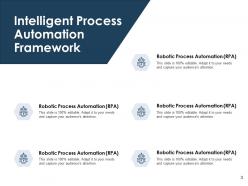
Slide 3: This slide shows Intelligent Process Automation Framework.
Slide 4: This slide presents Intelligent Process Automation Template describing- Technology, Analytics, Expertise, Outcomes, Vision.
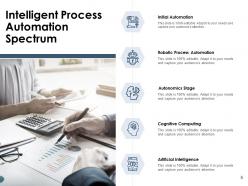
Slide 5: This slide displays Intelligent Process Automation Spectrum describing- Initial Automation, Robotic Process Automation, Autonomics Stage, Cognitive Computing, Artificial Intelligence.
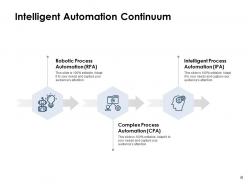
Slide 6: This slide represents Intelligent Automation Continuum describing- Robotic Process Automation (RPA), Intelligent Process Automation (IPA), and Complex Process Automation (CPA).
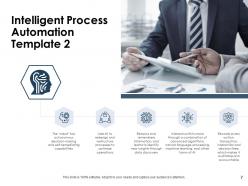
Slide 7: This slide showcases Intelligent Process Automation Template 2 with related imagery.
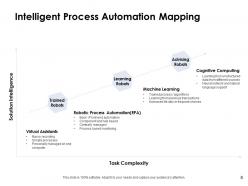
Slide 8: This slide shows Intelligent Process Automation Mapping.
Slide 9: This slide displays icons for Intelligent Process Automation Framework.
Slide 10: This slide is titled as Additional Slides for moving forward.
Slide 11: This is Our Mission slide with related imagery and text.
Slide 12: This is Meet Our Team slide with names and designation.
Slide 13: This is a Financial slide. Show your finance related stuff here.
Slide 14: This slide displays Magnifying Glass with text boxes.
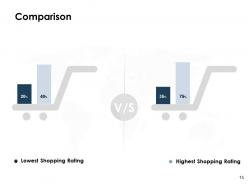
Slide 15: This is a Comparison slide to state comparison between commodities, entities etc.
Slide 16: This is a Timeline slide to show information related with time period.
Slide 17: This is another slide continuing Timeline.
Slide 18: This is an Idea Generation slide to state a new idea or highlight information, specifications etc.
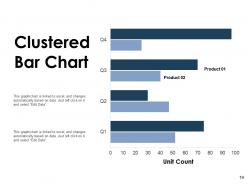
Slide 19: This slide shows Clustered Bar Chart with two products comparison.
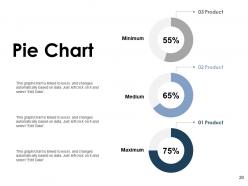
Slide 20: This slide displays Pie Chart with data in percentage.
Slide 21: This is a Thank You slide with address, contact numbers and email address.
Intelligent Process Automation Framework Powerpoint Presentation Slides with all 21 slides:
Use our Intelligent Process Automation Framework Powerpoint Presentation Slides to effectively help you save your valuable time. They are readymade to fit into any presentation structure.




FAQs for Intelligent Process Automation Framework
So IPA basically breaks down into three parts. RPA does your boring repetitive stuff - like a robot following steps. Then there's the AI/ML piece that actually makes decisions and handles tricky situations where you need some judgment. Process mining is cool too - it watches your workflows and spots where things get stuck. Honestly? It's way better than I expected when I first heard about it. Like having someone who doesn't just follow orders but can actually problem-solve. I'd start by looking at what your team does daily and figure out which tasks fit where.
So IPA is like RPA but way smarter - it can handle all the messy, unpredictable stuff that breaks regular automation. Your basic RPA bots are pretty dumb, honestly. They follow strict rules and crash the second something's different. But IPA uses AI to actually figure things out on its own. Weird document formats? Customer emails that don't fit templates? No problem. It learns from each situation instead of you having to fix it constantly. I'd look at whatever automation headaches you're dealing with right now - those spots where bots keep failing are perfect for IPA.
Banks are killing it with automation right now - loan processing, fraud detection, you name it. Healthcare's huge too, especially for patient records and insurance claims. Manufacturing was weirdly behind for a while but they're finally getting into supply chain stuff. Insurance companies are probably seeing the biggest wins though, at least from what I've heard. Claims and underwriting are perfect for this kind of thing since there's so many rules involved. My advice? Start small with whatever process makes you want to pull your hair out. Those boring, repetitive tasks are usually the easiest wins.
Look for the stuff that's eating up everyone's time - data entry, invoice processing, customer onboarding. Basically anything repetitive that follows the same steps every time. High-volume processes are perfect for this. Also, those annoying workflows that jump between multiple systems? Total nightmare to do manually but great candidates for automation. I'd focus on compliance-heavy tasks too since human errors there can be costly. Honestly, start by mapping what you're doing now and find where people are essentially robots already. If automating something frees up even 15-20 hours weekly, that's huge impact for your team.
So AI is what actually makes IPA "intelligent" - otherwise you're just doing fancy automation. Think natural language processing for messy data, machine learning that gets better over time, computer vision for docs and images. The really neat thing? It learns from your data patterns automatically. Without it, you're stuck with those rigid rule-based systems that totally fall apart when something's even slightly different than expected (been there, it sucks). I'd start by looking at where you deal with tons of unstructured data or weird exceptions - that's your sweet spot for getting actual results.
Honestly, the trickiest part is getting people comfortable with the whole thing - everyone's freaking out about being replaced, which I totally get. Pick something simple for your first project, don't be a hero and try to automate the most complicated process right off the bat. Your legacy systems are gonna fight you tooth and nail when you try integrating everything. Oh, and if your data's a mess going in, you're screwed from day one. I'd start with something that'll give you quick wins to show off, then spend serious time training your team. They need to see this as making their jobs easier, not eliminating them entirely.
Track your hard savings first - that's the obvious stuff like time saved, fewer errors, faster processing. But here's what most people miss: the soft benefits matter just as much. Better customer satisfaction, happier employees, compliance stuff that's hard to quantify but totally real. Get your baseline numbers before you change anything (seriously, do this first or you'll kick yourself later). Then watch everything for like 6-12 months. Dashboards help but don't go crazy with them. The real ROI picture needs both types of gains, not just the easy-to-measure ones.
Honestly, start with the job displacement stuff - just be straight up with your team about what's changing and figure out retraining options. Data privacy is massive since these systems touch customer info, so get your security sorted first. The bias thing caught me off guard when I first dealt with this. Your automation can pick up weird biases from training data and totally screw things up - I watched it wreck a hiring process once, not pretty. People should understand how these automated decisions work too, especially if it affects them directly. Oh, and loop in HR and legal from day one. Trust me on that. Keep humans involved for the big decisions.
So from what I've seen, IPA usually just shifts people around instead of straight-up firing them. Like your data entry folks become analysts, customer service handles the weird complex stuff while bots do the boring calls. Pretty satisfying watching people level up honestly. But here's the thing - you gotta spend serious money on training or it'll be a disaster. Oh and change management too, obviously. I'd start by figuring out who's gonna be most affected and map out how to retrain them first.
Start with UiPath or Automation Anywhere - they're solid foundations. You'll also want AI stuff for document processing, like OCR and machine learning tools. Process mining is clutch for figuring out what's actually worth automating (learned this the hard way). APIs and middleware handle the integration piece so you don't break existing systems. Workflow orchestration ties it all together. Honestly, pick one platform that does multiple things instead of cobbling together random tools. Trust me on this - the Frankenstein approach gets messy fast.
Yeah, IPA's actually perfect for compliance stuff. The audit trails are insane - everything gets logged without you thinking about it. Honestly, regulators love that kind of documentation. You can set it up to handle your routine reporting, catch weird transaction patterns, stuff like that. Way less room for human screwups too, which is clutch when dealing with regulatory people. They're not exactly forgiving about mistakes. I'd probably start by looking at whatever compliance tasks eat up most of your time and see if they follow predictable rules that could be automated.
Honestly, data quality makes or breaks IPA - it's like that old saying about garbage in, garbage out. Your automation will totally fail if the data feeding into it is messy, incomplete, or all over the place. Bad data = broken processes and wrong results, which kills everyone's confidence in the system pretty fast. You really want to get your data house in order first. I'd say audit what you're working with now and set some basic standards before jumping into IPA. Trust me, fixing data issues after the fact is way more painful than doing it upfront.
Dude, hyperautomation is where it's all heading - think IPA but connecting your whole tech setup. Process mining tools are getting crazy smart with AI, finding workflows you never even realized existed. No-code platforms are blowing up right now, so your business people can finally stop bothering IT every five minutes to build stuff themselves. The integration between RPA, AI, and analytics is becoming pretty seamless too. Honestly, I'd start with some small pilot projects soon because this space moves ridiculously fast. You don't want to be that company playing catch-up in two years.
So IPA cuts down on all that annoying waiting customers do - approvals, account changes, support stuff. Routine requests get handled instantly instead of sitting in some queue forever. Complex issues? They go straight to the right person. Honestly, it's pretty cool watching response times plummet. Less human error too, which means customers aren't getting bounced between departments as much. Though I guess some people miss the human touch - depends on your crowd. You'll want to look at your biggest customer complaints first. Find the repetitive stuff that's eating up time. Those processes are goldmines for automation.
Honestly, just make people feel safe to mess around with automation stuff without getting in trouble if it doesn't work. Google's got that 20% time thing going - do something similar but for automation experiments. Celebrate the flops as much as the wins, which sounds cheesy but actually works. Mix your tech people with regular business folks in workshops to bounce ideas around. Small pilot budgets are key here. Give teams like $5K to try their craziest ideas and see what happens. Oh, and stop letting IT own this whole thing - it's way better when everyone gets to play with it.
-
Editable templates with innovative design and color combination.