

Issue Matrix Powerpoint Ppt Template Bundles




Try Before you Buy Download Free Sample Product
 Impress Your
 Audience
 100%
100% Editable
 Save Hours
 of Time


Our Issue Matrix Powerpoint Ppt Template Bundles are topically designed to provide an attractive backdrop to any subject. Use them to look like a presentation pro.
People who downloaded this PowerPoint presentation also viewed the following :
Issue Matrix Powerpoint Ppt Template Bundles with all 22 slides:
Use our Issue Matrix Powerpoint Ppt Template Bundles to effectively help you save your valuable time. They are readymade to fit into any presentation structure.








FAQs for Issue Matrix Powerpoint
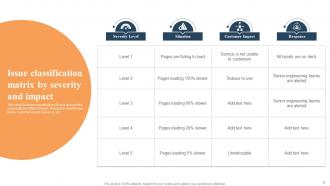
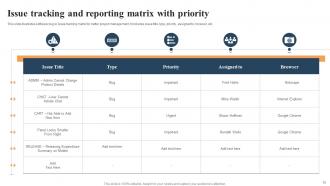
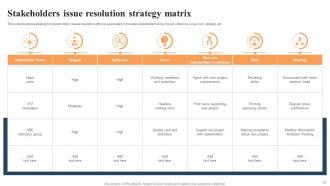
An effective issue matrix PowerPoint template should include clear priority rankings, risk assessment scales, impact categories, responsible party assignments, and timeline tracking sections. These elements enable organizations to systematically evaluate problems by severity and urgency, streamline decision-making processes, and enhance project management efficiency, with many teams finding that structured issue visualization ultimately delivers faster resolution times and improved stakeholder communication.
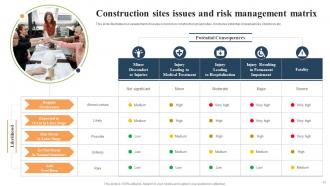
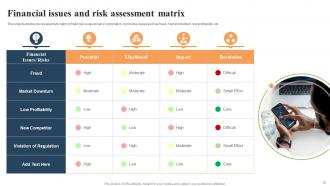
An issue matrix helps identify and prioritize project risks by categorizing them based on probability, impact severity, timeline urgency, and resource requirements for resolution. This systematic approach enables project managers to allocate resources strategically, address high-impact risks first, and maintain clear visibility across stakeholder communications, ultimately delivering more predictable project outcomes and enhanced risk mitigation.
Visual issue matrices deliver superior clarity through color-coded prioritization, spatial relationship mapping, and instant pattern recognition that text-based lists cannot match. These templates enable teams to quickly identify critical issues, assess risk-impact relationships, and communicate complex problem hierarchies to stakeholders, with many organizations finding that visual matrices accelerate decision-making processes and enhance cross-departmental collaboration.
Issue matrices prove particularly useful during complex project phases, risk assessment periods, stakeholder conflicts, resource allocation decisions, and crisis management situations. Through systematic categorization and prioritization, project managers in construction, software development, and healthcare implementation projects can streamline decision-making processes, enhance team communication, and ultimately deliver faster issue resolution while maintaining strategic project momentum.
Tailoring an issue matrix template involves customizing risk categories, impact scales, stakeholder roles, and terminology to reflect industry-specific challenges and regulatory requirements. Healthcare organizations might focus on patient safety, HIPAA compliance, and clinical outcomes, while technology companies emphasize data security, system vulnerabilities, and development lifecycle risks, ultimately delivering more accurate risk assessment and targeted mitigation strategies.
High-contrast color schemes like blue headers with white text, alternating row colors, and consistent iconography significantly enhance issue matrix readability by creating clear visual hierarchy and reducing cognitive load. Many organizations find that combining strategic use of red for high-priority items, amber for medium concerns, and green for low-risk issues with clean typography and adequate white space ultimately delivers faster decision-making and improved stakeholder comprehension during presentations.
Collaboration features in PowerPoint enhance issue matrices by enabling real-time editing, commenting, and version control, allowing team members to simultaneously identify problems, assign priorities, and track resolution progress. These capabilities streamline decision-making processes during meetings, with project managers and cross-functional teams finding that shared editing and integrated feedback loops ultimately deliver faster issue resolution and improved accountability across organizational initiatives.
Common mistakes include using inconsistent formatting across categories, overcrowding slides with excessive text, failing to prioritize issues by impact and urgency, and neglecting visual hierarchy through poor color coding. These presentation pitfalls undermine decision-making clarity, with many organizations finding that streamlined matrices with consistent layouts, concise descriptions, and strategic visual emphasis ultimately deliver faster issue resolution and enhanced stakeholder alignment.
Icons and symbols enhance issue matrix presentations by providing instant visual recognition, reducing cognitive load, and creating intuitive categorization systems that transcend language barriers. Through strategic visual elements, organizations streamline complex data interpretation, accelerate decision-making processes, and improve stakeholder engagement across diverse teams, ultimately delivering clearer communication and faster resolution outcomes.
**INPUT**: What steps can be taken to ensure stakeholders understand the findings presented in an issue matrix? **OUTPUT**: Effective stakeholder communication involves clear visual design, structured presentations, interactive discussions, executive summaries, and follow-up documentation. These approaches enhance comprehension by simplifying complex data, facilitating targeted dialogue, and providing actionable next steps, with many organizations finding that combining visual storytelling with collaborative sessions ultimately delivers stronger buy-in and faster decision-making across diverse stakeholder groups.
To effectively present an issue matrix during live presentations, use progressive disclosure by revealing one quadrant at a time, encourage interactive discussion by asking audiences to identify which issues they face most frequently, and incorporate real-time polling or collaborative exercises. This approach transforms static analysis into dynamic engagement, with many presenters finding that audience participation increases retention and creates more meaningful strategic conversations.
**INPUT**: What methods can be used to update an issue matrix template as new information becomes available? **OUTPUT**: Issue matrix updates can be accomplished through automated data integration, real-time collaboration platforms, scheduled review cycles, stakeholder feedback loops, and version control systems. These methods streamline information flow by enabling immediate status changes, facilitating cross-team input, and maintaining historical tracking, with many project managers finding that systematic update protocols ultimately deliver enhanced visibility and faster issue resolution across organizational initiatives.
Data visualization tools enhance issue matrix effectiveness by transforming complex problem data into clear visual formats, enabling faster pattern recognition, priority identification, and stakeholder communication. Through interactive dashboards and dynamic charts, organizations streamline decision-making processes, improve cross-functional collaboration, and accelerate issue resolution timelines, with many project teams finding that visual matrices deliver significantly better strategic outcomes than traditional spreadsheet approaches.
Feedback plays a crucial role in refining issue matrix templates by identifying unclear categorizations, improving visual hierarchy, and ensuring stakeholder alignment across different organizational levels. Through iterative reviews with project teams, executives, and end-users, organizations enhance template usability, streamline decision-making processes, and ultimately deliver more effective risk management tools that scale across departments.
Issue matrices enhance strategic planning by systematically categorizing challenges based on impact, urgency, complexity, and resource requirements, enabling leadership teams to prioritize initiatives objectively. Through visual frameworks, organizations streamline decision-making processes, allocate resources more effectively, and identify critical path dependencies, with many strategic planning teams finding that structured issue analysis ultimately delivers faster consensus-building and more actionable implementation roadmaps.
-
Definitely recommend SlideTeam to all who need help with PowerPoint presentations. Their design team can create anything you need.
-
Informative design.