

IT Department Project Costs Monitoring Dashboard




Try Before you Buy Download Free Sample Product
 Impress Your
 Audience
 100%
100% Editable
 Save Hours
 of Time


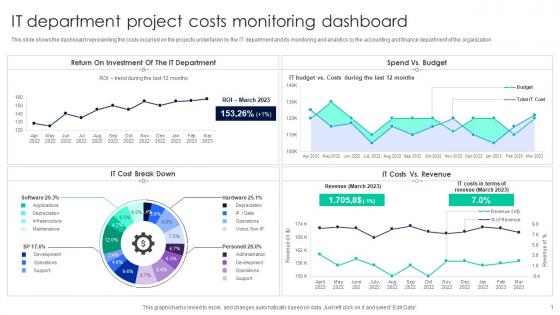
This slide shows the dashboard representing the costs incurred on the projects undertaken by the IT department and its monitoring and analytics by the accounting and finance department of the organization.
People who downloaded this PowerPoint presentation also viewed the following :
IT Department Project Costs Monitoring Dashboard with all 7 slides:
Use our IT Department Project Costs Monitoring Dashboard to effectively help you save your valuable time. They are readymade to fit into any presentation structure.





FAQs for IT Department Project
An IT Project Costs Dashboard should include budget variance, actual vs. planned expenditure, resource allocation costs, milestone completion rates, and ROI projections. These metrics enable project managers to identify cost overruns early, optimize resource deployment, and maintain financial accountability, with many organizations finding that comprehensive cost tracking reduces project expenses by 15-20% while improving delivery timelines.
An IT Project Costs Dashboard enhances budget forecasting by providing real-time visibility into current expenditures, tracking spending patterns against planned budgets, and identifying cost variances early in project lifecycles. Through predictive analytics and historical data analysis, organizations can anticipate future resource needs, adjust allocations proactively, and ultimately deliver more accurate budget projections while minimizing financial risks.
Tools best suited for creating an IT Project Costs Dashboard include Microsoft Power BI, Tableau, Excel with Power Query, Google Data Studio, and specialized project management platforms like Monday.com or Smartsheet. These platforms streamline cost tracking by integrating budget data, resource allocation metrics, and real-time expense monitoring, ultimately delivering enhanced financial transparency and enabling organizations to optimize project profitability across their IT portfolios.
Visualization improves IT project cost understanding by transforming complex financial data into clear charts, graphs, and dashboards that reveal spending patterns, budget variances, and resource allocation trends. Through interactive dashboards, project managers can quickly identify cost overruns, compare actual versus planned expenses, and communicate financial status to stakeholders, ultimately enabling faster decision-making and better budget control across enterprise IT initiatives.
Stakeholder requirements fundamentally shape dashboard design by determining which cost metrics, reporting frequencies, and visualization formats best serve different user needs across the organization. Executives typically require high-level budget summaries and variance alerts, while project managers need detailed expense breakdowns and real-time tracking capabilities, with many organizations finding that involving stakeholders early ensures adoption and delivers actionable insights.
Real-time data integration enhances dashboard effectiveness by providing immediate visibility into current project status, enabling faster decision-making, and eliminating delays from manual data updates. Through automated feeds from project management systems, financial tools, and resource databases, IT teams can instantly identify cost overruns, track budget variances, and respond to emerging issues, ultimately delivering more agile project management and improved financial control.
Common pitfalls include overcomplicating visualizations, failing to standardize cost categories, neglecting real-time data integration, inadequate stakeholder input during design, and poor mobile optimization. These challenges can undermine dashboard effectiveness by creating confusion, reducing accuracy, and limiting accessibility, with many IT departments finding that simple, standardized dashboards with automated data feeds ultimately deliver better project oversight and cost control.
Historical data in IT project costs dashboards enables pattern recognition, trend analysis, and resource allocation optimization by comparing past project performance, budget variances, and delivery timelines. Organizations leverage this information to create more accurate future estimates, identify cost overrun triggers, and benchmark current projects against similar historical initiatives, ultimately delivering improved budget accuracy and strategic project planning capabilities.
Transparency in cost reporting significantly enhances team performance by improving accountability, enabling data-driven decision making, and fostering collaborative problem-solving across project phases. When teams have clear visibility into budget allocation and spending patterns, they proactively identify cost-saving opportunities, optimize resource utilization, and deliver projects more efficiently, ultimately strengthening organizational trust and strategic outcomes.
An IT Project Costs Dashboard facilitates better communication by providing real-time visibility into budget allocation, expense tracking, milestone costs, and resource utilization across all team members. This shared transparency enables project managers, developers, and stakeholders to discuss financial concerns proactively, align on spending priorities, and make collaborative decisions, ultimately reducing miscommunication and enhancing project coordination.
Dashboard customization best practices include role-based data filtering, stakeholder-specific KPI selection, intuitive visual hierarchies, automated reporting schedules, and interactive drill-down capabilities. These approaches streamline decision-making by presenting relevant metrics to executives, project managers, and technical teams respectively, while enabling self-service analytics and reducing information overload, ultimately delivering faster insights and improved project oversight.
Prioritize costs by displaying the highest-value expenses, budget variance indicators, critical path project costs, and resource allocation metrics most prominently. Strategic placement emphasizes items requiring immediate attention, such as over-budget categories and high-impact expenditures, while many IT leaders find that highlighting cost trends and forecasting data enables faster decision-making and better resource optimization across projects.
Automation improves dashboard accuracy by eliminating manual data entry errors, providing real-time updates from integrated systems, and standardizing data formats across multiple sources. Through automated validation rules and direct API connections, organizations streamline cost tracking, reduce reporting discrepancies, and enhance decision-making capabilities, ultimately delivering more reliable financial oversight and strategic project management insights.
Predictive analytics in IT Project Costs Dashboards enables accurate budget forecasting, early risk identification, resource optimization, timeline predictions, and cost variance alerts. These capabilities help organizations anticipate project overruns, allocate resources strategically, and make proactive adjustments, with many IT departments finding that predictive insights reduce project costs by 15-25% while improving delivery timelines.
User feedback refines dashboard usability by identifying navigation pain points, highlighting confusing data visualizations, and revealing missing functionality requirements that impact daily operations. Through surveys, user testing sessions, and analytics tracking, IT teams can prioritize interface improvements, streamline workflows, and enhance data accessibility, ultimately delivering more intuitive experiences and faster decision-making capabilities.
-
Understandable and informative presentation.
-
“Love it! I was able to grab an exciting proposal because of SlideTeam.”