


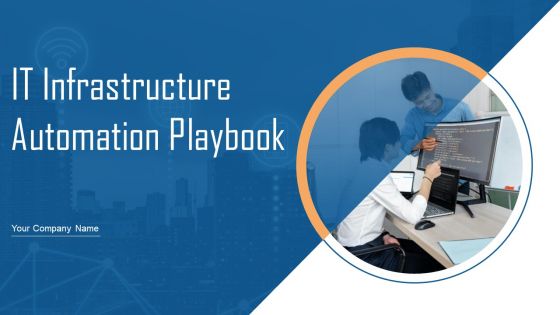
IT Infrastructure Automation Playbook Powerpoint Presentation Slides




Try Before you Buy Download Free Sample Product
 Impress Your
 Audience
 100%
100% Editable
 Save Hours
 of Time


IT Infrastructure Automation Playbook serves as a guideline for streamlining IT infrastructure and automating existing IT infrastructure through various techniques. It will assist IT teams and professionals in understanding IT infrastructure services and tracking costs. The playbook will benefit infrastructure managers, service level managers, ITSM managers, and process owners. It covers details about IT infrastructure overview in terms of IT infrastructure management framework, strengthens IT infrastructure to enhance service delivery, IT infrastructure core areas assessment checklist, and strategic IT infrastructure enhancement roadmap. It also covers various IT infrastructure automation techniques such as DevOps containerization, DevOps orchestration, infrastructure as code for overall process automation, and infrastructure automation through infrastructure provisioning. Moreover, it presents details about the IT infrastructure management team with key people involved and additional roles pivotal for successful infrastructure management. IT infrastructure cost management includes an on premise service rate sheet, off premise service rate sheet, and selecting suitable infrastructure monitoring tools. IT infrastructure management is done through dashboards to track incidents, and IT costs. Download our 100 percent editable and customizable template, which is also compatible with Google slides. Book a free demo now.
People who downloaded this PowerPoint presentation also viewed the following :
Content of this Powerpoint Presentation
Slide 1: This slide introduces IT Infrastructure Automation Playbook. State Your Company Name and begin.
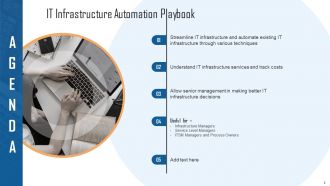
Slide 2: This slide states Agenda of the presentation.
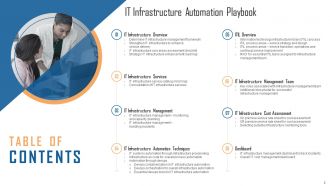
Slide 3: This slide presents Table of Content for the presentation.
Slide 4: This slide highlights title for topics that are to be covered next in the template.
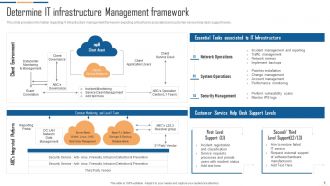
Slide 5: This slide provides information regarding IT infrastructure management framework.
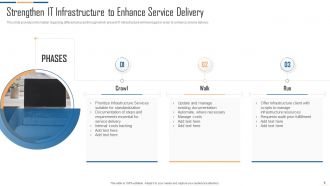
Slide 6: This slide displays Strengthen IT Infrastructure to Enhance Service Delivery.
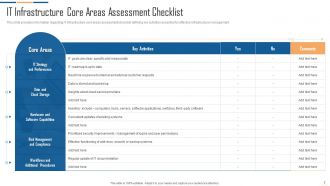
Slide 7: This slide provides information regarding IT infrastructure core areas assessment checklist.
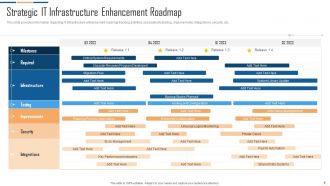
Slide 8: This slide represents information regarding IT infrastructure enhancement roadmap.
Slide 9: This slide highlights title for topics that are to be covered next in the template.
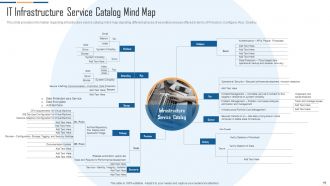
Slide 10: This slide provides information regarding infrastructure service catalog mind map.
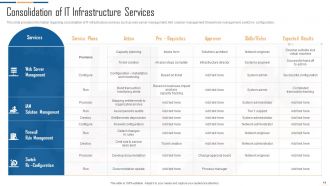
Slide 11: This slide represents consolidation of IT infrastructure services.
Slide 12: This slide highlights title for topics that are to be covered next in the template.
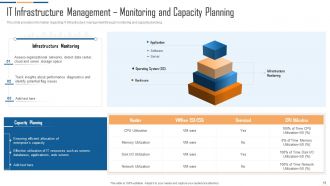
Slide 13: This slide provides information regarding IT infrastructure management through monitoring and capacity planning.
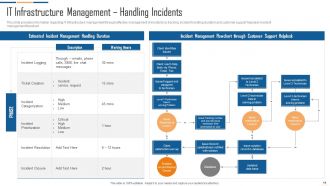
Slide 14: This slide represents Estimated Incident Management Handling Duration.
Slide 15: This slide highlights title for topics that are to be covered next in the template.
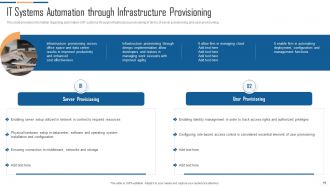
Slide 16: This slide showcases IT Systems Automation through Infrastructure Provisioning.
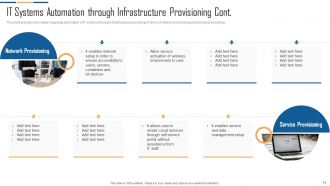
Slide 17: This is another slide continuing IT Systems Automation Through Infrastructure Provisioning.
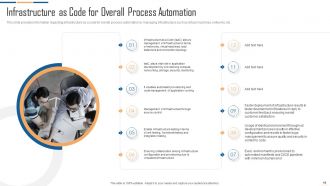
Slide 18: This slide provides information regarding infrastructure as a code for overall process automation.
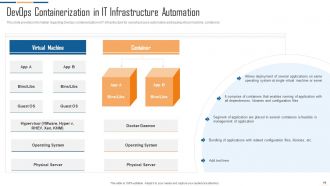
Slide 19: This slide displays Devops containerization in it infrastructure automation.
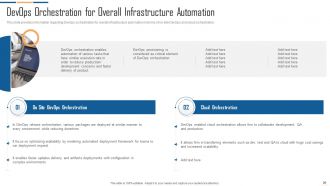
Slide 20: This slide represents DevOps orchestration for overall infrastructure automation.
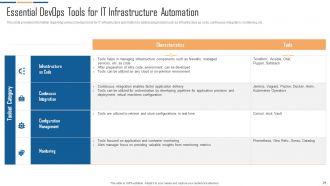
Slide 21: This slide showcases various DevOps tools for IT infrastructure automation by addressing toolset.
Slide 22: This slide highlights title for topics that are to be covered next in the template.
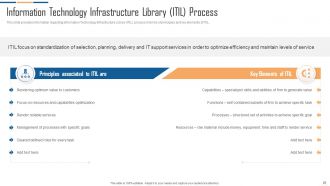
Slide 23: This slide displays Information Technology Infrastructure Library (ITIL) process in terms of principles and key elements of ITIL.
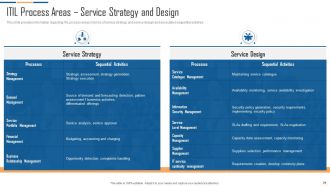
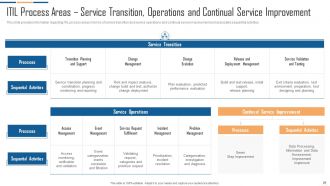
Slide 24: This slide showcases ITIL process areas in terms of service strategy and service design.
Slide 25: This slide presents ITIL process areas in terms of service strategy and service design.
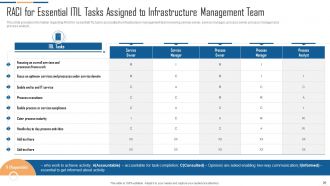
Slide 26: This slide displays RACI for Essential ITIL Tasks Assigned to Infrastructure Management Team.
Slide 27: This slide highlights title for topics that are to be covered next in the template.
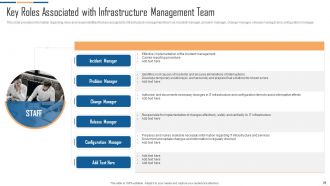
Slide 28: This slide represents Key Roles Associated with Infrastructure Management Team.
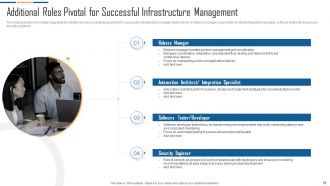
Slide 29: This slide showcases Additional Roles Pivotal for Successful Infrastructure Management.
Slide 30: This slide highlights title for topics that are to be covered next in the template.
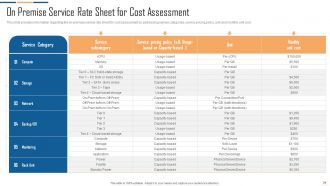
Slide 31: This slide provides information regarding the on-premise service rate sheet for cost assessment.
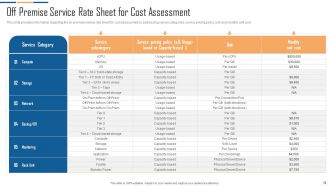
Slide 32: This slide presents Off Premise Service Rate Sheet for Cost Assessment.
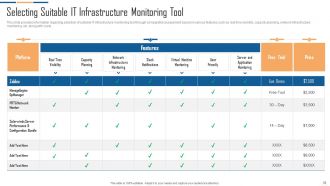
Slide 33: This slide shows Selecting Suitable IT Infrastructure Monitoring Tool.
Slide 34: This slide highlights title for topics that are to be covered next in the template.
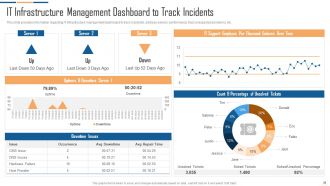
Slide 35: This slide displays IT Infrastructure Management Dashboard to Track Incidents.
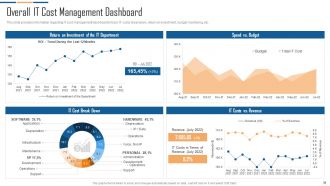
Slide 36: This slide represents IT cost management dashboard to track IT Costs Breakdown, return on investment, etc.
Slide 37: This slide displays Icons for IT Infrastructure Automation Playbook.
Slide 38: This slide is titled as Additional Slides for moving forward.
Slide 39: This is Our Mission slide with related imagery and text.
Slide 40: This is About Us slide to show company specifications etc.
Slide 41: This is Our Team slide with names and designation.
Slide 42: This slide displays Mind Map with related imagery.
Slide 43: This is a Quotes slide to convey message, beliefs etc.
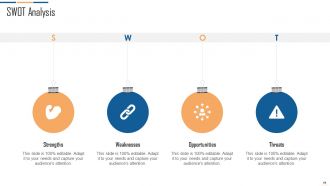
Slide 44: This slide shows SWOT describing- Strength, Weakness, Opportunity, and Threat.
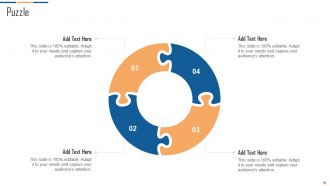
Slide 45: This slide contains Puzzle with related icons and text.
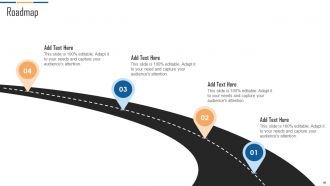
Slide 46: This slide presents Roadmap with additional textboxes.
Slide 47: This is a Thank You slide with address, contact numbers and email address.
IT Infrastructure Automation Playbook Powerpoint Presentation Slides with all 52 slides:
Use our IT Infrastructure Automation Playbook Powerpoint Presentation Slides to effectively help you save your valuable time. They are readymade to fit into any presentation structure.










FAQs for IT Infrastructure Automation Playbook
Key components of IT infrastructure automation include configuration management, network automation, server provisioning, monitoring and alerting systems, and orchestration platforms. These technologies streamline operations by reducing manual tasks, minimizing human errors, and accelerating deployment processes, with many organizations finding that strategic automation delivers faster service delivery, lower operational costs, and enhanced scalability across their IT environments.
Automation improves IT operations efficiency by eliminating manual tasks, reducing human error, and accelerating deployment processes across network management, server provisioning, and system monitoring. Through automated workflows, organizations streamline routine maintenance, enhance resource allocation, and minimize downtime, with many financial institutions and healthcare providers finding significantly faster incident response times and lower operational costs.
Ansible, Puppet, and Chef serve as configuration management tools that automate server provisioning, application deployment, system updates, and compliance monitoring across enterprise environments. These platforms streamline IT operations by eliminating manual configurations, ensuring consistency across multiple servers, and reducing deployment times, with many organizations finding that automated infrastructure management significantly enhances operational efficiency and minimizes human error.
Automation enhances disaster recovery by enabling rapid system restoration, automated failover processes, continuous data backup, and real-time monitoring of critical infrastructure. Through automated recovery scripts and predefined workflows, organizations can minimize downtime, reduce human error during crisis situations, and ensure seamless business continuity, with many enterprises achieving recovery times significantly faster than manual processes.
Automating IT infrastructure presents both enhanced security capabilities and new vulnerabilities, including improved consistency in security configurations, faster patch deployment, reduced human error, but also expanded attack surfaces and potential system-wide compromises. While automation enables organizations to implement security policies more uniformly and respond to threats rapidly, it requires robust access controls and monitoring to prevent automated vulnerabilities from scaling across entire networks.
Cloud services fundamentally transform automation strategies by providing scalable, on-demand resources, API-driven integrations, and managed infrastructure components that reduce manual oversight. Through cloud platforms, organizations streamline deployment processes, enhance resource allocation, and accelerate service delivery across global markets, with many enterprises finding that cloud-native automation delivers significant cost reductions and operational efficiency.
Infrastructure as Code best practices include version control for all configurations, automated testing and validation, modular template design, consistent naming conventions, and comprehensive documentation. These practices streamline deployment by reducing manual errors, enabling rapid scaling, and ensuring reproducibility, with many enterprises finding that systematic IaC implementation delivers faster provisioning, improved compliance, and significant operational cost reductions.
Organizations measure IT infrastructure automation ROI by calculating cost savings from reduced manual labor, decreased downtime, and minimized errors against implementation investments. Key metrics include operational efficiency gains, faster deployment times, and resource optimization, with many enterprises finding that automation delivers 20-40% cost reductions while significantly enhancing service reliability and scalability.
Teams need technical skills like scripting, configuration management, and monitoring, plus soft skills including collaboration, problem-solving, and change management capabilities. Through comprehensive training programs, organizations enhance their automation initiatives by developing cross-functional expertise, improving incident response times, and ultimately delivering more reliable services while reducing operational costs.
Businesses face challenges including skill gaps in automation technologies, integration complexities with legacy systems, initial implementation costs, resistance to change from staff, and security concerns around automated processes. While these hurdles require strategic planning and investment, organizations across finance, healthcare, and manufacturing find that addressing them systematically ultimately delivers significant operational efficiency and competitive advantage.
Automation enhances IT governance and compliance by standardizing processes, ensuring consistent policy enforcement, and providing comprehensive audit trails across all systems. Through automated monitoring and reporting tools, organizations streamline compliance verification, reduce human error risks, and maintain real-time visibility into security protocols, ultimately delivering faster regulatory responses and stronger governance frameworks.
Automation facilitates DevOps practices by enabling continuous integration, continuous deployment, infrastructure as code, automated testing, and streamlined monitoring across development lifecycles. These capabilities significantly reduce manual errors, accelerate release cycles, and enhance collaboration between development and operations teams, with many organizations finding that automated pipelines deliver faster time-to-market and improved software quality.
Organizations ensure successful legacy system integration through comprehensive system mapping, gradual phased implementation, robust API development, and thorough compatibility testing before deployment. Through strategic middleware solutions and careful data migration protocols, companies in manufacturing, healthcare, and financial services streamline operations while preserving critical legacy functionality, ultimately delivering enhanced operational efficiency and reduced integration risks.
Key trends include AI-driven infrastructure management, edge computing automation, serverless architectures, infrastructure as code expansion, and autonomous remediation systems. These technologies streamline operations by reducing manual interventions, accelerating deployments, and minimizing downtime, with many organizations finding that automated infrastructure delivers significant cost reductions and enhanced scalability in increasingly complex digital environments.
Automated monitoring enhances service reliability by detecting issues before they impact users, providing real-time performance insights, and enabling proactive resource allocation across systems. Through predictive analytics and instant alerting, organizations streamline incident response, minimize downtime, and deliver consistently faster services, with many enterprises finding that automated monitoring ultimately reduces operational costs while significantly improving customer satisfaction.
-
Easy to edit slides with easy to understand instructions.
-
The design is clean-cut, modern, and sleek, keeping the users' needs in mind. The multiple uses make this product worth every penny!