

IT Integration Post Mergers And Acquisition Powerpoint Presentation Slides





Try Before you Buy Download Free Sample Product
 Impress Your
Audience
 100%
Editable
 Save Hours
of Time


Enterprises today strive to boost the effectiveness of IT services by working or focusing on the practices that enable cross-functional or cross-organizational collaboration of service providers. Check out our competently designed IT Integration Post Mergers and Acquisition template that will benefit the businesses that want to leverage innovation and ensure better customer service by integrating their IT service and capabilities. Firstly, the company can use the section overview of IT service management before the merger to address the existing IT governance structure and project procurement process. With the need for system integration and management SIAM post-merger slide, the company can illustrate why there is a need for SIAM. The company can showcase six dimensions of successfully integrating IT services, best fit SIAM model, governance model, and PDCA model. The company can use a slides roadmap for IT integration, employee training schedule, RACI matrix, and integration checklist to assign roles and responsibilities, which will aid the company in meeting its business objectives. The challenges and solution section will assist the businesses in addressing major bottlenecks while implementing SIAM and appropriate ways to tackle them. To illustrate the impact of integration, the company can use the section impact of post-merger service integration. Book a free demo with our experts and access this 100 percent editable template.
People who downloaded this PowerPoint presentation also viewed the following :
Content of this Powerpoint Presentation
Slide 1: This slide displays the title "IT Integration Post Mergers & Acquisition".
Slide 2: This slide displays the Agenda of IT Integration Post Mergers & Acquisition.
Slide 3: This slide exhibits table of contents.
Slide 4: This slide exhibits Table of Contents- Overview of IT Service Management Before Merger.
Slide 5: This slide portrays the current information technology governance structure of the firm.
Slide 6: This slide shows project procurement management process of the organization.
Slide 7: This slide exhibits Table of Contents- "Need of System Integration and Management Post Merger".
Slide 8: This slide illustrate Why we Need SIAM.
Slide 9: This slide exhibits Table of Contents- How We will Manage Our IT Services.
Slide 10: This slide address six dimensions to successfully integrate IT services.
Slide 11: This slide portrays short-term as well as long-term role of IT in post merger integration.
Slide 12: This slide portrays the strategic objectives of SIAM.
Slide 13: This slide displays various service integration and management models.
Slide 14: This slide portrays the governance model of the organization post merger.
Slide 15: This slide exhibits Table of Contents- How We will Manage Our IT Services Post Merger.
Slide 16: This slide displays PDCA model for ensuring continuous improvement within the organization post merger.
Slide 17: This slide shows a three phased approach for successfully implementing post merger service integration.
Slide 18: This slide illustrates five S’s framework to support value driven integration within the organization post merger.
Slide 19: This slide exhibit Table of Contents- Roadmap for IT Integration.
Slide 20: This slide portrays a roadmap to successful IT integration within the organization.
Slide 21: This slide exhibits the Table of Contents- Employee Training Schedule and Cost.
Slide 22: This slide shows employee training schedule along with training cost.
Slide 23: This slide exhibit Table of Contents- RACI Matrix for Defining Roles and Responsibilities.
Slide 24: This slide illustrates RACI matrix that can be used to define roles and responsibilities to manage IT service integration.
Slide 25: This slide exhibit Table of Contents- Preparing for Day One with Integration Checklist.
Slide 26: This slide displays the integration checklist preparing for day one post merger.
Slide 27: This slide exhibit Table of Contents- Challenges and Solution.
Slide 28: This slide displays various possible challenges that can be faced by the organization while implementing SIAM.
Slide 29: This slide portrays right measures that can be used by by the organization to overcome possible challenges.
Slide 30: This slide exhibit Table of Contents- Impact of Post Merger Service Integration.
Slide 31: This slide illustrates the informational stats about the financial impact of integrating IT services post merger.
Slide 32: This slide portrays different value categories in IT integration.
Slide 33: This slide exhibits Table of Contents- Strategies to Long-Term Success in SIAM.
Slide 34: This slide portrays various strategies for long term success in SIAM.
Slide 35: This slide exhibit Table of Contents- Performance Evaluation.
Slide 36: This slide portrays a dashboard for measuring business performance.
Slide 37: This slide illustrates the customer service dashboard.
Slide 38: This is the Icons Slide for IT Integration Post Mergers & Acquisition.
Slide 39: This slide displays title Additional Slides.
Slide 40: This slide showcase IT Service Management Assessment Graph.
Slide 41: This slide showcase SIAM Operational Model.
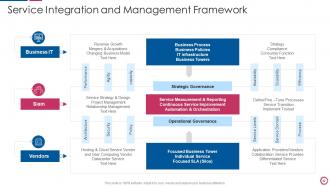
Slide 42: This slide shows Service Integration and Management Framework.
Slide 43: This slide displays the title About Us.
Slide 44: This title displays the title Meet Our Team.
Slide 45: This slide displays the title Our Mission.
Slide 46: This slide displays title Puzzle.
Slide 47: This slide showcase company Goal.
Slide 48: This slide shows yearly Timeline
Slide 49: This slide displays 30 60 90 Days Plan.
Slide 50: This slide displays title Financial.
Slide 51: This slide display Venn.
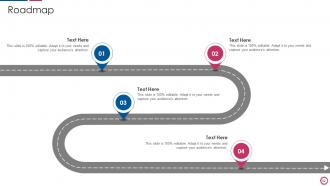
Slide 52: This slide displays Roadmap.
Slide 53: This slide display Post it Notes.
Slide 54: This is thank you slide & contains contact details of the company like office address, phone no., etc.
IT Integration Post Mergers And Acquisition Powerpoint Presentation Slides with all 59 slides:
Use our IT Integration Post Mergers And Acquisition Powerpoint Presentation Slides to effectively help you save your valuable time. They are readymade to fit into any presentation structure.











FAQs for IT Integration Post Mergers And Acquisition
So basically IT integration connects all your random systems so they actually work together instead of existing in their own little worlds. Your data flows better, less manual busy work, way fewer screw-ups. Honestly the best part is your team stops juggling like 15 different apps all day - such a pain killer for productivity. Real-time insights become possible since departments can actually see each other's data. Oh and customers get better service because your people have the full picture of what's happening. I'd start by figuring out which systems are the biggest headaches to connect first.
Start by mapping out everything that's connected to everything else - APIs, middleware, those weird custom integrations someone built three years ago that nobody remembers. You'll be shocked how much undocumented stuff is lurking around. Create a visual diagram first (seriously helps). Then hunt down data silos and bottlenecks where info gets stuck. Look for duplicate processes too - they're everywhere. Once you see the whole mess laid out, tackle the biggest headaches first. Don't try to fix everything at once or you'll go crazy.
Data migration is probably your biggest nightmare - legacy systems fight you at every step. User pushback happens constantly too, especially from people who've used the same process for years. Budget and timeline issues are inevitable, honestly. Different teams will argue about priorities while security problems keep popping up when you connect isolated systems. Oh, and communication between departments usually falls apart halfway through. Double your timeline estimate, seriously. Get users involved early so they don't sabotage the whole thing later. Trust me on this one.
Honestly, cloud computing makes integration so much easier. You're not stuck trying to force different on-premise systems to play nice together (which is such a pain). Everything can actually communicate once it's in the cloud since most platforms come with APIs and integration tools already baked in. Data flows better, compatibility headaches pretty much disappear, and you can add new stuff without rebuilding your whole setup. Oh, and it scales way better too. I'd start by looking at your messiest integrations first - those are usually the best candidates for moving to the cloud.
Honestly, automation completely transforms how IT integration works. Manual data mapping becomes a thing of the past - no more human errors slowing you down. We're talking 70-80% faster processes here. Workflows handle all the boring stuff automatically: data validation, field mapping, error fixes. Your integrations never sleep, which is pretty nice when you think about it. The best part? You'll actually have time for complex problems that need real thinking. Oh, and definitely start with just one repetitive task - don't go crazy trying to automate everything at once.
Honestly, backups are your best friend here - do them before any major moves because something always breaks when you least expect it. Set validation rules at each transfer point to catch weird stuff early. I'd definitely test everything in staging first, learned that one the hard way. Use checksums to make sure nothing gets corrupted during the actual transfer. Oh, and have rollback plans ready so you're not scrambling if things go south. Start with small pilot datasets instead of diving into the full thing right away. Way less stressful that way.
Track both the tech stuff and business impact - uptime, data accuracy, sync speeds between systems. Business-wise, look at reduced manual hours, faster processing, and ROI (leadership loves those numbers). User adoption is probably the most telling metric though. If people aren't actually using the workflows, you've got problems. Monthly dashboard reviews work well - catches issues before they blow up. Oh, and don't get too caught up in vanity metrics that look good but don't actually matter for your goals.
It really comes down to what you're trying to connect. For APIs, MuleSoft and Apigee are solid choices. Talend or Informatica handle data integration pretty well, and IBM Integration Bus is good for complex enterprise stuff. Cloud options like Azure Logic Apps or AWS Lambda are honestly way easier if you can swing it. Zapier and Power Automate work for simpler things too - don't sleep on those. Here's what I'd do: figure out exactly which systems need to talk to each other first. Then just pick whatever's simplest that actually does the job. No point overcomplicating it.
So basically IT integration gets your systems actually talking to each other instead of working in separate bubbles. Marketing, sales, support - they can all see the same customer info at the same time. No more "hang on, I need to ask someone else" or waiting around for data that should be right there. Teams stop duplicating work when everyone's looking at the same info instead of their own random spreadsheets. Honestly, it's wild how much time people waste on stuff like this. I'd start by figuring out where your teams are constantly waiting on each other - that's where you'll see results fastest.
Honestly, start with auditing all the user accounts and permissions - that's where most breaches happen anyway. Encrypt everything, especially when your systems are passing data back and forth. Network segmentation is huge too because if hackers get into one system, you don't want them jumping around everywhere else. Keep all your software patched and endpoint security tight. Oh, and definitely run a security assessment before you start integrating and again after - trust me, there's always something you miss the first time around.
Dude, don't make compliance an afterthought - that's where people get burned. Map out your regulatory requirements first (GDPR, SOX, whatever applies to your industry). Document everything because auditors are obsessed with paper trails. Automated monitoring helps catch issues early, which honestly saves you so much headache later. Get legal and compliance involved from the start - they'll catch stuff you'd never think of. Oh, and create a checklist you actually review at each milestone. Sounds boring but it works.
So basically, API-led integration creates reusable layers instead of building one-off connections every time. Traditional methods are like having a separate key for each door - gets messy fast. You get three layers: system APIs (connect to data), process APIs (business logic), and experience APIs (user-facing stuff). Way better than rebuilding the same connections over and over. Honestly, the time savings alone make it worth it. I'd start by looking at your current setup and spotting duplicates - that's where you'll see the biggest wins. It's more upfront work but pays off pretty quickly.
Honestly, those departmental silos are killing you - break those down first. Get IT, business folks, and operations in the same room for planning sessions so they can hash out issues early instead of finding problems later. Cross-functional teams work way better than everyone staying in their lanes. Oh, and tie their success metrics together somehow. People collaborate when their bonuses depend on it, not gonna lie. When teams actually work well together, make a big deal about it publicly. Sounds cheesy but it works - people notice what gets rewarded.
Honestly, AI-powered integration platforms are getting insanely good right now - they'll automate your data mapping and cut setup time in half. Everything's moving to API-first architecture because apps need to talk to each other constantly. Low-code tools are huge too, which is great since your business team can handle more without bugging IT every five minutes. Real-time data sync is replacing those old batch processes (thank god). Cloud-native is pretty much standard at this point. I'd start looking at your current integrations soon and figure out what needs upgrading. Trust me, it's way easier to tackle this stuff proactively than when everything's on fire.
Honestly, you can't do digital transformation without getting your systems talking to each other first. Right now you probably have apps and databases just sitting there doing their own thing - which is super frustrating when you're trying to get anything done. Once you connect everything up, data flows automatically and you stop doing the same data entry three times (seriously, who has time for that?). Map out what systems you have now and see where the biggest disconnects are. That's where you'll make the most impact. It's like finally organizing your desk drawer - everything just works better.
-
Loved the collection. Editing the presentation was seamless with their templates.
-
A fantastic collection of templates. I'll likely use this as my go-to resource for future templates and support.