

IT Project Management Dashboard With Planning And Testing




Try Before you Buy Download Free Sample Product
 Impress Your
 Audience
 100%
100% Editable
 Save Hours
 of Time


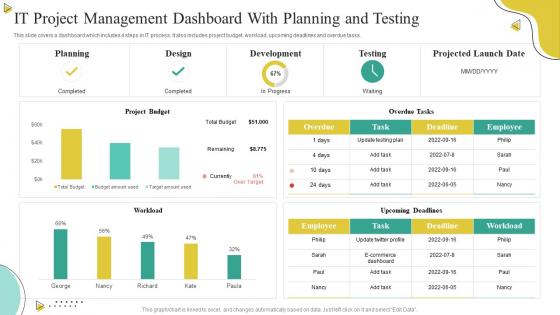
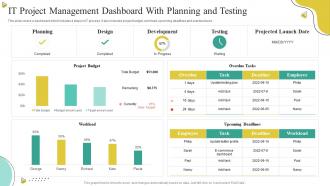
This slide covers a dashboard which includes 4 steps in IT process. It also includes project budget, workload, upcoming deadlines and overdue tasks.
People who downloaded this PowerPoint presentation also viewed the following :
IT Project Management Dashboard With Planning And Testing with all 7 slides:
Use our IT Project Management Dashboard With Planning And Testing to effectively help you save your valuable time. They are readymade to fit into any presentation structure.






FAQs for IT Project Management Dashboard With
Key IT project management dashboard metrics include project timeline adherence, budget utilization, resource allocation efficiency, sprint completion rates, defect tracking, and team productivity indicators. These metrics enable project managers to monitor progress, identify bottlenecks, and optimize resource deployment across development cycles, with many organizations finding that comprehensive dashboards ultimately deliver improved project visibility and faster delivery timelines.
Visual analytics enhance decision-making in IT project management by transforming complex data into clear insights, identifying bottlenecks in real-time, and enabling predictive analysis of project outcomes. Through interactive dashboards and data visualization, project managers can streamline resource allocation, accelerate problem resolution, and optimize team performance, ultimately delivering faster project completion and improved stakeholder communication across organizations.
Best practices for customizing dashboards include identifying team-specific KPIs, establishing clear visual hierarchies, implementing role-based access controls, ensuring real-time data integration, and creating actionable alert systems. These customizations streamline project oversight by aligning metrics with workflow requirements, enhancing decision-making capabilities, and delivering personalized insights, with many IT teams finding that tailored dashboards significantly improve project visibility and team collaboration.
Dashboards help track project timelines and milestones by providing real-time visibility into task progress, deadline adherence, and milestone completion through automated updates and visual indicators. These systems enable project managers to identify potential delays early, reallocate resources strategically, and maintain stakeholder alignment, with many organizations finding that centralized tracking ultimately delivers faster project completion and improved client satisfaction.
KPIs serve as the cornerstone of effective IT project management dashboards by providing real-time visibility into budget adherence, timeline progress, resource utilization, quality metrics, and stakeholder satisfaction. These performance indicators enable project managers to identify bottlenecks early, optimize resource allocation, and make data-driven decisions, with many organizations finding that comprehensive KPI tracking ultimately delivers faster project completion and improved ROI.
Project managers can leverage real-time data by monitoring project progress, tracking resource allocation, identifying bottlenecks, and making immediate adjustments to timelines and budgets. Through live analytics, teams streamline decision-making, enhance stakeholder communication, and proactively address risks, with many organizations finding that real-time visibility ultimately delivers improved project outcomes and competitive advantage.
Recommended tools include Microsoft Power BI, Tableau, Jira Dashboard, Monday.com, Asana, Smartsheet, and Trello for comprehensive project visualization. These platforms streamline project tracking by integrating real-time data, automating status updates, and centralizing team communications, with many IT organizations finding that dashboard consolidation enhances decision-making speed and delivers improved resource allocation across complex technical initiatives.
Dashboards facilitate better communication by providing real-time project visibility, centralized status updates, automated progress reporting, and standardized metrics that all stakeholders can easily understand. Through visual data representation and customizable views, project managers streamline information sharing across teams, reduce meeting overhead, and ensure consistent messaging, ultimately enabling faster decision-making and stronger stakeholder alignment throughout project lifecycles.
Methods to ensure data accuracy in project management dashboards include automated data validation, real-time integration with source systems, regular audit trails, standardized input protocols, and role-based access controls. These approaches streamline accuracy by minimizing manual entry errors, maintaining consistent data flows, and enabling continuous monitoring, with many IT organizations finding that automated validation combined with regular audits delivers significantly improved project visibility and decision-making reliability.
A dashboard enhances resource allocation by providing real-time visibility into team capacity, project demands, skill availability, and workload distribution across all initiatives. Through centralized tracking and analytics, project managers can quickly identify bottlenecks, redistribute tasks, optimize team utilization, and make data-driven staffing decisions, ultimately delivering improved efficiency and reduced project delays.
A mobile-friendly project management dashboard should include real-time task tracking, milestone progress indicators, team communication tools, resource allocation views, and budget monitoring capabilities. These features streamline project oversight by enabling instant updates, facilitating seamless collaboration, and providing comprehensive visibility, with many IT organizations finding that mobile accessibility ultimately enhances team productivity and accelerates project delivery timelines.
IT project management dashboards should be updated daily for task-level metrics, weekly for milestone progress, and monthly for strategic overviews, with real-time updates for critical indicators like budget variance and resource allocation. This tiered approach enables project managers to maintain operational control while providing stakeholders with current insights, ultimately delivering enhanced transparency and faster decision-making across complex technology initiatives.
Integration challenges include API compatibility issues, data synchronization delays, user authentication conflicts, customization limitations, and workflow disruption during transition periods. While these technical hurdles require careful planning, organizations implementing phased rollouts with proper testing find that seamless integration ultimately streamlines operations, enhances visibility, and delivers significant efficiency gains.
User feedback improves dashboard effectiveness by identifying pain points, highlighting missing features, and revealing workflow gaps that reduce productivity. Through regular surveys, usage analytics, and stakeholder interviews, organizations can optimize layouts, add critical metrics, and streamline navigation, with many IT teams finding that incorporating user insights ultimately delivers faster decision-making and enhanced project visibility.
Ethical considerations include data privacy protection, stakeholder consent for information sharing, transparent access controls, accurate representation without manipulation, and maintaining confidentiality of sensitive project details. Organizations must balance transparency with privacy, ensuring team members understand what data is visible to whom, while implementing role-based permissions that protect individual performance metrics and commercially sensitive information, ultimately delivering accountability without compromising trust.
-
Thank you for showering me with discounts every time I was reluctant to make the purchase.
-
“Slides are formally built and the color theme is also very exciting. This went perfectly with my needs and saved a good amount of time.”