

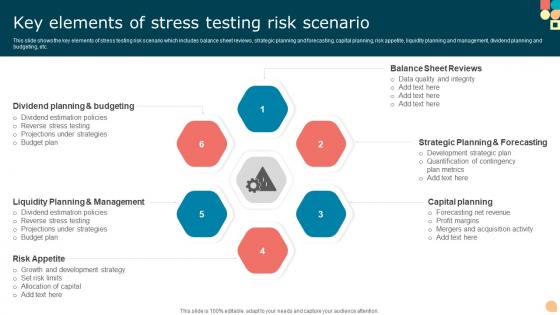
Key Elements Of Stress Testing Risk Scenario




Try Before you Buy Download Free Sample Product
 Impress Your
 Audience
 100%
100% Editable
 Save Hours
 of Time


This slide shows the key elements of stress testing risk scenario which includes balance sheet reviews, strategic planning and forecasting, capital planning, risk appetite, liquidity planning and management, dividend planning and budgeting, etc.
People who downloaded this PowerPoint presentation also viewed the following :
Key Elements Of Stress Testing Risk Scenario with all 6 slides:
Use our Key Elements Of Stress Testing Risk Scenario to effectively help you save your valuable time. They are readymade to fit into any presentation structure.





FAQs for Key Elements Of Stress
So basically you're testing how your bank would survive if the economy totally tanked - like another 2008 situation. Picture stress-testing a bridge but with way more math and panic. Regulators want proof you won't come crawling for a bailout when things get ugly. You're checking if your capital can handle market crashes, whether you'd stay afloat during a recession, that kind of thing. The key part? Actually use the results to fix weak spots in your risk strategy. Don't just shove the report in a drawer somewhere - I've seen too many places do exactly that.
So stress testing is different from your typical risk stuff - instead of looking at historical data or probabilities, you're basically throwing worst-case scenarios at your portfolio to see what survives. Market crashes, interest rates going crazy, liquidity drying up completely. VaR tells you statistical odds, but stress testing? It's like "ok what happens when literally everything implodes at the same time." You're not trying to predict anything - just seeing if you'd make it through absolute chaos. Honestly pretty eye-opening when you run those disaster scenarios alongside your regular analysis.
Stress tests usually hit you with three big scenarios: severe recessions, market crashes, and interest rate shocks. We're talking 2008-level disasters, but also stuff like commercial real estate meltdowns or geopolitical mess that wipes out whole sectors. They'll throw in operational risks too - cyberattacks, system failures, the usual nightmare fuel. Unemployment spikes and GDP drops are basically guaranteed. Housing crashes always make an appearance because regulators can't resist that one. The whole point? Testing if your bank's capital can survive when everything goes sideways. Your models need to show how losses ripple through different business lines - honestly, it's like financial dominoes falling everywhere.
Dude, regulators control literally everything about stress testing. They tell you which scenarios to run, what risks to cover, even your reporting deadlines. No making stuff up on your own! Capital ratios, liquidity rules, which business areas to test - it's all specified for you. Some banks do comprehensive annual tests, others run smaller targeted ones throughout the year. Honestly, the requirements change so much that your team better stay updated or you'll be scrambling to rebuild everything last minute. That's happened to more companies than you'd think.
Look, historical data is your starting point for building stress scenarios that actually make sense. Past crises show you how risk factors really behaved when everything hit the fan. 2008 data is still super valuable for this stuff - probably the best we've got, honestly. But don't just copy what happened back then. Use that data to figure out the real relationships between variables, then create scenarios based on today's actual vulnerabilities. I'd start by comparing your current portfolio against those historical stress periods. You'll spot gaps pretty quickly that way.
Think of stress testing like intentionally trying to break your business before life does it for you. You create nightmare scenarios - what if demand suddenly tripled? Supply chain collapsed? Market tanked hard? Honestly, it's weirdly fun in a twisted way. You're hunting for weak points: maybe your servers can't handle traffic spikes, or you don't have enough cash saved up. Could be gaps in your backup plans too. I'd start with whatever keeps you up at night - your most critical stuff. Then figure out what would make those systems completely fall apart.
Honestly, most teams mess up by creating super unrealistic test scenarios. They'll either go way too easy or just hammer the system with max traffic - which isn't how real users actually behave. The weird edge cases are what'll kill you, not the obvious stuff. Oh and definitely get ops and support involved early on. I've seen so many teams run tests in isolation then act shocked when everything falls apart and nobody knows how to fix it. Start with your normal usage patterns first, then gradually push things harder from there. Way more effective than just going nuclear right away.
So it totally depends on your industry's biggest fears, basically. Banks run scenarios where the economy tanks to see if they'd go under. Tech companies purposely overload their servers until stuff breaks (which honestly seems kinda masochistic but whatever). Manufacturing worries about supply chains falling apart. Hospitals? They simulate patient surges and system crashes. The whole point is figuring out what keeps your CEO up at night, then testing for that exact disaster. Financial companies care about staying solvent. Others focus more on whether operations can handle chaos. Start with your industry's worst nightmare and build from there.
Think of stress testing as running worst-case scenarios on banks before shit actually hits the fan. Regulators throw hypothetical disasters at them - market crashes, crazy unemployment spikes, whatever - to see which ones would fold. Banks that fail these tests? They're forced to build up more capital or cut back on risky stuff. It's honestly pretty smart after what happened in 2008 when everyone was shocked at how fragile everything was. Way better to catch problems early than wait for another meltdown. The whole system works because you're basically making banks prove they can handle the next crisis.
Here's what I've found works best - start with your biggest time-wasters and automate those first. AI can run thousands of market scenarios at once, which honestly blows my mind every time. Monte Carlo simulations are clutch for this stuff. Cloud computing lets you run everything in parallel instead of waiting around for sequential processing. Days become hours, basically. The automation cuts out all those annoying manual data entry mistakes we always make. You'll get real-time dashboards and standardized reports without the headache. Oh, and the parallel processing thing - that's probably where you'll see the biggest time savings right away.
Dude, you've gotta know your audience first. Executives just want the "oh shit" moments and business impact. Technical folks need all the nitty-gritty details though. I always start with an exec summary - what failed and why it matters money-wise. Then get into the weeds for the tech team. Visual stuff like dashboards make everything way clearer than dumping spreadsheets on people. Been there, done that mistake! Don't forget your action plan either. What's broken, why should anyone care, and here's how we fix it. Honestly, being upfront about failures goes way further than trying to sugarcoat everything.
Look, most places do them yearly just to check the box. Banking and finance? They're doing quarterly or more because regulators are breathing down their necks. Really depends on how fast your stuff changes though. New systems rolling out constantly? Test more often. Pretty stable environment? Annual works fine. I'd start with one big comprehensive test per year, then throw in smaller targeted ones whenever you push major updates or spot new risks popping up. Oh, and don't forget to actually learn from each test - sounds obvious but you'd be surprised how many teams just file the report and move on.
Honestly, stress testing is like finding out where your business actually cracks when things get messy. You'll spot which parts of your company are fragile way before they implode. Plus it shows you what your risk tolerance really is - not what you think it should be on paper. Kind of like a fire drill but for your finances, if that makes sense. The cool part? You can use all this to figure out where to spend money next and build way better backup plans. Next time you're making a big decision, run it through some worst-case scenarios first. Trust me on this one.
Response time and error rates are the big ones you want to watch. CPU and memory usage too - that's where you'll spot your bottlenecks hiding. Honestly, the error rate spikes are usually the most telling part. Track how response times slow down as you add more users. Don't skip measuring recovery time after everything's done either, that bit's super useful. Oh, and definitely get your baseline numbers first - otherwise you're just guessing at the impact when you start cranking things up.
Hey! So you definitely want to go beyond the usual financial stress tests. Cyber stuff is huge now - model what happens when ransomware takes down your core systems for like 2-3 days. Or a data breach forces you to shut everything customer-facing. The hard part? Figuring out how that hits your liquidity and what the regulatory fallout costs. I'd loop in your cybersecurity people to get realistic timelines on attacks and recovery. They know the actual threat landscape better than anyone. Run these scenarios quarterly with your normal economic ones. It's honestly more relevant than some of the traditional shocks we used to focus on.
-
This PowerPoint layout is very helpful from a business point of view, and it's visually stunning too! I'm so happy with this product because it has helped me understand and deliver great presentations.
-
Loved the templates on SlideTeam, I believe I have found the go to place for my presentation needs!