

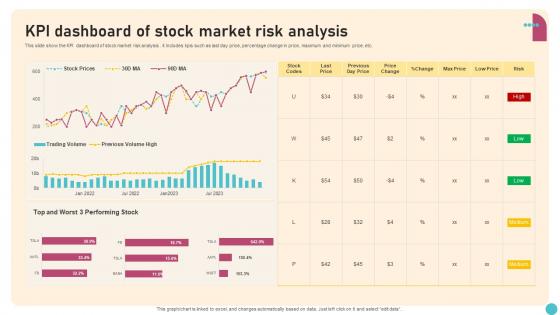
KPI Dashboard Of Stock Market Risk Analysis




Try Before you Buy Download Free Sample Product
 Impress Your
 Audience
 100%
100% Editable
 Save Hours
 of Time


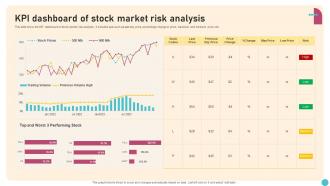
This slide show the KPI dashboard of stock market risk analysis .it includes kpis such as last day price, percentage change in price, maximum and minimum price, etc.
People who downloaded this PowerPoint presentation also viewed the following :
KPI Dashboard Of Stock Market Risk Analysis with all 7 slides:
Use our KPI Dashboard Of Stock Market Risk Analysis to effectively help you save your valuable time. They are readymade to fit into any presentation structure.





FAQs for KPI Dashboard Of Stock
Sales team KPI dashboards should prioritize revenue metrics, conversion rates, pipeline velocity, customer acquisition cost, average deal size, and activity metrics like calls and meetings. These indicators streamline performance tracking by revealing bottlenecks, forecasting accuracy, and individual productivity, with many organizations finding that combining leading and lagging indicators ultimately delivers better sales outcomes and strategic visibility.
Visualizations enhance KPI understanding by transforming complex data into intuitive charts, graphs, heat maps, and trend lines that enable instant pattern recognition and anomaly detection. Through strategic color coding, comparative displays, and interactive elements, executives and managers can quickly identify performance gaps, track progress against targets, and make data-driven decisions faster, ultimately improving organizational responsiveness and strategic alignment.
Common KPI dashboard pitfalls include overcrowding with excessive metrics, using misleading visualizations, lacking clear stakeholder alignment, ignoring mobile responsiveness, and failing to establish data refresh frequencies. These design missteps can overwhelm users and reduce decision-making effectiveness, with many organizations finding that focusing on 5-7 key metrics, consistent visual hierarchy, and regular stakeholder feedback ultimately delivers clearer insights and improved business performance.
KPI data should be updated based on business needs and data criticality, with real-time updates for operational metrics, daily updates for sales and customer data, and weekly or monthly updates for strategic indicators. Many organizations find that automated, frequent updates enhance decision-making speed and accuracy, while balancing system performance with actionable insights for competitive advantage.
User experience significantly impacts KPI dashboard effectiveness by ensuring intuitive navigation, clear data visualization, responsive design, and personalized interfaces that match user workflows. Well-designed UX enables faster decision-making, reduces training requirements, and increases user adoption rates, with many organizations finding that streamlined, user-centric dashboards deliver better business insights and ultimately enhance operational efficiency across departments.
KPI dashboards drive employee performance by providing real-time visibility into individual and team metrics, establishing clear performance benchmarks, and enabling data-driven feedback conversations. Through transparent goal tracking and automated progress updates, organizations enhance accountability while empowering employees to self-monitor their contributions, ultimately delivering improved productivity and stronger alignment with strategic objectives.
Selecting industry-specific KPIs requires aligning metrics with core business objectives, regulatory requirements, customer expectations, operational priorities, and competitive benchmarks. Financial services emphasize risk metrics and compliance rates, while manufacturing focuses on production efficiency and quality control, with many organizations finding that combining leading indicators with lagging performance measures delivers comprehensive insights and strategic advantage.
Integration with real-time data sources transforms KPI dashboards by delivering current performance metrics, enabling immediate decision-making, and eliminating delays from outdated information. Through live data feeds, organizations can monitor customer interactions, track sales performance, and identify operational bottlenecks instantly, with many financial services and retail companies finding that real-time insights significantly enhance strategic responsiveness and competitive advantage.
**INPUT**: What tools are recommended for creating an interactive and engaging KPI dashboard? **OUTPUT**: Recommended tools include Tableau, Power BI, Qlik Sense, Google Data Studio, and Looker, each offering robust visualization capabilities and real-time data integration. These platforms streamline dashboard creation by providing drag-and-drop interfaces, customizable templates, and automated reporting features, with many organizations finding that interactive dashboards enhance decision-making speed and operational transparency across departments. **Word count: 58 words**
KPI dashboards remain aligned with changing business objectives through regular review cycles, stakeholder feedback sessions, and flexible design architectures that accommodate evolving metrics. Organizations typically conduct quarterly assessments with department heads, integrate real-time business intelligence tools, and maintain modular dashboard structures, ensuring dashboards continuously reflect strategic priorities while delivering actionable insights for competitive advantage.
Having too many KPIs on a dashboard creates cognitive overload, dilutes focus from critical metrics, and slows decision-making processes. This information clutter overwhelms users, reduces dashboard effectiveness, and can lead to analysis paralysis, with many organizations finding that streamlined dashboards featuring 5-7 key metrics ultimately deliver clearer insights and faster strategic responses.
Stakeholder feedback can be incorporated through structured interviews, iterative design sessions, and prototype testing phases that capture diverse user requirements and priorities. Organizations streamline this process by conducting department-specific workshops, creating feedback loops during development cycles, and implementing pilot programs, with many finding that collaborative design approaches ultimately deliver dashboards with higher adoption rates and stronger business alignment.
**INPUT**: What strategies can be employed to train teams on interpreting and using KPI dashboards? **OUTPUT**: Effective KPI dashboard training strategies include hands-on workshops, role-specific tutorials, scenario-based exercises, mentorship programs, and regular refresher sessions. These approaches enhance understanding by combining theoretical knowledge with practical application, enabling teams across departments like sales, marketing, and operations to make data-driven decisions, ultimately delivering improved performance tracking and strategic alignment.
Mobile accessibility significantly enhances KPI dashboard usability by enabling real-time data access, touch-optimized navigation, and location-independent monitoring for distributed teams. Through responsive design and cloud integration, remote managers can track performance metrics, respond to alerts instantly, and make data-driven decisions from anywhere, ultimately delivering operational agility and competitive advantage.
Ethical considerations include ensuring data accuracy, maintaining employee privacy, providing contextual information, avoiding manipulative visualizations, and establishing transparent methodologies. Organizations must balance performance transparency with fair representation, considering factors like data consent, potential bias in metrics selection, and psychological impact on teams, while ensuring dashboards promote constructive improvement rather than punitive surveillance across different departments.
-
Thanks for all your great templates they have saved me lots of time and accelerate my presentations. Great product, keep them up!
-
Great designs, Easily Editable.