

KPI Dashboard To Evaluate Effectiveness Achieving Higher ROI With Brand Development




Try Before you Buy Download Free Sample Product
 Impress Your
 Audience
 100%
100% Editable
 Save Hours
 of Time


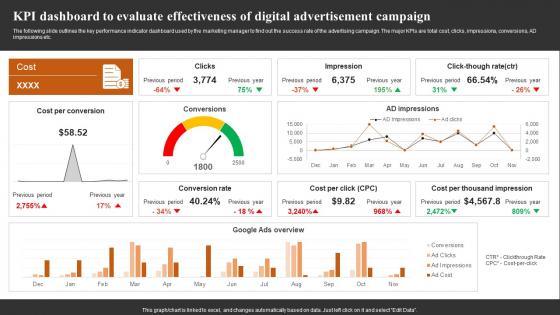
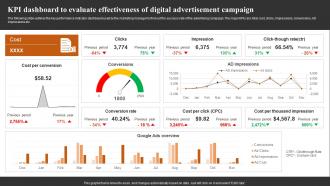
The following slide outlines the key performance indicator dashboard used by the marketing manager to find out the success rate of the advertising campaign. The major KPIs are total cost, clicks, impressions, conversions, AD impressions etc.
People who downloaded this PowerPoint presentation also viewed the following :
KPI Dashboard To Evaluate Effectiveness Achieving Higher ROI With Brand Development with all 7 slides:
Use our KPI Dashboard To Evaluate Effectiveness Achieving Higher ROI With Brand Development to effectively help you save your valuable time. They are readymade to fit into any presentation structure.






FAQs for KPI Dashboard To Evaluate Effectiveness Achieving Higher ROI
Effective KPI dashboard components include clear visualization charts, real-time data integration, customizable filters, drill-down capabilities, and automated alerts for threshold breaches. These elements work together by enabling quick performance assessment, facilitating data-driven decisions, and streamlining monitoring processes, with many organizations finding that well-designed dashboards significantly enhance operational efficiency and strategic oversight.
Determining relevant KPIs requires aligning metrics with strategic objectives, stakeholder needs, and operational priorities through comprehensive analysis of business goals, departmental functions, and performance drivers. Organizations typically engage cross-functional teams to identify measurable outcomes that directly impact revenue, efficiency, and customer satisfaction, while ensuring selected KPIs are actionable, timely, and ultimately deliver competitive advantage across all business units.
Common KPI dashboard mistakes include overcrowding with excessive metrics, using inappropriate visualizations, lacking clear hierarchies, ignoring user context, and failing to align with business objectives. These design flaws create confusion rather than clarity, with many organizations finding that streamlined dashboards focusing on actionable insights ultimately deliver better decision-making and improved operational efficiency.
KPI dashboards should be updated based on business needs and data frequency, with real-time updates for operational metrics, daily updates for sales performance, weekly updates for project tracking, and monthly updates for strategic indicators. Organizations increasingly find that automated, scheduled updates enhance decision-making speed while reducing manual effort, ultimately delivering more responsive management and competitive advantage.
Effective KPI visualizations include gauge charts, progress bars, trend lines, heat maps, and comparison charts. These visual formats enhance data comprehension by presenting complex metrics clearly, enabling quick performance assessment, and facilitating informed decision-making, with many organizations finding that strategic dashboard design ultimately delivers improved operational efficiency and competitive advantage.
Creating user-friendly KPI dashboards requires intuitive design principles, clear visual hierarchy, relevant metric selection, and responsive layouts that adapt across devices. These approaches streamline decision-making by minimizing cognitive load, prioritizing critical information, and enabling quick data interpretation, with many organizations finding that well-designed dashboards enhance operational efficiency and accelerate strategic responses.
Data accuracy serves as the foundation for effective KPI dashboards, directly impacting decision-making quality, strategic planning reliability, and organizational trust in performance metrics. Without precise data, even the most sophisticated dashboards can mislead executives, trigger incorrect resource allocation decisions, and undermine competitive advantage, with many organizations finding that data validation processes and regular accuracy audits ultimately deliver more confident leadership decisions and improved business outcomes.
KPI dashboard customization involves role-based access controls, personalized metric selections, adjustable visualization formats, customizable reporting frequencies, and stakeholder-specific data filtering capabilities. Through these features, executives can focus on strategic performance indicators while department managers track operational metrics, and analysts access detailed data granularity, ultimately delivering relevant insights that enhance decision-making across organizational levels.
Real-time data integration in KPI dashboards delivers immediate visibility into performance metrics, eliminates data silos, reduces manual reporting errors, and enables faster decision-making across organizations. This integration streamlines operations by providing live updates on sales performance, operational efficiency, and customer satisfaction, with many businesses finding that instant access to current data significantly enhances their competitive advantage.
Aligning KPIs with business objectives involves mapping each metric directly to strategic goals, ensuring measurable outcomes like revenue growth, operational efficiency, and customer satisfaction. Through strategic selection and regular review processes, organizations can streamline dashboard focus, eliminate vanity metrics, and enhance decision-making capabilities, with many companies finding that targeted KPI alignment ultimately delivers improved performance visibility and competitive advantage.
Leading KPI dashboard platforms include Tableau, Power BI, Google Data Studio, Looker, and Qlik Sense, each offering distinct visualization capabilities and integration options. These tools streamline data consolidation, automate reporting processes, and enable real-time monitoring, with many organizations finding that cloud-based solutions like Power BI and Data Studio deliver faster implementation and lower costs.
KPI dashboards help identify trends through historical data visualization, comparative analytics, pattern recognition tools, and automated trend alerts that highlight performance shifts. These features enable organizations to spot emerging patterns in sales cycles, customer behavior, and operational efficiency, with many businesses finding that visual trend analysis accelerates strategic decision-making and enhances competitive positioning.
Strategies include intuitive design with clear visualizations, interactive filtering capabilities, personalized metrics relevant to user roles, mobile accessibility, and real-time data updates. These approaches enhance engagement by streamlining decision-making processes, reducing information overload, and enabling users to quickly identify trends, with many organizations finding that customizable dashboards significantly improve adoption rates and strategic insights.
Handling large datasets in KPI dashboard design involves data aggregation, real-time filtering, strategic sampling, performance optimization, and cloud-based processing capabilities. These approaches streamline dashboard performance by reducing load times, enabling faster queries, and maintaining visual clarity, with many organizations finding that strategic data layering and automated refresh schedules ultimately deliver responsive analytics without compromising comprehensive insights.
**INPUT**: What methods can be used to display qualitative KPIs alongside quantitative ones? **OUTPUT**: Methods include visual storytelling through infographics, color-coded status indicators, progress bars with contextual annotations, dashboard tiles combining metrics with narrative summaries, and hybrid widgets integrating charts with qualitative assessments. These approaches enable organizations to streamline performance monitoring by presenting comprehensive insights, enhancing decision-making processes, and ultimately delivering more holistic business intelligence that drives strategic outcomes. **Word count: 60 words**
-
Extremely professional slides with attractive designs. I especially appreciate how easily they can be modified and come in different colors, shapes, and sizes!
-
I looked at their huge selection of themes and designs. They appeared to be ideal for my profession. I'm sure I'll grab a few of them.