

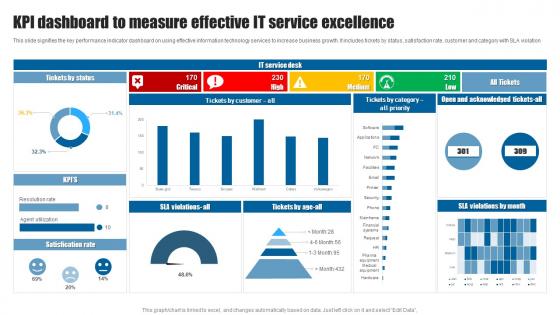
KPI Dashboard To Measure Effective IT Service Excellence




Try Before you Buy Download Free Sample Product
 Impress Your
 Audience
 100%
100% Editable
 Save Hours
 of Time


This slide signifies the key performance indicator dashboard on using effective information technology services to increase business growth. It includes tickets by status, satisfaction rate, customer and category with SLA violation.
People who downloaded this PowerPoint presentation also viewed the following :
KPI Dashboard To Measure Effective IT Service Excellence with all 7 slides:
Use our KPI Dashboard To Measure Effective IT Service Excellence to effectively help you save your valuable time. They are readymade to fit into any presentation structure.





FAQs for KPI Dashboard To Measure Effective
So first off, pick KPIs that actually matter to your goals - not just vanity metrics that look good. Real-time data is clutch, and honestly, auto-feeding from consistent sources is non-negotiable because manual updates are the worst. Visual design should be dead simple. Put your most critical stuff up top where people can't miss it. Include benchmarks so everyone knows if they're winning or losing. Oh, and resist the urge to cram everything onto one screen just because you can - focus beats fancy every time when people need to make quick decisions.
Figure out what actually matters for your business first, then work backwards from there. Focus on metrics your audience can actually do something about - not just pretty numbers that look good but don't help anyone make decisions. Honestly, I've seen so many dashboards that are just total chaos with every possible metric thrown in. Keep it simple - maybe 5-7 KPIs tops so people don't tune out. Mix some predictive stuff with your results metrics too. Oh, and definitely test it with real users before you launch. They'll catch things you missed and you can tweak it based on what actually works for them.
Don't cram everything onto one screen - I learned this the hard way. Focus on 5-7 metrics that actually matter to your business goals, not just stuff that looks cool. Vanity metrics are the worst because they're basically useless for decisions. Your data needs to be fresh and accurate too - stale dashboards are honestly pointless. Clean design with consistent colors helps a lot. Oh, and definitely test it with real users first! They'll catch things you missed. You can always add more later based on their feedback.
Honestly, I'd go with daily updates for your main operational stuff and weekly/monthly for the bigger picture metrics. Daily morning updates work really well - gives you fresh info without making everyone crazy analyzing every tiny change. Sales numbers? Yeah, track those daily. Customer satisfaction though, maybe monthly is fine since that moves slower anyway. Don't make the mistake I've seen where people refresh dashboards every hour like it's social media or something. Match how often you update to how fast you can actually do something about it. Start simple, see what works.
For dashboards, go with stuff that's super clear at first glance. Line charts are perfect for tracking things over time, and bar charts make comparing different metrics really easy. Gauge charts show progress toward goals nicely too. Oh, and sparklines are actually amazing - those little mini trend lines that don't take up much space but tell you everything you need to know. Heat maps work well when you've got tons of metrics across different teams since they highlight problem spots instantly. Just avoid anything too fancy that makes people have to think hard about what they're looking at.
Here's what I'd do - figure out what each team actually looks at every day. Sales wants their pipeline numbers and conversion rates right there. HR cares about headcount and turnover stuff. Operations is all about efficiency metrics and cost breakdowns (honestly gets pretty boring but whatever). Just ask each department head what keeps them stressed about their numbers. Then set up different dashboards so people aren't drowning in irrelevant data. I'd start small though - maybe 3-4 key metrics per team and expand later once you see what's actually getting used.
Honestly, UX makes or breaks dashboards. I've watched so many projects crash because teams cramming every possible metric onto one screen - it's painful to see. People bail if they can't figure out where stuff is or what it means. Keep navigation simple, make the visual flow obvious, and match the detail level to who's actually using it. Your users should spot what they need fast and get the data story without scratching their heads. Oh, and definitely talk to real users first about what they actually care about. Design around that core stuff instead of guessing.
First thing - double check your data sources and make sure the flows are actually clean. Set up automated alerts for weird spikes or missing data because manually checking everything will drive you insane. Everyone needs to agree on what each KPI actually means too, otherwise you're all measuring different things. I'd do monthly spot-checks where you randomly pick some metrics and trace them back to the source data. Oh, and write down how you calculate everything and where it comes from - future you will thank you when someone asks "how'd we get this number?" Trust me on that one.
So for KPI dashboards, you've got your main contenders: Tableau, Power BI, and Looker. Power BI's great if you're already in the Microsoft ecosystem - everything just clicks together. Tableau does incredible visualizations but can be way more than you need (learned that the hard way). Google Data Studio won't break the bank and gets the job done. Klipfolio and Geckoboard are decent for basic stuff. Honestly though? Go with whatever your IT folks are already comfortable with. Trust me, fighting with permissions and data connections isn't worth it.
So you'll want to hook up API connections between your data and whatever dashboard you're using - Tableau, Power BI, or if you built something custom. Most of these can handle real-time feeds no problem. Hook directly into your databases or web services with webhooks or just schedule API calls. Honestly though, real-time stuff can be a total resource drain. I'd figure out which metrics actually need live updates first. Your refresh rate really depends on what your system can handle - could be every few seconds or every couple minutes. Most things can probably wait for hourly updates anyway.
Honestly, the biggest win is freedom from your desk. You can check your numbers anywhere - on the train, grabbing coffee, whatever. Makes you way more responsive when something's going wrong. Mobile dashboards usually strip out the clutter too, so you're just seeing what actually matters instead of drowning in data. Your team stays on the same page even when everyone's scattered around. I'd definitely set up push notifications for your top metrics though - otherwise you'll forget to check and miss important stuff. Way better than finding out about problems hours later.
Honestly, these things are total game-changers. You get all your important numbers in one spot instead of hunting through endless spreadsheets - which we both know is the worst. Suddenly you can actually see what's working and what's completely tanking. Real-time tracking means you catch problems before they get ugly. The coolest part? You can click into specific areas when something looks weird. I'd say pick maybe 3-5 metrics that actually move the needle for you and start there. Don't go overboard initially or you'll just overwhelm yourself with data you won't even use.
Honestly, just think pyramid when you're setting this up. Most critical stuff goes right at the top where nobody can miss it. Then work your way down - department metrics in the middle, detailed breakdowns at the bottom. Group similar metrics together and stick with the same colors throughout. Otherwise people get confused trying to decode what they're looking at. Don't cram everything together either - white space actually helps your brain process things better. Oh, and sketch out what your stakeholders absolutely need to see first. That'll guide the whole layout. Way easier than overthinking it from scratch.
Honestly, just ask yourself: does this metric help me make actual decisions? If not, ditch it. I'd stick to your top 3-5 KPIs that really matter. You don't want one of those nightmare dashboards where there's charts everywhere and nobody knows what they're looking at - I've definitely been guilty of that before. Group similar stuff together, leave some breathing room between sections. Maybe set up different views so people can dig deeper if they want, but your main screen should make sense in like 5 seconds. White space is your friend here.
Get your stakeholders involved from the start - ask them what metrics actually matter for their day-to-day work. Visual stuff works way better than dense spreadsheets, obviously. Set up alerts so they know when something needs their attention instead of checking constantly. Monthly check-ins help too, where you walk through what the numbers mean for their upcoming decisions. The key is connecting everything back to outcomes they're personally responsible for. Oh, and automate what you can - nobody has time to manually update dashboards anymore. Make it dead simple to understand at first glance.
-
I really liked their customized design services. I got my desired template made by their expert team. Thank You!
-
Visually stunning presentation, love the content.