

KPI Dashboard To Measure Saas Product Launch Performance




Try Before you Buy Download Free Sample Product
 Impress Your
 Audience
 100%
100% Editable
 Save Hours
 of Time


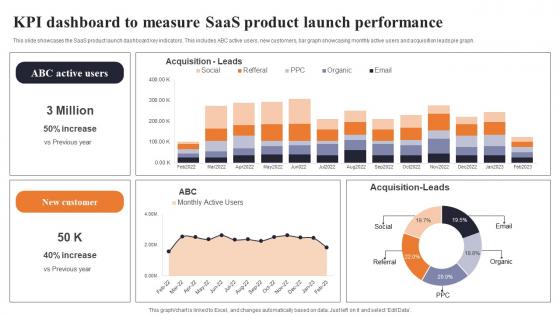
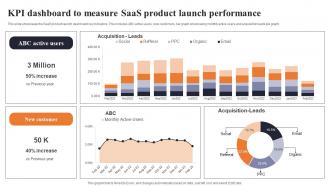
This slide showcases the SaaS product launch dashboard key indicators. This includes ABC active users, new customers, bar graph showcasing monthly active users and acquisition leads pie graph.
People who downloaded this PowerPoint presentation also viewed the following :
KPI Dashboard To Measure Saas Product Launch Performance with all 10 slides:
Use our KPI Dashboard To Measure Saas Product Launch Performance to effectively help you save your valuable time. They are readymade to fit into any presentation structure.








FAQs for KPI Dashboard To Measure Saas
Effective KPI dashboard components include clear data visualization, real-time metrics, customizable widgets, drill-down capabilities, and automated alerts for threshold breaches. These elements work together by streamlining performance monitoring, enhancing decision-making speed, and enabling proactive management responses, with many organizations finding that well-designed dashboards ultimately deliver improved operational efficiency and strategic alignment.
Determining relevant KPIs requires aligning metrics with specific business objectives, analyzing current performance gaps, evaluating industry benchmarks, and considering stakeholder priorities across departments. Strategic KPI selection involves assessing measurability, actionability, and direct impact on revenue or operational efficiency, with successful organizations finding that 5-7 focused metrics deliver clearer insights than overwhelming dashboards with dozens of indicators.
Effective KPI dashboard visualizations include gauge charts for target progress, sparklines for trends, heatmaps for performance comparisons, bar charts for categorical data, and color-coded scorecards for quick status assessment. These techniques enhance decision-making by enabling instant pattern recognition, simplifying complex data interpretation, and highlighting critical performance deviations, with many organizations finding that strategic visual hierarchy ultimately delivers faster insights and improved operational responsiveness.
KPI data should be updated based on business needs and data availability, ranging from real-time for critical metrics like sales performance to daily, weekly, or monthly for strategic indicators. Many organizations find that automated daily updates work well for most operational KPIs, while executive dashboards often refresh weekly or monthly, ultimately delivering timely insights without overwhelming users with excessive data noise.
Stakeholder feedback ensures KPI dashboards align with specific business needs, user workflows, and decision-making processes across different organizational levels. Through collaborative input sessions, organizations identify relevant metrics, optimize interface design, and establish meaningful data visualization priorities, with many teams finding that stakeholder-driven dashboards deliver higher adoption rates and more actionable insights.
**INPUT**: How can you ensure your KPI dashboard remains user-friendly and intuitive? **OUTPUT**: You can ensure KPI dashboard user-friendliness through clean visual design, logical data hierarchy, customizable views, and intuitive navigation pathways. These design principles streamline decision-making by reducing cognitive load, enabling faster data interpretation, and delivering personalized experiences, with many organizations finding that well-designed dashboards ultimately enhance operational efficiency and strategic responsiveness. [Word count: 54]
Recommended KPI dashboard tools include Tableau, Power BI, Google Data Studio, Klipfolio, and Sisense, each offering distinct visualization capabilities, data integration features, and customization options. These platforms streamline performance monitoring by automating data collection, enabling real-time updates, and delivering intuitive interfaces, with many organizations finding that strategic tool selection significantly enhances decision-making speed and operational efficiency.
Data integration across departments enhances KPI dashboard effectiveness by eliminating data silos, providing comprehensive cross-functional insights, and enabling real-time visibility into interconnected business processes. This strategic combination allows organizations to identify correlations between sales performance, marketing campaigns, and operational efficiency, ultimately delivering more accurate forecasting and faster decision-making across all business units.
Common KPI dashboard pitfalls include displaying too many metrics, using irrelevant indicators, poor visual design, lack of real-time data, and insufficient user training. These issues can overwhelm decision-makers and reduce effectiveness, with many organizations finding that focusing on 5-7 strategic KPIs, ensuring mobile compatibility, and providing stakeholder training ultimately delivers clearer insights and better business outcomes.
Balancing KPI dashboard information requires focusing on role-specific metrics, using progressive disclosure through drill-down capabilities, and implementing visual hierarchy with color coding and sizing. Strategic dashboard design enables stakeholders to access summary views initially, then explore detailed analytics when needed, while maintaining clean interfaces that highlight critical performance indicators, ultimately delivering actionable insights without overwhelming users across different organizational levels.
Startups should prioritize cash burn rate, customer acquisition cost, monthly recurring revenue, runway months, and product-market fit indicators, while established businesses focus on profit margins, market share, operational efficiency, customer lifetime value, and ROI across divisions. These metrics reflect different growth stages, with startups emphasizing survival and scaling metrics, while mature companies track optimization and sustained competitive advantage.
Automated reports complement KPI dashboards by delivering detailed breakdowns, scheduled summaries, and historical trend analysis that extend beyond real-time dashboard views. These reports enable stakeholders to receive regular performance updates via email, generate compliance documentation, and conduct deeper data analysis, while dashboards provide instant visual monitoring, ultimately creating a comprehensive performance management system.
KPI dashboards drive strategic decision-making by providing real-time performance visibility, identifying trend patterns, highlighting resource allocation opportunities, and revealing competitive positioning insights. These comprehensive analytics enable executives to pivot strategies quickly, optimize operational efficiency, and capitalize on emerging market opportunities, with many organizations finding that data-driven decisions ultimately deliver measurable competitive advantages.
Color and design choices significantly impact KPI dashboard effectiveness by enhancing readability, directing attention to critical metrics, and reducing cognitive load through intuitive visual hierarchies. Strategic use of contrasting colors for alerts, consistent design patterns, and clean layouts enables faster decision-making, improves user engagement, and minimizes interpretation errors, ultimately delivering more efficient monitoring and better business outcomes.
Mobile-accessible KPI dashboard best practices include responsive design, simplified visualizations, touch-friendly interfaces, offline capabilities, and role-based content filtering. These approaches streamline decision-making by prioritizing critical metrics, optimizing load times, and ensuring seamless navigation across devices, with many executives finding that mobile-first dashboards ultimately enhance real-time business monitoring and faster strategic responses.
-
The pricing page of this website is very sorted. I felt no pain while buying the PPTs.
-
Such amazing slides with easy editable options. A perfect time-saver.