

Lean Manufacturing Dashboard Deployment Of Lean Manufacturing Management System




Try Before you Buy Download Free Sample Product
 Impress Your
 Audience
 100%
100% Editable
 Save Hours
 of Time


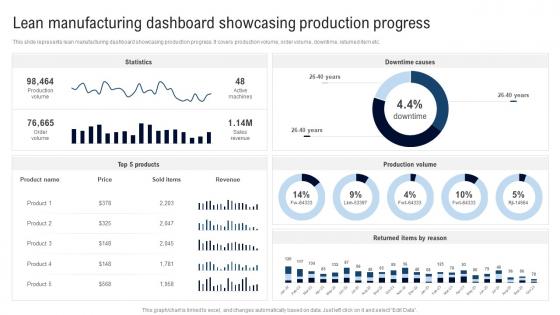
This slide represents lean manufacturing dashboard showcasing production progress. It covers production volume, order volume, downtime, returned item etc.
People who downloaded this PowerPoint presentation also viewed the following :
Lean Manufacturing Dashboard Deployment Of Lean Manufacturing Management System with all 7 slides:
Use our Lean Manufacturing Dashboard Deployment Of Lean Manufacturing Management System to effectively help you save your valuable time. They are readymade to fit into any presentation structure.





FAQs for Lean Manufacturing Dashboard Deployment Of Lean
Honestly, just stick to the basics that actually matter. OEE is your best friend for tracking how well machines are running. Cycle time and lead time show if you're getting faster. First-pass yield tells you about quality issues. Inventory turns are huge - too much sitting around is just pure waste. Track defect rates and changeover times too. Oh, and don't forget some kind of 5S visual thing so people can see if workstations stay organized. Here's the thing though - resist the urge to track everything. Pick maybe 6-8 metrics your team can actually do something about. Real-time updates are nice if you can swing it.
Basically, these dashboards show you what's happening on your production floor right now. No more digging through endless spreadsheets (thank god). You can actually see the seven wastes as they're occurring - overproduction, waiting times, all that stuff. Bottlenecks become super obvious when everything's visual. It tracks your cycle times, downtime, inventory, quality metrics in one spot. Honestly, the best part is setting up alerts so you catch problems before they turn into expensive headaches. Makes spotting patterns way easier than the old-school method of piecing things together after the fact.
Honestly, once you see what's happening on your floor in real-time, there's no going back. Problems jump out at you instantly - bottlenecks, quality issues, equipment acting up - instead of discovering them hours later when fixing costs way more. Your team can actually make smart calls on the spot rather than waiting around for those end-of-shift reports (which let's be real, sometimes come too late anyway). The immediate feedback is weirdly satisfying too. Don't go crazy though - pick a few important metrics to display first. You can always add more later.
So basically, these dashboards show you what's happening right now - cycle times, waste, defects, all that stuff. Way better than waiting for weekly reports that are already outdated. You'll actually get hooked on checking the data once you see how patterns emerge (I know, sounds nerdy but it's true). The visual setup makes team meetings way more productive since everyone's looking at the same current info. No more guessing or going with your gut when the numbers are right there. My advice? Pick maybe 3-4 metrics that actually move the needle for you first, then expand from there.
Dude, data integration is everything. Your dashboard is basically useless without it - just fancy graphics that don't mean anything. Real-time feeds from production, quality control, inventory... that's what gives you the actual picture of what's happening. I've watched so many people build these gorgeous dashboards that pull from systems that can't even talk to each other (such a waste of time honestly). Flying blind with stale data is worse than having no dashboard at all. Map out your data sources first. Figure out which systems need to connect, then make the magic happen with seamless updates.
The "5-second rule" is everything - people need to get the key stuff immediately. Put your most critical metrics like OEE and defect rates right at the top where they can't miss them. Red for bad, green for good, yellow for "eh, watch this" - basic but it works. Honestly, operators are gonna glance at this between doing actual work, so don't overthink it. Make sure you can read everything from across the room and group things by production line. Oh, and definitely test it with real users first - you'd be surprised what seems obvious to you but confuses everyone else.
Yeah absolutely! First thing is figuring out what actually matters for your business - like manufacturing cares about cycle times and defects, but healthcare tracks patient wait times instead. Most dashboard tools let you drag and drop widgets around pretty easily these days. Time intervals are huge too - some places need live data, others can work with daily updates. I'd honestly start by mapping out where your biggest bottlenecks are happening, then build around those specific problems. Way more useful than generic metrics that look nice but don't tell you anything.
Power BI and Tableau are your best starting points - both handle manufacturing KPIs really well. Excel can work if budget's tight, but it gets messy with real-time feeds. QlikView's solid too, especially for drilling into specific processes. Actually had a client who swore by their QlikView setup, was pretty slick. Start with whatever your IT folks already know though - saves you tons of headaches later. The real trick isn't the tool anyway, it's getting clean data flowing from your production systems first. That's where most projects crash and burn.
So predictive analytics basically turns your Lean dashboard into a fortune teller - but one that actually works. You'll stop just looking at yesterday's waste and start getting warnings about equipment ready to break down or quality problems brewing. Those algorithms catch patterns we totally miss as humans. My old plant manager would've killed for this stuff! Focus on whatever's causing you the biggest headaches right now. That's where you'll see results fastest. Instead of putting out fires all day, you're preventing them before they even start.
Honestly, data integration is going to be your biggest headache. Most systems weren't built to play nice together, so getting real-time info into one dashboard? Good luck with that mess. Your operators will probably hate it too - they'll think you're just finding new ways to watch over their shoulder. Oh, and picking the right metrics is weirdly hard. What seems super important might not actually move the needle. I'd say test it on just one line first. Once you can show it actually works, then worry about the whole facility.
Honestly, if your team isn't engaged with the Lean dashboard, you're just wasting money on fancy charts nobody looks at. Get them involved in building it from the start - let them pick the metrics that actually matter to their daily work. That ownership piece is huge. When people are bought in, they'll naturally check those KPIs and jump on problems before they get worse. I've watched so many companies roll out these beautiful dashboards that just... sit there collecting digital dust because nobody cares about them. Your engaged employees will collaborate on fixes, spot trends early, and keep feeding useful insights back into the system. Without that human element? You're basically decorating walls with expensive data.
So KPIs are like the pulse check for your lean dashboard - they tell you if all those improvements you're making are actually paying off. Track stuff like cycle time, defect rates, OEE, waste reduction. Pretty standard metrics but they work. They'll also catch issues early before things get messy. The visual dashboard makes it way easier to spot patterns instead of staring at spreadsheets all day (trust me on this one). Honestly, I'd start small - pick maybe 3-5 KPIs that connect directly to your main goals. You can always add more later once you get the hang of it.
So basically, dashboards let you watch your supply chain stuff in real-time - inventory levels, how long suppliers take, delivery performance, all that. You'll catch problems before they get expensive. Honestly feels like having a pulse check on your whole network. The trick is setting up alerts for when things go wrong, otherwise you're just looking at graphs for no reason. Oh and don't try to track everything at once - that's overwhelming. Pick your biggest 3-5 headaches first and build around those metrics.
Focus on real-time production metrics and OEE tracking first. Mobile is critical - you don't want to be stuck at a desk when something breaks. Live video feeds are clutch for remote monitoring. Set up downtime alerts that actually work (half of them are garbage honestly). Role-based dashboards make sense so your floor guys aren't drowning in executive-level data. Historical trending helps catch patterns before they bite you. Oh, and customizable KPI widgets save tons of time. Start simple with metrics you check daily, then add the fancy stuff later.
Dude, these dashboards are game-changers for spotting bottlenecks and waste as they happen. You can literally see where things are getting stuck or where you're hoarding too much inventory. Quick fixes become way easier before stuff spirals out of control. Instead of waiting around for those boring monthly reports, you're tracking cycle times and inventory turns constantly. Honestly feels like having superpowers for your operations - okay that sounds dramatic but it's true. Focus on your worst problem areas first. You'll probably notice improvements in just a few weeks once you get the right views set up.
-
I am extremely pleased with these PPT slides that we used for our event. They were easy to modify and came out great in all aspects!
-
Very unique, user-friendly presentation interface.