

Level of automation powerpoint presentation slides




Try Before you Buy Download Free Sample Product
 Impress Your
 Audience
 100%
100% Editable
 Save Hours
 of Time


Increase efficiency of your business with the help of Level Of Automation Powerpoint Presentation Slides. Incorporate our readily available business process automation PPT slide deck and discuss the importance of automation such as higher productivity, reliability, availability, increased performance, and reduced operating costs, etc. Highlight the company’s current cost of production, automation techniques, implementation plan, the impact of automation on business, etc. with our visually appealing digital transformation PPT slide deck. It is possible to compare equipment manufacturers and evaluate the price offered by them. Graphically represent the return on an investment after automation based on sales, profit, cost, and time. Provide an overview of the installation cost of machinery with the aid of this visually attractive business process reengineering PowerPoint slideshow. This covers the cost of depreciation, service, operating, disposal, etc. The timeline for implementing automation in the company can also be showcased. Discuss automation training programs, training, and budget schedule, etc, by downloading our professionally designed business automation PPT slide deck.
People who downloaded this PowerPoint presentation also viewed the following :
Content of this Powerpoint Presentation
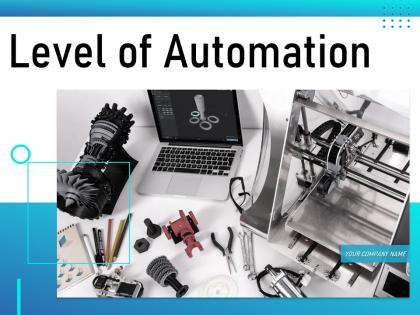
Slide 1: This slide introduces Level of Automation. State your Company name and begin.
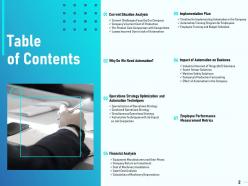
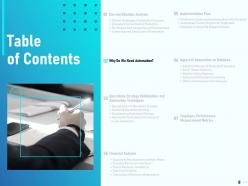
Slide 2: This slide displays Contents.
Slide 3: This slide displays Contents of the presentation.
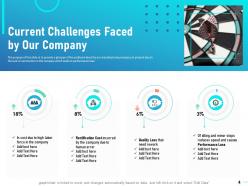
Slide 4: The purpose of this slide is to provide a glimpse of the problems faced by our manufacturing company at present due to the lack of automation in the company which leads to performance loss.
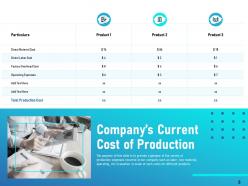
Slide 5: The purpose of this slide is to provide a glimpse of the variety of production expenses incurred in our company such as labor, raw material, operating, etc. Evaluation is made of such costs for different products.
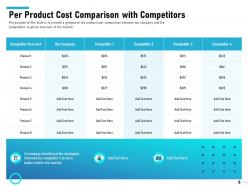
Slide 6: The purpose of this slide is to provide a glimpse of the product cost comparison between our company and the competitors to get an overview of the market.
Slide 7: The purpose of this slide is to provide a glimpse of losses incurred by our company in various quarters for three years simultaneously.
Slide 8: This slide displays Contents.
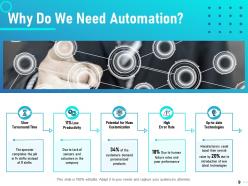
Slide 9: The purpose of this slide is to provide a glimpse of challenges faced by our company such as slow turnaround time, outdated technologies, error rate etc. arises the need for automation.
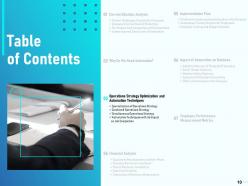
Slide 10: This slide showcases Contents.
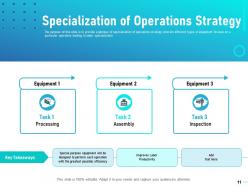
Slide 11: The purpose of this slide is to provide a glimpse of specialization of operations strategy wherein different types of equipment focuses on a particular operation leading to labor specialization.
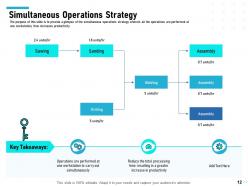
Slide 12: The purpose of this slide is to provide a glimpse of the simultaneous operations strategy wherein all the operations are performed at one workstation, thus increases productivity.
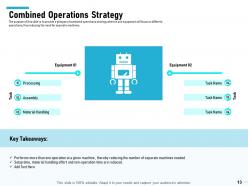
Slide 13: The purpose of this slide is to provide a glimpse of combined operations strategy wherein one equipment will focus on different operations, thus reducing the need for separate machines.
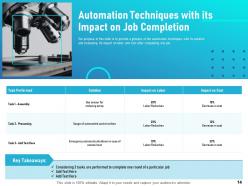
Slide 14: The purpose of this slide is to provide a glimpse of the automation techniques with its solution and evaluating its impact on labor and cost after completing one job.
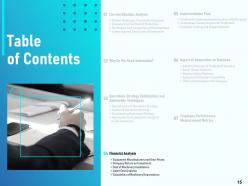
Slide 15: This slide displays Contents.
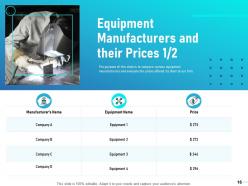
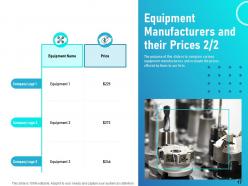
Slide 16: The purpose of this slide is to compare various equipment manufacturers and evaluate the prices offered by them to our firm.
Slide 17: The purpose of this slide is to compare various equipment manufacturers and evaluate the prices offered by them to our firm.
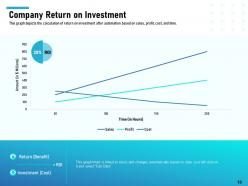
Slide 18: This graph depicts the calculation of return on investment after automation based on sales, profit, cost, and time.
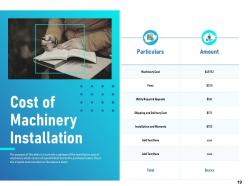
Slide 19: The purpose of this slide is to provide a glimpse of the installation cost of machinery which covers all quantifiable facets of a purchased asset, this is the original cost recorded on the balance sheet.
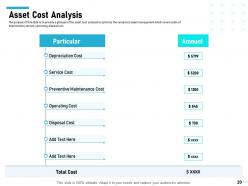
Slide 20: The purpose of this slide is to provide a glimpse of the asset cost analysis to optimize the company’s asset management which covers costs of depreciation, service, operating, disposal etc.
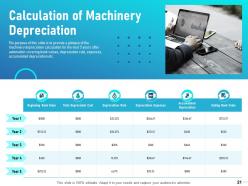
Slide 21: The purpose of this slide is to provide a glimpse of the machinery depreciation calculation for the next 5 years after automation covering book values, depreciation rate, expenses, accumulated depreciation etc.
Slide 22: This slide displays Contents.
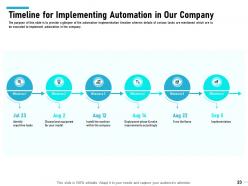
Slide 23: The purpose of this slide is to provide a glimpse of the automation implementation timeline wherein details of various tasks are mentioned which are to be executed to implement automation in the company.
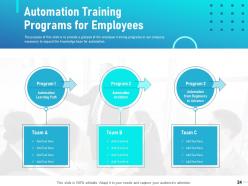
Slide 24: The purpose of this slide is to provide a glimpse of the employee training programs in our company necessary to expand the knowledge base for automation.
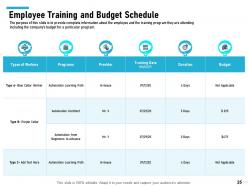
Slide 25: The purpose of this slide is to provide complete information about the employee and the training program they are attending including the company’s budget for a particular program.
Slide 26: This slide displays Contents.
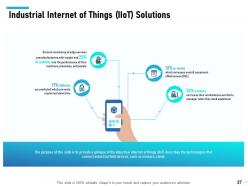
Slide 27: The purpose of this slide is to provide a glimpse of the industrial internet of things (IIoT) describes the technologies that connect industrial field devices, such as sensors, cloud.
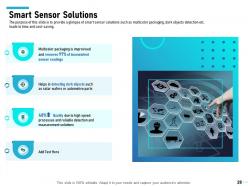
Slide 28: The purpose of this slide is to provide a glimpse of smart sensor solutions such as multicolor packaging, dark objects detection etc. leads to time and cost-saving.
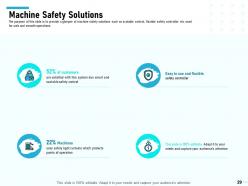
Slide 29: The purpose of this slide is to provide a glimpse of machine safety solutions such as scalable control, flexible safety controller etc. used for safe and smooth operations.
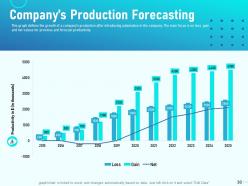
Slide 30: This graph defines the growth of a company’s production after introducing automation in the company. The main focus is on loss, gain and net values for previous and forecast productivity.
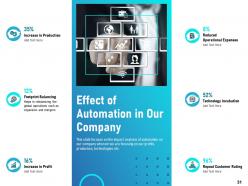
Slide 31: The purpose of this slide is to provide a glimpse of combined operations strategy wherein one equipment will focus on different operations, thus reducing the need for separate machines.
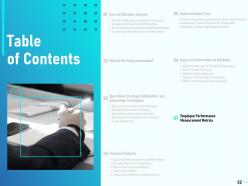
Slide 32: This slide displays Contents.
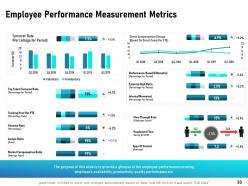
Slide 33: The purpose of this slide is to provide a glimpse of the employee performance covering employee’s availability, productivity, quality performance etc.
Slide 34: This is Level of Automation Icons Slide
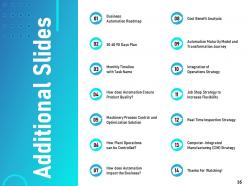
Slide 35: This slide is titled as Additional Slides for moving forward.
Slide 36: This slide depicts Business Automation Roadmap
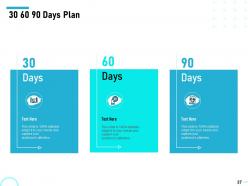
Slide 37: This is 30 60 90 Days Plan slide.
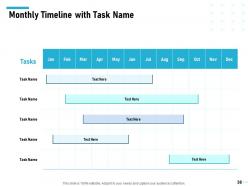
Slide 38: This slide displays Monthly Timeline with Task Name.
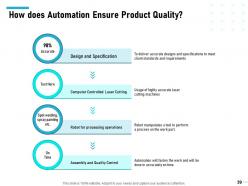
Slide 39: This slide show How does Automation Ensure Product Quality?
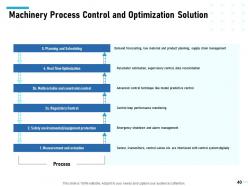
Slide 40: This slide depicts Machinery Process Control and Optimization Solution
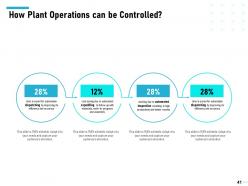
Slide 41: This slide explains How Plant Operations can be Controlled?
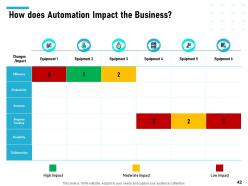
Slide 42: This slide explains How does Automation Impact the Business?
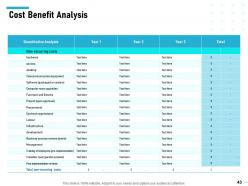
Slide 43: This slide depicts Cost Benefit Analysis
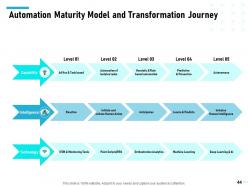
Slide 44: This slide shows Automation Maturity Model and Transformation Journey
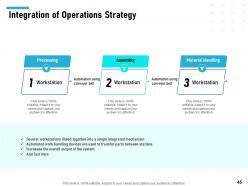
Slide 45: This slide displays Integration of Operations Strategy
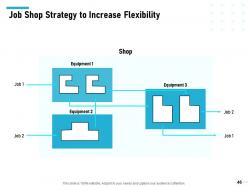
Slide 46: This slide presents Job Shop Strategy to Increase Flexibility
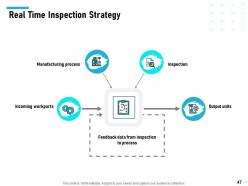
Slide 47: This slide displays Real Time Inspection Strategy
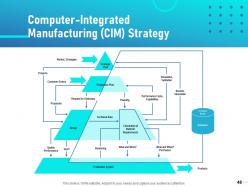
Slide 48: This slide shows Computer-Integrated Manufacturing (CIM) Strategy
Slide 49: This is Thank You with Contact details.
Level of automation powerpoint presentation slides with all 49 slides:
Use our Level Of Automation Powerpoint Presentation Slides to effectively help you save your valuable time. They are readymade to fit into any presentation structure.


FAQs for Level of automation
So there are 5 automation levels in factories. Level 0 is totally manual - workers doing everything by hand like the old days. Then Level 1 adds basic sensors and gauges. Level 2 gets supervisory control where systems auto-adjust to setpoints. Level 3 is where things get cool - you've got optimization that can actually predict problems before they happen. Level 4 connects everything to your ERP systems. Most plants I've seen run somewhere between 2-3 honestly. Just figure out what fits your budget and don't overthink it.
So automation definitely pays off - you'll cut labor costs and way fewer mistakes happen. The biggest wins? Going from manual to semi-automated first. That's honestly where most companies see their money back fastest. Full automation can triple your output and slash defects by like 90%, but damn, the upfront costs are brutal. Level 3-4 automation hits that sweet spot between gains and what you actually want to spend. I'd map out where you're getting stuck now - those bottlenecks are your best targets for upgrading first.
So you know how regular automation just follows set rules? ML flips that completely - it learns patterns and makes decisions without you programming every single scenario. Pretty crazy stuff honestly. Your systems can predict when machines will break, optimize processes in real-time, and handle new situations they've never seen before. Way smarter than the old "if this, then that" approach. Start small though - look at decisions your team makes over and over. Those boring repetitive choices? Perfect for ML to take over.
Honestly, automation totally flips your team structure on its head. Once you hit Level 3+, all the boring repetitive stuff just vanishes. Your people suddenly need way more problem-solving and tech troubleshooting skills instead of just processing paperwork all day. The analytical roles become super critical - like, that's where the real value is now. Start training your team early though, because I've seen companies scramble when they automate first and figure out staffing later. It's messy. The whole shift happens faster than you'd expect once it gets rolling.
Honestly, just focus on the stuff that's driving you crazy right now - repetitive tasks that eat up time and where people make mistakes. Don't get sucked into automating everything though. I've watched companies go nuts with this and then spend forever maintaining systems they didn't really need. Look at your budget first, then your team's tech skills. Can you actually handle whatever you're considering? Start with one annoying process, see if it works, then maybe expand. The fancy scalable solution sounds great until you realize you're spending more time fixing it than the manual way took. ROI matters more than having the coolest setup.
Map out your main supply chain stuff first - procurement, warehousing, shipping, order fulfillment. Then rate each one on how much manual work is still happening vs automated. Most companies think they're way more automated than they actually are, which is kinda funny. Don't forget to check how data moves between your systems too - that's where tons of hidden manual work lives. Make a simple chart showing where you are now vs where you want to be. Boom, you've got your roadmap for what to automate first.
Honestly, the biggest problem is people getting too comfortable with automation. Level 2 stuff like Tesla's Autopilot is weird - you're supposed to pay attention but it does most of the work, which is mentally draining. I'd rather have full autonomy (Level 4-5) since those don't need you watching constantly. Level 3 systems are probably the worst though - they'll suddenly dump control back to you. Clear handoff rules help a lot. Oh, and definitely practice manual overrides regularly if you're dealing with the higher-level systems.
Honestly, companies just go after whatever's costing them the most money or headaches. Manufacturing throws everything at robotics because labor's expensive and mistakes are costly. Healthcare's weird though - they'll automate diagnostics all day but keep doctors doing the actual patient stuff. Makes total sense if you think about it. Finance automates transactions and fraud detection since every second costs them money. Retail focuses on inventory and checkout systems mostly. Just look at what's eating your team's time or where you're screwing up the most - that's probably where you should start automating.
Yeah, the upfront costs are brutal - we're talking 3-5x more for Level 3-4 systems compared to basic stuff. Hardware's expensive, software licensing gets crazy, plus you'll need to train everyone. I remember getting those first quotes and just... wow. But your operational costs tank afterward. Less labor, fewer screw-ups, way higher throughput. Most places break even around 18-36 months depending on volume. Honestly though, I'd start by figuring out what you're spending on manual processing now, then see what automation budget actually makes sense. Don't let the sales guys oversell you on features you won't use.
So here's the deal - as tech gets better and cheaper, we can automate way more stuff than before. Processing power keeps climbing, AI gets smarter, and suddenly tasks that used to need human brains can run on autopilot. Look at how machine learning went from sci-fi movies to fixing your typos without you thinking about it. Better sensors and algorithms mean you're not stuck with just basic alerts anymore - you can actually build systems that make real decisions. Honestly, the trick is just figuring out what'll work reliably for your specific situation instead of getting carried away with the flashy new stuff.
Yeah, automation definitely helps the environment - mostly because machines are way better at staying efficient than we are. Like, they can optimize energy use and cut waste in real-time without getting tired or distracted. Manual stuff is honestly just messier and more wasteful. But here's the thing - all those sensors and computers you need? They have their own environmental cost from manufacturing. I'd say aim for Level 3-4 automation. You get the good stuff without going overboard. Oh, and measure your current usage first so you can actually see if it's working.
Map out your customer journey first - figure out where people actually need human connection vs boring stuff you can automate. Basic things like scheduling and FAQ responses? Perfect for bots. But complaints or complicated issues need real people, trust me on this. I've watched companies totally bomb by automating their complaint process and it just pisses everyone off more. Automation should free up your team for the meaningful conversations that actually build relationships. Oh, and always make it super easy to reach a human when someone's frustrated. Test small and see what works.
Honestly, start with ROI and processing time improvements - those are your bread and butter metrics. Error reduction rates matter too, plus employee satisfaction scores (people hate clunky automation). I always tell teams to get baseline measurements first, otherwise you're just guessing at impact later. Track adoption rates because I've seen amazing automation sit unused. Oh, and throughput increases plus cost savings per process - leadership loves seeing those numbers. Don't go overboard though. Pick maybe 3-5 metrics and actually stick with them instead of trying to measure every little thing.
So basically, IoT devices create this huge network where all your sensors and equipment talk to each other instantly. Data flows from everything - production lines, environmental monitors, you name it - straight into your main system. When I first saw this setup at my buddy's plant, it was actually insane how connected everything was. Your factory starts making smart decisions on its own, like tweaking production speeds when supply chain issues pop up or quality problems get detected early. I'd start by checking what devices you've already got that could connect, then focus on the ones that'll give you the biggest bang for your buck operationally.
Honestly, you're gonna hit three main walls. First is people freaking out about change - nobody likes feeling like their job's at risk or having to learn totally new systems. Can't blame them really. Then there's the tech nightmare of trying to make your old systems play nice with shiny new automation tools. Budget's the third killer since different automation levels cost wildly different amounts. My advice? Don't try to automate everything at once - that's a recipe for disaster. Phase it out gradually, get your team trained early on, and have solid change management backing you up. Way less chaotic that way.
-
Good research work and creative work done on every template.
-
Good research work and creative work done on every template.
-
Very unique and reliable designs.
-
Innovative and attractive designs.