

Line chart powerpoint templates





Try Before you Buy Download Free Sample Product
 Impress Your
 Audience
 100%
100% Editable
 Save Hours
 of Time


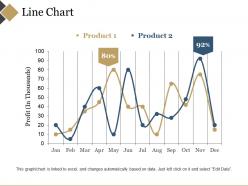
Employ this Line Chart PowerPoint Templates for your business plan. You can illustrate the comparative study of two or more products using this statistical chart PowerPoint theme. You can utilize this curve chart PowerPoint theme to discuss with your employees the various components affecting the product sales. Incorporating this line graph PPT layout, you can highlight a series of data points linked by a straight line. The trend prediction and data comparison can be illustrated effectively to your colleagues using our line plot PowerPoint layout. This chronological data record PPT template can be elucidated to discuss the significance of depicting information in an easy to comprehend data. Employ this data interpretation PPT theme to pinpoint the key execution problems to implement strategies accordingly to your co-workers. Finance professionals can download this curve chart PPT slide to discuss your enterprise’s asset price action in a definite time frame.
People who downloaded this PowerPoint presentation also viewed the following :
Line chart powerpoint templates with all 5 slides:
Extol heroic deeds with our Line Chart Powerpoint Templates. Bestow honor on brave individuals.
FAQs for Line
Your chart needs solid axis labels and a clear title first. If you're plotting multiple lines, throw in a legend. Keep gridlines light - nobody wants that graph paper nightmare from 7th grade math! Pick consistent colors that work for colorblind people too. Start your y-axis at zero unless you have a really good reason not to. Font sizes should stay readable when someone inevitably shrinks your chart. Oh, and add your data source somewhere. Honestly, the best thing you can do is test it with different datasets before calling it done.
Honestly, line chart templates are a game changer for making data actually readable. People can spot trends and patterns instantly instead of squinting at boring spreadsheets. You'll save so much time too - no more messing around with formatting when you could be analyzing the actual insights. They're perfect for showing progress over time or comparing different data sets. Your presentations automatically look way more professional. I always start with a basic template then just tweak the colors to match whatever theme I'm going for. Makes everything look clean without the headache.
Dude, finance and healthcare companies are obsessed with these things - they're tracking everything over time and need their reports to look consistent. Tech and marketing teams use them constantly too for performance stuff. Manufacturing does production tracking, sales does pipeline reports. Pretty much anyone dealing with data that changes over time, honestly. The trick is building templates around your actual KPIs instead of trying to make generic charts work. I'd start with whatever reports you're making most often - that's where you'll see the biggest difference. Oh, and don't overthink it at first.
Don't cram too many lines on one chart - it gets messy fast. Label your axes properly (sounds obvious but you'd be surprised). Default colors are terrible for distinguishing between data series, plus some people are colorblind. Keep your time intervals consistent and honestly? Don't always start your y-axis at zero if it doesn't make sense. I used to add every fancy feature available because why not, but clean charts tell better stories. Oh, and print it in black and white first to see if it's still readable.
Colors can totally make or break how people read your charts. You want high contrast between data lines - otherwise everything just mushes together. Red screams "bad news" even if your data is positive (learned that the hard way), while blue feels safe and green says "growth." Psychology is weird like that. Honestly, I'd stick with your brand colors if they contrast well enough. Test it on someone who hasn't seen it before - they'll spot issues you missed. Oh, and avoid making people squint at similar shades. Nobody's got time for that guessing game.
Honestly, start with clean axes and clear labels - that's like 80% of making charts people can actually read. Grid lines are clutch for reading values quickly. You'll want a legend that's easy to tweak and room for multiple data series so you can compare stuff. Color schemes matter more than you'd think - stick with ones that don't make your eyes bleed. Oh, and add title/subtitle spots obviously. The template should handle different data ranges without completely falling apart (learned that one the hard way). Keep it simple at first rather than going overboard with features you might not even use.
Thick lines and bigger fonts are your best friends for mobile charts. Nobody wants to squint at tiny data points on their phone. Cut down on how many data series you're showing - seriously, less is more here. Use high contrast colors, but also throw in different line styles like dashed or dotted since color alone doesn't always work great on smaller screens. Give everything more space so people can actually tap what they need to. Oh, and test it on your own phone first - saves you from that awkward moment when nobody can read your presentation.
Line charts are perfect when you've got data that changes over time - sales numbers, website visits, stock prices, that sort of thing. The points need to connect logically from one to the next. Time-series stuff is where they really shine. Don't use them for random categories like survey answers or comparing totally different products though. Your x-axis should show progression (usually time) and y-axis shows values that actually flow together. I'd grab your cleanest time-based data first. You'll quickly see why everyone defaults to line charts - they just make sense for this kind of thing.
Honestly, line chart templates are a lifesaver for this stuff. Just dump your revenue, customer numbers, whatever key metrics into them and the growth patterns pop right out. Way better than staring at spreadsheet rows - stakeholders actually get it when they see that upward line. Templates handle all the boring design work so you're not messing with colors and fonts for hours. I'd start with your best-looking growth metric first, obviously. Monthly or quarterly data works great, just keep your time periods the same throughout. Oh and pick metrics your audience actually cares about, not just what's easy to track.
Line charts are honestly super versatile for teaching! Track student progress over time, or have kids plot their own science experiment data. Great for math too - slope, correlation, all that stuff. My old teachers would've saved themselves so much confusion if they'd just shown us visual stuff like this. Historical curriculum trends work well, and you can make templates students fill out during research projects. Oh, and class performance metrics if you're into that. I'd start basic with simple progress tracking, then work up to the fancier data visualization lessons once they get it.
Dude, labeling seriously makes or breaks line charts. People need to know what they're looking at - clear axis labels, data point callouts for important stuff, legends that don't leave you guessing. I've seen so many charts that look decent but are completely useless because the labels suck. Your title should actually tell the story, not just describe the chart. Oh and honestly? If someone can't figure out your chart in like 10 seconds without help, you've got a labeling problem. It's the difference between "oh I get it" and people just staring at lines going nowhere.
So dynamic line charts are honestly game-changers for presentations. Your audience actually stays awake because they're watching data unfold instead of staring at boring static charts. You can build suspense by revealing trends bit by bit, then BAM - hit them with that dramatic inflection point right as you're explaining it. I swear people literally lean in when you animate a big trend shift. The best part? You control the timing, so pause whenever you want discussion. Oh, and you can interact with it live if someone asks a random question. Just start with your most shocking data point and tell the story from there.
Step charts work great when your data jumps at specific points. Area charts are cool too - they fill in the space under the line which looks way more dramatic. You can do multi-axis stuff to compare different metrics, though honestly that gets confusing fast if you overdo it. Sparklines are tiny charts that fit perfectly in tight spaces like dashboards. Oh, and curved lines instead of straight ones can look really smooth. Adding gradient colors along the line itself is another nice touch. Figure out what story you're telling first, then pick whichever style fits best.
Okay so scale choice is huge for line charts - it totally changes how people read your data. Narrow y-axis range? Tiny changes look like crazy spikes. Wide range makes real changes look boring and flat. I've watched people tank their own quarterly reports just by picking bad scales, it's painful to see. Don't cram too many points on your x-axis either or trends get messy. Honestly, just step back and ask: does this actually show what's happening? Sometimes you want dramatic scales to highlight patterns, but don't accidentally mislead people.
Honestly, just use Excel first - you probably already have it anyway. The color and font customization is pretty straightforward once you mess around with it for like 10 minutes. Google Sheets is solid too, especially if you're sharing with other people. I've been impressed with how much better it's gotten recently. PowerBI and Tableau are way more powerful but total overkill unless you're doing some heavy-duty data viz stuff. Oh, and there's a bunch of free templates you can grab online and just modify instead of starting from scratch. That's usually what I do.
-
Visually stunning presentation, love the content.
-
Informative design.