


Load Testing IT Powerpoint Template Bundles Ppt Slides





Try Before you Buy Download Free Sample Product
 Impress Your
Audience
 100%
Editable
 Save Hours
of Time


Our Load Testing IT Powerpoint Template Bundles Ppt Slides are topically designed to provide an attractive backdrop to any subject. Use them to look like a presentation pro.
People who downloaded this PowerPoint presentation also viewed the following :
Content of this Powerpoint Presentation
Slide 1: This slide introduces Load Testing. State your company name and begin.
Slide 2: The purpose of this slide is to compare the various types of load testing techniques, such as smoke, load, stress, breakpoint, soak and spike testing. The comparison is carried out based on several factors, known as throughput, duration, etc.
Slide 3: This slide demonstrates the different types of load testing strategies and their key characteristics. These approaches are manual load testing, in-house developed load testing, open-source load testing tools and enterprise-class load testing tools.
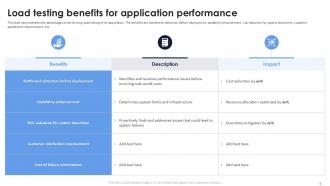
Slide 4: This slide demonstrates the advantages of performing load testing of an application. The benefits are bottleneck detection before deployment, scalability enhancement, risk reduction for system downtime, customer satisfaction improvement, etc.
Slide 5: The purpose of this slide is to outline the evaluation metrices of software load testing. The key points discussed in this slide are average response time, error rate, throughput, concurrent users, peak response time and requests per second.
Slide 6: The purpose of this slide is to demonstrate the architecture of load testing process to evaluate the system performance. The key components of this slide are test scenario, load generation on cloud, on-premises load generation, web server, etc.
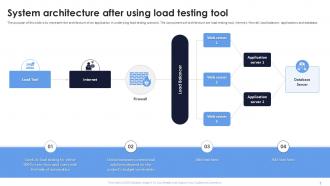
Slide 7: The purpose of this slide is to represent the architecture of an application in underlying load testing scenario. The components of architecture are load testing tool, internet, firewall, load balancer, applications and database.
Slide 8: This slide outlines the steps involved in load testing of an application. These are setup the test environment, load test scenarios, execute test scenario, test analyze test outcomes and re-test. The purpose of this slide is to explain all these steps in detail.
Slide 9: This slide represents the checklist to conduct load performance testing. The steps involved are test environment setup, load test scenarios, test scenario execution, test result analysis, bottleneck identification, etc.
Slide 10: The purpose of this slide is to represent the timeline for performing load testing. The key steps include setup the test environment, load test scenarios, execute test scenario, test analyze test outcomes and re-test.
Slide 11: This slide depicts the dashboard to test the load handling capabilities of the software. The purpose of this slide is to cover the details of test case status, requirement base suite, defects status, bugs linked to requirements, test case linked requirements, etc.
Slide 12: This slide demonstrates the best measures for conducting load testing of software. These include identifying business objectives, test case creation, key measures determination, understand the environment, select the right tool, incremental testing, etc.
Slide 13: This slide highlights the various considerations for choosing appropriate load testing tool. These factors are user-friendliness, capacity for load generation, test development and management, reporting and data analysis, budget constraints, etc.
Slide 14: The purpose of this slide is to outline the different tools used to conduct load testing of an application. This slide represents the names and key features of various load testing tools available in the market.
Slide 15: This slide outlines the applications of load testing. These are airline website promotion evaluation, government web portal traffic spike, stress testing server with concurrent requests, large file transfers from hard disk, downloading large files, etc.
Slide 16: The purpose of this slide is to discuss the key differences between load testing and stress testing. This slide compares the load and stress testing strategies of performance testing based on different parameters, such as goal, metrics tracked, etc.
Slide 17: This slide shows Icon for conducting website load testing.
Slide 18: This slide presents Load testing for quality assurance icon.
Slide 19: This slide displays Icon for server load testing schedule.
Slide 20: This slide contains all the icons used in this presentation.
Slide 21: This slide is titled as Additional Slides for moving forward.
Slide 22: This is a Financial slide. Show your finance related stuff here.
Slide 23: This slide contains Puzzle with related icons and text.
Slide 24: This is an Idea Generation slide to state a new idea or highlight information, specifications etc.
Slide 25: This slide provides 30 60 90 Days Plan with text boxes.
Slide 26: This slide shows Post It Notes. Post your important notes here.
Slide 27: This is a Thank You slide with address, contact numbers and email address.
Load Testing IT Powerpoint Template Bundles Ppt Slides with all 35 slides:
Use our Load Testing IT Powerpoint Template Bundles Ppt Slides to effectively help you save your valuable time. They are readymade to fit into any presentation structure.













-
Awesome use of colors and designs in product templates.
-
They helped us design the pamphlets for our church’s food drive! The people loved the design, and I’m happy to say it was successful. Thank you, SlideTeam!