

Make Vs Buy PowerPoint PPT Template Bundles




Try Before you Buy Download Free Sample Product
 Impress Your
 Audience
 100%
100% Editable
 Save Hours
 of Time


Our Make Vs Buy PowerPoint PPT Template Bundles are topically designed to provide an attractive backdrop to any subject. Use them to look like a presentation pro.
People who downloaded this PowerPoint presentation also viewed the following :
Make Vs Buy PowerPoint PPT Template Bundles with all 22 slides:
Use our Make Vs Buy PowerPoint PPT Template Bundles to effectively help you save your valuable time. They are readymade to fit into any presentation structure.







FAQs for Make Vs Buy PowerPoint
Honestly, the biggest thing is it stops you from just winging it every time. Makes you actually think through all the important stuff - money, timing, quality, who's doing what, what could go wrong. Way better than starting fresh each time you hit this same decision. Your stakeholders can follow your logic too instead of wondering how you landed on whatever recommendation. Oh and definitely tweak it for your industry - tech companies care about different things than, say, manufacturing. Trust me, having that structure keeps you from blanking on obvious factors when you're stressed.
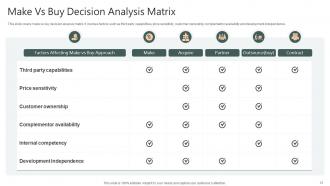
So basically, make vs buy analysis helps you figure out if you should do something yourself or pay someone else to handle it. Sounds obvious, right? But it gets messy quick when you dig into the real costs. You're comparing all the hidden expenses of building something in-house against outsourcing it. The whole point is identifying what you're actually good at versus what others do better or cheaper. I'd use it for any big decision - new products, services, whatever. Just list out every cost for both options, including the stuff you might miss otherwise. Honestly saves you from some expensive mistakes.
Honestly, I'd start by mapping out what both options actually cost - not just upfront but ongoing too. Do you even have the skills in-house for this? Sometimes it's way smarter to just buy rather than reinventing everything from scratch. Time matters too - how fast do you need this live? Also think about whether this is core to your business or just supporting stuff. If it's central to what you do, building gives you way more control and helps you stand out. But if you're already stretched thin capacity-wise... yeah, buying might be the move. Really depends on your timeline and what resources you can actually spare.
Honestly, templates are game-changers. You don't waste hours staring at blank slides trying to figure out where to start. Just drop your numbers into the existing framework - costs, timelines, risks, all that stuff. Your stakeholders will love the consistency too, especially if you're doing multiple projects. I've watched colleagues struggle for way too long just organizing their thoughts (it's painful to watch). The structure basically forces you to think through everything systematically, so you won't forget crucial details. Start basic and tweak it as you figure out what clicks with your team.
Charts and timelines make make-vs-buy decisions so much easier to follow than endless spreadsheets. Trust me on this one. Flow charts work really well for decision trees, and side-by-side comparisons let people actually see the trade-offs. I'd throw in some infographics covering quality control and risk stuff too. Before/after scenarios are clutch for showing your recommendation clearly. People retain way more when they can visualize cost breakdowns and resource allocation instead of just staring at numbers. Honestly, anything beats another boring PowerPoint full of bullet points.
Don't get stuck listing every tiny cost detail - nobody wants that level of breakdown. The thing most people mess up? They forget to put actual numbers on stuff like having more control or reducing risk. Those "soft" benefits matter but you gotta quantify them somehow. Compare the real total costs, not just the obvious ones. Training time, management headaches, what you're giving up by choosing one path - all that counts. I've definitely been guilty of massaging numbers to fit what I already decided, but try not to do that. Keep it honest and let the data do the talking. Just make sure your assumptions actually make sense if someone pushes back.
Honestly, just focus on what actually matters in your specific industry first. Tech stuff? Scalability and how complex the integration gets. Manufacturing is all about quality control and supply chain headaches - learned that one the hard way. Healthcare projects are basically 70% regulatory compliance nightmares. The financial part needs work too. Swap out those generic examples for ones your stakeholders will actually recognize. Different industries have totally different project timelines and cost buckets. Figure out your top 3-5 decision factors, then rebuild everything around those. Way more effective than using some cookie-cutter template.
Definitely break down the full cost picture first - internal stuff like labor and materials vs what vendors are quoting. Timeline's huge too, obviously. Don't skip the annoying hidden costs though, like how long it'll take to train people or integration nightmares (those always bite you). Quality differences matter, and honestly, risk is probably more important than people think. Also check if your team actually has bandwidth - I've seen so many projects fail because everyone was already drowning. Make a simple comparison chart at the end. Stakeholders love that stuff and it makes the choice pretty clear.
Look, if your stakeholders aren't engaged, you're basically talking to a wall. Nobody cares about data dumps when they're checking emails on their phones. Hook them right away with scenarios they actually relate to - budget hits, timeline disasters, stuff that keeps them up at night. Interactive polls work great for surfacing what they're really worried about. Honestly, I love opening with "what would you do if..." because it forces them to think instead of just sitting there. The more they're actually participating, the better questions they'll ask. Plus you'll catch their real objections early instead of getting blindsided later.
Use stuff everyone knows - Netflix ditching DVDs for original shows, or companies choosing between hiring their own IT people vs outsourcing to IBM. Tesla making their own batteries instead of buying them is solid too. Honestly, Apple dropping Intel for their own chips was crazy to watch unfold. These examples click because people get the strategic thinking behind make-vs-buy choices. Pick 2-3 that fit your industry best. That way your audience can actually connect it to their own world without you having to explain everything.
Color-coded risk matrices work great for this - just do side-by-side charts with red/yellow/green for different categories like financial, operational, timeline stuff. Heat maps are solid too. Honestly, those probability vs impact quadrants are clutch for presentations, I use them all the time. Bar charts showing risk scores keep things simple, or you could try spider charts if you're comparing multiple factors at once. The goal is making it super obvious which option's riskier in each area. Oh, and definitely throw some brief mitigation notes right on the visual - stakeholders love seeing you've thought through contingencies.
PowerPoint's probably your easiest bet - everyone's got it and sharing with stakeholders is painless. Google Slides works too if you're more of a Google person. Canva's surprisingly solid for this stuff, way less design headache than starting from scratch. Prezi could work if you want something flashy, and Figma's an option though honestly that feels like way too much work for a make vs buy analysis. I'd personally just grab a business template in PowerPoint and customize the comparison criteria. Oh, and avoid those super corporate-looking templates - they make everything look like a 2010 consulting deck.
Templates are lifesavers because they keep everyone talking about the same stuff - costs, timelines, risks, you know the drill. Otherwise you'll have these meandering meetings where nothing gets decided. What I do is fill it out beforehand with whatever data I can find, then we just work through it section by section. Makes comparing options so much cleaner than the usual "this feels right" approach (which honestly drives me nuts). Plus you're documenting all your assumptions upfront. Trust me, future you will thank present you when someone inevitably asks "wait, why did we decide this again?"
Look at three things: total cost, how fast you need it done, and quality standards. Don't just think upfront costs though - training your team, maintenance, all that stuff adds up quick. Sometimes buying is actually faster even if it costs more initially, which matters if you're racing against deadlines. Quality-wise, check if you can honestly hit the same standards as what's out there. I learned this the hard way on a project last year - thought we'd save money building in-house but ended up spending way more. Map these out for your specific situation and you'll know pretty fast which way to go.
Honestly, you can't skip the cost-benefit analysis - that's what makes or breaks these presentations. Executives want hard numbers, not just your gut feeling about what sounds better. Include the obvious stuff like labor and materials, but don't forget the sneaky costs. Training time, opportunity costs, ongoing maintenance... all that adds up. I've watched so many people crash and burn because they walked in with weak data. Short sentences work great in charts. Your stakeholders need something concrete to justify spending money either way, and spreadsheets speak their language way better than vague recommendations do.
-
Love the template collection they have! I have prepared for my meetings much faster without worrying about designing a whole presentation from scratch.
-
Unique and attractive product design.