


Managing critical threat vulnerabilities and security threats powerpoint presentation slides




Try Before you Buy Download Free Sample Product
 Impress Your
 Audience
 100%
100% Editable
 Save Hours
 of Time


Managing Critical Threats, Vulnerabilities and Security Threats requires planning and due importance in businesses today to keep vital information confidential with integrity, availability and assurance. Mitigating these challenges is the new normal for companies to protect their IT operations, enable technology in the processes and create a security policy to enforce it correctly. Here is an efficiently designed Managing Critical Threats, Vulnerabilities and Security Threats template that will reduce the risk of crisis in your company and the effects of that crisis occurring outside. This template aims to identify high safety risks, enable cyber threat security to protect the company from fears, and set up safety plans to reduce such risks. One can display their current security plans critical success factors and significant reasons for poor security to know the companys challenges. Security tasks require organizations to show the elements that affect the operations and overcome them by setting an advanced safety plan for IT. Businesses evaluate information processing assets for analyzing the risk and clearly define the threat management system through adopting high-tech assessment controls for themselves. Download it and get access now.
People who downloaded this PowerPoint presentation also viewed the following :
Content of this Powerpoint Presentation
Slide 1: This slide introduces Managing Critical Threat, Vulnerabilities & Security Threats. State Your Company Name and begin.
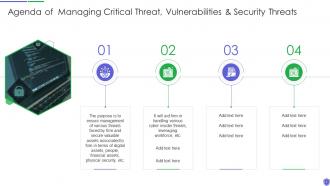
Slide 2: This slide shows Agenda of Managing Critical Threat, Vulnerabilities & Security Threats.
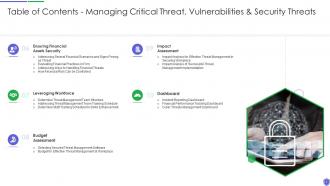
Slide 3: This slide displays Table of Contents for Managing Critical Threat, Vulnerabilities & Security Threats.
Slide 4: This is another slide continuing Table of Contents for Managing Critical Threat, Vulnerabilities & Security Threats.
Slide 5: This slide depicts title for 'Current scenraio assessment'.
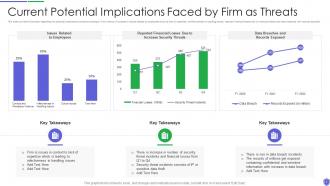
Slide 6: This slide provides information regarding the potential implications/concerns existing in firm.
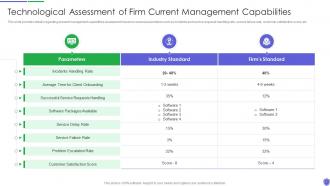
Slide 7: This slide provides details regarding present management capabilities assessment.
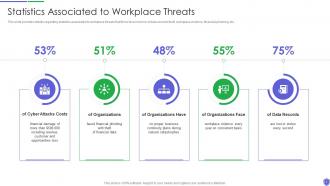
Slide 8: This slide provides details regarding statistics associated to workplace threats.
Slide 9: This slide displays title for 'Handling cyber threats to secure digital assets'.
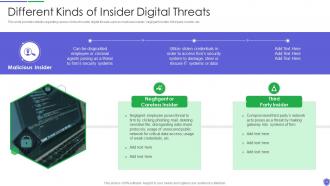
Slide 10: This slide provides details regarding various kinds of insider digital threats.
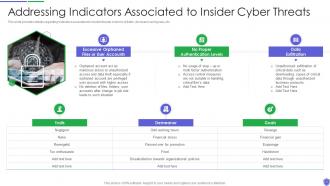
Slide 11: This slide provides details regarding indicators associated to insider threats.
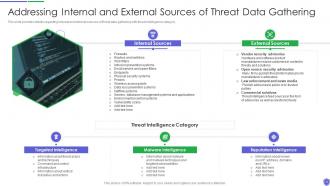
Slide 12: This slide provides details regarding internal and external sources of threat data.
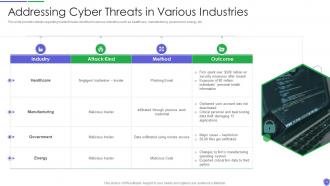
Slide 13: This slide provides details regarding insider threats identified in various industries.
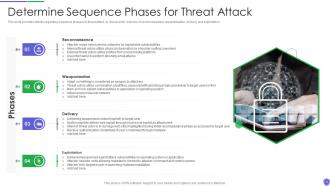
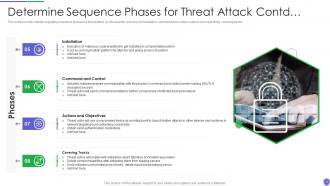
Slide 14: This slide provides details regarding sequence phases for threat attack by threat actor.
Slide 15: This slide presents continued content.
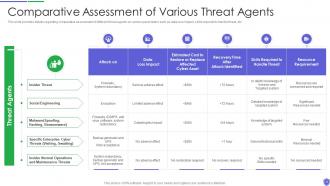
Slide 16: This slide provides details regarding comparative assessment of different threat agents on various parameters.
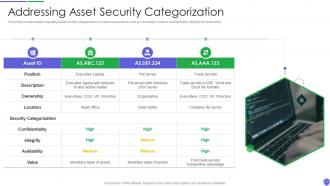
Slide 17: This slide provides details regarding asset security categorization on certain parameters.
Slide 18: This slide provides details regarding several threat actors profile.
Slide 19: This slide provides details regarding threat scenario assessment by understanding various phases of threat actor attack on victim.
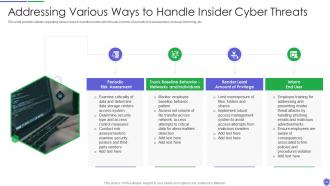
Slide 20: This slide provides details regarding various ways to handle insider cyber threats.
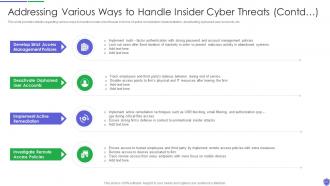
Slide 21: This slide exhibits continued content.
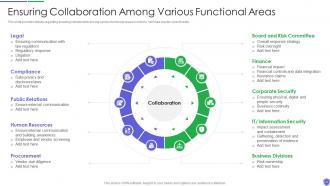
Slide 22: This slide provides details regarding ensuring collaboration among various functional areas.
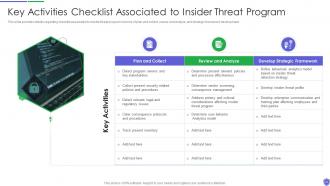
Slide 23: This slide provides details regarding checklist associated to insider threat program.
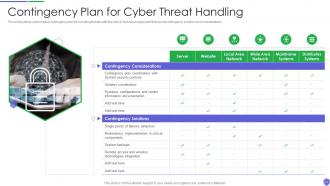
Slide 24: This slide portrays information contingency plan for handling threats with the help of technical equipment.
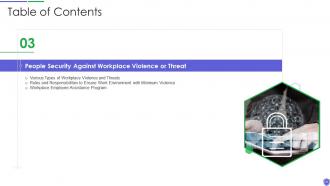
Slide 25: This slide shows title for 'People security against workplace violence or threat'.
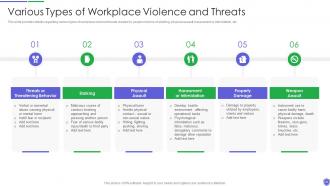
Slide 26: This slide provides details regarding various types of workplace violence threats created by people.
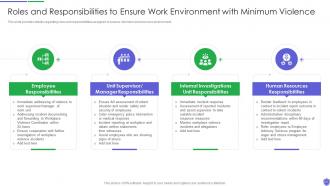
Slide 27: This slide provides details regarding roles and responsibilities assigned to ensure minimum violence work environment.
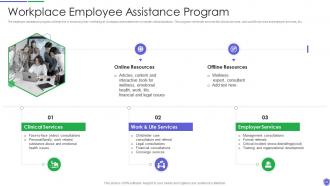
Slide 28: This slide depicts Workplace Employee Assistance Program.
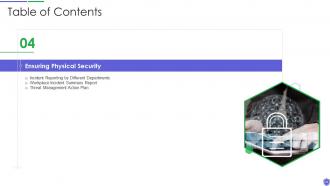
Slide 29: This slide displays title for 'Ensuring physical security'.
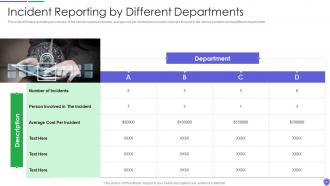
Slide 30: This slide provides overview of the various reported incidents.
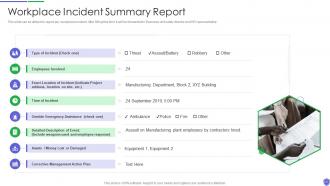
Slide 31: This slide can be utilized to report any workplace incident.
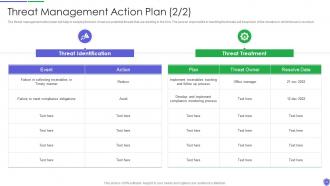
Slide 32: This slide presents Threat Management Action Plan.
Slide 33: This slide exhibits continued content.
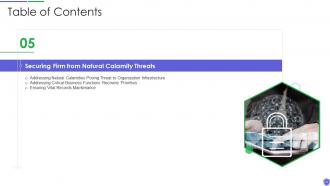
Slide 34: This slide shows title for 'Securing firm from natural calamity threats'.
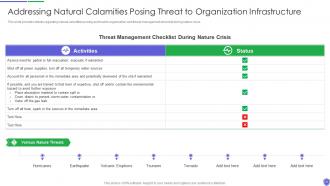
Slide 35: This slide provides details regarding natural calamities posing as threat.
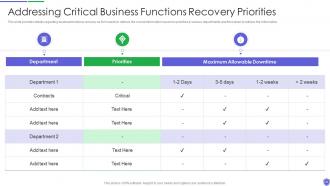
Slide 36: This slide provides details regarding business functions recovery as firm needs to retrieve the crucial information.
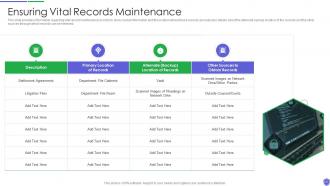
Slide 37: This slide provides information regarding vital record maintenance in order to store crucial information.
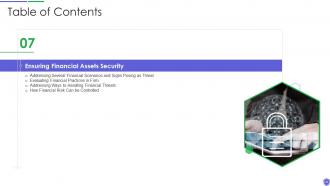
Slide 38: This slide displays title for 'Ensuring financial assets security'.
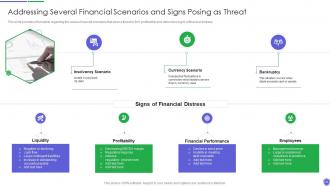
Slide 39: This slide provides information regarding the various financial scenarios that pose a threat to firm.
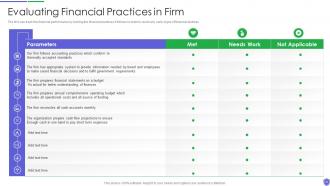
Slide 40: This slide presents Evaluating Financial Practices in Firm.
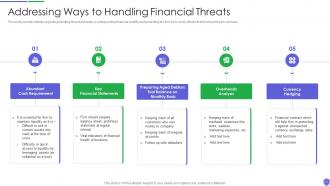
Slide 41: This slide provides details regarding handling financial threats by safeguarding financial stability.
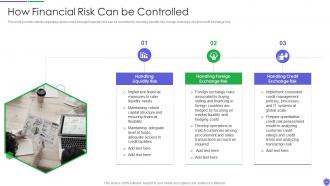
Slide 42: This slide provides details regarding various ways through financial risks can be controlled.
Slide 43: This slide presents title for 'Leveraging workforce'.
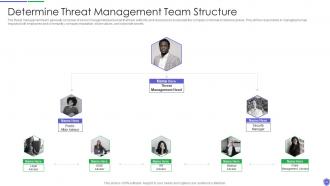
Slide 44: This slide exhibits 'Determine Threat Management Team Structure'.
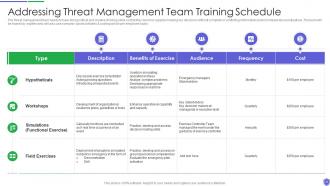
Slide 45: This slide addresses Threat Management Team Training Schedule.
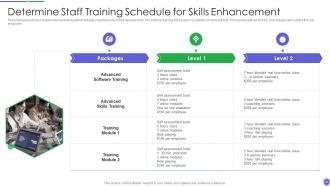
Slide 46: This slide shows 'Determine Staff Training Schedule for Skills Enhancement'.
Slide 47: This slide depicts title for 'Budget assessment'.
Slide 48: This slide highlights 'Selecting Secured Threat Management Software'.
Slide 49: This slide illustrates Budget for Effective Threat Management at Workplace.
Slide 50: This slide presents title for 'Impact assessment'.
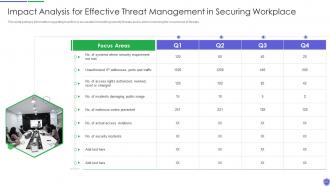
Slide 51: This slide portrays information regarding how firm is successful in handling security threats.
Slide 52: This slide depicts the impact of successful implementation of threat management.
Slide 53: This slide exhibits title for 'Dashboard'.
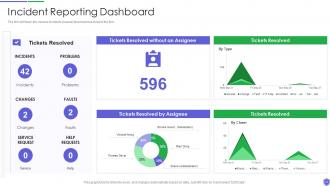
Slide 54: This slide shows Incident Reporting Dashboard.
Slide 55: This slide presents the dashboard which will help firm in tracking the fiscal performance.
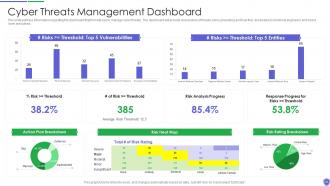
Slide 56: This slide portrays information regarding the dashboard that firm will use to manage cyber threats.
Slide 57: This slide displays Icons for Managing Critical Threat, Vulnerabilities & Security Threats.
Slide 58: This slide is titled as Additional Slides for moving forward.
Slide 59: This slide provides 30 60 90 Days Plan with text boxes.
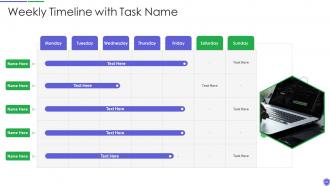
Slide 60: This slide represents Weekly Timeline with Task Name.
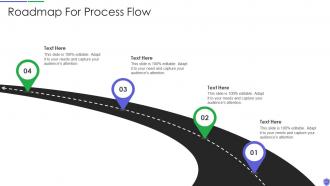
Slide 61: This slide showcases Roadmap For Process Flow.
Slide 62: This is About Us slide to show company specifications etc.
Slide 63: This slide depicts Venn diagram with text boxes.
Slide 64: This slide shows Post It Notes. Post your important notes here.
Slide 65: This slide shows Post It Notes. Post your important notes here.
Slide 66: This is Our Target slide. State your targets here.
Slide 67: This slide displays Mind Map with related imagery.
Slide 68: This slide contains Puzzle with related icons and text.
Slide 69: This is an Idea Generation slide to state a new idea or highlight information, specifications etc.
Slide 70: This is a Thank You slide with address, contact numbers and email address.
Managing critical threat vulnerabilities and security threats powerpoint presentation slides with all 75 slides:
Use our Managing Critical Threat Vulnerabilities And Security Threats Powerpoint Presentation Slides to effectively help you save your valuable time. They are readymade to fit into any presentation structure.
-
Managing critical threat vulnerabilities and security threats powerpoint presentation slides
-
Managing critical threat vulnerabilities and security threats powerpoint presentation slides
-

Managing critical threat vulnerabilities and security threats powerpoint presentation slides
-
Managing critical threat vulnerabilities and security threats powerpoint presentation slides
-
Managing critical threat vulnerabilities and security threats powerpoint presentation slides
-
Managing critical threat vulnerabilities and security threats powerpoint presentation slides
-
Managing critical threat vulnerabilities and security threats powerpoint presentation slides
-
Managing critical threat vulnerabilities and security threats powerpoint presentation slides
-
Managing critical threat vulnerabilities and security threats powerpoint presentation slides
-
Managing critical threat vulnerabilities and security threats powerpoint presentation slides
-
Managing critical threat vulnerabilities and security threats powerpoint presentation slides
-
Managing critical threat vulnerabilities and security threats powerpoint presentation slides
-
Managing critical threat vulnerabilities and security threats powerpoint presentation slides
-
Managing critical threat vulnerabilities and security threats powerpoint presentation slides
-
Managing critical threat vulnerabilities and security threats powerpoint presentation slides
-
Managing critical threat vulnerabilities and security threats powerpoint presentation slides
-
Managing critical threat vulnerabilities and security threats powerpoint presentation slides
-

Managing critical threat vulnerabilities and security threats powerpoint presentation slides
-

Managing critical threat vulnerabilities and security threats powerpoint presentation slides
-
Managing critical threat vulnerabilities and security threats powerpoint presentation slides
-
Managing critical threat vulnerabilities and security threats powerpoint presentation slides
-
Managing critical threat vulnerabilities and security threats powerpoint presentation slides
-
Managing critical threat vulnerabilities and security threats powerpoint presentation slides
-
Managing critical threat vulnerabilities and security threats powerpoint presentation slides
-
Managing critical threat vulnerabilities and security threats powerpoint presentation slides
-
Managing critical threat vulnerabilities and security threats powerpoint presentation slides
-
Managing critical threat vulnerabilities and security threats powerpoint presentation slides
-
Managing critical threat vulnerabilities and security threats powerpoint presentation slides
-
Managing critical threat vulnerabilities and security threats powerpoint presentation slides
-
Managing critical threat vulnerabilities and security threats powerpoint presentation slides
-
Managing critical threat vulnerabilities and security threats powerpoint presentation slides
-

Managing critical threat vulnerabilities and security threats powerpoint presentation slides
-
Managing critical threat vulnerabilities and security threats powerpoint presentation slides
-
Managing critical threat vulnerabilities and security threats powerpoint presentation slides
-
Managing critical threat vulnerabilities and security threats powerpoint presentation slides
-
Managing critical threat vulnerabilities and security threats powerpoint presentation slides
-
Managing critical threat vulnerabilities and security threats powerpoint presentation slides
-
Managing critical threat vulnerabilities and security threats powerpoint presentation slides
-
Managing critical threat vulnerabilities and security threats powerpoint presentation slides
-
Managing critical threat vulnerabilities and security threats powerpoint presentation slides
-
Managing critical threat vulnerabilities and security threats powerpoint presentation slides
-
Managing critical threat vulnerabilities and security threats powerpoint presentation slides
-
Managing critical threat vulnerabilities and security threats powerpoint presentation slides
-
Managing critical threat vulnerabilities and security threats powerpoint presentation slides
-
Managing critical threat vulnerabilities and security threats powerpoint presentation slides
-
Managing critical threat vulnerabilities and security threats powerpoint presentation slides
-
Managing critical threat vulnerabilities and security threats powerpoint presentation slides
-

Managing critical threat vulnerabilities and security threats powerpoint presentation slides
-

Managing critical threat vulnerabilities and security threats powerpoint presentation slides
-
Managing critical threat vulnerabilities and security threats powerpoint presentation slides
-
Managing critical threat vulnerabilities and security threats powerpoint presentation slides
-

Managing critical threat vulnerabilities and security threats powerpoint presentation slides
-
Managing critical threat vulnerabilities and security threats powerpoint presentation slides
-
Managing critical threat vulnerabilities and security threats powerpoint presentation slides
-

Managing critical threat vulnerabilities and security threats powerpoint presentation slides
-
Managing critical threat vulnerabilities and security threats powerpoint presentation slides
-

Managing critical threat vulnerabilities and security threats powerpoint presentation slides
-

Managing critical threat vulnerabilities and security threats powerpoint presentation slides
-
Managing critical threat vulnerabilities and security threats powerpoint presentation slides
-
Managing critical threat vulnerabilities and security threats powerpoint presentation slides
-
Managing critical threat vulnerabilities and security threats powerpoint presentation slides
-
Managing critical threat vulnerabilities and security threats powerpoint presentation slides
-

Managing critical threat vulnerabilities and security threats powerpoint presentation slides
-
Managing critical threat vulnerabilities and security threats powerpoint presentation slides
-
Managing critical threat vulnerabilities and security threats powerpoint presentation slides
-

Managing critical threat vulnerabilities and security threats powerpoint presentation slides
-

Managing critical threat vulnerabilities and security threats powerpoint presentation slides
-

Managing critical threat vulnerabilities and security threats powerpoint presentation slides
-
Managing critical threat vulnerabilities and security threats powerpoint presentation slides
-

Managing critical threat vulnerabilities and security threats powerpoint presentation slides
-

Managing critical threat vulnerabilities and security threats powerpoint presentation slides
-

Managing critical threat vulnerabilities and security threats powerpoint presentation slides
-

Managing critical threat vulnerabilities and security threats powerpoint presentation slides
-

Managing critical threat vulnerabilities and security threats powerpoint presentation slides
-

Managing critical threat vulnerabilities and security threats powerpoint presentation slides
FAQs for Managing critical threat vulnerabilities and security threats
Ugh, honestly the usual suspects are still killing everyone - unpatched stuff, garbage passwords, and people clicking sketchy links. Those three are like most of your headaches right there. But you've also got cloud configs that are totally messed up, ancient systems nobody wants to touch, and vendors doing god knows what with your data. Web apps? Still getting wrecked by SQL injection constantly. It's honestly overwhelming to track everything. I'd say figure out what you actually have running first - sounds basic but most places have no clue. Then hit those public-facing systems hard with patches.
Look at three main things: how bad it is, how easy it is to exploit, and what it'll actually hurt. CVSS scores are a good starting point for severity, but don't just blindly follow them. Some "critical" bugs end up being way less important than medium ones that hit your most important systems. Check if there are active exploits floating around - those jump to the front of the line immediately. Also think about what assets are affected. A vulnerability in your main database? Drop everything. Something on a random test server? Eh, it can probably wait. Create some kind of scoring system that balances all this stuff out.
Look, training your people is literally the most important thing you can do for security. They're the ones clicking links and writing code - one bad click and your fancy firewalls mean nothing. Skip the PowerPoint death though. Do realistic scenarios instead, like fake phishing tests or code review sessions. Make them practice spotting sketchy emails and following secure practices. I've seen companies with million-dollar security setups get wrecked because someone fell for a basic phish. Your team becomes your best defense when they actually know what to watch for.
Weekly scans are your baseline, but daily is way better if you can pull it off. Critical systems? Yeah, scan those daily for sure. The full deep-dive assessments can be quarterly for most places, though if you're in a sketchy environment maybe monthly. Here's the thing though - don't just hoard scan results like some kind of vulnerability dragon. Actually fix what you find! Automated scanning helps a ton. Oh, and definitely run scans after big changes. That's when all the weird stuff decides to pop up and ruin your day.
Start with Nessus or OpenVAS for scanning - they're solid choices. Patch management depends on what you're running though. WSUS works if you're Windows-heavy, SCCM for bigger environments. The scanning part trips people up because there's honestly too many options out there. You'll probably want something like Rapid7 InsightVM to tie everything together and actually prioritize what matters. Don't pick tools that'll just create more headaches for your team. One decent scanner first, then build out from there. Oh and make sure whatever you choose plays nice with your current setup.
Honestly, start with CVE databases and vendor security advisories - that's your baseline. CISA feeds are solid too. Twitter's actually clutch for this stuff since researchers drop news way before official channels catch up. Don't forget threat intel from your security vendors either. Here's what saved my sanity though: automate alerts for just your tech stack. Otherwise you'll drown in random vulnerabilities that don't even apply to you. Set up weekly team reviews to go through everything - sounds boring but it works. You can always tweak the frequency later once you figure out your flow.
So vulnerability assessments are like getting a full diagnostic - they scan everything and make a list of all your security weak spots. Pen testing is way different though. Those guys actually try to break in and see how much damage they could do, like a real attacker would. Honestly, I'd say start with the assessment first so you know what you're working with. Then do pen tests on your biggest risks to see if someone could actually exploit them. Oh and pen tests are more focused too - they're not looking at everything, just testing specific attack paths.
Regulations basically run the whole show for vulnerability management. GDPR gives you 72 hours for breach notifications, PCI DSS wants quarterly scans - stuff like that. Healthcare folks with HIPAA? Yeah, they've got it way worse tbh. The upside is it forces you to actually plan ahead instead of just scrambling when things break. Detailed docs become mandatory, patching schedules get locked down. You can't wing it anymore. I'd start by checking what regulations hit your industry first, then see where your current processes are falling short. Most places need faster response times once they dig into the requirements.
Honestly, don't try patching everything at once - that's a recipe for disaster. Focus on the critical stuff first, especially anything internet-facing. Always test patches in staging before production (trust me on this one, broke our auth system last year with what seemed like a tiny update). Set up automated scanning so you're not constantly playing catch-up. Document your process and create SLAs for different severity levels. Your team needs to know whether they've got 4 hours or 4 days to fix something. Oh, and work your way down from high-risk to medium - keeps things manageable.
Honestly, the best thing you can do is get your IT and security teams talking to each other regularly. Security folks know which vulnerabilities are actually dangerous, while IT knows how long fixes will realistically take. Without that communication, you're stuck with security screaming "patch everything now!" and IT going "uh, that'll break half our systems." Set up weekly check-ins between the teams and create clear handoff processes for vulnerability scanning and patch rollouts. Trust me, it beats those 2am emergency patching calls. When both sides understand each other's constraints, you'll get faster fixes on the stuff that actually matters.
Track your detection and fix times first - that's your MTTD and MTTR. Those numbers tell you everything about response speed. Coverage is huge too, so measure how much of your infrastructure you're actually scanning. I'd also watch remediation rates by severity and what percentage of critical vulns get patched within SLA. Oh, and definitely track repeat vulnerabilities - honestly that metric is underrated but shows if you're actually learning or just playing whack-a-mole. Weekly dashboard updates work best for spotting patterns. Don't overthink it though, start simple and add more as you go.
Focus on real risk and user impact first, not just those severity numbers. Backend patches are your friend - users won't even know you fixed anything. When you have to mess with their daily stuff, give them a heads up so they can actually plan around it. Getting users involved early beats dropping surprises on them every time. Honestly, people are way less annoying about security changes when they understand why you're doing it. Oh, and temporary workarounds can buy you time while you're rolling out the real fixes. Just don't forget to communicate the reasoning behind everything.
Oh man, third-party vendors are such a headache for this stuff. You're basically giving other people keys to your systems, and if they mess up their security, guess what? Now it's your problem too. The tricky part is you can't really see what they're doing with patches or how tight their security actually is. Honestly, it's like trying to lock down your house when someone else controls half the doors. Make sure your contracts spell out security requirements upfront. You'll want to check on their security regularly and have a plan for when things go sideways. First step though - figure out everywhere they can access your stuff.
Dude, AI is crazy fast at finding security bugs now - like minutes instead of the usual day-long scans. The best part? It actually tells you which vulnerabilities matter for YOUR setup instead of drowning you in every random CVE (seriously, the spam was getting ridiculous). Auto-patch generation is pretty solid too, though I'd still have someone double-check before deploying. Just make sure whatever tools you pick play nice with your current security stuff. Oh, and don't forget to train your team on the new workflows - learned that one the hard way.
Cloud security is honestly a pain because everything's constantly changing - servers spinning up and down, auto-scaling doing its thing. Traditional scanners totally miss stuff that only exists for like 20 minutes, which is super frustrating. Plus you're dealing with multiple cloud providers and that whole "shared responsibility" thing where nobody knows who's supposed to handle what (I swear this confuses even the experts). You can't see the underlying hardware either. Get some solid asset discovery tools that actually talk to your cloud APIs first. Oh, and definitely hash out those ownership boundaries with your cloud team - that'll save you headaches later.
-
Wonderful templates design to use in business meetings.
-
Unique research projects to present in meeting.