


Manual processing of data and tasks automation ppt powerpoint presentation layouts





Try Before you Buy Download Free Sample Product
 Impress Your
Audience
 100%
Editable
 Save Hours
of Time


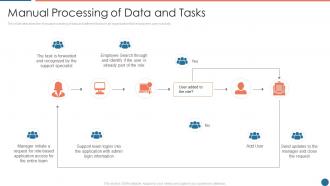
This slide describes the manual processing of data and different tasks in an organization that employees carry out daily.
People who downloaded this PowerPoint presentation also viewed the following :
Manual processing of data and tasks automation ppt powerpoint presentation layouts with all 6 slides:
Use our Manual Processing Of Data And Tasks Automation Ppt Powerpoint Presentation Layouts to effectively help you save your valuable time. They are readymade to fit into any presentation structure.




FAQs for Manual processing of data and tasks automation ppt
Honestly, the efficiency gains are insane - automation just crushes repetitive stuff way faster than any human could. Your team gets to ditch the boring manual work (which they'll actually love you for). Better consistency across everything, plus you can run things around the clock without hiring more people. The accuracy improvements and cost savings usually make up for what you spent pretty fast. Oh, and start with whatever's eating up the most time and feels super repetitive - that's where you'll see the biggest impact right away.
Honestly, just pick one thing that's driving you crazy time-wise and automate that first. Email marketing stuff like Mailchimp is super easy to set up. Calendly changed my life for scheduling - no more back-and-forth texts about meeting times. CRM systems help too, though they can feel overwhelming at first. Social media scheduling tools are clutch. Invoice generation is another huge time-saver. Don't try to automate everything at once or you'll lose your mind. Customer follow-ups and inventory tracking usually give you the biggest bang for your buck. Start small, see what works, then add more tools gradually.
So AI basically turns dumb automation into something that can actually think. Instead of just running the same script over and over, systems now learn from what's happening and adapt on the fly. It's honestly pretty crazy how flexible things have gotten. Your automated processes can handle weird situations they've never seen before and keep getting better at their job. The old "if this happens, do that" approach feels ancient now. AI does all the smart stuff - spotting patterns, predicting when things might break - while regular automation just executes whatever needs doing.
Honestly, the biggest headache is when your chatbot can't handle anything complicated and customers get trapped in those annoying loops. You know how frustrating that is. Plus you lose that human connection that actually keeps people coming back. When automation screws up badly, it can really hurt your brand reputation. There's also the risk of becoming too dependent on systems that inevitably break down at the worst times. Oh, and automated responses totally miss emotional cues - so you won't catch brewing problems early like a real person would. I'd start with basic stuff and always have an easy way for people to reach humans.
Dude, automation will totally change your production game. Machines work 24/7 without coffee breaks, so speed goes way up. Quality gets more consistent too since there's no human error in the mix. Your labor costs shrink - though honestly, retraining workers for better roles is the smart move here. The data piece is huge though. You'll actually see where things slow down instead of just guessing. Don't go crazy at first - pick one line, prove it works, then expand. Way less risky that way.
Start with the boring stuff that happens over and over - data entry, copying info between systems, anything where people are basically human copy machines. High-volume, rule-based tasks are perfect. Time-sensitive processes work great too since bots don't take coffee breaks. I'd also target anything super error-prone where humans mess up regularly. Just avoid the complex stuff initially - if it needs tons of judgment calls or has weird exceptions constantly, you'll hate yourself later. Map your workflows first and find what's driving everyone crazy. That's usually gold.
Start with Zapier or Microsoft Power Automate - they're great for connecting apps and handling the boring repetitive stuff. UiPath and Blue Prism are solid for complex automation but man, they'll hit your wallet hard. You definitely need API integration tools so everything can actually communicate. Oh, and grab some monitoring tools to see if your automations are actually working or just breaking silently (been there). Honestly though? Begin with simple workflows first. See what genuinely saves you hours before going crazy with the fancy enterprise stuff.
Honestly, most jobs don't just disappear - they change. Like instead of doing data entry all day, you'd analyze the data instead. Way more interesting if you ask me. The boring, repetitive stuff gets automated while you handle the tricky problems and bigger picture work. People skills matter more now since robots can't really do creativity or deal with difficult customers yet. I'd look at what parts of your job could be automated and start learning the stuff that comes after. Don't panic about it - this shift's been happening forever, just faster now.
Honestly, just start with one department first - you'll save yourself so much headache later. Get your actual users involved right away, not just the IT people. They know what'll actually work day-to-day. Oh and definitely be upfront about how this changes jobs instead of eliminating them, because people freak out otherwise. I learned that the hard way at my last place. Train everyone properly and have a backup plan ready. Also track your metrics before and after so you can show it's actually worth the money and pivot if needed.
So most platforms these days have APIs or webhook options - honestly it's kinda crazy how connected everything can be now. I'd start by looking at what you're doing manually that's just moving data around between apps. Check if your software has built-in integrations first before going the Zapier route (though Zapier's pretty solid). Map out one simple workflow - like syncing your CRM contacts with your email tool or whatever. Don't go crazy with it initially. Once you see how smooth that first automation runs, you can start connecting more stuff. Takes some trial and error but it's worth it.
Honestly, just track three things: time saved, fewer mistakes, and money saved. Count the hours your team gets back weekly - that's usually where you'll see the biggest difference. Compare error rates before and after too. ROI matters obviously, but don't sleep on how much happier your people get when they're not doing boring repetitive stuff all day. That's worth something too. Start simple with your first few processes, then get fancy later if you want. Oh, and don't track more than 2-3 metrics or you'll drown in spreadsheets.
So automation basically takes all those tedious, repetitive tasks and lets machines handle them way faster than we ever could. Think warehouse robots grabbing orders, AI figuring out what you'll need next month, tracking systems that actually tell you where stuff is in real time. The cost savings are huge - less manual labor, way fewer screwups, plus you get all this data to optimize your routes and inventory. Honestly, the analytics part is probably my favorite benefit. Start by looking at whatever's eating up the most time manually. Those processes are perfect for automating first.
Honestly, people think automation just wipes out entire jobs, but that's not what happens. Most of the time it handles boring stuff like data entry while humans do the actual thinking and decision-making. Also, everyone assumes it only hits factory workers or "low-skill" jobs - which is so 2010s thinking at this point. It actually creates tons of new roles too, especially for maintaining and programming these systems. The real deal? Jobs change more than they vanish. So instead of freaking out, just focus on skills that work WITH automation rather than against it. Way smarter approach.
Okay so automation can actually make things feel MORE personal if you do it right. Start with email sequences that trigger based on what people do - cart abandonment, resource downloads, that stuff. Chatbots handle the quick questions (though half of them are still terrible, let's be honest). For social media, scheduling tools are a lifesaver so you're not constantly posting. Here's the thing though - you've gotta segment your audience properly. Otherwise your "personalized" messages just sound like spam. I'd say pick one workflow first, see how it performs, then build from there. Don't try to automate everything at once or you'll lose your mind.
Honestly, the stuff worth watching is AI that can actually make decisions, not just do boring repetitive work. Real-time personalization is getting pretty wild - systems that literally adapt to each customer as they're using them. Voice automation finally doesn't suck anymore too, which is about time. The whole game is changing from following rules to actually learning. Your automation gets smarter without you doing anything. My advice? Pick one process, see what happens, then expand if it works. Don't overthink it.
-
Easily Understandable slides.
-
Great designs, Easily Editable.