

Manuelle Teststrategien für die Qualitätskontrolle PowerPoint-Präsentationsfolien





Try Before you Buy Download Free Sample Product
 Impress Your
Audience
 100%
Editable
 Save Hours
of Time


Manuelle Teststrategien für Qualitätskontrolle Kurze Erklärung des manuellen Softwaretestens, verschiedener Techniken und Ansätze zur Durchführung manueller Tests. Whitebox-Testing für Qualitätssoftware Überblick, Vorteile und Testmethoden des manuellen Testens. Blackbox-Testing zur Erstellung qualitativ hochwertiger Software Überblick, Vorteile und Testtechniken des Whitebox-Testens. Auch Fokusbereich und Nachteile des Whitebox-Testens. Best Practices für Graykbox-Testing Überblick, Vorteile, Testtools und Softwaretest-Lebenszyklus des Blackbox-Testens. Einführung, Vorteile und Tools des Graykbox-Testens. Manuelles Testing für End-to-End-Softwareintegration Bewährte Praktiken, Checkliste, Schulungsbudget, Zeitplan, Roadmap und Auswirkungen des Automatisierungstestens. Laden Sie unsere 100% bearbeitbare und anpassbare Vorlage herunter, die auch mit Google Slides kompatibel ist.
People who downloaded this PowerPoint presentation also viewed the following :
Inhalt dieser Powerpoint-Präsentation
Folie 1: Diese Folie führt in manuelle Teststrategien für die Qualitätskontrolle ein. Nennen Sie den Namen Ihres Unternehmens und beginnen Sie.
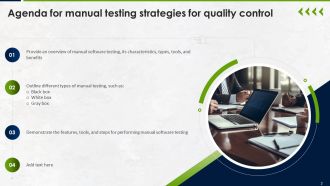
Folie 2: Dies ist eine Agenda-Folie. Geben Sie hier Ihre Tagesordnungspunkte an.
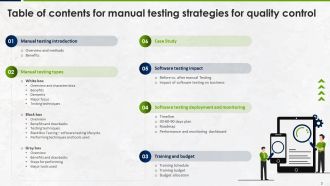
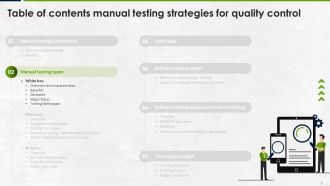
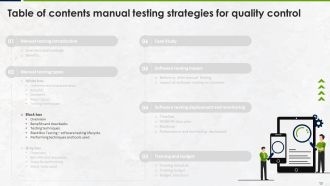
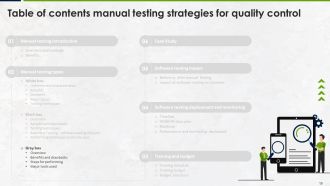
Folie 3: Diese Folie zeigt ein Inhaltsverzeichnis für die Präsentation.
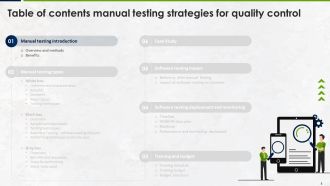
Folie 4: Diese Folie setzt die vorherige Folie fort.
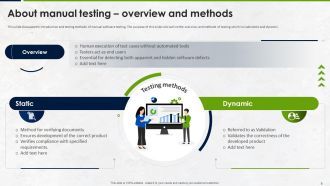
Folie 5: Diese Folie behandelt die Einführung und Testmethoden des manuellen Software-Testens.
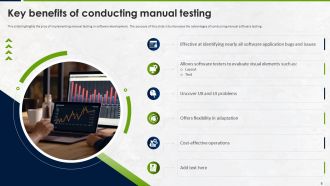
Folie 6: Diese Folie hebt die Vorteile der Implementierung des manuellen Testens in der Softwareentwicklung hervor.
Folie 7: Diese Folie setzt die vorherige Folie fort.
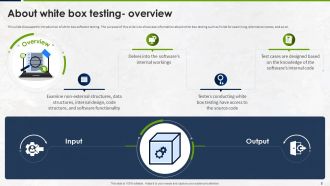
Folie 8: Diese Folie beinhaltet die Einführung des White-Box-Software-Testens.
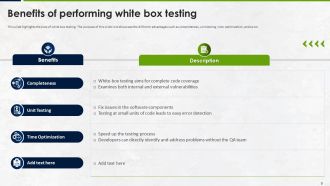
Folie 9: Diese Folie befasst sich mit den Vorteilen des White-Box-Testens.
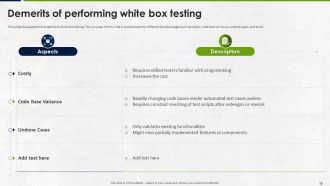
Folie 10: Diese Folie diskutiert die Nachteile des White-Box-Testens.
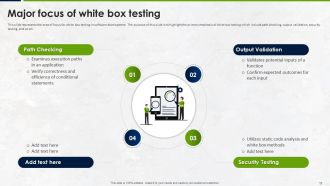
Folie 11: Diese Folie hebt den Fokusbereich für White-Box-Tests in der Softwareentwicklung hervor.
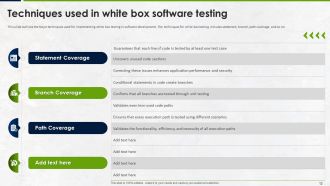
Folie 12: Diese Folie umreißt die wichtigsten Techniken für die Implementierung von White-Box-Tests in der Softwareentwicklung.
Folie 13: Diese Folie setzt die vorherige Folie fort.
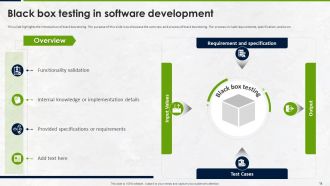
Folie 14: Diese Folie hebt die Einführung des Black-Box-Testens hervor.
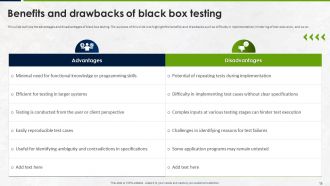
Folie 15: Diese Folie umreißt die Vor- und Nachteile des Black-Box-Testens.
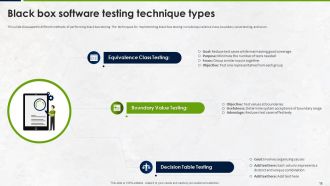
Folie 16: Diese Folie zeigt die verschiedenen Methoden zur Durchführung von Black-Box-Tests.
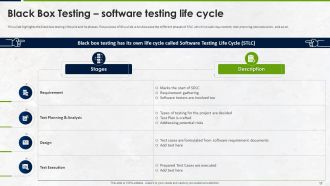
Folie 17: Diese Folie zeigt den Black-Box-Testlebenszyklus und seine Phasen.
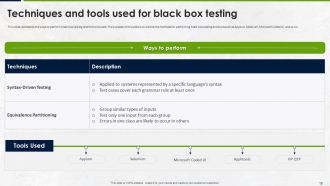
Folie 18: Diese Folie erläutert die Möglichkeiten zur Durchführung von Black-Box-Tests und die verwendeten Tools.
Folie 19: Dies ist eine Einführungsfolie.
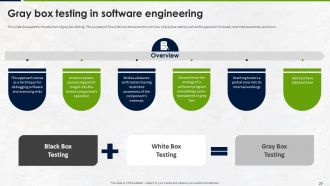
Folie 20: Diese Folie stellt die Einführung des Gray-Box-Testens dar.
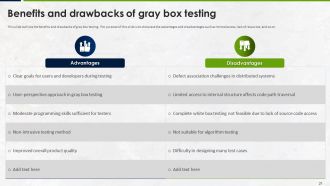
Folie 21: Diese Folie markiert die Vor- und Nachteile des Gray-Box-Testens.
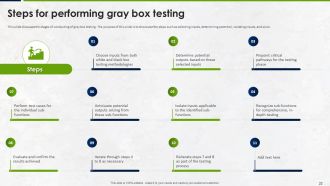
Folie 22: Diese Folie diskutiert die Phasen der Durchführung von Gray-Box-Tests.
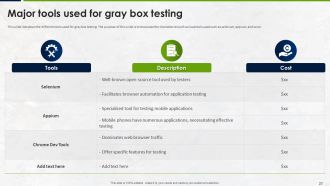
Folie 23: Diese Folie listet die verschiedenen für Gray-Box-Tests verwendeten Tools auf.
Folie 24: Dies ist eine Einführungsfolie.
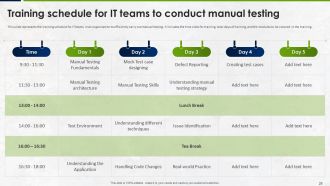
Folie 25: Diese Folie stellt den Trainingsplan für IT-Teams in einer Organisation dar, um manuelles Testen effizient durchführen zu können.
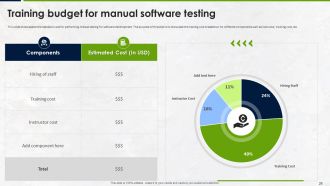
Folie 26: Diese Folie zeigt die Kostenaufschlüsselung für die Durchführung von manuellem Testen für die Softwareentwicklung.
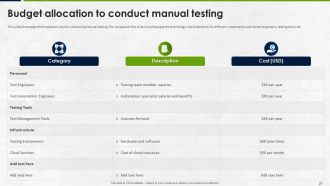
Folie 27: Diese Folie zeigt die Kostenaufschlüsselung für die Durchführung von manuellem Testen.
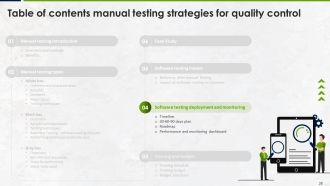
Folie 28: Dies ist eine Einführungsfolie.
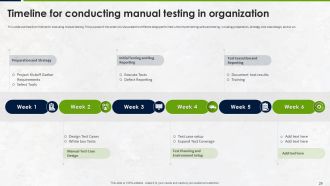
Folie 29: Diese Folie umreißt den Zeitplan für die Durchführung von manuellem Testen.
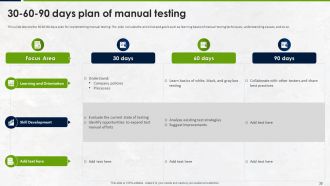
Folie 30: Diese Folie zeigt den 30-60-90-Tage-Plan für die Implementierung von manuellem Testen.
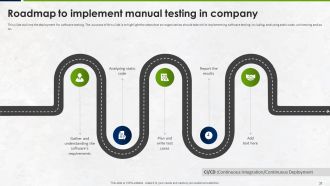
Folie 31: Diese Folie projiziert die Bereitstellung für Software-Tests.
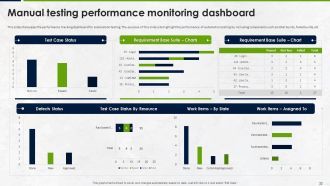
Folie 32: Diese Folie bezieht sich auf das Leistungsverfolgungsdashboard für Automatisierungstests.
Folie 33: Dies ist eine Einführungsfolie.
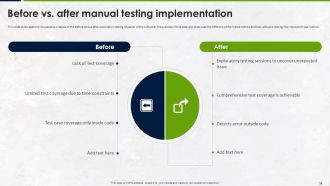
Folie 34: Diese Folie zeigt die vergleichende Analyse der Situation vor und nach der Automatisierung der Software-Tests.
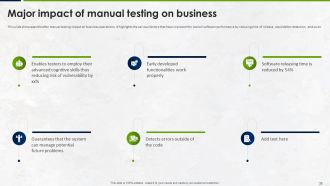
Folie 35: Diese Folie erläutert die Auswirkungen des manuellen Testens auf die Geschäftsabläufe.
Folie 36: Diese Folie projiziert die Auswirkungen des manuellen Testens auf die Geschäftsabläufe.
Folie 37: Dies ist eine Einführungsfolie.
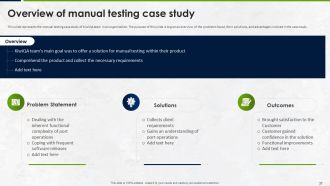
Folie 38: Diese Folie stellt die Fallstudie des manuellen Testens des KiwiQA-Teams in einer Organisation dar.
Folie 39: Diese Folie zeigt alle in der Präsentation enthaltenen Symbole.
Folie 40: Diese Folie trägt den Titel Zusätzliche Folien für den weiteren Fortschritt.
Folie 41: Dies ist die Folie Unsere Mission mit zugehörigen Bildern und Texten.
Folie 42: Dies ist die Folie Unser Team mit Namen und Bezeichnungen.
Folie 43: Diese Folie zeigt Post-It-Notizen. Notieren Sie hier Ihre wichtigen Notizen.
Folie 44: Diese Folie zeigt ein Venn-Diagramm mit Textfeldern.
Folie 45: Diese Folie zeigt eine Lupe, um Informationen, Spezifikationen usw. hervorzuheben.
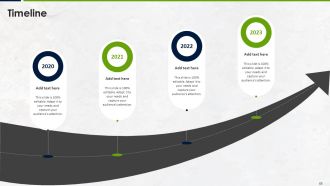
Folie 46: Dies ist eine Zeitachsen-Folie. Zeigen Sie hier zeitbezogene Daten an.
Folie 47: Dies ist eine Dankesfolie mit Adresse, Telefonnummern und E-Mail-Adresse.
Manuelle Teststrategien für die Qualitätskontrolle PowerPoint-Präsentationsfolien mit allen 55 Folien: 1. Einführung in manuelle Teststrategien 2. Wichtigkeit von manuellen Tests 3. Arten von manuellen Tests 4. Planungsphase 5. Testfallentwicklung 6. Testdurchführung 7. Fehlerbehandlung 8. Berichterstattung und Nachverfolgung 9. Kontinuierliche Verbesserung 10. Schlussfolgerung
Unsere Manuellen Teststrategien für Qualitätskontroll-Präsentationsfolien können Ihnen dabei helfen, wertvolle Zeit zu sparen. Sie sind fertig erstellt und lassen sich in jede Präsentationsstruktur einfügen.












FAQs for Manual Testing Strategies For Quality Control
So basically you're catching all the stuff automated tests miss - bugs, weird edge cases, usability problems. Manual testing lets you actually think like a regular person using the app, not like a developer who knows how everything works. You're checking if the requirements make sense and if people can actually navigate without getting confused. Honestly, half the time you'll find issues that nobody even thought to test for. I'd start by mapping out real user journeys - like how someone would actually use it day-to-day, not just the technical boxes to check.
Honestly, go manual when you need actual human eyes on things. Does the UX feel weird? Are the colors totally off? That's manual territory. Automated tests can't tell if your app sucks from a user perspective - they just check if buttons work the same way every time. I'd use manual testing early on when stuff's still changing constantly. Also great for exploring random edge cases you didn't think of. Quick question though - are you asking "does this feel right" or "does this function correctly"? First one = manual testing. Second = automate that thing. Start by figuring out what actually needs a person versus what you can script.
Start with stuff that'll absolutely wreck your product if it breaks - those core user flows everyone hits. Happy path scenarios first, then weird edge cases. I always go after high-frequency features over the random stuff nobody uses. Areas with previous bugs? Test those again - they love to resurface. Same with recent code changes. Time's always tight, so weigh how long each test takes against what you actually get from it. Honestly, just make a simple 1-5 scoring thing for impact and failure risk, then multiply them. Keeps things from getting too complicated.
So exploratory testing is basically where you ditch the script and just poke around like a normal person would. You're asking "what happens if I click this?" or following weird hunches when something seems sketchy. Way more fun than running the same boring test cases, honestly. You'll catch edge cases and usability stuff that planned tests totally miss - like when users do something completely unexpected (which they always do). I'd probably do this for like 20-30% of your testing time alongside your regular structured stuff. It's where you find the really interesting bugs.
Honestly, documentation saves your butt in manual testing. Test cases keep you on track instead of randomly clicking stuff. Bug reports help you remember what broke (trust me, you'll forget). Test plans organize the chaos. I learned this the hard way when I had to explain missing issues to my manager - not great. Plus when someone new joins your team, they won't be completely lost. Start with basic templates for test cases and bug reports. Makes regression testing less of a nightmare too. It's boring work but totally worth it.
Honestly, just make a traceability matrix first - sounds tedious but it'll show you exactly what's missing. Break those chunky requirements into smaller bits you can actually test. Don't skip the weird edge cases either, those always bite you later. Get stakeholders to review your coverage too. They interpret requirements totally different than we do sometimes. Oh, and negative scenarios - test what happens when things go wrong, not just the happy path. I'd start by auditing what you've got now against the requirements. You'll probably find gaps you didn't even realize were there.
Boundary testing is your best friend - max/min inputs, empty fields, stuff just outside the limits. Try weird user behavior too like spam clicking buttons or navigating in unexpected ways. Special characters always break things in the most random places, and don't get me started on super long text inputs. Load testing reveals the weirdest bugs honestly. Think about those "what if a user accidentally does this" moments. Oh, and keep notes on edge cases you find - they'll definitely show up again in other features later.
Log bugs right away in whatever tracking system you use - include repro steps, what you expected vs what actually happened, plus severity. Screenshots are your best friend here, trust me on this. Developers will thank you later instead of going back and forth asking "wait, what exactly did you click?" Categorize everything properly and set the right priority levels. For reporting, build dashboards that show trends, open/closed rates, critical stuff. Regular updates to stakeholders are key - focus on blockers and quality metrics. Just stay consistent with your format so people can actually make sense of what you found.
Focus on defect detection rate, test execution rate, and how many bugs slip into production - those are your bread and butter. Test coverage percentage matters too, plus cycle time. Honestly? I'm kinda obsessed with defect density per module because it shows you exactly where the code's falling apart. Resolution time and retest effectiveness tell you if devs are actually listening to your feedback. Don't go crazy trying to track everything though. Pick maybe 3 metrics that match whatever's currently driving you nuts, then add more later.
Standardized test cases and checklists are your best friend here - seriously, they'll save you so much headache later. Document the steps, findings, and those random edge cases that seem pointless but always bite you somehow. Same test data every time, stick to your entry/exit criteria religiously. Write down everything about your testing environment too, especially when something's different from usual. Think of it like this: if you had to pass your work to another tester tomorrow, could they follow your exact process? Templates for common scenarios are a game changer. Start building those now.
Get real users involved - they'll find stuff you never would. I learned this when users completely destroyed our "bulletproof" checkout flow lol. Make test scenarios that actually match how people work, not just the perfect happy path. Document issues with screenshots so devs can't say "works fine for me." You need clear acceptance criteria from the start or you'll argue about what's broken vs what's done. Oh and give people time to mess around naturally instead of rushing through some boring checklist. Do a debrief right after while they remember what sucked.
Ditch the heavy documentation and go exploratory instead. Your best bet is getting tight with the dev team - like actually sitting in their daily standups. Test stuff as it gets built, not at the end (that waterfall thing is dead anyway). I'd focus on the risky parts first since you can't test everything. Automate the boring repetitive tests so you have more time for the weird edge cases that actually break things. Oh, and push for getting testable pieces every couple days - makes your life way easier. The continuous approach just works better than cramming everything into a "testing phase."
Honestly? Time pressure's brutal. You're constantly racing against deadlines while doing the same test flows repeatedly - gets mind-numbing fast. Plus tracking everything without missing weird edge cases is a nightmare. My advice: build some solid checklists for your common scenarios first. Game changer for saving mental energy. Try exploratory testing to keep things interesting, and definitely pair up with devs when you can. They'll catch stuff you miss and vice versa. Oh, and get decent test management software - trust me on this one. Makes organizing way less painful than spreadsheets everywhere.
Honestly, getting testers and developers talking to each other is like half the battle won already. Developers can point you toward the sketchy code they just pushed, and you'll catch way more meaningful bugs. When they actually get your repro steps, fixes happen so much faster too. I've watched teams spiral for weeks just because nobody was communicating - it's painful to see. Try doing quick sync meetings and sharing test plans before you dive in. Oh, and definitely keep shared docs somewhere everyone can find them. Your whole bug cycle will speed up once people start actually working together instead of throwing stuff over the fence.
For test case management, grab TestRail, Zephyr, or qTest - they'll save your sanity organizing scenarios and tracking results. Bug tracking is huge too, so Jira or Azure DevOps work great for logging issues and working with devs. Screen recording tools like Loom are clutch for showing exactly what broke (way better than trying to describe it). I keep all my testing notes in Notion but honestly any decent note app works. Oh, and seriously avoid spreadsheets if you can - I've watched teams lose their minds trying to manage everything in Excel. Just start with what your team already has, then add stuff as you need it.
-
SlideTeam is a great place for PPT templates. They have many templates on a single topic. It has made my life a lot easier.
-
SlideTeam provides PPTs on every single topic. Their templates suit my job very well. I am very grateful!