

Market forecast chart powerpoint ideas




Try Before you Buy Download Free Sample Product
 Impress Your
 Audience
 100%
100% Editable
 Save Hours
 of Time


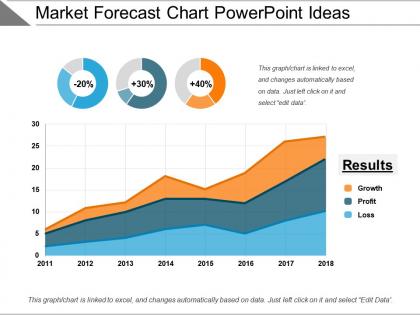
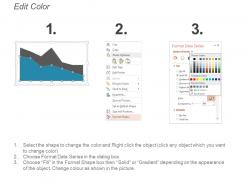
Get this Market Forecast Chart PowerPoint Ideas template to make PPT presentations on the stock market, foreign exchange, and financial market trends. This PPT slide will help you deliver quality presentations on project proposals, investment profiles, market trends, cash flow forecasts. It is a 3 stage PPT template that depicts growth, profits, and losses. Analyze the profits and losses of the past years and devise strategies to make more profits in the upcoming years. Guide your audience about how to implement the methodologies. Depict the growth pattern of the organization over the years. Explain the overall demand forecasting process, its approaches, its overall objectives with just one single slide. This template can be used by corporate strategists, marketers, and other business analysts. Showcase the performance of the products and focus on the product that needs more attention for improvement.
People who downloaded this PowerPoint presentation also viewed the following :
Market forecast chart powerpoint ideas with all 5 slides:
Highlight areas of disparity with our Market Forecast Chart Powerpoint Ideas. Guide folks on how to eliminate them.
FAQs for Market forecast
Okay so first thing - be super clear about your time periods and data sources. People get lost otherwise. Show the historical stuff next to your forecasts because everyone wants that "where we were vs where we're going" story. Definitely explain your assumptions upfront since someone's gonna grill you on them anyway. Confidence intervals are clutch here - makes you look like you actually know what you're talking about. Don't skip the external factors either, like market changes that could mess with your predictions. Oh and keep it visually clean with consistent colors. End with a summary slide hitting your top 3 points.
Honestly, charts and graphs are game-changers for market forecasts. People absorb visual stuff 60x faster than text - which is kind of crazy when you think about it. Skip the spreadsheet dump and show trends with color-coded projections or interactive timelines instead. Your audience will actually get what you're saying at a glance. I'd personally go nuts trying to parse rows of numbers, but a good bar chart? Makes sense immediately. Pick your biggest forecast insight first. Build one solid visual around that. Trust me, stakeholders remember presentations they can actually see, not ones that feel like homework.
For market trends, go with line charts - they're clean and people can actually follow what's happening. Candlestick charts work if you're doing stock stuff since they pack in all the price data (open, close, highs, lows). Area charts look pretty but honestly get messy fast. I'd just stick with simple line charts for PowerPoint. Your audience won't have to squint or figure out what they're looking at. Oh, and make sure your time periods actually make sense - like don't use daily data if you're talking about yearly trends, you know?
Honestly, color coding saves your butt when presenting forecasts. People's brains just get it faster - green means good, red means trouble, you know? Stick with the same colors throughout so nobody's confused halfway through. I made this mistake once where I went nuts with like 7 different colors and my boss was completely lost. Keep it simple - maybe 3 colors tops. Make your most important stuff pop with brighter shades. Oh, and definitely check how it looks on the projector beforehand because colors can look totally different up there.
Think of annotations as subtitles for your charts - they help people actually get what's happening with the data. Use callout boxes and arrows to highlight big trends or explain those weird spikes that always confuse everyone. Market forecasts especially need the "why" spelled out, like when you're projecting changes. I usually go with something specific like "Q3 surge from holiday shopping" instead of just labeling it "increase" or whatever. Nobody's got time to play detective with your charts. Keep them short but helpful - you want people focusing on your insights, not scratching their heads trying to figure out what that random dip means.
Try "Fly In" or "Fade" animations so people follow your story instead of jumping ahead to read everything at once. Honestly, I'm kind of obsessed with the "Wipe" effect on bar charts - watching growth literally appear is so satisfying. "Pulse" works great for highlighting big forecasts or major turning points. Keep your timing consistent though, like 0.5-1 second intervals, and stick with the same animation style throughout. Don't go overboard - maybe animate 3-5 key insights max, not every single number. That gets annoying fast. Start with your most important forecast and build everything else around it.
Definitely put your sources right on the slides - industry reports, government data, whatever you're using. People need to see where numbers come from or they'll get suspicious real fast. Multiple sources are your friend here, and stick with the legit stuff like research firms or trade groups. I've watched presentations completely bomb when someone called out questionable data and the presenter just stood there looking lost. If it's internal data, give a quick rundown of how you got it. Oh, and this might sound counterintuitive, but if your data isn't perfect? Just admit it upfront. Honestly makes you look way more credible than acting like everything's bulletproof.
Honestly, investors just want to see dollar signs - hit them with ROI projections, market growth charts, and competitive analysis. Bold visuals work best. Corporate stakeholders are totally different though. They're thinking operationally - resource needs, timelines, how this fits with existing strategy. Way more practical stuff. Here's what I'd do: make two versions of your key slides instead of trying to please everyone with one. Investors want the big picture trends, but your internal team needs granular details they can actually act on. It's kind of annoying to duplicate work, but trust me, it's worth it.
Honestly, Excel's probably your best bet for this stuff. It handles data well and makes clean charts you can just drag into your presentation. Tableau and Power BI are great too but might be overkill unless you're working with crazy complex data. Oh, and Google Charts is free if budget's tight - it's actually pretty solid. I've seen people make really impressive forecasts with just Excel and decent design skills. The key is keeping it simple - clear labels, consistent colors, don't go overboard with fancy effects. Your audience just needs to get the forecast at a glance, you know?
Dude, you've gotta break down your forecast data instead of showing one messy line that nobody can read. Split it by customer type or region - suddenly you'll see stuff like enterprise customers crushing it at 40% growth while small business stays dead flat. Honestly, this saves so many confusing meetings. I usually do 3-4 segments max on one chart with different colors so execs can actually follow what's happening. Way easier than trying to explain some giant trend that doesn't tell the real story. Your presentations will thank you.
Don't cram everything onto one slide - seriously, people's eyes will just glaze over. Keep it to 3-4 data points max and make your fonts readable. Those 3D chart effects? Skip them, they're tacky and mess with your data. Label your time periods clearly and start scales at zero so you're not accidentally misleading anyone. Also, PowerPoint's default colors are honestly terrible for charts - pick something better. Here's what I do: show your chart to someone for 10 seconds. If they can't tell you the main point right away, you need to simplify it more.
Start with your biggest insight - what's the one thing they absolutely need to remember? That's your headline. Then keep slides super clean, maybe 3-5 data points each. I swear, the worst presentations are just Excel dumps on slides and everyone zones out. Have backup slides ready for questions, but your main deck should only show metrics that actually support your story. Oh, and stick to consistent colors - it sounds basic but really helps guide people's attention. Nobody wants to hunt around trying to figure out what they're supposed to be looking at.
Bar charts work best when you're comparing separate categories instead of showing how things change over time. Perfect for stuff like quarterly sales by department or market share across different cities. The whole point is making those comparisons pop visually. Line charts honestly get cluttered fast when you've got multiple categories anyway. Use bars when your data is more like individual snapshots rather than continuous flow. Your audience will instantly see which values are bigger without having to trace lines around. Way cleaner for that kind of analysis.
Start with the problem your audience is dealing with right now - that's your hook. Walk them through what's coming next like you're telling a story with a clear beginning, middle, and end. "What if" scenarios work really well here, gets people engaged. I always build some tension by showing the risks first, then reveal the opportunities. Makes it way more compelling than just dumping data on them. Real customer examples are gold - they make your forecast feel human instead of just spreadsheet numbers. Oh, and try treating each section like a chapter. People digest complex stuff so much better that way.
Quarterly updates work for most companies, but it really depends on how crazy your industry gets. Tech and crypto? You're probably looking at monthly because everything moves at warp speed. More stable stuff like manufacturing can get away with quarterly or even twice a year. Honestly, consistency matters more than the exact timing - just pick a schedule and stick with it so people know what to expect. Oh, and you'll definitely need to jump in with surprise updates when big market events happen that mess with your numbers. That's just reality.
-
Nice and innovative design.
-
Content of slide is easy to understand and edit.