

Meeting Plan Powerpoint Ppt Template Bundles





Try Before you Buy Download Free Sample Product
 Impress Your
 Audience
 100%
100% Editable
 Save Hours
 of Time


Our Meeting Plan Powerpoint PPT Template Bundles are topically designed to provide an attractive backdrop to any subject. Use them to look like a presentation pro.
People who downloaded this PowerPoint presentation also viewed the following :
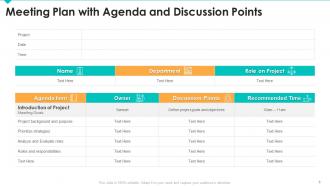
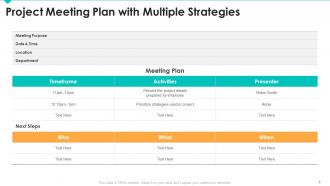
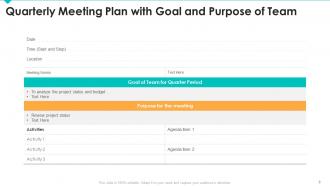
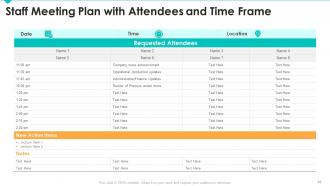
Meeting Plan Powerpoint Ppt Template Bundles with all 16 slides:
Use our Meeting Plan Powerpoint PPT Template Bundles to effectively help you save your valuable time. They are readymade to fit into any presentation structure.








FAQs for Meeting Plan Powerpoint
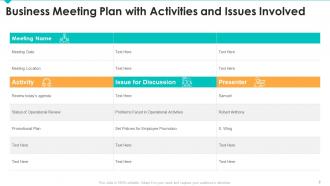
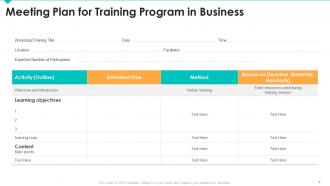
An effective meeting plan PPT template should include agenda overview, time allocations, participant roles, key discussion topics, decision points, and action item tracking sections. These elements streamline meeting flow by establishing clear structure, managing time efficiently, and ensuring accountability, with many organizations finding that comprehensive templates reduce meeting duration while improving outcomes and follow-through.
Visual design enhances meeting plan presentations by improving information hierarchy, increasing audience engagement, and facilitating better comprehension through clear layouts, consistent formatting, and strategic use of colors and graphics. Professional templates streamline preparation time while ensuring visual consistency, with many organizations finding that well-designed presentations improve meeting focus, participant retention, and decision-making outcomes.
Essential sections include meeting objectives, agenda with time allocations, participant roles and responsibilities, key discussion topics, decision points, and action items with assigned owners. These components streamline communication by establishing clear expectations, maintaining focus throughout discussions, and ensuring accountability, with many organizations finding that structured templates significantly enhance meeting productivity and participant engagement while reducing time wastage.
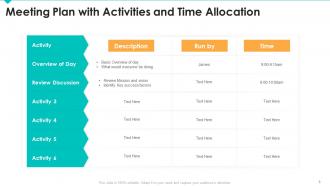
A meeting plan PPT template facilitates better time management by establishing clear agendas, designated time slots for each topic, and structured discussion frameworks that keep conversations focused. These templates streamline meeting flow by providing visual time cues, progress indicators, and transition points, with many organizations finding that structured presentations reduce meeting duration by 30-40% while enhancing participant engagement and decision-making efficiency.
**INPUT**: What strategies can be employed in a PPT template to highlight action items and responsibilities? **OUTPUT**: Effective PPT templates employ visual hierarchy through bold typography, color-coded sections, dedicated responsibility columns, timeline indicators, and status tracking elements. These strategies streamline accountability by clearly distinguishing owners from tasks, incorporating progress indicators and deadline markers, ultimately delivering enhanced meeting outcomes and ensuring strategic initiatives maintain momentum across organizational levels.
Different industries adapt meeting plan PPT templates by customizing content focus, visual elements, terminology, and structural frameworks to align with sector-specific requirements, regulatory standards, and operational priorities. Healthcare organizations emphasize patient outcomes and compliance metrics, financial services focus on risk assessments and market data, while manufacturing companies prioritize production timelines and safety protocols, ultimately delivering more targeted communication and enhanced stakeholder engagement.
Audience analysis drives template design by determining content depth, visual complexity, presentation duration, and communication style preferences. Understanding whether you're presenting to executives, technical teams, or cross-functional groups enables strategic customization of layouts, data visualization approaches, and messaging frameworks, ultimately delivering more engaging presentations and improved meeting outcomes.
Interactive features in PPT templates enhance participant engagement by incorporating polls, clickable navigation, embedded videos, animations, and Q&A sections that transform passive presentations into dynamic conversations. These elements enable real-time feedback collection, personalized content paths, and collaborative discussions, with many organizations finding that interactive meetings increase retention rates, accelerate decision-making, and ultimately deliver more productive outcomes than traditional static presentations.
Focus your meeting plan PPT by limiting each slide to one key topic, using bullet points instead of lengthy paragraphs, and including only essential agenda items with specific time allocations. These streamlined approaches enhance clarity by eliminating redundant information, establishing clear expectations, and maintaining participant engagement, with many organizations finding that concise presentations ultimately deliver more productive discussions and actionable outcomes.
Color psychology in PPT templates significantly influences meeting outcomes by enhancing comprehension, guiding attention, and reinforcing key messages through strategic visual cues. Blue builds trust and credibility for financial presentations, while green promotes collaboration in team meetings, and red creates urgency for decision-making sessions, ultimately delivering improved engagement and more productive discussions.
Visual agendas in meeting plan PPTs enhance clarity, engagement, and meeting efficiency by presenting topics, timeframes, and priorities in an easily digestible format. They streamline participant preparation, minimize confusion during transitions, and maintain focus on objectives, with many organizations finding that visual agenda formats reduce meeting duration by up to 25% while improving outcome achievement.
Presenters can leverage meeting plan PPT templates for remote meetings by incorporating clear agendas, time allocations, participant roles, and interactive elements like polls or breakout sessions. These structured templates enhance virtual engagement by providing visual anchors, streamlined transitions, and designated spaces for action items, ultimately delivering more focused discussions and measurable outcomes across distributed teams.
Common mistakes include overcrowding slides with excessive text, using inconsistent formatting and fonts, neglecting clear agenda structures, and creating templates without flexible sections for different meeting types. These design flaws significantly reduce meeting effectiveness by overwhelming participants, diminishing professional credibility, and limiting template reusability across departments, ultimately hampering productive collaboration and strategic alignment.
Feedback from team members enhances meeting plan PPTs by identifying unclear content, highlighting missing agenda items, and ensuring comprehensive topic coverage that addresses diverse perspectives. Through collaborative input, organizations can streamline presentation flow, improve visual clarity, and ultimately deliver more engaging meetings, with many teams finding that peer review significantly increases participant engagement and meeting outcomes.
Tools that complement PDF and PPT formats for interactive meeting plans include collaborative platforms like Miro and Mural, real-time polling software such as Mentimeter and Slido, and integrated solutions like Microsoft Teams and Zoom with built-in whiteboards. These technologies enhance engagement by enabling live feedback, visual collaboration, and dynamic content updates, with many organizations finding that combining traditional presentations with interactive tools delivers more productive meetings and stronger participant involvement.
-
Loved the fact that SlideTeam provides clean, high-definition, and professional PowerPoint products.
-
Very unique and reliable designs.