

Metric Dashboard To Monitor Lean Implementation Of Lean Manufacturing Enhance Effectiveness




Try Before you Buy Download Free Sample Product
 Impress Your
 Audience
 100%
100% Editable
 Save Hours
 of Time


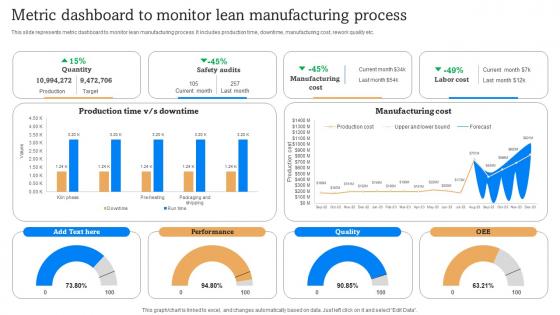
This slide represents metric dashboard to monitor lean manufacturing process. It includes production time, downtime, manufacturing cost, rework quality etc.
People who downloaded this PowerPoint presentation also viewed the following :
Metric Dashboard To Monitor Lean Implementation Of Lean Manufacturing Enhance Effectiveness with all 7 slides:
Use our Metric Dashboard To Monitor Lean Implementation Of Lean Manufacturing Enhance Effectiveness to effectively help you save your valuable time. They are readymade to fit into any presentation structure.






FAQs for Metric Dashboard To Monitor Lean Implementation Of Lean
Pick metrics that actually connect to your goals, not just random stuff that looks impressive. Revenue ones are obvious - monthly recurring revenue, conversion rates, customer acquisition cost. Then throw in some operational basics like customer satisfaction and employee productivity. Honestly, I've seen too many companies drown in dashboards with 20+ metrics. Keep it to maybe 5-8 max that you'll actually use for decisions. The key thing is being able to dig deeper when numbers look weird. Try to choose ones that tell a complete story together rather than just isolated data points sitting there.
Honestly, visuals are a game changer for making sense of data chaos. Your brain just processes charts and graphs way faster than endless spreadsheet rows. Heat maps are clutch - you'll instantly see what's performing and what's tanking. Color coding is your friend too, like green for good stuff, red for problems. I always group similar metrics together visually so my team can scan everything in seconds. Oh, and stick with consistent colors across your whole dashboard - it sounds obvious but you'd be surprised how many people mess this up. Progress bars and icons work great for that quick gut-check understanding.
Look, KPIs are what actually make your dashboard worth checking instead of just being eye candy. Pick 5-7 that connect to real business goals - cramming in 20+ random metrics is honestly pointless. I learned this the hard way when my first dashboard was basically metric soup. Work backwards from the decisions you need to make, then find KPIs that'll give you those answers. Your dashboard should tell you what's happening at a quick glance. Don't waste time on vanity metrics that make you feel good but don't drive action.
Dude, this stuff is actually pretty sweet. Your dashboard updates live instead of showing yesterday's news, so when sales tank or servers crash you'll know immediately. No more finding out about disasters during Monday meetings when it's too late to fix anything. I honestly wish more companies got this - you can catch problems Friday afternoon and actually do something instead of just watching everything burn over the weekend. Set up alerts for the important metrics so it pings you when things go sideways. Way better than flying blind with old reports.
Put your most important stuff right at the top - people have zero patience these days. Group similar metrics together and pick a color scheme that actually makes sense. Don't jam everything in there like you're trying to solve a puzzle. Your charts need to work on phones too, not just your massive monitor. Always add context like date ranges or targets so users know if they should panic or celebrate. Oh, and definitely test this with real people first - I learned that one the hard way. They'll spot problems you'd never notice.
So basically you'll want separate dashboard views for each role. Executives just want the big picture KPIs and trends, but team leads need those detailed operational metrics they can actually do something with. Sales folks obsess over pipeline stuff and conversion rates - your CFO only cares about revenue and costs though. Here's what works: ask each group upfront what decisions they're making with this data. Saves you tons of headache later, trust me. Set up role-based permissions so people automatically see what matters to them. Most tools let you build multiple views from one data source anyway. Then just automate the reports so everyone gets their stuff delivered without bugging you.
Honestly, Google Data Studio is where I'd start - it's free and way better than you'd expect. Tableau and Power BI are the fancy options but they'll cost you. Looker Studio sits somewhere in between with decent features. I mean, I've even seen people do crazy things with just Excel if they're creative enough (though that sounds like torture to me). Start with Google's free tool, see how it feels, then move up to the premium stuff if you need more data connections or advanced analytics. Most people are surprised by what they can build without spending anything.
Set up dashboards tracking session time, click rates, return visits - that stuff. Look for patterns over time because that's where you'll actually see what's broken. Maybe people bail at checkout or nobody's using that fancy feature you built. Break down your data by user type too - new vs returning users behave totally differently. Automated alerts are clutch when numbers drop so you're not finding out about problems three weeks later. Most teams just wing it instead of checking this regularly, which is wild to me.
Honestly, the worst thing you can do is cram like 20 different metrics on one screen. Total chaos. Stick to maybe 5-7 things that actually matter for decisions. Skip the vanity stuff too - nobody cares about total page views if they can't do anything with that info. Your data needs to be fresh and consistent, otherwise people just stop trusting the whole thing. Also think about who's using it - your CEO doesn't need the same nitty-gritty details as your ops team. I always tell people to start basic first, then add more later if you really need it.
So predictive analytics takes your dashboard data and uses machine learning to show you what's coming next. You'll see forecasts for the next few months instead of just last quarter's numbers. Tableau and Power BI both have this built in now - though honestly the accuracy is all over the place depending on how clean your data is. The real trick is setting up alerts when things start going off track so you can fix stuff early. Oh, and don't go crazy with complex models right away. Start with simple trend lines first.
Honestly, mobile accessibility can totally make or break your dashboard. If people can't check metrics on their phones easily, they just won't bother - and then what's the point? Everyone's always on their devices anyway. When dashboards actually work well on mobile, teams check them way more often and catch issues faster. Your people can stay updated during meetings, commutes, whatever. Just make sure whoever builds your dashboard cares about responsive design. Otherwise you're paying for something that'll sit there looking pretty while everyone ignores it. Trust me on this one.
Start with automated alerts - they'll catch weird spikes or missing data before anyone notices. Someone has to own each metric though, otherwise you're just guessing who screwed up. I'd run monthly audits comparing dashboard numbers to your actual source systems. Trust me, stuff breaks way more than people admit. Set up rules that flag when numbers look sketchy - like if conversion rates suddenly jump 300%. Build this into your routine instead of panicking when your boss asks why the numbers don't match. Oh, and document everything first so you actually know what you're validating.
Check your metrics monthly or quarterly - whatever feels right for your team's pace. Automated alerts are a lifesaver when things go sideways. Honestly, half the dashboards I've worked with just collect digital dust because nobody actually looks at them anymore. Audit what your team really uses for decisions. Business priorities change like the weather, so touch base with stakeholders regularly to make sure you're tracking stuff that still matters. Don't let dashboard maintenance become everyone's job (aka nobody's job). Pick specific owners for each section - trust me on this one.
Honestly, metric dashboards are a game changer for tracking sprint stuff. Story points completed, cycle time, sprint goal progress - that's what you want to watch. Set them up with automated updates so you're not manually refreshing data like some caveman. Your whole team can check it during standups and planning sessions. It's wild how much time teams waste in meetings just figuring out basic status updates! You'll spot bottlenecks and scope creep way faster this way. Real-time visibility into team velocity and backlog burndown keeps everyone on the same page about project health. Trust me on this one.
Ditch those boring static charts and add some hover details or clickable drill-downs instead. Sparklines work amazingly well when you're tight on space. Heat maps and gradient colors look way cooler than the usual red/green thing everyone does. Progress rings are my current obsession - so much better than bar charts, honestly. Layout your metrics like a story instead of just dumping everything randomly on screen. Oh, and real-time animations are huge right now. People get weirdly excited watching numbers update live. Don't go crazy though - try one new thing first and see how it lands.
-
“You have the structure in place that are easy to explore new opportunities.I will be recommending your services to other people.”
-
The slides are remarkable with creative designs and interesting information. I am pleased to see how functional and adaptive the design is. Would highly recommend this purchase!