

Metrics Chart Powerpoint PPT Template Bundles




Try Before you Buy Download Free Sample Product
 Impress Your
 Audience
 100%
100% Editable
 Save Hours
 of Time


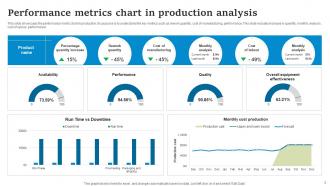
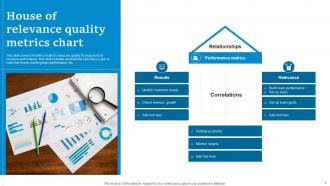
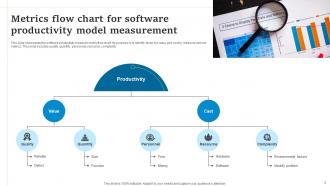
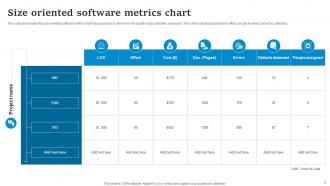
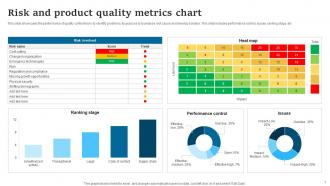
Introducing our dynamic Metrics Chart PowerPoint PPT presentation your comprehensive solution for unlocking the power of performance metrics in production analytics. This feature-packed PPT empowers businesses with insightful size-oriented metrics charts and cohort analysis metrics charts to drive data-informed decision-making. Visualize and interpret complex data effortlessly with our visually appealing charts, enabling you to gauge project performance and identify areas for improvement. Harness the potential of size-oriented metrics to optimize resource allocation and streamline operations. Additionally, explore the strategic benefits of cohort analysis metrics, enabling you to understand user behavior and retention patterns. Empower your team to make informed choices and achieve peak efficiency with our Metrics Chart PPT. Elevate your analytics game and transform raw data into actionable insights all in one place.
People who downloaded this PowerPoint presentation also viewed the following :
Metrics Chart Powerpoint PPT Template Bundles with all 21 slides:
Use our Metrics Chart Powerpoint PPT Template Bundles to effectively help you save your valuable time. They are readymade to fit into any presentation structure.










FAQs for Metrics Chart Powerpoint
Effective metrics charts should include financial indicators like revenue growth and profit margins, operational metrics such as efficiency ratios and productivity measures, customer analytics including satisfaction scores and retention rates, and strategic KPIs like market share and competitive positioning. These comprehensive dashboards enable organizations to track performance across departments, identify trends quickly, and make data-driven decisions, with many executives finding that visual metric presentations streamline reporting processes and enhance strategic discussions.
Data visualization enhances metrics chart clarity in PowerPoint by leveraging strategic color coding, intuitive chart types, consistent formatting, and interactive elements that guide audience attention. Through thoughtful design choices, organizations streamline complex data interpretation, minimize cognitive load, and accelerate decision-making processes, with many financial services and healthcare institutions finding that well-visualized metrics improve stakeholder engagement and strategic alignment.
Best practices for designing metrics chart templates include using clear visual hierarchy, consistent color schemes, readable fonts, strategic white space, and interactive elements like hover effects or clickable sections. These design principles enhance audience comprehension by minimizing cognitive load, emphasizing key data points, and maintaining professional aesthetics, with many organizations finding that well-designed templates significantly improve presentation impact and stakeholder engagement during critical business reviews.
Customizable metrics chart templates save time by eliminating design work, providing pre-formatted layouts, offering professional styling, and including ready-to-use data visualization structures that require only content updates. These templates enable professionals to focus on analysis rather than formatting, with many finding that presentation preparation time reduces by 60-80% while maintaining consistent branding and visual impact across organizational reports.
Different industries customize their PowerPoint metrics charts by selecting performance indicators that align with their operational priorities, such as patient outcomes and readmission rates in healthcare, sales conversion and customer acquisition costs in retail, and operational efficiency metrics in manufacturing. These tailored approaches enable organizations to visualize sector-specific data through industry-relevant templates, color schemes, and chart formats, ultimately delivering clearer insights and enhanced decision-making capabilities.
Software tools that complement PowerPoint templates for advanced metrics charts include Tableau, Power BI, Excel with advanced charting features, Google Data Studio, and specialized dashboard platforms like Qlik Sense. These technologies enhance presentation capabilities by enabling real-time data integration, interactive visualizations, and automated updates, with many organizations finding that combining PowerPoint's presentation strengths with robust analytics tools delivers more compelling, data-driven storytelling and strategic insights.
Animated metrics charts in PowerPoint enhance storytelling by revealing data progressively, maintaining audience attention, and creating narrative flow that guides viewers through key insights, trends, and conclusions. These dynamic visualizations enable presenters to control pacing, emphasize critical turning points, and build compelling arguments step-by-step, with many organizations finding that animated charts significantly improve audience engagement and message retention.
Accessible metrics chart PowerPoint templates should include high-contrast color schemes, clear sans-serif fonts, alternative text descriptions for screen readers, consistent formatting, and simplified visual elements that avoid relying solely on color coding. These design elements enhance comprehension by providing multiple ways to interpret data, ensuring readability across different devices and abilities, while enabling presenters to deliver inclusive presentations that reach broader audiences and maximize engagement effectiveness.
Colors and fonts significantly influence metrics chart perception by affecting readability, emotional response, and professional credibility, with warm colors highlighting achievements while cool colors suggest stability and reliability. Strategic font choices enhance data comprehension, with sans-serif fonts improving clarity for numerical data and consistent color schemes building audience trust, ultimately delivering more persuasive presentations and better stakeholder engagement.
Bar charts, line graphs, pie charts, column charts, and gauge charts are most effective for displaying numeric metrics in PowerPoint presentations. These visualization types enable clear data comparison, trend analysis, and performance tracking across different business scenarios, with many organizations finding that strategic chart selection significantly enhances stakeholder comprehension and decision-making processes.
Presenters can effectively convey metrics chart insights by contextualizing data with clear business implications, highlighting key trends and outliers, and connecting findings to actionable recommendations. Through strategic storytelling techniques, presenters transform raw data into compelling narratives, helping audiences understand performance drivers, identify opportunities for improvement, and make informed decisions that ultimately enhance organizational outcomes and competitive positioning.
Peer feedback enhances metrics chart template selection through diverse perspective evaluation, visual clarity assessment, data interpretation validation, and audience-specific relevance testing. Through collaborative review processes, teams identify potential misalignments, optimize visual hierarchies, and ensure templates effectively communicate key performance indicators, with many organizations finding that peer-validated templates deliver significantly higher stakeholder engagement and clearer decision-making outcomes.
Branding plays a crucial role in customizing metrics chart PowerPoint templates by ensuring visual consistency through corporate colors, fonts, logos, and design elements that reinforce company identity. This strategic alignment enhances professional credibility, strengthens brand recognition across presentations, and creates cohesive reporting standards, with many organizations finding that branded templates streamline design processes while delivering more impactful stakeholder communications.
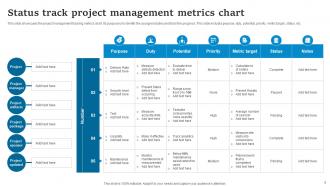
Metrics charts in PowerPoint enable project managers to track progress through visual dashboards displaying key performance indicators, milestone completion rates, budget utilization, timeline adherence, and resource allocation metrics. These comprehensive tracking tools streamline project oversight by providing real-time visibility into deliverables, identifying potential bottlenecks early, and facilitating data-driven decision making, ultimately enhancing team accountability and project success rates.
Presenters often struggle with data overwhelm, unclear visual hierarchy, inconsistent formatting, and difficulty highlighting key insights from complex metrics. Professional templates mitigate these challenges by providing structured layouts, pre-designed visual emphasis tools, and standardized formatting that guides audience attention, ultimately enabling presenters to deliver clearer data narratives and more impactful business presentations.
-
Like always a great experience with you guys. Always there on the drop of hat to help.
-
Professional and unique presentations.