

Monthly Project Accomplishment Organizational Dashboard




Try Before you Buy Download Free Sample Product
 Impress Your
 Audience
 100%
100% Editable
 Save Hours
 of Time


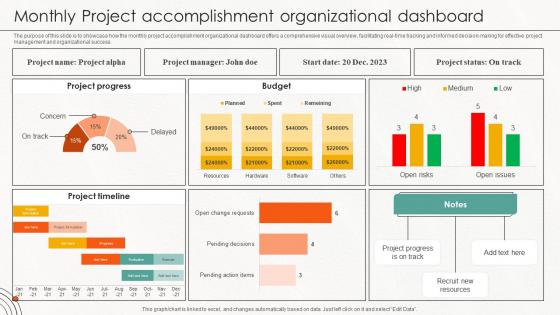
The purpose of this slide is to showcase how the monthly project accomplishment organizational dashboard offers a comprehensive visual overview, facilitating real-time tracking and informed decision-making for effective project management and organizational success.
People who downloaded this PowerPoint presentation also viewed the following :
Monthly Project Accomplishment Organizational Dashboard with all 10 slides:
Use our Monthly Project Accomplishment Organizational Dashboard to effectively help you save your valuable time. They are readymade to fit into any presentation structure.










FAQs for Monthly Project
Key project metrics include timeline progress, budget utilization, resource allocation, milestone completion rates, risk indicators, and quality measures. These metrics enable project managers to identify bottlenecks, optimize resource distribution, and maintain stakeholder transparency, with many organizations finding that comprehensive dashboards ultimately deliver faster project delivery and enhanced team accountability.
Visual elements enhance project dashboard usability by improving data comprehension, reducing cognitive load, and enabling faster decision-making through intuitive design patterns, color coding, and progressive disclosure. These design principles streamline information processing by highlighting critical metrics, organizing complex data hierarchically, and providing immediate visual cues, with many project managers finding that well-designed dashboards significantly accelerate project oversight and stakeholder communication.
**INPUT**: What tools or software are best suited for creating project dashboards? **OUTPUT**: Project dashboard tools include Microsoft Project, Tableau, Power BI, Asana, Monday.com, and Smartsheet, each offering unique visualization and tracking capabilities. These platforms streamline project management by enabling real-time collaboration, automated reporting, and customizable metrics tracking, with many organizations finding that integrated dashboards ultimately deliver enhanced transparency and faster decision-making across teams. [Word count: 56 words]
Real-time data integration in project dashboards is achieved through APIs, automated data feeds, cloud-based synchronization, database connections, and webhook implementations. These technologies streamline information flow by eliminating manual updates, reducing lag time, and ensuring accuracy across all project metrics, with many organizations finding that seamless integration ultimately delivers enhanced decision-making capabilities and operational efficiency.
User accessibility plays a crucial role in project dashboard design by ensuring clear navigation, readable fonts, color contrast compliance, keyboard functionality, and screen reader compatibility. These design principles enable diverse teams to effectively monitor project progress, make informed decisions, and collaborate seamlessly, ultimately delivering broader organizational engagement and improved project outcomes across all user capabilities.
A project dashboard facilitates better team collaboration by providing centralized visibility into project status, real-time updates, shared metrics, and transparent task assignments across all stakeholders. Through unified data visualization, teams streamline communication, reduce information silos, and enhance coordination, with many organizations finding that dashboard-driven transparency significantly improves decision-making speed and overall project outcomes.
Common pitfalls include overcrowding with unnecessary metrics, lacking clear visual hierarchy, using inconsistent data sources, ignoring user-specific needs, and poor mobile responsiveness. These design flaws reduce dashboard effectiveness by creating confusion, slowing decision-making, and undermining user adoption, with many project teams finding that streamlined, role-based dashboards deliver significantly better engagement and actionable insights.
Project dashboards can be customized through role-based views, adjustable metrics displays, personalized KPI selections, and flexible reporting frequencies tailored to specific stakeholder requirements. Executives typically prefer high-level progress summaries and budget overviews, while project managers need detailed task tracking and resource allocation insights, ultimately enabling more informed decision-making across all organizational levels.
The most impactful project dashboard visualizations include Gantt charts, milestone trackers, budget burn-down charts, resource allocation maps, and real-time progress indicators. These visual elements streamline project oversight by highlighting critical path dependencies, budget variance, and team workload distribution, enabling project managers to make faster decisions and deliver projects on time while maintaining stakeholder transparency.
**INPUT**: How can you measure the success of a project dashboard post-implementation? **OUTPUT**: Project dashboard success can be measured through user adoption rates, decision-making speed improvements, reduction in status meetings, and enhanced project visibility across teams. Organizations typically track metrics like time-to-insight, stakeholder engagement levels, and project delivery accuracy, with many finding that effective dashboards reduce reporting overhead by 40-60% while significantly improving strategic alignment.
Project dashboard strategies include intuitive navigation, strategic color coding, customizable views, progressive information disclosure, and consistent visual hierarchy. These approaches streamline decision-making by prioritizing critical metrics, grouping related data logically, and enabling role-based customization, with many organizations finding that clean, focused dashboards enhance team productivity and project transparency.
Historical data can be effectively represented through trend lines, comparative charts, milestone timelines, performance metrics over time, and variance analysis against baselines. These visualization methods enable project managers to identify patterns, forecast future outcomes, and make data-driven decisions, with many organizations finding that historical insights significantly enhance project planning and risk mitigation strategies.
Best practices for updating and maintaining a project dashboard include establishing regular update schedules, ensuring data accuracy through automated feeds, maintaining visual consistency, and focusing on actionable metrics that align with stakeholder needs. These practices streamline project oversight by providing real-time visibility, enhancing team coordination, and enabling faster decision-making, with many organizations finding that consistent dashboard maintenance ultimately delivers improved project outcomes and enhanced operational efficiency.
Incorporating user feedback to improve project dashboards involves conducting regular user interviews, analyzing usage patterns, implementing A/B testing for different layouts, and gathering surveys about functionality preferences. Through iterative design cycles, organizations can enhance dashboard usability, streamline data visualization, and customize reporting features, ultimately delivering more intuitive interfaces and better decision-making capabilities for project teams.
Mobile compatibility in modern project dashboards is essential because teams increasingly work remotely, travel frequently, and need real-time project insights across devices. This flexibility enables project managers to monitor progress, respond to issues, and make decisions from anywhere, while team members can update tasks, check deadlines, and collaborate seamlessly, ultimately delivering faster project delivery and enhanced productivity in today's mobile-first work environment.
-
Been using SlideTeam for some time now…can’t imagine why I wasted all that time in front of the screen trying to make the perfect presentation.
-
The pricing page of this website is very sorted. I felt no pain while buying the PPTs.