

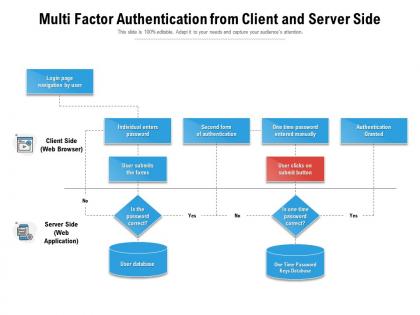
Multi factor authentication from client and server side




Try Before you Buy Download Free Sample Product
 Impress Your
 Audience
 100%
100% Editable
 Save Hours
 of Time


Our Multi Factor Authentication From Client And Server Side are topically designed to provide an attractive backdrop to any subject. Use them to look like a presentation pro.
People who downloaded this PowerPoint presentation also viewed the following :
Multi factor authentication from client and server side with all 2 slides:
Use our Multi Factor Authentication From Client And Server Side to effectively help you save your valuable time. They are readymade to fit into any presentation structure.
FAQs for Multi factor authentication from client
The most common MFA factors include something you know (passwords, PINs), something you have (smartphones, hardware tokens), something you are (fingerprints, facial recognition), somewhere you are (location-based verification), and something you do (behavioral patterns). These authentication layers work together to significantly reduce security breaches, streamline access management, and enhance user verification, with financial institutions and healthcare organizations finding that layered approaches deliver both robust protection and improved operational efficiency.
MFA significantly enhances security by requiring multiple verification methods—something you know, have, or are—making unauthorized access exponentially more difficult than single passwords alone. Even if hackers obtain login credentials, they cannot bypass additional authentication layers like biometrics or mobile tokens, with financial institutions and healthcare organizations finding that MFA reduces breach risks by over 99% while maintaining user accessibility.
Multi-Factor Authentication vulnerabilities include SMS interception through SIM swapping, phishing attacks targeting authentication apps, biometric spoofing, hardware token theft, and social engineering bypassing backup codes. While these challenges exist, organizations can mitigate risks through strategic combinations of methods, with many financial institutions and healthcare providers finding that layered approaches significantly reduce successful breach attempts.
Organizations can effectively implement MFA by conducting user education campaigns, offering multiple authentication options like SMS, authenticator apps, and biometrics, establishing phased rollouts starting with high-privilege accounts, and providing comprehensive technical support. This strategic approach minimizes user resistance while enhancing security, with many financial institutions and healthcare organizations finding that gradual deployment combined with clear communication delivers stronger compliance and significantly reduced security incidents.
Biometric factors serve as highly secure authentication elements in MFA by utilizing unique physical characteristics like fingerprints, facial recognition, iris scans, and voice patterns that are nearly impossible to replicate. These biological identifiers enhance security significantly while streamlining user experience, with many financial institutions and healthcare organizations finding that biometric integration reduces fraud attempts while accelerating secure access to sensitive systems.
Multi-Factor Authentication presents both enhanced security and potential friction challenges, requiring careful balance between protection and usability through streamlined workflows, intuitive interfaces, and strategic authentication method selection. While initial implementation may temporarily increase login times, organizations across banking, healthcare, and e-commerce find that well-designed MFA systems ultimately deliver stronger user trust, reduced fraud concerns, and improved customer confidence without significantly impacting user satisfaction.
MFA significantly strengthens compliance with data protection regulations like GDPR, HIPAA, and SOX by providing robust access controls, audit trails, and risk mitigation frameworks that regulatory bodies increasingly require. Through layered authentication protocols, organizations demonstrate due diligence in protecting sensitive data, reduce breach liability, and meet stringent security standards, ultimately delivering enhanced regulatory confidence while minimizing compliance-related penalties and reputational risks.
Hardware tokens are physical devices offering enhanced security through dedicated encryption chips and offline functionality, while software-based MFA solutions provide greater convenience, cost-effectiveness, and easier deployment through smartphone apps and cloud integration. Many financial institutions use hardware tokens for high-security transactions, whereas businesses increasingly adopt software solutions for employee access, with organizations finding that hybrid approaches deliver both robust protection and user accessibility.
Businesses can educate users about MFA through interactive training sessions, clear policy documentation, regular security awareness campaigns, practical demonstrations, and ongoing communication about emerging threats. Through workshops, email updates, and hands-on setup guidance, organizations streamline user adoption while emphasizing how MFA protects personal data and company resources, ultimately delivering enhanced security confidence and reduced breach risks.
Companies face challenges including user resistance to additional steps, integration complexities with legacy systems, increased IT support requests, and initial implementation costs. However, organizations overcome these through phased rollouts starting with high-risk users, comprehensive training programs, and choosing MFA solutions with seamless integration capabilities, ultimately finding that gradual implementation reduces friction while significantly enhancing security posture.
MFA integrates into existing security protocols through API connections, single sign-on systems, identity management platforms, and directory services like Active Directory. Organizations seamlessly embed MFA into network access controls, application logins, and cloud platforms, with many enterprises finding that strategic integration enhances overall security posture while maintaining user productivity and operational efficiency.
MFA may not be recommended for low-risk internal systems with minimal sensitive data, emergency access scenarios requiring immediate entry, or legacy systems lacking integration capabilities. While MFA significantly enhances security, these situations prioritize operational continuity over additional authentication layers, with many organizations finding that risk-based authentication provides better balance between security and accessibility in such contexts.
Best practices for managing MFA backup codes include storing them in secure password managers, printing physical copies for safe storage, avoiding cloud storage or email, and regularly updating codes after use. Organizations should encrypt backup codes, limit access to authorized personnel only, establish clear recovery procedures, and conduct periodic audits, with many financial institutions finding that proper backup code management significantly reduces account lockouts while maintaining robust security standards.
AI and machine learning significantly enhance MFA by enabling adaptive authentication, behavioral biometrics, risk-based scoring, and intelligent threat detection capabilities. These technologies streamline security processes by analyzing user patterns, device characteristics, and contextual factors in real-time, with financial institutions and healthcare organizations finding that AI-powered MFA delivers stronger protection while reducing friction for legitimate users.
Remote work significantly amplifies MFA's importance by expanding security perimeters beyond traditional office networks, making multi-layered authentication essential for protecting distributed access points, cloud applications, and personal devices. Organizations increasingly find that MFA becomes more effective in remote environments, streamlining secure access while reducing IT overhead, with many companies reporting enhanced security posture and employee productivity.
-
Use of icon with content is very relateable, informative and appealing.
-
Wonderful templates design to use in business meetings.
-
Qualitative and comprehensive slides.
-
Great designs, Easily Editable.
-
Very well designed and informative templates.
-
Presentation Design is very nice, good work with the content as well.
-
Wonderful templates design to use in business meetings.
-
Great quality product.