


Multi Factor Authentication Powerpoint Ppt Template Bundles





Try Before you Buy Download Free Sample Product
 Impress Your
Audience
 100%
Editable
 Save Hours
of Time


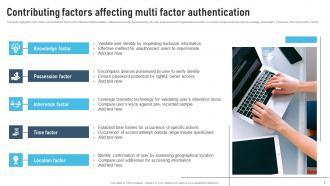
Multi Factor Authentication MFA is a robust security measure designed to enhance digital authentication beyond traditional passwords. By requiring users to provide multiple forms of identification, such as passwords, bio metrics, or authentication tokens, MFA adds an extra layer of protection against unauthorised access. This multi layered approach significantly reduces the risk of identity theft, phishing, and other cyber threats. MFA enhances security in online banking, e commerce, and various digital platforms, ensuring that only authorised individuals can access sensitive information or perform transactions. Its effectiveness lies in the combination of factors, reinforcing the overall security posture and providing a reliable defence against evolving cyber threats
People who downloaded this PowerPoint presentation also viewed the following :
Multi Factor Authentication Powerpoint Ppt Template Bundles with all 30 slides:
Use our Multi Factor Authentication Powerpoint Ppt Template Bundles to effectively help you save your valuable time. They are readymade to fit into any presentation structure.






FAQs for Multi Factor Authentication Powerpoint
MFA is a lifesaver, honestly. You're adding extra security layers on top of passwords, which cuts way down on breaches and unauthorized access. So even if hackers get your employees' passwords somehow, they're still locked out without that second authentication step. Most compliance stuff requires it now anyway - kill two birds with one stone, you know? Yeah, the initial setup is annoying and your team might grumble a bit. But protecting your business data and customer info is huge. I'd start with your most important systems first, then expand from there.
So MFA is a lifesaver when your team's working remotely. You know how sketchy home WiFi can be, right? Instead of just passwords - which let's be real, everyone reuses anyway - you're making people use their phone or a token too. Even if some hacker gets their password from a phishing email, they still can't get in without that second thing. Remote work makes this way more critical since you can't control what router someone bought at Best Buy three years ago. Start with your most important stuff first: email, VPN, cloud apps. Total game changer.
So there are three main types - passwords/PINs (stuff you know), your phone or a token (stuff you have), and biometrics like fingerprints (stuff you are). Most apps combine the first two. You'll enter your password, then they text you a code or you use an authenticator app. Face ID and fingerprint scanners are everywhere now since phones have them built in. Honestly, SMS codes are probably the easiest place to start if you're trying to set this up somewhere - though Google Authenticator is way more secure if you don't mind the extra step.
Yeah it adds like 10 seconds to logging in, but you get used to it pretty quick. Most annoying part is when your phone's dead or in another room - hate that. But here's the thing, once you set up "trusted devices" it remembers your laptop for weeks so you're not constantly doing the two-step thing. I'd definitely set up backup methods though, maybe your work phone too? Trust me, getting locked out of your accounts is way worse than the minor hassle. The security boost is actually huge, especially if you're doing banking or work stuff online.
So basically, 2FA and MFA are super similar but not exactly the same thing. 2FA means you're using exactly two ways to prove who you are - like your password plus getting a code texted to you. MFA is the bigger umbrella term that includes two OR more factors. Companies love saying "MFA" even when they just mean regular old 2FA because it sounds more professional or whatever. The security concept behind both is identical though - you're mixing different types of proof like something you know, something you have, etc. Honestly? You can pretty much use either term and people will know what you mean.
Honestly, it depends on what kind of business you're running. A bank obviously needs way tighter security than like a pottery studio's login page. SMS codes are super cheap but hackers can intercept them pretty easily these days. Hardware tokens are rock solid but they'll cost you. Google Authenticator and similar apps are probably your best bet - not too expensive, pretty secure, and most people can figure them out without calling IT every five minutes. Oh, and definitely test whatever you pick with a few people first. Trust me on that one.
So biometric authentication is basically the "something you are" part of multi-factor authentication - your fingerprint, face, voice, that kind of stuff. Can't lose your face like you can a password, which is honestly pretty nice. Way harder for hackers to fake too. Most phones already have the sensors built in, so it's not like you need special equipment or anything. You'd still pair it with passwords or tokens for that layered security thing. Just make sure wherever your biometric data gets stored is actually secure, and always have a backup method ready in case the sensor acts up.
Yeah, tons of industries have MFA requirements now. Healthcare's got HIPAA breathing down their necks, financial companies deal with PCI DSS and SOX stuff. Government contractors? They're stuck with NIST standards. GDPR in Europe pushes for it too. The crazy part is how fast this list keeps expanding - regulators are finally waking up to cyber threats. Even if your industry doesn't explicitly require it yet, most compliance frameworks are basically screaming "use MFA already!" I'd definitely talk to your compliance people about what hits your company specifically. Those non-compliance fines are absolutely savage.
Yeah MFA is honestly kind of a pain sometimes. Users will complain about having to grab their phone constantly - and I mean, fair enough. But the real nightmare? When someone loses their device or gets a new phone without updating everything first. Then you're stuck doing account recovery for days. There's always that one stubborn person who just won't download the authenticator app too, which drives me crazy. Still though, set up good backup methods and it's worth the headache overall.
Honestly, start with real horror stories from companies like yours - people pay attention when they realize "oh shit, that could've been us." Run some phishing tests so they actually feel how easy it is to get tricked, then show how MFA would've saved their ass. Skip the boring email announcements and do lunch sessions instead. Here's the thing - don't make it sound like IT being paranoid. Tell them it protects their personal stuff too since everyone reuses passwords anyway (we all do it). Most important part? Let them set it up on their actual work accounts right there. Demos are useless.
So basically everyone's moving away from those terrible SMS codes - finally! Push notifications are way better, plus you've got passwordless stuff like Face ID becoming huge. There's also this adaptive MFA thing that changes based on how risky your login looks, which is pretty smart. FIDO2 and WebAuthn are the new standards everyone's adopting. Even biometrics are getting weird now - they can recognize your typing patterns apparently? For your company though, I'd start with push authenticators since they're easiest to roll out. Then maybe look at passwordless later when people aren't freaking out about change.
Most hackers hit the "something you have" part first - like doing SIM swaps to steal your phone number or phishing for those one-time codes. Some use malware that grabs SMS messages as they come in. The really good ones target your recovery options or hijack your session after you've logged in. Honestly, I'm always impressed by how sneaky they get - probably shouldn't be though lol. Best bet is switching to app-based authenticators instead of SMS. Keep those backup codes safe somewhere. And definitely be suspicious if you get random auth requests, even legit-looking ones.
So basically, if someone gets your password (and trust me, it happens), they still can't access your stuff without that second step. It's like having two locks instead of one. Data breaches are everywhere these days, and phishing emails fool people constantly. But even if they crack your password, they'd also need your phone or whatever second factor you're using. Not perfect, but way better protection. Definitely turn it on for email and banking - honestly, I put it on everything important now. Makes hackers move on to easier targets.
So you need to watch a few things to know if MFA's actually doing its job. Check your login success rates vs failures - more failures could mean users are struggling OR you're blocking bad guys (honestly the second one's not terrible). See which backup methods people prefer, like SMS vs authenticator apps. That tells you how well adoption's going. Also track your support tickets for MFA problems and how long logins take now. The real test though? Compare security incidents before and after you rolled it out. I'd do a quarterly review of all this stuff and tweak things based on what you're seeing.
Start with admin accounts and privileged users - that's where you'll see the biggest impact security-wise. SMS is sketchy since it can get intercepted, so go with authenticator apps or hardware tokens if you can swing it. Roll it out slowly to everyone else or your help desk will hate you (learned this the hard way). Set up backup recovery methods and whitelist your corporate IPs. Oh, and definitely test everything first - nothing worse than locking everyone out on day one. Train people beforehand so they're not completely lost when it hits.
-
Easily Editable.
-
I want to express my gratitude to SlideTeam’s presentation design services team for helping me create the best presentation of my life!