

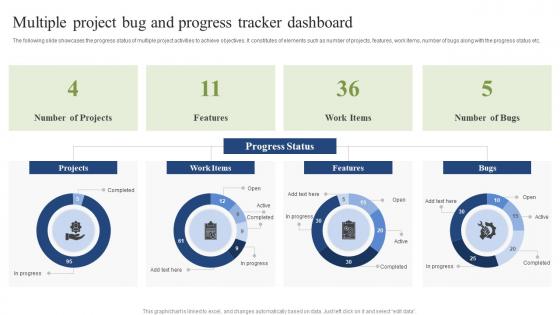
Multiple Project Bug And Progress Tracker Dashboard




Try Before you Buy Download Free Sample Product
 Impress Your
 Audience
 100%
100% Editable
 Save Hours
 of Time


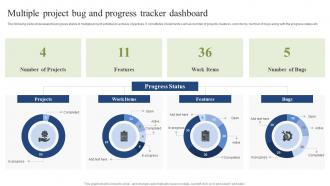
The following slide showcases the progress status of multiple project activities to achieve objectives. It constitutes of elements such as number of projects, features, work items, number of bugs along with the progress status etc.
People who downloaded this PowerPoint presentation also viewed the following :
Multiple Project Bug And Progress Tracker Dashboard with all 7 slides:
Use our Multiple Project Bug And Progress Tracker Dashboard to effectively help you save your valuable time. They are readymade to fit into any presentation structure.





FAQs for Multiple Project Bug And
Effective bug tracker dashboards include real-time bug status overviews, priority classification systems, assignment tracking, resolution timelines, and customizable filtering options. These features streamline project management by enabling rapid issue identification, enhancing team collaboration, and accelerating resolution workflows, with many software development teams finding that comprehensive dashboards ultimately reduce debugging time and improve product quality.
Visualizations enhance bug tracker dashboard usability by transforming complex data into intuitive charts, graphs, and heat maps that enable quick pattern recognition and priority assessment. Through visual representations like sprint burndown charts, severity distribution graphs, and team workload displays, development teams can instantly identify bottlenecks, track resolution trends, and optimize resource allocation, ultimately delivering faster debugging cycles and improved software quality.
Comprehensive bug reporting should track severity levels, resolution times, bug discovery rates, testing phase distributions, and assignee workloads across development cycles. These metrics enable teams to identify bottlenecks, optimize resource allocation, and improve software quality, with many organizations finding that tracking these key indicators reduces release delays and enhances customer satisfaction.
Integration with development tools enhances bug tracker dashboards by enabling seamless workflow automation, real-time synchronization, and centralized project visibility across teams. Through API connections with GitHub, Jira, and CI/CD platforms, development teams streamline issue tracking, automate status updates, and accelerate resolution times, ultimately delivering faster deployment cycles and improved software quality.
User adoption of bug tracker dashboards depends on intuitive interface design, comprehensive customization options, seamless integration with existing development tools, real-time visibility into bug status, and automated workflow capabilities. When dashboards streamline bug reporting, enhance team collaboration, and provide actionable insights through clear metrics, development teams find they can resolve issues faster, improve product quality, and ultimately deliver more reliable software with greater operational efficiency.
A bug tracker dashboard facilitates team communication by providing real-time visibility into bug status, priority levels, assignment details, and resolution progress, enabling seamless coordination across development, testing, and product management teams. Through centralized reporting and automated notifications, teams can streamline handoffs, reduce miscommunication, and accelerate issue resolution, ultimately delivering faster product releases and enhanced customer experiences.
Real-time data transforms bug tracking decision-making by enabling immediate priority assessment, faster resource allocation, and proactive issue resolution before they escalate into major problems. Through live dashboards, development teams can identify critical patterns, streamline workflow bottlenecks, and enhance customer satisfaction, with many software organizations finding that instant visibility ultimately delivers faster release cycles and improved product quality.
Customization enables bug tracker dashboards to align with diverse team workflows, priorities, and reporting needs through configurable views, custom fields, personalized filters, and role-based access controls. Development teams might prioritize severity metrics while QA teams focus on testing phases, with many organizations finding that tailored dashboards enhance productivity, streamline collaboration, and deliver faster resolution times across departments.
Historical data improves bug-fixing processes by identifying recurring patterns, prioritizing critical issues, and optimizing resource allocation across development cycles. Through analytics-driven insights, software teams can predict bug hotspots, streamline testing protocols, and reduce resolution times, with many organizations finding that data-driven approaches ultimately enhance product quality and accelerate release schedules.
Bug prioritization best practices include categorizing by severity level, business impact, customer-facing visibility, frequency of occurrence, and resource requirements for resolution. These frameworks enable development teams to streamline workflow management by addressing critical system failures first, minimizing customer experience disruptions, and optimizing resource allocation, with many organizations finding that strategic prioritization ultimately delivers faster resolution times and enhanced product reliability.
User roles and permissions in bug tracker dashboards are managed through hierarchical access controls, role-based assignments, and granular permission settings that define viewing, editing, and administrative capabilities. Organizations typically implement developer, tester, project manager, and administrator roles with customized access levels, enabling teams to maintain security while streamlining collaboration, ultimately delivering controlled workflows and enhanced project transparency.
Mobile compatibility enhances bug tracker dashboards by enabling real-time notifications, on-the-go status updates, instant priority adjustments, and immediate team communication from any location. This accessibility allows development teams, QA professionals, and project managers to respond to critical issues faster, maintain continuous workflow visibility, and accelerate resolution times, ultimately delivering improved software quality and enhanced team productivity.
Common pitfalls include overcrowding the interface with excessive data, poor categorization of bug severity levels, lack of real-time updates, inadequate filtering options, and unclear visual hierarchies. Many development teams find that dashboards without customizable views, proper stakeholder permissions, and intuitive navigation ultimately hinder productivity, while streamlined designs with focused metrics enhance team collaboration and accelerate resolution timelines.
End-user feedback improves bug tracker dashboards by identifying workflow gaps, highlighting confusing interface elements, and revealing missing functionality that impacts daily operations. Through user surveys, usability testing, and direct input sessions, development teams can streamline navigation, enhance reporting capabilities, and customize visualizations, ultimately delivering more intuitive dashboards that accelerate issue resolution and improve team productivity.
Cloud-based bug tracker dashboards offer automatic updates, enhanced accessibility, reduced maintenance overhead, scalable storage capacity, and seamless team collaboration across locations. These platforms enable development teams to access real-time bug data from anywhere, minimize IT infrastructure costs, and automatically scale during high-traffic periods, with many software companies finding that cloud solutions deliver faster deployment times and improved cross-functional visibility.
-
Unique design & color.
-
The Designed Graphic are very professional and classic.