

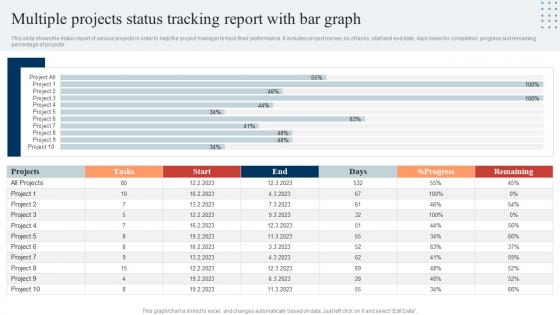
Multiple Projects Status Tracking Report With Bar Graph




Try Before you Buy Download Free Sample Product
 Impress Your
 Audience
 100%
100% Editable
 Save Hours
 of Time


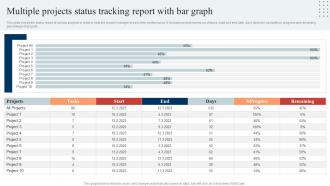
This slide shows the status report of various projects in order to help the project manager to track their performance. It includes project names, no.of tasks, start and end date, days taken for completion, progress and remaining percentage of projects.
People who downloaded this PowerPoint presentation also viewed the following :
Multiple Projects Status Tracking Report With Bar Graph with all 7 slides:
Use our Multiple Projects Status Tracking Report With Bar Graph to effectively help you save your valuable time. They are readymade to fit into any presentation structure.





FAQs for Multiple Projects Status Tracking Report
Honestly, I'd start with Asana if you want detailed project tracking - their timeline views are super helpful. Trello's the opposite though, really simple with those drag-and-drop cards (which are oddly satisfying to move around lol). Monday.com falls somewhere between those two and has decent automation stuff. Quick thought - if your team's already using Slack or Teams constantly, their project features aren't terrible either. Just pick whatever people will actually use consistently. Nobody wants another app they'll ignore. Try the free versions first and see what clicks with everyone before you commit to paying for anything.
Dude, skip the endless spreadsheets - nobody reads those anyway. Gantt charts show your timeline instantly, and progress bars make completion rates super clear. Color-coded dashboards are clutch for flagging delays or risks. I swear, stakeholders zone out the second they see walls of text, but throw in some clean visuals and they're suddenly paying attention. Charts help you catch problems way faster than staring at raw numbers too. Oh, and trends become obvious. Try swapping half your bullet points for visuals next time - people actually appreciate it.
So definitely track your schedule progress - like actual % done vs what you planned. Budget stuff too, obviously (spent vs what you have left). Milestone dates are huge. Honestly, the risk indicators and resource utilization numbers usually show you what's really happening behind the scenes. Quality metrics matter depending on your project - defect rates, customer happiness, whatever fits. Oh, and call out any blockers or dependencies that are screwing things up. Charts and dashboards are your friend here. Nobody wants to read paragraphs when they can just glance at a visual and get it.
Weekly updates work best for most stuff, but honestly it depends on how crazy your project is. Fast-moving or urgent things? Go daily. Longer projects where nothing changes much? Monthly's probably fine. I always start with weekly - it's like the goldilocks of updates, not too much but not radio silence either. Nobody wants their inbox flooded (learned that the hard way). Stay consistent with whatever you pick though. Ask your stakeholders after a few rounds if they want more detail or can handle less frequent check-ins. They'll tell you.
Honestly, the hardest part is getting your team to actually tell you what's going on. Half the time they're sugarcoating their progress or just forget to update you entirely. Then you've got requirements changing every five minutes and deadlines that make zero sense. Dependencies between different work streams? Good luck tracking those. Oh, and everyone uses different tools and reporting styles, so your data becomes a hot mess real quick. Set up weekly check-ins (non-negotiable), pick one tracking system and stick with it, then standardize how people report back to you.
So agile is actually a game-changer for tracking projects. Those short sprints mean you catch problems right away instead of finding out weeks later that everything's broken. Daily standups are where the magic happens - seriously, just start doing those if you aren't already. You'll be shocked how much clearer everything becomes. The visual stuff like Kanban boards makes it so easy to see progress at a glance (I'm lowkey obsessed with updating mine). Burndown charts show exactly where you stand. Oh, and retrospectives help you keep tweaking your approach. It's way better than the old school "hope and pray" method.
Honestly, team feedback is everything for tracking project status. Your people will spot problems way before they hit official reports - they always do. Regular check-ins help you see what's really happening vs what should be happening on paper. Blockers, scope changes, resource drama... the team knows first. But here's the thing - you can't just ask "how's everything going?" and expect useful answers. Ask specific questions and make it safe for people to be honest. Otherwise your status updates are basically creative writing, and nobody wants that mess.
Honestly, tracking project status is like having a smoke detector for your work - it catches problems while you can still fix them. You'll notice patterns when you're checking milestones and budgets regularly. Tasks running behind schedule? Budget creeping up? Those are your red flags right there. Way better than finding out everything's screwed after it's too late to recover. I'd say do weekly check-ins and maybe set up some kind of dashboard (doesn't have to be fancy). The whole point is spotting trends early enough to actually pivot instead of just watching things fall apart.
So quantitative is all the hard numbers - budget, tasks done, timeline stuff. Easy to put in charts and see exactly where you stand percentage-wise. Qualitative is more like... how's the team feeling? Are stakeholders happy? What's the quality looking like? Way harder to measure but honestly just as crucial. You really need both though. The numbers show your current spot, but the qualitative stuff? That's where you'll catch problems before they blow up. I've seen projects look great on paper but the team was totally burned out.
Templates are honestly a lifesaver - they handle all the "wait, what am I supposed to be tracking again?" moments. You get pre-built structures with the important fields already there, so you're not starting from zero every single time. Your whole team stays on the same page too since everyone's using identical formats and metrics. Makes comparing projects actually possible instead of a nightmare. Oh, and you can make different versions for different stuff - marketing campaigns need different tracking than product launches, obviously. Just copy whatever template fits and you're good to go. Saves so much headache upfront.
Yeah, it totally works! Once everyone can see what you're doing, you naturally step up your game. People stop procrastinating as much because there's nowhere to hide. I've seen teammates who used to be flaky suddenly become super proactive about updates - it's wild how that visibility changes behavior. Some folks hate it at first (the transparency can feel weird), but they adjust. When your progress is right there for everyone to see, making excuses becomes awkward fast. Maybe start with weekly check-ins instead of daily ones? You'll notice people getting more accountable pretty quick.
Honestly, integration is a game-changer for all that tedious status updating you're doing. Hook up your tracking system to Jira or Asana and watch task progress sync automatically - no more copy/paste hell. You'll spot bottlenecks way earlier, and your team actually knows what's happening without those endless check-ins. The auto-generated reports alone will save you hours (probably my favorite feature if I'm being honest). I'd test it on one critical project first to make sure the workflow clicks, then roll it out to everything else. Trust me, once you see how smooth it runs, you won't go back.
Dude, color codes are a game changer for tracking stuff. Your brain just gets visual info way faster than text - so you can glance at a project board and instantly see what's screwed without reading anything. Red means blocked, yellow's risky, green's good to go. Basically like traffic lights but for work. Team meetings become so much smoother since everyone spots the problem areas right away and actually talks about what matters. I'd start with just three colors though. Don't overcomplicate it unless you really have to.
Start with RAG status - red, amber, green keeps it simple. Highlight any major risks or blockers right up front. Don't dump every detail on them (I learned this the hard way). One page max with bullets covering budget changes, timeline shifts, and which milestones you hit or missed. Budget variance is huge - they always want those numbers. End with specific asks like budget approval or extra resources. Short sentences work. They don't care about technical stuff, just what decisions they need to make and what's actually broken.
First thing - get everyone tracking the same stuff using the same definitions. Hours vs estimates, milestones, blockers, whatever. Weekly updates beat monthly ones hands down because problems don't snowball as much (daily's probably too much unless you're totally slammed). Train people to call out risks before they explode into actual disasters. Oh, and this is critical - don't blame people for reporting delays. That blame culture will get you nothing but sugar-coated lies instead of real updates. Trust me on that one.
-
You know what? I'm so glad I opted for this PPT design. It has been a total game-changer for me and my presentations. Thank you!
-
Informative presentations that are easily editable.