

Network Architecture Proposal Powerpoint Presentation Slides




Try Before you Buy Download Free Sample Product
 Impress Your
 Audience
 100%
100% Editable
 Save Hours
 of Time


The Network Architecture Proposal is designed to help organizations enhance their security and flexibility framework by upgrading to the latest mechanisms. Check out our insightful Network Architecture Proposal PowerPoint presentation that covers details about more robust service solutions. Additionally, this Modern Network Architecture Proposal aims to identify problems with the traditional network architecture system. It also intends to develop a plan for migrating to the latest network architecture framework. Furthermore, our innovative Network Design Proposal deck exhibits details about the expert team, client testimonials, sponsorship agreement, and the terms and conditions. It further incorporates the organizations timeline and contact details. Lastly, this Strategic Network Architecture Proposal can help the company adhere to industrial standards and regulatory compliance requirements. Download our 100 percent editable and customizable template, which is also compatible with Google Slides.
People who downloaded this PowerPoint presentation also viewed the following :
Content of this Powerpoint Presentation
Slide 1: This slide introduces Network Architecture Proposal. State your company name and begin.
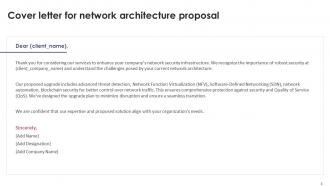
Slide 2: This slide shows Cover letter for network architecture proposal.
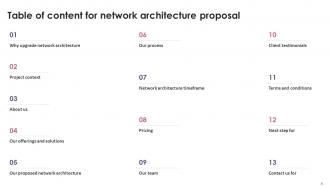
Slide 3: This slide shows Table of Content for the presentation.
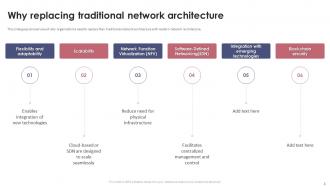
Slide 4: This slide gives an overview of why organizations need to replace their traditional network architecture.
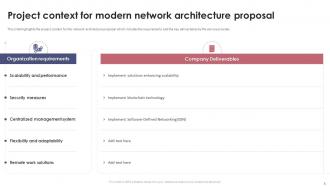
Slide 5: This slide presents Project context for modern network architecture proposal.
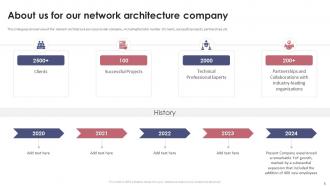
Slide 6: This slide gives an overview of the network architecture service provider company.
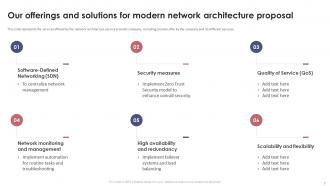
Slide 7: This slide represents the services offered by the network architecture service provider company.
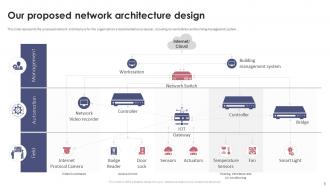
Slide 8: This slide represents the proposed network architecture for the organization's implementation proposal.
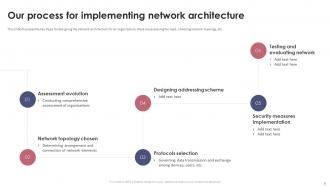
Slide 9: This slide discusses the key steps for designing the network architecture for an organization.
Slide 10: This slide presents Time framework for network architecture proposal.
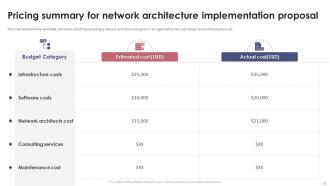
Slide 11: This slide displays Pricing summary for network architecture implementation proposal.
Slide 12: This slide represents an overview of the team structure for the network architecture implementation proposal.
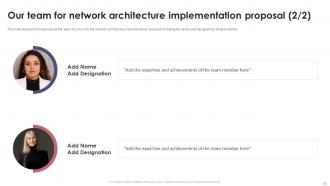
Slide 13: This slide represents Our team for network architecture implementation proposal.
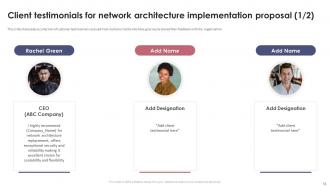
Slide 14: This slide showcases Client testimonials for network architecture implementation proposal.
Slide 15: This slide shows Client testimonials for network architecture implementation proposal.
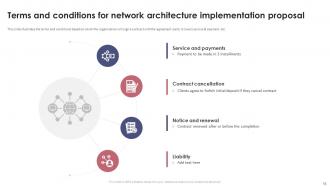
Slide 16: This slide presents Terms and conditions for network architecture implementation proposal.
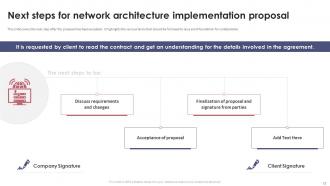
Slide 17: This slide displays Next steps for network architecture implementation proposal.
Slide 18: This is a Contact us slide with address, contact numbers and email address.
Slide 19: This slide contains all the icons used in this presentation.
Slide 20: This slide is titled as Additional Slides for moving forward.
Slide 21: This slide represents the proposed network architecture for the organization's implementation proposal.
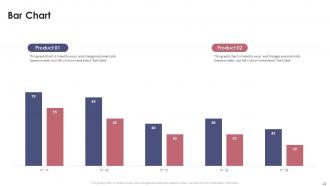
Slide 22: This slide presents Bar chart with two products comparison.
Slide 23: This is a Timeline slide. Show data related to time intervals here.
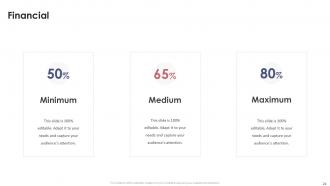
Slide 24: This is a Financial slide. Show your finance related stuff here.
Slide 25: This slide contains Puzzle with related icons and text.
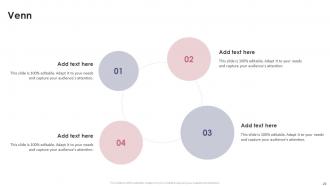
Slide 26: This slide depicts Venn diagram with text boxes.
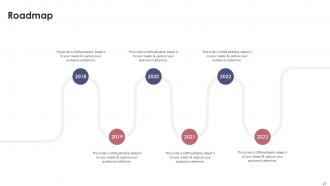
Slide 27: This slide presents Roadmap with additional textboxes.
Slide 28: This is an Idea Generation slide to state a new idea or highlight information, specifications etc.
Network Architecture Proposal Powerpoint Presentation Slides with all 36 slides:
Use our Network Architecture Proposal Powerpoint Presentation Slides to effectively help you save your valuable time. They are readymade to fit into any presentation structure.














FAQs for Network Architecture Proposal
Start with a solid executive summary that explains the "why" before getting into tech details. Cover your current situation (what's busted), proposed fix with network diagrams, hardware/software needs, timeline, and costs. Security is massive - honestly, skip it and they'll tear you apart in the meeting. Business justification matters since you need the non-tech people on board. Don't forget performance metrics so you can actually prove it worked later. Oh, and make sure your diagrams are clean - nothing screams amateur like messy visuals.
Start with auditing everything you've got - hardware, software, bandwidth, the works. Network diagrams are honestly kind of a pain but they'll save you later. Map your topology and find where stuff's choking up. Run tests when everyone's actually using the system, not at 2am when it's dead. Here's the thing though - talk to your users first. They know about weird issues that never show up in monitoring. My old boss used to skip this step and wonder why his "fixes" didn't work. Once you have that baseline data, then you can suggest real solutions instead of just buying the most expensive router and hoping for the best.
Look, start with what you actually need - traffic load, budget, whether stuff can go down without you panicking. Star topology is solid for management but yeah, bottleneck city if you're not careful. Mesh gives you backup routes but costs way more. Most people go down this rabbit hole and forget their actual requirements. I'd honestly just sketch out what you're dealing with now and maybe where you'll be in a year or two. Don't overthink the topology stuff until you know your real needs and how much maintenance headache you can handle.
Dude, horizontal scaling is everything - build that into your design from the start. Don't just keep upgrading individual boxes, add more nodes instead. Load balancers will literally save your life here, they fix most scaling nightmares. Plan your IP scheme with room to grow and segment traffic properly so nothing gets choked. Oh and avoid single points of failure at all costs. Your monitoring should scream at you before you hit limits. Document the scaling steps now while you're not panicking - trust me on this one. Modular architecture makes spinning up new services way easier when traffic spikes.
Definitely hit the basics first - firewalls, network segmentation, and solid access controls. Intrusion detection systems are a must, plus you'll need regular monitoring. Remote VPN access is basically non-negotiable now (learned that one the hard way during COVID). Don't skip patch management protocols and encrypt everything - data in transit AND at rest. Backup and disaster recovery plans too. Honestly, the worst thing you can do is just throw a firewall at it and walk away. Map out what actually matters first, then build layers of protection around those critical assets. That approach always looks way more thoughtful in proposals.
Check your current peak usage first, then tack on 30-40% extra for growth. Run a network tool for about a week - way better than just guessing at numbers. Your busy period traffic is your starting point. Don't forget stuff like backups and updates can randomly spike things too. Factor in any new apps or more users you're planning for. Video calls eat bandwidth like crazy if that's in the mix. Honestly, it's better to overestimate a bit since adding more later costs way more than getting it right from the start.
Honestly, cloud computing is pretty much running the show in network architecture these days. Most companies are going hybrid or multi-cloud because nobody wants to be stuck with just one provider - been there, seen that disaster. You get way better scalability and can actually adjust stuff on the fly based on what you need. Plus the cost savings are real compared to maintaining everything in-house. Oh, and disaster recovery becomes so much easier. When you're looking at proposals, just make sure the cloud stuff actually fits what your business does instead of just being trendy buzzwords thrown around.
Figure out where speed actually matters first. Your main backbone needs the good stuff, but those random edge connections? Standard gear works fine. Most people way overdo it - like 80% of traffic is just people checking email and browsing anyway. Run some traffic analysis to see where you're actually bottlenecked, then spend money fixing those specific spots. Oh, and map out where you think you'll be in 3 years so you're not constantly buying new equipment. Trust me, constantly ripping out gear gets expensive fast.
So first thing - run performance tests on throughput, latency, packet loss under different loads. Don't skip the security stuff either, penetration testing and vulnerability scans are a must. Finance will want that cost-benefit breakdown (good luck with that conversation lol). Test how it scales up and what happens when things break - you need to know your redundancy actually works. Honestly, I'd start small with a pilot program first. Way easier to fix problems in a controlled setup than deal with a network-wide disaster later.
Dude, IoT is gonna flip your whole network setup upside down. Instead of just handling computers and phones, you're suddenly managing thousands of tiny sensors pumping out data 24/7. That old hub-and-spoke thing? Yeah, that's dead. You need edge computing to handle processing locally, plus way more bandwidth everywhere. Security becomes a total nightmare too - I'm not even kidding about that part. Don't try cramming IoT into what you already have. Map out where all these devices will actually sit first, then build backwards from there. Scale has to be baked in from the start or you'll hate yourself later.
Definitely need an executive summary and some visual diagrams - stakeholders love pictures. Document where you are now, what you want to change, and why each piece makes business sense. Security stuff and scalability plans are must-haves too, plus cost breakdowns because finance will definitely ask. Oh, and timelines with risk mitigation strategies. Trust me, being super detailed upfront saves you from endless follow-up meetings later. Keep it all in a shared doc with version control. Don't forget contact info for vendors and team members who'll actually do the work.
Honestly, once a year minimum but that's kinda the bare minimum. Big changes like security breaches or your company doubling in size? Yeah, don't wait for your annual review. I've watched teams ignore their network until everything's on fire - not fun. Startups probably need to check quarterly since they're constantly pivoting and adding stuff. More stable companies can stretch it to yearly. Really depends how fast you're growing or changing things up. Oh, and actually put it in your calendar now or you'll totally forget about it.
Honestly, just go with Visio if you can - it's what everyone expects and does the job well. Lucidchart's pretty solid too, especially if your team likes working in the cloud. There's also Draw.io (they renamed it diagrams.net for some reason) which is completely free and actually works great once you get past the weird interface. For bigger setups, SolarWinds Network Topology Mapper will automatically map out your existing stuff, which is a huge time-saver. But real talk - don't overthink it. Use whatever tool you've already got access to and just get the diagram done.
So here's the thing - you gotta build accessibility right into your network design from the start. Map out which paths your screen readers and voice commands will actually take, then optimize those routes first. Low-latency is huge for critical interactions. Your edge nodes need enough juice to handle real-time captioning and audio descriptions without choking. Redundancy matters too - honestly, nothing's worse than locking people out because your network can't handle assistive tech smoothly. Oh, and don't forget to prioritize accessibility traffic in your routing. It's more processing overhead but totally worth it.
Track your technical stuff first - network latency, throughput, uptime. Sub-100ms latency and 99.9% availability are solid targets. But honestly, the business metrics are just as crucial because your CFO's gonna want ROI numbers. Cost per transaction, scalability metrics, all that fun stuff. Page load times and error rates directly hit customer satisfaction too. Oh, and set up automated monitoring with a dashboard that doesn't suck - you want to catch issues early. I learned that the hard way when our system crashed during peak hours last year.
-
Great designs, really helpful.
-
I am really satisfied with their XYZ products. Used their slides for my business presentations and now I am taking their help for my son's high-school assignments. Super satisfied!!