

Network Optimization Powerpoint Ppt Template Bundles





Try Before you Buy Download Free Sample Product
 Impress Your
 Audience
 100%
100% Editable
 Save Hours
 of Time


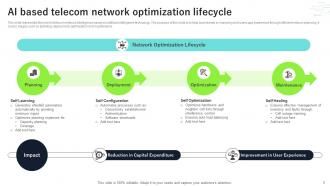
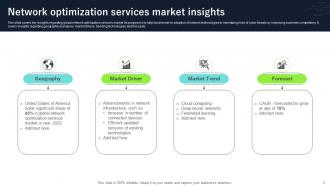
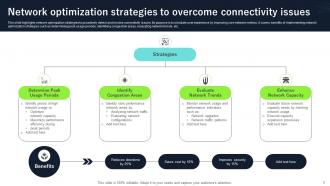
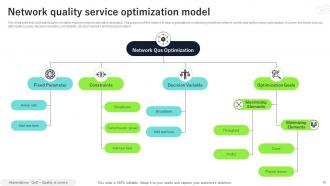
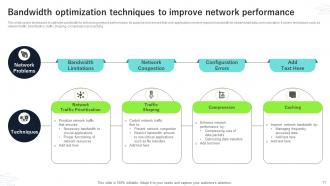
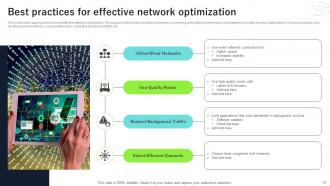
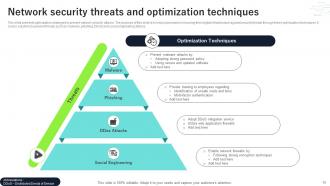
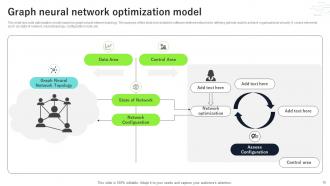
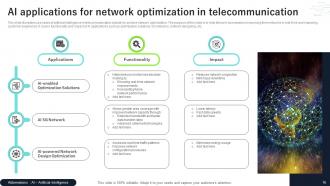
Network optimization is the process of upgrading a computer networks overall use, efficiency, and performance. To maximize data throughput, reduce latency, and maximize resource utilization, network optimization encompasses a range of tactics, methods, and technologies. This involve using traffic management tools, updating hardware, putting in place effective protocols, and optimizing settings. Organizations may attain enhanced throughput, less congestion, quicker reaction times, and a more resilient and effective network architecture by regularly evaluating and optimizing the network. With our Network Optimisation PowerPoint presentation, explore the particulars of optimizing bandwidth to guarantee effective resource use for continuous data flow. Understand the importance of network performance monitoring to acquire the skills required to identify and fix constraints immediately. Learn how edge computing can revolutionize business by decentralizing data processing and improving productivity. This presentation offers insights into the strategies and innovations influencing existing network optimization.
People who downloaded this PowerPoint presentation also viewed the following :
Network Optimization Powerpoint Ppt Template Bundles with all 28 slides:
Use our Network Optimization Powerpoint Ppt Template Bundles to effectively help you save your valuable time. They are readymade to fit into any presentation structure.











FAQs for Network Optimization Powerpoint
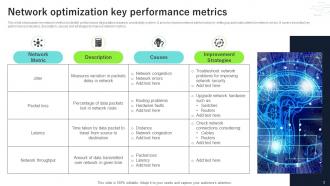
So you'll want to watch throughput and latency first - that's your bread and butter. Throughput tells you how much data actually moves through your network, latency shows delay times between point A and B. Packet loss is obvious but annoying when it jumps up randomly. Don't forget jitter either, especially if you're dealing with video calls or anything real-time since it measures how consistent your latency stays. Bandwidth utilization and error rates matter too. Honestly, just baseline everything first before you start tweaking stuff - otherwise you're flying blind on whether changes actually help.
Honestly, ML can make a huge difference for network optimization. Traffic prediction is where I'd start - way easier to implement and you'll see results fast. The algorithms actually learn from your historical data to spot congestion before it hits, which beats static rules any day. You can throw reinforcement learning at load balancing, use neural networks to catch weird anomalies. What's neat is the system gets better over time, adapting to how your specific network behaves. Predictive models help with bandwidth allocation too based on actual usage patterns. Start simple though - traffic prediction first, then expand from there.
QoS is like having a bouncer for your network traffic. Critical stuff like video calls gets VIP access while downloads wait in line when things get busy. Trust me, it makes a huge difference if you've got mixed traffic - I learned this the hard way when my Zoom calls kept dropping because someone was torrenting movies. Without it, everything fights for bandwidth equally and your important apps suffer. Just figure out what needs priority first, then set up policies to give those apps dibs on the connection. You'll notice way better consistency right away.
So adaptive routing is basically like having smart GPS for your network - it watches traffic in real time and automatically switches to better paths when things get clogged up. Your data doesn't get stuck using the same route when there's congestion or a link goes down. Pretty neat, right? These protocols juggle the load across different paths and cut down on delays without you having to babysit anything. OSPF and EIGRP are solid choices if you want to try this out. Honestly beats manually fixing routes every time something breaks.
Honestly, you're basically trying to manage three different networks that all need to talk to each other smoothly. On-premises, public cloud, private cloud - they all have different speeds, costs, and security rules. It gets messy fast, especially if you're dealing with multiple cloud providers who each do things their own way. Here's what I'd do: map out where your data actually flows first. Don't try to fix everything at once - that's a recipe for burnout. Focus on the paths that matter most to your users, then work outward from there. The whole thing's complicated enough without overthinking it from the start.
Bandwidth management is seriously a lifesaver for your network. It controls traffic flow and stops those annoying bottlenecks that kill productivity. You can prioritize the apps that actually matter while limiting bandwidth hogs. Without it? You'll get lag spikes and dropped connections every time someone starts streaming Netflix during work hours (which, let's be honest, happens way too often). It's basically like having traffic lights for your data - keeps everything moving smoothly. Start by figuring out which applications are most critical, then set up QoS policies so they get first dibs on bandwidth.
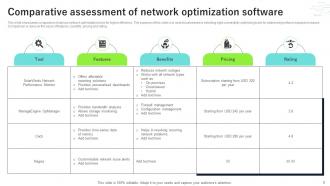
PRTG's probably your best bet for real-time monitoring - the interface actually makes sense, unlike some others I've used. SolarWinds NPM gives you way more control but you'll pay for it. Nagios works if budget's tight. Oh, and Zabbix or LibreNMS are solid open source options that won't eat your resources. The whole point is catching issues before users flood your inbox with complaints. I'd start with PRTG's free trial since it handles most network setups pretty well without being overly complicated.
Honestly, don't just throw money at more bandwidth yet. Map out what you're actually using first - I've seen so many companies buy way more than they need. Traffic shaping and QoS can work wonders with what you already have. Kill any apps hogging bandwidth for no reason. Your critical stuff should get the good treatment, everything else can take the slow lane. Oh and monitor it constantly - small tweaks beat massive overhauls every time. Seriously though, start with an audit next week so you know where your budget's disappearing to.
Start with zero-trust and microsegmentation - don't just rely on perimeter defenses anymore. Next-gen firewalls can inspect packets without tanking your speeds, which is clutch. SSL/TLS optimization makes a huge difference since encryption can really bog things down if you're not careful about it. Real-time monitoring helps you catch both performance drops and threats fast. Honestly, half the battle is picking security tools that actually speed up traffic instead of just scanning everything. Look for solutions with built-in performance features - some of them are surprisingly good at this now.
Honestly, IPv6 is gonna make you rethink everything optimization-wise. First thing - check if your current tools even work with IPv6 because half of them probably don't yet (learned that the hard way). The huge address space is actually pretty sweet though, gives you way more room for smart subnetting and traffic separation. Built-in stuff like better multicast and ditching NAT can really speed things up too. I'd start by figuring out which monitoring tools are ready before jumping in. Oh, and the performance gains are real if you design around IPv6's features instead of just treating it like IPv4 with longer addresses.
Dude, latency is such a pain - 100ms delays make everything feel like trash and users bail fast. First thing, measure what you're dealing with because you can't fix what you don't know. CDNs are your friend for getting content closer to people. Those N+1 database queries? Total killers, fix those ASAP. Caching helps at every level too. If you're still on some crappy shared server, honestly just upgrade already. Under 200ms is okay but shoot for under 100ms if you can swing it. Oh and database optimization made the biggest difference for us last year.
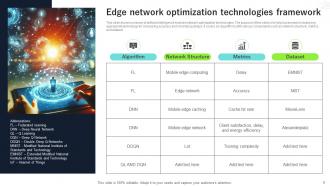
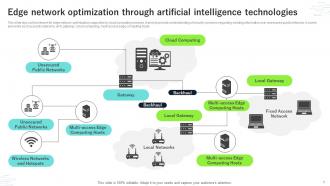
So basically you want to move your data processing closer to where people actually are instead of sending everything back to some distant data center. Edge computing lets you use local servers or even smart devices to handle the work right there. Way faster response times, and you're not clogging up your main network with all that traffic. Real-time apps love this stuff - total game changer honestly. Plus you get natural load balancing since you're spreading things out geographically. I'd start by looking at whatever's running slowest right now and see if you can move those to the edge first.
Wireless is such a pain compared to wired stuff. Signal strength matters most - you gotta place access points smart and avoid interference from other crap. Dead zones will destroy your performance, so map out coverage first. Bandwidth gets tricky since everyone's fighting over the same spectrum (not like dedicated wired connections). QoS settings become way more important too. I'd start with a site survey to find weak spots and see what's causing interference. Also keep checking for random devices hogging bandwidth - happens more than you'd think.
So SD-WAN basically routes your traffic smarter across multiple connections instead of sending everything back to your main data center first. Way cheaper than those old MPLS circuits too. You get automatic failover and can prioritize important stuff over, well, people streaming Netflix at work (let's be honest). The visibility is probably the best part though - you'll actually see what's hogging bandwidth across all your sites. Real-time policy changes are nice. I'd start with your worst remote locations for bandwidth issues and pilot it there. You'll see improvements pretty quickly.
Honestly, those assessments are total lifesavers for avoiding expensive disasters later. You can spot slow network areas before they crash completely. Security holes get caught early too - way better than dealing with a hack that ruins your week. The info you gather helps with smarter buying decisions instead of randomly upgrading stuff. My old job learned this the hard way when our main server died during a client presentation (awkward). Try doing them every quarter if possible, but twice yearly works too. Just don't skip them entirely.
-
“I always have a wonderful experience with SlideTeam. It's my ""go to"" when I need a template.”
-
I discovered this website through a google search, the services matched my needs perfectly and the pricing was very reasonable. I was thrilled with the product and the customer service. I will definitely use their slides again for my presentations and recommend them to other colleagues.