

Online Marketing Content Planning Calendar For Franchise Promotional Plan Playbook




Try Before you Buy Download Free Sample Product
 Impress Your
 Audience
 100%
100% Editable
 Save Hours
 of Time


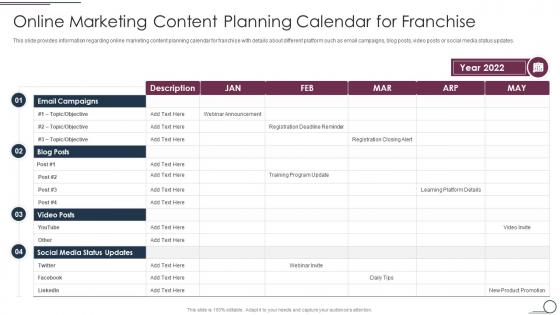
This slide provides information regarding online marketing content planning calendar for franchise with details about different platform such as email campaigns, blog posts, video posts or social media status updates.
People who downloaded this PowerPoint presentation also viewed the following :
Online Marketing Content Planning Calendar For Franchise Promotional Plan Playbook with all 6 slides:
Use our Online Marketing Content Planning Calendar For Franchise Promotional Plan Playbook to effectively help you save your valuable time. They are readymade to fit into any presentation structure.





FAQs for Online Marketing Content Planning Calendar For Franchise
Honestly, just start with the basics - campaign dates, who's posting what, and which platforms you're hitting. I used to skip the "who's responsible" part and it was a disaster. Trust me on that one. Color-coding by campaign makes everything way easier to scan. Build in buffer time because approvals always take longer than expected, and someone will definitely want last-minute changes. Track your metrics too so you know what's actually working. Don't overthink the tool - a Google Sheet works fine until you need something fancier.
Okay so basically you want one central place where you can see all your marketing stuff at once - saves you from that nightmare of forgetting to post something important. I'd start with just a Google Calendar honestly, don't overcomplicate it. You can plan out your content themes, batch similar tasks together (which is honestly a game-changer), and catch any weird scheduling conflicts before they bite you. Your team will actually know what's happening and when. The seasonal stuff is where it really pays off though - planning holiday content in July feels weird but you'll thank yourself later. Way better than my old system of random Post-its stuck to my monitor.
Honestly? Start with Google Sheets or Airtable if you're on a tight budget - they're free and work great for basic planning. CoSchedule and Hootsuite are worth checking out if you need more features like task assignments and performance tracking. Monday.com's pretty solid too. But here's the thing - I've watched so many teams get stuck in analysis paralysis, spending forever comparing tools when a simple spreadsheet would've worked just fine. My advice? Use whatever you already have access to first. You can always upgrade later once you figure out what you actually need vs. what sounds cool in demos.
Start mapping out holidays and seasonal stuff about 6-8 weeks ahead - not just the obvious ones like Christmas. Back-to-school, tax season, summer vacation planning, all that matters. I literally always forget National Coffee Day exists until I see everyone else posting about it lol. Build your content themes and campaigns around these dates, but give yourself enough time for the creative work and getting approvals. Oh and make a master calendar! Show your regular posting schedule plus all the seasonal overlays. Trust me, without that visual you'll definitely miss something important. Way easier than trying to keep track in your head.
Honestly, getting everyone on the same calendar is like 80% of the problem solved right there. Set up clear ownership so people know whose campaign is whose. Your calendar needs actual details - target audience, goals, the whole brief basically. Otherwise you get those super awkward meetings where nobody knows what they're supposed to be promoting. Color coding helps a ton, maybe by team or campaign type. Oh and turn on comments so people can flag conflicts right away instead of finding out the day before launch (been there). We do weekly reviews across teams which sounds boring but actually saves so much drama later.
So basically you gotta break down your calendar by who you're actually talking to. Gen Z loves TikTok stuff, but your LinkedIn crowd wants more professional content - totally different vibes. Timing's huge too. B2B people scroll during work hours, while regular consumers are mostly active evenings and weekends. I'd create separate content tracks for your main audience groups. Maybe start with your top 2-3 personas and see where your current calendar falls short? It's honestly like switching between how you'd text your boss versus your college friends. Same info, completely different energy.
Honestly, social media pretty much dictates your whole content calendar since those platforms are always demanding fresh stuff. I'd start by figuring out which platforms actually work for you, then build your posting schedule around that. Map out your seasonal campaigns and keep an eye on trending events your audience cares about. The trick is batching everything so you're not constantly stressed about what to post next. Daily posts, stories, videos - plus you need to hit those peak engagement times when people are actually scrolling. It sounds like a lot but once you get the rhythm down it's way more manageable.
Honestly, just pick a few solid KPIs for each campaign and actually stick to tracking them. Yeah, clicks and conversions are obvious, but engagement stuff like shares matters too - that's your brand awareness right there. I always add a results column directly in my calendar because who has time to dig through separate reports? Track against your actual goals, not those feel-good vanity numbers that don't mean anything. The magic happens when you look back after a couple months and can spot what bombed vs. what killed it. Oh and measure weekly so you can bail on crap campaigns fast.
Don't cram your calendar with a million campaigns right off the bat. Leave room for those inevitable "oh crap we need to change everything" moments. I've watched teams build gorgeous calendars that totally forget about Christmas or whatever big trade show everyone goes to. Also, factor in approval time and actually making the content - unrealistic deadlines kill calendars faster than anything. Your team needs to understand how to use whatever system you pick, otherwise it's pointless. Honestly? Start basic and add complexity later instead of trying to nail everything perfectly from the start.
Honestly, visual templates are a game-changer for marketing calendars. Color-coding everything by campaign type lets you catch patterns instantly - like when you're hammering social media but totally ignoring your email list. Pretty calendars also get way more attention from stakeholders than boring spreadsheets (learned that the hard way). Your team stays on the same page too since everyone's presenting info the same way. Start simple - just dates, channels, and campaign types. You can get fancy later once people aren't confused by the basics.
Honestly, data analytics is a game-changer for planning your marketing stuff. Pull your last 6 months of performance data first - you'll start seeing patterns everywhere. Like which days and times actually work, what content people engage with most, that kind of thing. Seasonal trends are super helpful too since you can predict when to go hard on campaigns vs when people check out (holidays are brutal for engagement). Real-time data's great because you can quickly switch things up if something's flopping. Way better than just throwing content at the wall and hoping it sticks.
Check your marketing calendar weekly - trust me on this one. I totally bombed a Facebook campaign once by ignoring it for three weeks straight. What a waste of money! Monthly reviews are where the real magic happens though. That's when you dig into the bigger stuff like seasonal patterns and budget shifts. Quick weekly peeks help you spot problems before they get expensive. Oh, and actually set phone reminders or you'll forget like I always do. Short bursts work better than trying to analyze everything at once anyway.
Honestly, content planning saved my sanity last year. Map your themes to business goals and seasonal stuff first - that's your foundation. Batch similar content together because switching between formats is exhausting. Focus on your big pieces first (blog posts, videos, whatever), then build the smaller social and email stuff around those. Oh, and always add buffer time because I swear everything takes 50% longer than expected. Track what actually works so you can do more of the good stuff and kill what's flopping. Trust me on this one.
Honestly, a marketing calendar is a lifesaver when everything goes sideways. You'll know exactly what's scheduled to post without digging through notes or panicking at 2am. Crisis hits? Just pull up your calendar and see what needs to get paused or completely scrapped. Events are where it really shines - all your pre-buzz, live coverage, and follow-ups mapped out so nothing falls through the cracks. Pro tip: color-code everything by priority. Flexible stuff gets one color, must-post content gets another. Makes pivoting way less painful when you're already stressed out of your mind.
Honestly, the real-time collaboration thing is huge - everyone sees updates instantly instead of you manually sending stuff around. You can automate recurring posts and set reminders too. Never worry about losing your planner under random papers again (been there way too many times lol). Access it anywhere, drag things around super easily when campaigns need to move. The integration with social tools is pretty sweet, plus you get performance metrics right there with your content. I'd just move next month's stuff over first and see how it feels - that's what convinced me.
-
The quality of PowerPoint templates I found here is unique and unbeatable. Keep up the good work and continue providing us with the best slides!
-
The customer care of SlideTeam is very responsive. I was having a payment issue and they fixed it for me in no time.