


Our services presentation powerpoint






Try Before you Buy Download Free Sample Product
 Impress Your
 Audience
 100%
100% Editable
 Save Hours
 of Time


Don't allow feelings to get out of hand with our Our Services Presentation Powerpoint. It helps control inflamed emotions.
People who downloaded this PowerPoint presentation also viewed the following :
Content of this Powerpoint Presentation
Description:
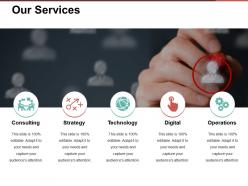
This slide is a professional template detailing "Our Services" with five key areas of service offerings: Consulting, Strategy, Technology, Digital, and Operations. Each service is complemented by a pictorial icon and a short explanatory text underneath emphasizing that the slide is completely customizable. The icons represent a person at a meeting table for Consulting, a tic-tac-toe game for Strategy, a globe for Technology, a hand selecting an option for Digital, and gears for Operations, all suggesting the nature of the service offered.
Use Cases:
Now, let's go through seven industries where these slides can be aptly used, along with their potential uses, presenters, and audiences:
1. Management Consulting:
Use: To present service offerings to potential clients.
Presenter: Strategy Consultant.
Audience: Business Executives.
2. Information Technology:
Use: To showcase the range of tech services and solutions available.
Presenter: IT Services Provider.
Audience: CTOs and IT Managers.
3. Marketing and Advertising:
Use: To demonstrate how digital strategies can complement traditional marketing approaches.
Presenter: Digital Marketing Expert.
Audience: Marketing Professionals.
4. Financial Services:
Use: To highlight consulting and strategy development services for financial planning.
Presenter: Financial Advisor.
Audience: Investors and Finance Professionals.
5. Education and Training:
Use: To offer technology and digital learning solutions.
Presenter: Educational Consultant.
Audience: Educational Administrators and Instructors.
6. Healthcare:
Use: To discuss operational efficiency and digital transformation in healthcare.
Presenter: Healthcare Consultant.
Audience: Hospital Administrators and Healthcare Providers.
7. Manufacturing:
Use: To outline operational improvements and technology integration in manufacturing processes.
Presenter: Operations Manager.
Audience: Manufacturing Executives and Plant Managers.
Our services presentation powerpoint with all 5 slides:
Arrest the decline with our Our Services Presentation Powerpoint. Initiate action to end further deterioration.
FAQs for Our
Look, forget about showing off all your fancy features - nobody cares. Figure out what's actually broken for them first. Then position your solution as the fix that gets them from point A to point B. I've seen way too many pitches that are just laundry lists of services. Pick maybe 2-3 things that solve their specific headache and focus there. Throw in some real examples if you've got them, be honest about timelines, and don't lowball the pricing just to win. Oh, and make the next step super obvious - like stupidly easy for them to move forward.
Here's the thing - services are invisible, right? People can't hold them like a product. That's why visuals are clutch. Flowcharts and process maps literally show clients what their experience will look like. Screenshots work amazingly if you're doing anything digital. Most folks learn better visually anyway (I'm definitely one of them). Before/after comparisons hit different too. Charts breaking down timelines or deliverables help people actually *get* what you're offering instead of just hearing buzzwords. Honestly, try mapping out your process for the next pitch - it's a game changer.
Okay so for financial services, go super clean and data-focused - tons of charts, graphs, structured layouts. Minimal colors, lots of white space, formal fonts. The whole "we're trustworthy and analytical" vibe. Creative services? Complete opposite. Bold visuals, crazy layouts, vibrant colors, typography that shows off your actual design chops. Here's the thing - your template needs to match what you're promising clients. Like, if you're doing financial planning, don't pick something that screams art gallery opening, you know? Choose whatever reinforces that expertise and reliability people expect when they're trusting you with their money.
Yeah, you've gotta totally switch up your pitch depending on the industry. Tech folks want hard data and ROI numbers - like, show me the metrics or I'm out. Creative agencies are the opposite - they're all about visual storytelling and flashy case studies. Healthcare and finance? They're obsessed with compliance stuff, so lead with your certifications and processes. Manufacturing clients just want the nuts and bolts - timelines, costs, how you'll actually get it done. No fancy presentation needed there. Legal and consulting firms will grill you on methodology, so come prepared. Honestly, just research their biggest headaches first and hit those pain points right in your opening.
Okay so here's the thing - people don't remember boring bullet points, but they'll totally remember that story about how you saved some client's ass. Storytelling makes your audience actually *feel* the problem instead of just getting it on paper. Paint real scenarios they can relate to. Customer success stories work great, or even made-up situations that sound like their world. Oh and make it specific and emotional - none of that generic fluff. I always tell people to weave in one solid story for each major benefit you're pitching. Way more effective than just listing features.
Okay so first thing - figure out who you're actually talking to. What keeps them up at night? What buzzwords do they use? I always dig into how they make decisions too. Swap out those boring generic examples for stuff from their industry. Healthcare people don't care about your retail wins - show them hospital success stories instead. Match your language to the room. Tech people want specs and data. Executives just want to know the ROI. This part honestly makes or breaks everything. Oh and structure your slides around how they typically buy. Start with 2-3 key things about your audience, then build everything around that.
Biggest mistake? Making it all about YOU. Your prospects honestly don't care about your fancy awards or that you've been around since 1974. They want to know how you'll fix their actual problems. Skip the generic fluff too - "we provide excellent customer service" makes my eyes roll because literally everyone claims that. Show them real examples instead. Case studies work way better than empty promises. Oh, and please don't just read your slides word for word! Practice some actual stories that prove your worth. Then give them a clear next step so they know what happens next.
Honestly, visuals are a game changer for presentations. Nobody wants to stare at endless bullet points - I've been there and it's painful. Charts and graphs let people actually *see* what you're talking about instead of trying to process a bunch of numbers. You'll want bar charts for comparing stuff, line graphs when you're showing how things change over time. That kind of thing. The whole point is telling a story with your data rather than just dumping facts on people. Oh, and definitely keep your labels clear - nothing worse than a confusing chart that defeats the purpose.
Honestly, your intro is make-or-break territory. People check out in like 30 seconds if you don't grab them - I see it happen all the time. You need to hook them fast and show you get their problems. Since you're selling services (not actual products they can hold), credibility matters way more than you'd think. Try opening with a stat that'll make them go "oh shit" or tell a quick client story. Better yet, ask them something that hits their biggest pain point. The key is making them feel like you actually understand what keeps them up at night, not just throwing generic solutions at the wall.
Start with stakeholder interviews to figure out what actually clicks with different audiences. Nothing's worse than templates that obviously weren't tested on real people first - such a waste! Get your initial version in front of internal teams and a couple trusted clients. Ask them about clarity, flow, visual stuff. Then tweak based on what they tell you. Maybe they need bigger sections for case studies or want pricing laid out differently. Oh, and set up quarterly reviews so your templates don't get stale. Seriously though, pick your key reviewers now and get those feedback sessions on the calendar.
Dude, every 10-15 minutes you gotta mix things up - polls, quick discussions, whatever gets people involved. I bombed a presentation once doing 45 straight minutes of talking and literally watched everyone's souls leave their bodies lol. Move around the room, change your voice up, throw in some videos. Real stories beat bullet points every single time. Oh and definitely let people stretch or grab coffee during longer sessions - bladders are real. Honestly though, just watch faces. Glazed eyes = time to pivot fast.
Listen, your color choices and fonts matter way more than you'd think for credibility. Blues and greens make people trust you automatically - reds can stress people out even if they create urgency. Clean fonts are everything. I mean, Comic Sans is obviously terrible, but even those Instagram-trendy fonts will backfire if nobody can actually read them. Keep your typography consistent across slides because clients notice that attention to detail stuff. Oh, and definitely test how it looks on different screens first - what looks great on your laptop might be unreadable projected on a wall.
Okay so here's the thing - you gotta nail the ending with three parts: recap what you actually do, remind them why you're perfect for *their* specific mess, and give them one clear next step. I swear, most people just trail off at the end and it's painful to watch. Circle back to their actual problems, not your generic services. Then make moving forward ridiculously easy - schedule something, send a proposal, whatever. Oh and honestly? Skip the "here's everything we offer" dump. You want them walking away thinking "yep, these people get it" instead of "well that was nice I guess."
Pick case studies that actually match what your audience is dealing with - not just your flashiest wins. Walk them through your exact process with real numbers and before/after comparisons. I used to always go with my most impressive story, but honestly? The boring, relevant one converts way better. Each case study should be 2-3 minutes tops, focusing on whatever outcome matters most to them. Oh, and have a few ready because you'll probably need to switch gears based on their questions. They want to see themselves in the story, not just be impressed by it.
Start with PowerPoint or Google Slides - they're fine for basic stuff. But honestly? Canva is a game changer if you want something that doesn't look like garbage without being a designer. Prezi's cool for interactive presentations, and Figma works great for mapping out user journeys. Excel's chart features have actually gotten pretty decent lately, or go with Tableau if you're dealing with heavy data. Oh, and Miro's perfect for brainstorming service flows with your team beforehand. My advice though - just pick one tool and stick with it. I made the mistake of bouncing between everything when I started.
-
Use of different colors is good. It's simple and attractive.
-
Easily Understandable slides.