


Overview Google Workspace AI Suite How To Use Google AI For Your Business AI SS




Try Before you Buy Download Free Sample Product
 Impress Your
 Audience
 100%
100% Editable
 Save Hours
 of Time


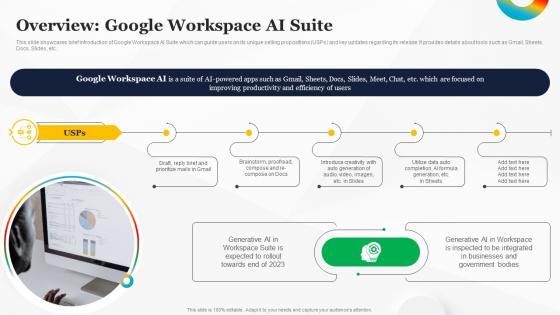
This slide showcases brief introduction of Google Workspace AI Suite which can guide users on its unique selling propositions USPs and key updates regarding its release. It provides details about tools such as Gmail, Sheets, Docs, Slides, etc.
People who downloaded this PowerPoint presentation also viewed the following :
Overview Google Workspace AI Suite How To Use Google AI For Your Business AI SS with all 6 slides:
Use our Overview Google Workspace AI Suite How To Use Google AI For Your Business AI SS to effectively help you save your valuable time. They are readymade to fit into any presentation structure.





FAQs for Overview Google Workspace AI Suite How To Use Google AI For Your
Google Workspace AI Suite offers Smart Compose for automated writing assistance, intelligent meeting summaries, real-time language translation, automated task prioritization, and AI-powered content suggestions across documents and presentations. These features streamline workflows by reducing manual drafting time, eliminating communication barriers, and enhancing decision-making speed, with many organizations finding that teams collaborate more efficiently and deliver projects faster in increasingly competitive business environments.
Small businesses can leverage Google Workspace AI Suite through Smart Compose in Gmail, automated meeting summaries in Meet, intelligent data analysis in Sheets, and AI-powered content creation in Docs. These tools streamline workflow by reducing manual tasks, accelerating document creation, and enhancing communication efficiency, with many small businesses finding significantly improved productivity and competitive advantage.
Google Workspace AI Suite integrates seamlessly with existing applications through Smart Compose in Docs for writing assistance, automated data analysis and formula suggestions in Sheets, intelligent email responses in Gmail, and real-time transcription in Meet. These AI-powered enhancements streamline workflows by reducing manual tasks, accelerating document creation, and improving data insights, with many organizations finding significantly enhanced productivity across their collaborative processes.
Google Workspace's AI Suite enhances data analysis in Google Sheets through intelligent insights, automated chart recommendations, natural language queries, and predictive modeling features. These capabilities streamline complex data interpretation by identifying trends automatically, suggesting optimal visualization formats, and enabling users to ask questions in plain English, ultimately delivering faster decision-making and deeper analytical insights for businesses.
Natural language processing in Google Workspace AI Suite enables automated meeting transcription, real-time translation, smart reply suggestions, and sentiment analysis across Google Meet and Chat. These NLP capabilities streamline communication by generating meeting summaries, facilitating multilingual collaboration, and providing contextual response recommendations, ultimately enhancing productivity and enabling organizations to capture insights more effectively from their digital interactions.
Google Workspace allows users to customize AI features through personalized settings, workflow integrations, smart suggestions training, and custom automation rules within individual apps like Gmail, Docs, and Sheets. These customization options enable organizations to align AI assistance with specific business processes, industry requirements, and team preferences, ultimately delivering more relevant suggestions, streamlined workflows, and enhanced productivity across diverse operational environments.
Google Workspace AI implements enterprise-grade encryption, zero-trust architecture, advanced threat detection, data loss prevention controls, and SOC 2/ISO 27001 compliance certifications. These security frameworks operate through real-time monitoring, automated anomaly detection, and granular access controls, with many organizations finding that Google's infrastructure delivers enhanced data protection while enabling seamless AI-powered collaboration and productivity gains.
The AI Suite enhances Google Slides content creation through automated slide generation, intelligent design suggestions, smart image recommendations, and real-time collaborative editing assistance. These capabilities streamline presentation development by reducing creation time, ensuring visual consistency, and enabling dynamic content adaptation, with many organizations finding that teams deliver more compelling, professional presentations while focusing strategic effort on messaging rather than formatting tasks.
Businesses have successfully implemented Google Workspace AI Suite across diverse sectors, with financial institutions using Smart Compose for consistent client communications, healthcare organizations leveraging automatic meeting transcriptions for patient consultations, and retail companies utilizing Smart Reply to streamline customer service responses. These AI-powered features enhance operational efficiency by reducing manual tasks, accelerating response times, and improving communication quality, ultimately delivering competitive advantage.
Educators can utilize Google Workspace AI Suite to create personalized learning paths, automate grading and feedback, generate interactive content, and facilitate real-time collaboration through smart suggestions in Docs and Slides. These AI-powered tools streamline lesson planning, enhance student engagement through adaptive assignments, and provide data-driven insights into learning progress, ultimately delivering more effective educational outcomes while reducing administrative workload for teachers.
Google Workspace AI Suite offers comprehensive training through Google's Skills Boost platform, interactive tutorials, certification programs, Help Center documentation, and community forums. These resources enable users to master features like Smart Compose, Smart Reply, and automated insights through hands-on modules, with many organizations finding that structured learning paths significantly accelerate adoption and enhance productivity outcomes.
Google Workspace AI Suite's speech recognition enhances accessibility by enabling voice-to-text conversion in Docs, real-time transcription in Meet, and hands-free navigation across applications. These features particularly benefit users with mobility impairments, hearing disabilities, and learning differences, with many organizations finding that automated captions and voice commands streamline document creation and meeting participation, ultimately delivering more inclusive workplace experiences.
Google Workspace AI tools enhance project management through intelligent task automation, predictive scheduling, resource optimization, and real-time collaboration insights. Smart features in Sheets can forecast project timelines, while Gmail's AI prioritizes communications and Calendar automatically suggests optimal meeting times, ultimately streamlining workflows and enabling teams to deliver projects faster with improved resource allocation.
Future AI developments in Google Workspace will significantly enhance remote work by enabling intelligent meeting summaries, automated task prioritization, and real-time language translation across global teams. These capabilities will streamline virtual collaboration, reduce administrative overhead, and create more seamless cross-cultural communication, with distributed organizations finding that AI-powered workflows ultimately deliver greater productivity and stronger team connectivity regardless of geographic location.
User feedback on Google Workspace AI Suite highlights strong appreciation for its intuitive design, seamless integration with familiar tools, and minimal learning curve for everyday tasks like drafting emails and generating documents. While users praise the streamlined experience and natural language processing capabilities, many organizations find that maximizing advanced features requires strategic training, ultimately delivering enhanced productivity and collaborative efficiency across teams.
-
The visual appeal of the templates is just unparalleled! I was so worried about the design of my presentation but SlideTeam made it all so easy.
-
The PPTs are extremely simple to modify. Thank you for providing the slides that are ready to be used. They assist me in saving a lot of time.