

Overview Of Key Findings Powerpoint Presentation Slides





Try Before you Buy Download Free Sample Product
 Impress Your
 Audience
 100%
100% Editable
 Save Hours
 of Time


Showcase the factors to enhance the performance of your organization by using our content ready Overview Of Key Findings PowerPoint Presentation Slides. You can determine the ways to build a progressive and successful business with the aid of this visually appealing key factors of business plan presentation PPT theme. Use the summary of business findings & recommendations presentation template to summarize your key findings on your customers. With the help of key findings of the business growth PowerPoint graphic, you represent the results of business research activities. Take the assistance of key business findings PPT visual and make a short presentation on your research. Employ this professionally designed key points of business analysis PowerPoint layout and show how to improve the operational efficiency of your projects before its execution. Hence, download our ready-to-use key points of the business development plan PPT deck and list out the preventive action to overcome the business issues.
People who downloaded this PowerPoint presentation also viewed the following :
Content of this Powerpoint Presentation
Slide 1: This slide introduces Overview of Key Findings. State Your Company Name and begin.
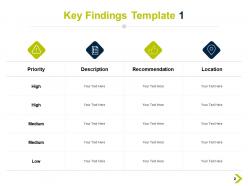
Slide 2: This slide shows Key Findings Template 1 in tabular form with categories as Priority, description, recommendation and location.
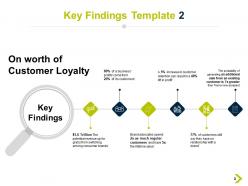
Slide 3: This slide presents Key Findings Template 2 with a related flow chart.
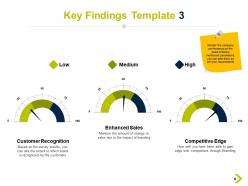
Slide 4: This slide displays Key Findings Template 3 to monitor the company performance on the basis of below mentioned parameters.
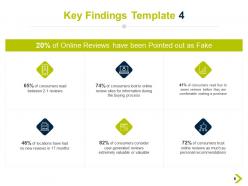
Slide 5: This slide represents Key Findings Template 4 for entering survey/ tracking results.
Slide 6: This slide showcases Key Findings Template 5 with related icons. Add text as per needs.
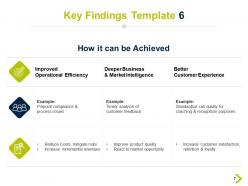
Slide 7: This slide shows Key Findings Template 6 in tabular form.
Slide 8: This slide displays Overview of Key Findings Icons.
Slide 9: This slide is titled as Additional Slides for moving forward.
Slide 10: This slide shows Stacked Line With Markers.
Slide 11: This is a Venn slide with text boxes.
Slide 12: This is a Puzzle slide with text boxes to show information.
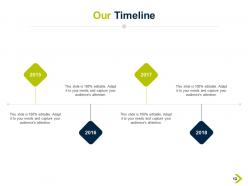
Slide 13: This is Our Timeline slide to show information related period.
Slide 14: This slide is titled as Post It Notes. Post your important notes here.
Slide 15: This is a Thank You slide with address, contact numbers and email address.
Overview Of Key Findings Powerpoint Presentation Slides with all 15 slides:
Use our Overview Of Key Findings Powerpoint Presentation Slides to effectively help you save your valuable time. They are readymade to fit into any presentation structure.





FAQs for Overview Of Key Findings
Essential elements include a clear executive summary, prioritized findings with supporting data, actionable recommendations, visual aids like charts and graphs, and structured conclusions. These components work together by streamlining complex information, highlighting strategic insights, and enabling decision-makers to quickly grasp critical outcomes, ultimately delivering faster implementation and competitive advantage.
Visual aids enhance key findings comprehension by transforming complex data into digestible formats, creating memorable visual anchors, and accommodating different learning styles through charts, infographics, and interactive elements. These tools streamline information processing while reducing cognitive load, with many organizations finding that strategic visual integration delivers significantly improved audience retention, faster decision-making processes, and more compelling stakeholder buy-in across presentations.
Effective engagement strategies include interactive polling, strategic pauses for questions, visual storytelling through infographics, breakout discussions, and real-time feedback collection. These approaches transform passive listening into active participation, with many organizations finding that incorporating audience response systems, case study walkthroughs, and collaborative analysis sessions ultimately delivers higher retention rates and stronger buy-in for recommended actions.
Presenters can effectively summarize complex data by focusing on the most impactful insights, using clear visual hierarchies, and translating numbers into actionable business implications. Through strategic data visualization and storytelling techniques, organizations streamline decision-making processes, enhance stakeholder understanding, and accelerate implementation timelines, with many executives finding that well-summarized findings drive faster strategic responses.
Storytelling transforms key findings presentations by creating emotional connections, simplifying complex data through relatable narratives, and enhancing audience retention through memorable scenarios. Through strategic storytelling frameworks, presenters structure findings around clear problem-solution arcs, customer journey examples, and real-world case studies, ultimately delivering more persuasive recommendations and actionable insights that resonate with stakeholders.
Presenters can tailor key findings by adjusting language complexity, visual depth, and focus areas based on audience expertise and priorities. Executives prefer high-level strategic insights with clear business implications, technical staff appreciate detailed methodologies and data analysis, while general audiences benefit from simplified visuals and relatable examples, with many organizations finding that audience-specific customization significantly enhances comprehension and decision-making outcomes.
Common pitfalls include overwhelming audiences with excessive data, failing to connect findings to business objectives, using technical jargon without context, and presenting without clear recommendations for action. These missteps can dilute impact by confusing stakeholders, reducing engagement, and missing opportunities to drive strategic decisions, with many organizations finding that focused, outcome-oriented presentations deliver significantly better stakeholder buy-in.
Presenters can enhance key findings delivery by analyzing audience engagement patterns, identifying unclear messaging points, refining visual storytelling techniques, and adapting communication styles based on stakeholder responses. Through systematic feedback integration, organizations streamline presentation effectiveness, minimize information gaps, and accelerate decision-making processes, with many finding that iterative improvements ultimately deliver stronger stakeholder buy-in and more actionable outcomes.
Techniques include visual emphasis through color coding and icons, strategic positioning of critical data, comparative frameworks showing before-and-after scenarios, and storytelling elements that contextualize findings. These approaches enhance audience comprehension by creating clear hierarchies, simplifying complex information, and connecting insights to actionable outcomes, with many organizations finding that strategic visual presentation ultimately delivers stronger stakeholder engagement and faster decision-making processes.
Presenters should structure key findings presentations by opening with executive summary highlights, organizing findings by priority or theme, supporting each finding with clear data visualizations, and concluding with actionable recommendations. This approach enables audiences to quickly grasp critical insights, while strategic sequencing from high-impact discoveries to implementation steps ultimately delivers enhanced decision-making and organizational alignment.
Best practices for integrating multimedia elements include using high-quality visuals that directly support your data, incorporating interactive charts and graphs, embedding relevant video testimonials or case studies, ensuring consistent design themes, and maintaining proper audio levels for seamless playback. These elements enhance audience engagement by creating dynamic storytelling experiences, improving information retention through multiple sensory channels, and delivering more persuasive presentations, with many organizations finding that strategic multimedia integration significantly increases stakeholder buy-in and decision-making speed.
Presenters can measure effectiveness through audience engagement metrics, comprehension assessments, feedback surveys, and actionable outcomes generated from their findings. Post-presentation follow-ups, stakeholder questions, decision implementation rates, and meeting requests help gauge impact, with many organizations finding that successful key findings presentations ultimately drive strategic decisions, resource allocation changes, and measurable business improvements.
Strategies include preparing anticipated challenges, acknowledging uncertainty honestly, redirecting to available data, offering follow-up research, and maintaining composure throughout responses. Presenters can enhance credibility by admitting knowledge limits, providing context around data constraints, and demonstrating commitment to thorough analysis, with many organizations finding that transparent handling of difficult questions ultimately strengthens stakeholder trust and project outcomes.
Data visualization tools enhance clarity by transforming complex datasets into intuitive charts, graphs, infographics, and interactive dashboards that audiences can quickly comprehend. These tools streamline information processing, minimize cognitive load, and highlight critical patterns, with many organizations finding that visual presentations reduce meeting times, accelerate decision-making, and ultimately deliver more impactful stakeholder communications.
**INPUT**: What are the best ways to rehearse and prepare for a key findings presentation to ensure smooth delivery? **OUTPUT**: Effective preparation includes practicing out loud multiple times, timing each section, rehearsing transitions between key points, and anticipating potential questions from stakeholders. These rehearsal strategies enhance delivery confidence by familiarizing presenters with content flow, identifying weak spots early, and ensuring message clarity, ultimately enabling more engaging presentations that resonate with audiences across various organizational levels. *[Word count: 58]*
-
Illustrative design with editable content. Exceptional value for money. Highly pleased with the product.
-
Unique design & color.
-
Topic best represented with attractive design.
-
Great quality product.