

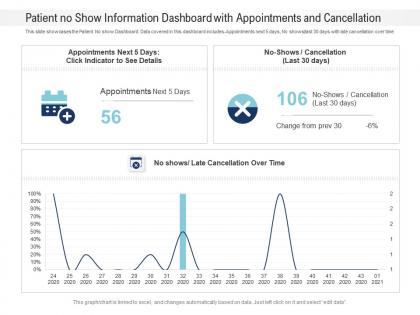
Patient no show information dashboard with appointments and cancellation powerpoint template




Try Before you Buy Download Free Sample Product
 Impress Your
 Audience
 100%
100% Editable
 Save Hours
 of Time


Our Patient No Show Information Dashboard With Appointments And Cancellation Powerpoint Template are topically designed to provide an attractive backdrop to any subject. Use them to look like a presentation pro.
People who downloaded this PowerPoint presentation also viewed the following :
Patient no show information dashboard with appointments and cancellation powerpoint template with all 2 slides:
Use our Patient No Show Information Dashboard With Appointments And Cancellation Powerpoint Template to effectively help you save your valuable time. They are readymade to fit into any presentation structure.
FAQs for Patient no show information dashboard with appointments and
Track your no-show percentages and cancellation rates - break those down by provider and specialty because some departments are absolute disasters (dermatology, I'm looking at you). Don't forget lead time stuff either - when people book versus when they bail tells you a lot. Patient demographics can show patterns too. Set up alerts when your rates jump above normal so you can tweak your reminder system or maybe overbook more aggressively. Oh, and definitely look at appointment types since routine visits behave totally different than urgent ones.
So here's the thing - real-time dashboards let you catch problems as they happen instead of finding out weeks later through some dusty report. You'll see exactly when no-shows spike (rainy Mondays are the WORST, trust me). The visual stuff makes it obvious which patient types or appointment slots are trouble spots. Plus you can actually tell if your reminder texts are doing anything by watching the trends change. Oh, and definitely set up alerts for weird spikes - way better than playing detective after the fact when you're already behind schedule.
Honestly, it's usually timing and communication stuff that kills you. Early mornings and late afternoons are the worst - people just bail. Then you've got the obvious barriers like transportation headaches, work schedules, insurance drama. Life happens, right? But here's what really gets me - when there's too much time between booking and the actual visit, people forget or their situation changes. Your system should definitely track these patterns though. Like, you'll probably notice Monday 8am slots are a disaster. Focus on data that actually lets you do something about it, not just pretty charts.
Look, tracking no-shows is honestly brilliant for scheduling. You'll spot patterns super quick - like if 20% of people skip Monday morning slots, just schedule fewer nurses then. I learned this the hard way with overstaffing costs. The data also shows you which patient types bail most often, so you can overbook those slots or send extra reminders. My advice? Track everything for a month first to get your baseline numbers, then tweak your whole scheduling setup. It really does make a huge difference once you see the patterns.
Honestly, good communication is huge for cutting down no-shows. Your dashboard will show you which methods actually work - some people respond to texts right away, others completely ignore them (which is so frustrating). Check your reminder engagement rates and see if 24-hour or 48-hour notices work better. Response rates tell you a lot too. The timing thing varies by practice, but you can spot patterns pretty quickly. Once you figure out what your patients prefer, you can stop wasting time on channels they don't use and focus on what actually gets through to them.
Look at your old no-show data first - appointment types, what days people flake, demographics, how far ahead they booked. Build a simple dashboard tracking this stuff over time. Seriously, the patterns will shock you once you dig in. Then use basic machine learning to score risky appointments based on what you found. Your staff can call high-risk patients ahead of time or maybe double-book strategically. Don't overthink it initially though - start with obvious patterns before you go crazy with fancy algorithms.
Look for filtering by appointment types and patient demographics - that's huge. Different specialties need different thresholds too. Like cardiology expects around 15% no-shows but dermatology freaks out at 8%. Totally makes sense when you think about it. You'll want custom time ranges and the ability to track by provider, location, referral source. Oh and definitely customizable reminder protocols by specialty. The main thing is drilling down into YOUR specific patterns instead of getting those useless hospital-wide reports that tell you absolutely nothing actionable.
So the dashboard shows no-show patterns by age, gender, insurance, zip code - all that stuff. Younger folks (like 18-35) and Medicaid patients tend to be the worst offenders, honestly. Geography matters too depending on your area. What's nice is you can filter down to specific groups instead of just looking at everything together. Then you can get smarter about reminders - maybe blow up younger patients' phones with texts or call those sketchy zip codes twice. Every practice is different though, so you'll figure out your own patterns pretty quick.
Once you spot the patterns in your no-show data, there's a bunch of stuff you can try. Set up automated reminders for those high-risk slots - your dashboard will tell you exactly which times are the worst. Maybe tweak your scheduling rules too, like making certain patient groups confirm their appointments. Honestly, people get flaky when they have to wait weeks for an appointment, so same-day slots can help. You could even overbook a bit during those peak no-show periods. The whole point is using those dashboard trends to actually prevent gaps instead of just scrambling to fill them after.
Oh dude, EHR integration is honestly a total game changer for your dashboard. Instead of manually updating everything like some kind of data entry robot, it pulls patient info automatically. You'll get way better insights - appointment history, demographics, how urgent their medical needs are. That stuff actually helps predict no-shows pretty well. The system can also send reminders based on however each patient likes to be contacted, which is clutch. Makes the whole thing less basic tracking, more like... predictive magic? I know it sounds like extra work upfront, but seriously get that data connection going first. Worth it.
Looking at your dashboard, there's definitely a pattern here. Lower-income zip codes have way higher no-show rates - like 2-3x worse than wealthier areas. The heat map makes it super obvious too, all that dark red clusters right where you'd expect. Transportation's probably a huge factor, plus people can't just leave work whenever or find babysitters easily. Honestly feels pretty unfair when you think about it. Maybe try switching to text reminders for those neighborhoods? People check phones more than voicemail anyway. Flexible scheduling could help too.
So the dashboard basically shows you who's skipping appointments and why - way better than blasting everyone with the same boring reminders. You'll start noticing weird stuff, like how certain groups always no-show on Mondays or patients with diabetes keep missing follow-ups. Honestly caught me off guard how clear some patterns were. Then you can get smart about it - send different reminder times to working parents, maybe check in more with your chronic patients. It's all about personalizing instead of that generic approach everyone defaults to. Makes such a difference.
Honestly, start with the predictive stuff - machine learning can spot which patients are likely to bail before they do it. Pretty wild how accurate it gets. Set up automated texts where people can actually respond and reschedule right from their phone instead of calling back. Make sure it syncs with your EHR so you're not doing double work. Weather integration is clutch too - if there's a storm coming, you'll know cancellations are about to spike. Telehealth backup doesn't hurt either. Don't go crazy trying to build everything at once though. Pick like two features that'll solve your biggest headaches first.
Check out your no-show patterns first - which appointment types or times are the worst offenders? Then build training around those specific problem areas. Monday mornings killing you? Train your team on weekend reminder calls. Honestly, the data becomes like a cheat sheet for where to focus your efforts. Staff members with lower no-show rates? Have them teach their tricks to everyone else. Oh, and don't waste training budget on stuff that's already working fine. Target the pain points your dashboard is screaming about.
Don't jump straight to blaming patients for missing appointments - there's usually way more going on than you'd think. Transportation, work schedules, childcare... the list goes on. Also keep everything anonymous when you're showing the data around. Nobody needs to see individual patient stuff, just the big picture trends. Honestly, I've seen too many places use this data to punish people instead of actually helping. Focus on what barriers you can remove - better reminders, flexible scheduling, that kind of thing. The whole point should be making it easier for people to show up, not harder.
-
Unique and attractive product design.
-
Informative presentations that are easily editable.
-
Designs have enough space to add content.
-
The content is very helpful from business point of view.
-
Enough space for editing and adding your own content.
-
Attractive design and informative presentation.