

Performance Testing For Application Optimization Powerpoint Presentation Slides




Try Before you Buy Download Free Sample Product
 Impress Your
 Audience
 100%
100% Editable
 Save Hours
 of Time


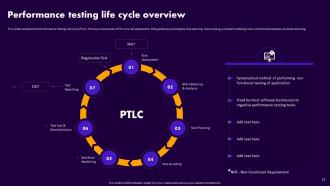
This performance testing for application optimization PPT discusses the performance testing of applications to evaluate certain performance factors, such as speed, scalability, and stability. It also outlines the performance indicators, factors analysed, and advantages of conducting performance tests of websites. In addition, the capacity testing for software quality assurance module discusses the different types of performance testing, such as volume testing, stress testing, load testing, spike testing, scalability testing, and endurance testing. Furthermore, Performance Testing Life Cycle PTLC PPT demonstrates the step-by-step process of performance testing life cycle. The key components of PTLC are risk assessment, non-functional requirement gathering and analysis, test planning, test scripting, workload modeling, test run and result analysis, and test reporting. Moreover, this endurance testing to optimize website performance outlines the applications of performance testing, such as load tests in web and mobile applications. It also highlights the web, mobile, and cloud application use cases of performance testing. Lastly, this performance testing for application optimization deck comprises a training program, budget, checklist, roadmap, 30-60-90 plan, and timeline for conducting performance tests of a web application. Download our 100 percent editable and customizable template, which is also compatible with Google Slides.
People who downloaded this PowerPoint presentation also viewed the following :
Content of this Powerpoint Presentation
Slide 1: This slide introduces Performance Testing for Application Optimization. State Your Company Name and begin.
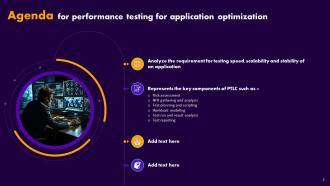
Slide 2: This slide is an Agenda slide. State your agendas here.
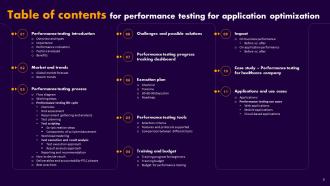
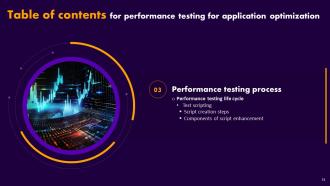
Slide 3: This slide shows a Table of Contents for the presentation.
Slide 4: This slide is an introductory slide.
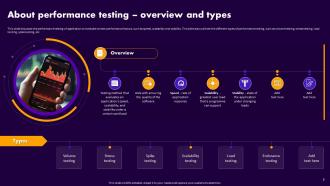
Slide 5: This slide discusses the performance testing of application.
Slide 6: This slide highlights the importance of conducting performance tests of an application.
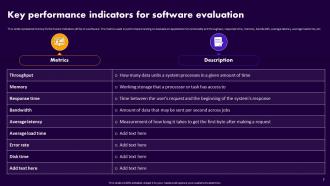
Slide 7: This slide represents the Key Performance Indicators (KPIs) of a software.
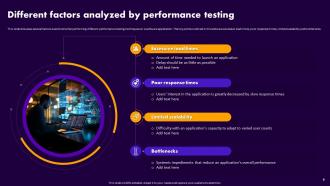
Slide 8: This slide depicts several factors examined while performing different performance testing techniques on a software application.
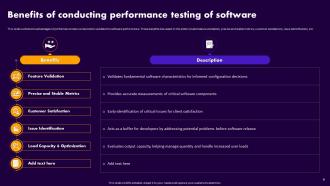
Slide 9: This slide outlines the advantages of performance tests conducted to validate the software performance.
Slide 10: This slide is an introductory slide.
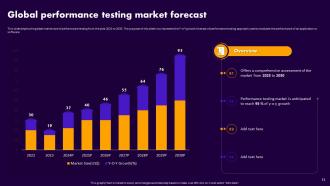
Slide 11: This slide depicts the global market size of performance testing from the year 2023 to 2030.
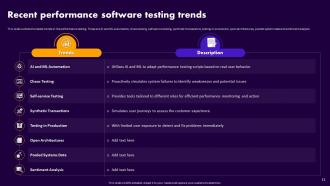
Slide 12: This slide contains the latest trends in the performance testing.
Slide 13: This slide is an introductory slide.
Slide 14: This slide represents the working process of performance testing with the help of a flow diagram.
Slide 15: This slide demonstrates the working steps involved in performance testing.
Slide 16: This slide is an introductory slide.
Slide 17: This slide represents the Performance Testing Life Cycle (PTLC).
Slide 18: This slide discusses the risk assessment phase of Performance Testing Life Cycle (PTLC).
Slide 19: This slide demonstrates the requirement gathering and analysis phase of Performance Testing Life Cycle (PTLC).
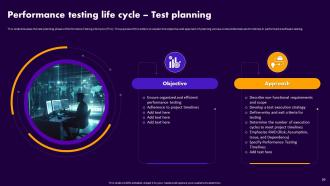
Slide 20: This slide puts the test planning phase of Performance Testing Life Cycle (PTLC).
Slide 21: This slide is an introductory slide.
Slide 22: This slide entails the test scripting phase of Performance Testing Life Cycle (PTLC).
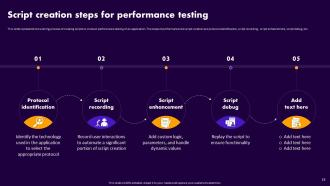
Slide 23: This slide highlights the working process of creating scripts to conduct performance testing of an application.
Slide 24: This slide illustrates the steps involved in script enhancement phase of performance testing lifecycle.
Slide 25: This slide is an introductory slide.
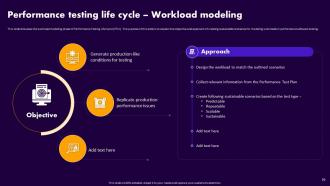
Slide 26: This slide entails the workload modeling phase of Performance Testing Life Cycle (PTLC).
Slide 27: This slide is an introductory slide.
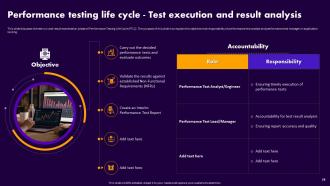
Slide 28: This slide discusses the test run and result examination phase of Performance Testing Life Cycle (PTLC).
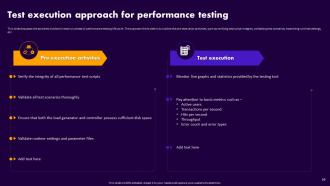
Slide 29: This slide caters to the activities involved in test run phase of performance testing life cycle.
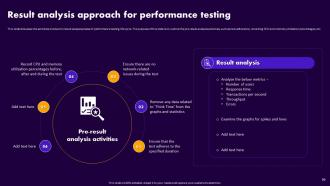
Slide 30: This slide consists the activities involved in result analysis phase of performance testing life cycle.
Slide 31: This slide is an introductory slide.
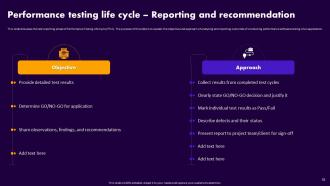
Slide 32: This slide contains the test reporting phase of Performance Testing Life Cycle (PTLC).
Slide 33: This slide is an introductory slide.
Slide 34: This slide highlights the process of selecting decision status of performance testing based on the outcomes.
Slide 35: This slide represents the outcomes of different phases of performance testing lifecycle.
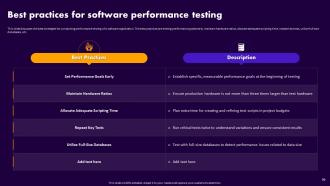
Slide 36: This slide presents the best strategies for conducting performance testing of a software application.
Slide 37: This slide is an introductory slide.
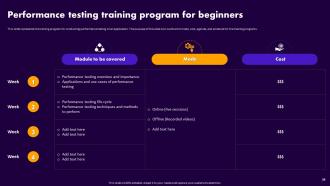
Slide 38: This slide views the training program for conducting performance testing of an application.
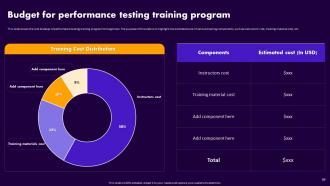
Slide 39: This slide shows the cost breakup of performance testing training program for beginners.
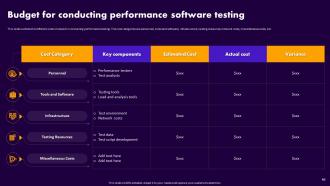
Slide 40: This slide outlines the different costs involved in conducting performance testing.
Slide 41: This slide is an introductory slide.
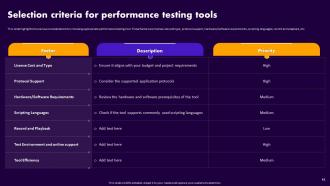
Slide 42: This slide highlights the various considerations for choosing appropriate performance testing tool.
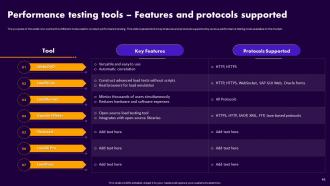
Slide 43: This slide is to outline the different tools used to conduct performance testing.
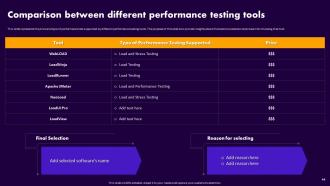
Slide 44: This slide represents the price and type of performance test supported by different performance testing tools.
Slide 45: This slide is an introductory slide.
Slide 46: This slide presents the checklist to conduct performance testing.
Slide 47: This slide entails the timeline for performing software capability testing.
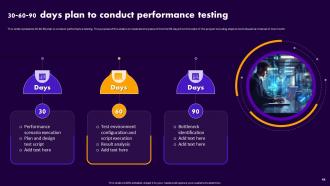
Slide 48: This slide puts 30-60-90 plan to conduct performance testing.
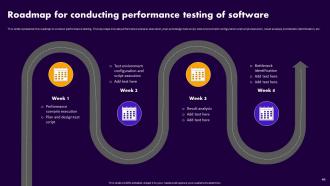
Slide 49: This slide denotes the roadmap to conduct performance testing.
Slide 50: This slide is an introductory slide.
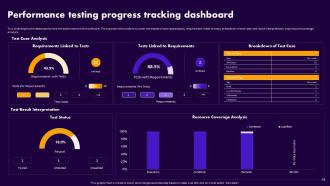
Slide 51: This slide marks the dashboard to test the performance of the software.
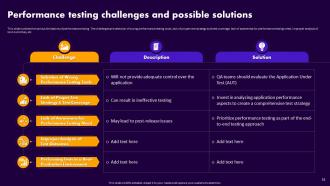
Slide 52: This slide outlines the various limitations of performance testing.
Slide 53: This slide is an introductory slide.
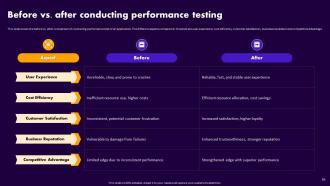
Slide 54: This slide discusses the business impact of conducting performance testing.
Slide 55: This slide shows the before vs. after comparison of conducting performance test of an application.
Slide 56: This slide is an introductory slide.
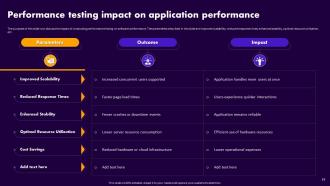
Slide 57: This slidee entails the impact of conducting performance testing on software performance.
Slide 58: This slide contains the before vs. after comparison of conducting performance test of an application.
Slide 59: This slide is an introductory slide.
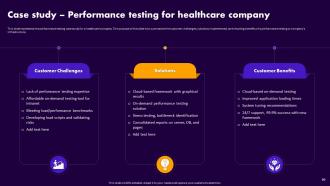
Slide 60: This slide represents the performance testing case study for a healthcare company.
Slide 61: This slide is an introductory slide.
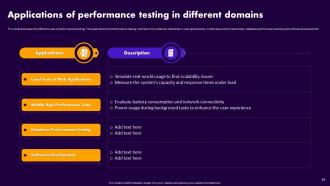
Slide 62: This slide discusses the different uses of performance testing.
Slide 63: This slide is an introductory slide.
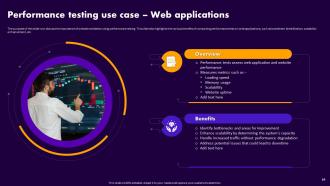
Slide 64: This slide elucidates the importance of website validation using performance testing.
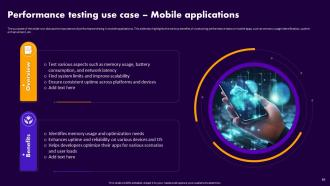
Slide 65: This slide marks the importance of performance testing in mobile applications.
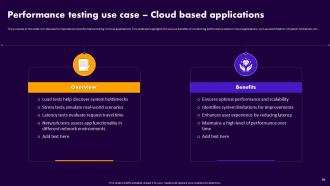
Slide 66: This slide illustrates the importance of performance testing in cloud applications.
Slide 67: This slide shows all the icons included in the presentation.
Slide 68: This slide is titled Additional Slides for moving forward.
Slide 69: This slide shows Post-It Notes. Post your important notes here.
Slide 70: This slide is a Timeline slide. Show data related to time intervals here.
Slide 71: This slide is an About Us slide to show company specifications etc.
Slide 72: This slide is Our Target slide. State your targets here.
Slide 73: This slide is an Idea Generation slide to state a new idea or highlight information, specifications, etc.
Slide 74: This slide is a Comparison slide to state comparisons between commodities, entities, etc.
Slide 75: This slide shows SWOT describing- Strength, Weakness, Opportunity, and Threat.
Slide 76: This slide contains a Puzzle with related icons and text.
Slide 77: This slide is a thank-you slide with address, contact numbers, and email address.
Performance Testing For Application Optimization Powerpoint Presentation Slides with all 85 slides:
Use our Performance Testing For Application Optimization Powerpoint Presentation Slides to effectively help you save your valuable time. They are readymade to fit into any presentation structure.






























FAQs for Performance Testing For Application Optimization
Basically you want to catch problems before your users do - nobody wants their app crashing when people actually need it. Performance testing finds bottlenecks and shows you how much traffic you can handle before things get messy. Think Black Friday madness but for your app. It's super helpful for figuring out if you're meeting speed requirements too. Oh and definitely don't wait until the end to run these tests - I learned that one the hard way. Fixing stuff early is so much cheaper than scrambling last minute when everything's already built.
So load testing is basically checking if your system can handle normal traffic - like 1000 users hitting your app during rush hour. Stress testing? That's when you crank things up way past normal to see where everything breaks. I always think of it like this: load testing = "will Black Friday crash us?" while stress testing = "what if we go viral overnight and get totally slammed?" Honestly, start with load testing first since there's no point breaking things if you can't even handle regular users. Run load tests often during dev, but stress testing is more for understanding how badly things fail.
So you'll want to watch response time and throughput first - basically how fast your app responds and how many requests it handles per second. Error rate's obvious, keep that low. CPU, memory, and disk usage will show you if your infrastructure's choking. Oh, and if you're doing heavy database stuff, definitely track those queries too. Concurrent users is another big one I almost forgot. Honestly, these basics will catch like 90% of issues before they blow up in production. Start there and you'll be good.
So basically add automated perf tests right after your functional tests pass. Start simple - just run quick smoke tests on every build, then do the heavy load testing on release candidates. I've been using k6 a lot lately and honestly it's way cleaner than JMeter for most stuff. Set performance thresholds as gates so builds actually fail when response times suck or throughput tanks. Don't go crazy at first though - begin with basic response time checks, then build up to more complex scenarios. Oh and definitely set up dashboards to track trends over time. You'll catch regressions before they become a headache.
JMeter's probably your best starting point - free and covers most stuff you'd need. LoadRunner's what the big companies use but man, the licensing fees will make you cry. If your team likes coding, Gatling's really solid and the reports look great. There's also k6 which uses JavaScript - been hearing good things about it lately for web testing. I'd mess around with JMeter first since it won't cost you anything, then see what else you might need based on how technical your team is and whether you want vendor support.
First thing - dig into your actual traffic data and user analytics to see what you're really dealing with. Peak hours, how many people are on at once, transaction volumes, all that stuff. Don't just throw out random numbers like "1000 users" because honestly, that's usually way off. Business growth projections matter too - think marketing pushes or busy seasons that'll spike your traffic. I always test at 100%, 150%, and 200% of expected peak loads to find the breaking points. That'll give you solid benchmarks to work from.
Look, performance testing is like your safety net against pissed-off users. Slow apps? People will ditch you in seconds. Crashes during busy periods? Even worse. You want to catch this stuff before real users do - trust me, nobody's waiting around for a checkout page that won't load. I learned this the hard way once. Run tests that actually match how people use your app. Find those bottlenecks early and fix them. Short story: smooth experience = users stick around. Laggy mess = they're gone.
So first thing - get your baseline measurements when everything's running normally, otherwise you won't know what "broken" actually looks like later. Monitor the usual suspects: response times, CPU, memory, throughput. I'm obsessed with APM tools like New Relic because they'll catch those sneaky database queries that are killing your performance. Oh, and memory leaks - those are the worst. Run your load tests gradually, don't just slam everything at once. That way you can see exactly when things start falling apart. Server monitoring tools help spot bottlenecks too.
Honestly, start by digging into your production logs first - that's where the real patterns are hiding. Gradual ramp-ups work way better than sudden traffic bombs. Mix up your test data with different user types doing stuff they'd actually do on your app. Don't forget geographic spread either (users aren't all camping in the same data center, obviously). Real people pause between clicks, so build in think time. Some folks will bail mid-session too - that's just reality. The key is recreating those messy, realistic user flows instead of perfect robot behavior.
Cloud testing is totally different from the old-school stuff you're used to. Your app scales on its own and shares resources with random other apps - makes everything super unpredictable honestly. Test your auto-scaling triggers first, then monitor across different availability zones. Oh and simulate actual user traffic, not just those crazy peak load scenarios. Different regions have wildly different latency too, so don't skip that. Set up your baseline performance metrics in whatever cloud setup you're using before you start comparing anything. Trust me, it'll save you headaches later.
Honestly, the biggest headaches are usually environment setup and getting decent test data. Your test environment never perfectly matches production - that's just life. Plus getting realistic data volumes is a nightmare since obviously no one's handing over their actual customer database. My advice? Start small with whatever setup you have and build from there. Synthetic data generation tools are actually pretty solid these days. Don't get caught up tracking every single metric either - pick 3-4 things that genuinely matter to your users and obsess over those instead. Way less overwhelming that way.
Honestly, the biggest thing is matching your prod setup as closely as you can - same hardware, network config, database size, all that stuff. Here's what trips people up though: they'll use some tiny subset of production data and wonder why everything runs fine in testing but crashes in prod. Scale your test data properly or you're basically wasting your time. Oh, and make sure you've got the same resource limits too - I've seen teams with unlimited memory in test environments then act shocked when prod runs out of RAM. Start by writing down what your production actually looks like, then compare it to your test setup. You'll probably find some obvious gaps.
Response time is your app's first impression - users bail if things drag. Web pages need to load under 2-3 seconds (though honestly that still feels slow now). API calls should hit under 200ms, database queries under 100ms ideally. Mobile apps? 100-200ms for interactions or they'll feel laggy. Oh, and Google actually dings your search ranking for slow pages, which sucks but whatever. Start by measuring what you've got now, then set realistic targets. Don't go crazy - just aim for what your users expect and your tech can handle.
Dude, you really want to catch your architecture problems before users do. Performance testing shows you exactly where things'll blow up - like if your database can't handle the load or your API craps out with multiple users. Think of it as stress-testing a bridge, except way less dramatic. Most teams skip it because of tight deadlines (classic mistake tbh). The results tell you if you need caching, load balancing, or just better servers. Honestly, run these tests early and save yourself from 3am emergency calls later.
Dude, skipping performance testing is asking for trouble. Your app will crawl when real users show up, crash under pressure, and people will just bounce. Found that out the hard way once - nothing worse than scrambling to fix a melting server on a Friday night. You're basically guessing how your system handles traffic spikes or tons of concurrent users. Those issues you could've spotted early? Now they're expensive emergencies eating your weekend. Honestly, fixing performance stuff after launch is such a pain and costs way more than just testing during development. Start load testing early, even basic stuff helps.
-
The presentations are very helpful. I am always able to get appropriate templates for the different topics related to my profession.
-
SlideTeam’s readymade presentations have landed my unique images with my bosses in the past and it continues to reward me.