

Pilot Strategy Performance Measurement Metrics




Try Before you Buy Download Free Sample Product
 Impress Your
 Audience
 100%
100% Editable
 Save Hours
 of Time


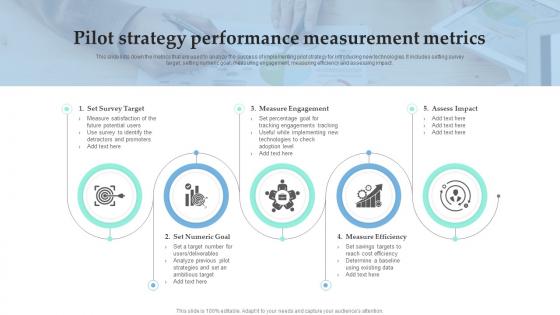
This slide lists down the metrics that are used to analyze the success of implementing pilot strategy for introducing new technologies. It includes setting survey target, setting numeric goal, measuring engagement, measuring efficiency and assessing impact.
People who downloaded this PowerPoint presentation also viewed the following :
Pilot Strategy Performance Measurement Metrics with all 6 slides:
Use our Pilot Strategy Performance Measurement Metrics to effectively help you save your valuable time. They are readymade to fit into any presentation structure.





FAQs for Pilot Strategy
Track flight time efficiency and fuel consumption first - those are solid basics. Safety incident rates obviously matter most (nobody wants to explain accidents). Route stuff like on-time performance and path deviations show if pilots are actually learning. Pilot workload scores during sim scenarios are pretty telling too. Fuel per flight hour might seem boring but it's where you prove the program's worth it. Response times for decision-making scenarios work well also. Honestly though, don't go crazy tracking everything. Pick maybe 3-4 that match what you're trying to accomplish. Way easier to focus on those than drowning in data you won't use.
So basically it comes down to scale, you know? Commercial aviation is all about hundreds of passengers, strict schedules, fuel efficiency per mile - that whole massive operation thing. Private's totally different though. You're focused on keeping individual clients happy, making sure planes are available when needed, cost per flight hour. Commercial pilots basically fly checklists (which sounds mind-numbing tbh), but private gives you way more flexibility with routes and timing. Oh, and the regulatory stuff is insane on the commercial side. Figure out if your stakeholders care more about efficiency or customer experience first - that'll tell you which metrics actually matter.
Look, data analytics is basically what turns your pilot metrics from random numbers into something you can actually use. Track what's working and what isn't - you'll spot patterns you'd miss otherwise. Half the stuff people measure is just fluff that looks good in presentations tbh. The real value? Finding which metrics actually predict success vs the ones that just stroke your ego. You can iterate faster, tweak your approach, and zero in on the indicators that matter. Start by checking which metrics connect to your pilot's main goals.
So basically, pilot strategy metrics track everything - fuel burn, weather, aircraft systems, flight performance. Really useful stuff. You'll catch patterns that help avoid problems before they happen, plus optimize routes for better fuel efficiency. Honestly, the data's probably more reliable than half the copilots I've flown with! Airlines use it to spot training gaps and update procedures too. I'd start with metrics that actually matter for your day-to-day flights. Focus on fuel burn rates, approach stability, and how often you're deviating around weather. Those three will give you the biggest bang for your buck.
Start tracking your key numbers before you even launch - maybe 3-5 metrics that actually matter to what you're testing. Don't go crazy measuring everything, that's just busywork. Set up automated data collection if you can, trust me on this one. Get feedback from real users every week, not just at the end when they've already forgotten half their thoughts. Compare against your starting point and control groups. Oh, and write everything down as it happens. I've made that mistake before - you think you'll remember the details but you absolutely won't when you're trying to expand later.
Weather totally throws off your pilot metrics - headwinds screw up timing, turbulence tanks comfort scores, and storms just wreck everything. It's like measuring performance while someone keeps moving the goalposts, which is super frustrating. You'll want to normalize your data against actual weather instead of what you planned. Use weather severity as a control variable when you analyze stuff. Track both your planned numbers and the weather-adjusted reality so you can actually see pilot performance separate from environmental chaos. That way you're not blaming pilots for things they can't control.
So I'd definitely check their flight hours in the specific aircraft types first. Recent experience matters way more than total hours though - like when was their last proficiency check? That'll show you any gaps real quick. FAA minimums are honestly pretty bare bones if you ask me. You want to dig into simulator performance trends too, plus any customer feedback (good or bad). Emergency scenario handling during training is huge. Oh and don't forget to talk to instructors who've actually been up with them lately - their gut feel combined with the hard data usually tells the whole story.
Flight sims are perfect for this - you can study pilot decisions without anyone actually crashing. Track reaction times, how they handle workload, situational awareness stuff across different scenarios. Turbulence, emergencies, bad weather, you name it. The cool part? You can run the exact same situation with different pilots or replay it with the same person to see what changes. Eye tracking data, control inputs, how they communicate - stuff you'd never get safely in a real cockpit. Oh and you can get super detailed with the metrics too. Just figure out what specific behaviors you're after first, then build scenarios that'll force those decision moments.
CRM is massive for measuring how well your pilot strategies actually work - it shows team dynamics under pressure, not just individual skills. You'd be surprised how many ace pilots completely crumble in crew scenarios. Look at communication patterns, decision-making processes, and workload distribution when you're evaluating strategies. Some approaches look perfect on paper but fail miserably in real cockpit situations. Track callout compliance, cross-checking behaviors, and how well crews share situational awareness. That's where you'll see if your strategies actually improve collaborative performance or if they're just theoretical BS.
Check out those big consulting reports from McKinsey or Deloitte first - they break down pilot success rates by industry. Professional associations are super helpful too since members swap data pretty openly. Honestly, LinkedIn groups are where I've found some of the best intel on this stuff. Don't be shy about cold-reaching non-competitors either. Most people will chat about their pilot numbers if you ask nicely. Just make sure you're comparing similar timeframes and goals, otherwise the data's kinda useless. I'd start with maybe 3-5 solid comparisons and go from there.
For visualizing your pilot data, go with Tableau or Power BI - both are solid choices. Asana or Monday.com work great for tracking your milestones. Google Analytics is essential if you're measuring any digital stuff. But here's the thing - I've watched teams build these elaborate dashboards that just sit there collecting dust. Keep it simple initially. HubSpot's CRM is pretty useful for participant feedback too, though honestly their sales emails are annoying. Start with maybe 2-3 tools tops. You can always add more once you figure out what metrics actually move the needle for your specific situation.
Ugh, regulations totally dictate what you can measure from the start. Can't just track whatever seems cool - you need stuff that actually proves you're hitting safety standards and data rules. It's annoying but honestly keeps you on track. Your whole metrics setup needs audit trails and risk assessments that regulators will buy into. I learned this the hard way on my last project. Map out all the relevant rules first, then design metrics that hit both your learning goals and compliance boxes at once. Way easier than trying to retrofit everything later.
Ugh, this is such a headache honestly. You can't use the same metrics for an A320 vs a 777 - totally different beasts. Each aircraft has its own fuel efficiency standards, approach speeds, even cockpit tech that changes how pilots operate. Your short-haul crews deal with completely different stuff than long-haul pilots too. What I'd do is create specific baselines for each fleet first, then find things that work across all types - like safety compliance rates or crew management scores. It's kinda like comparing... well, you get it. Start fleet-specific, then zoom out.
So track stuff like flight hours, safety scores, training completion - basically anything that shows who's crushing it vs. who's struggling. Replacing pilots is crazy expensive, so watch for red flags like someone always declining certain routes or their performance dropping off. That's usually when they're about to bail. The scheduling preferences thing is actually pretty telling too - pilots get picky when they're already mentally checked out. Use all this to jump in early with workload adjustments or throw retention bonuses at the right people before they walk.
Honestly, pilot feedback is like having an inside scoop on what your numbers actually mean. They're dealing with the real stuff day-to-day, not just spreadsheet data. You'll get the truth about whether that metric spike means genuine improvement or if people are just finding workarounds (which happens way more than anyone admits). Regular check-ins work best - I'd say monthly? Ask them specific questions about how the numbers translate to their actual work. Sometimes they catch weird side effects or broken processes that completely fly under the radar of your tracking systems.
-
“Slides are formally built and the color theme is also very exciting. This went perfectly with my needs and saved a good amount of time.”
-
Been using SlideTeam for some time now…can’t imagine why I wasted all that time in front of the screen trying to make the perfect presentation.