

Planning And Implementation Of CRM Software Powerpoint Presentation Slides




Try Before you Buy Download Free Sample Product
 Impress Your
 Audience
 100%
100% Editable
 Save Hours
 of Time


CRM Implementation is the procedure of deploying and installing a Customer Relationship Management Tool to streamline the process and improve the overall organizational performance. The key objective of introducing this module is to track leads and evaluate customer interactions efficiently. The module also discusses the need for CRM in an organization, showcasing the efficiency indicators and features like marketing automation, data security, remote work, and order fulfillment. The given module incorporates a comparison chart and identifies the best CRM in the current market scenario. The critical components of the implementation strategy include setting up an account, adding roles, and enabling security. Other such elements are process automation, data transmission, and CRM deployment. After implementation, there is always a need for CRM optimization. This module includes challenges faced while installing CRM and its mitigation strategies and a training program for employees to acquaint them with CRM usability. At last, CRM future development projections help the organization track and monitor the overall business process. Get access now.
People who downloaded this PowerPoint presentation also viewed the following :
Content of this Powerpoint Presentation
Slide 1: This slide introduces Planning and Implementation of CRM Software. State Your Company Name and begin.
Slide 2: This is an Agenda slide. State your agendas here.
Slide 3: This slide presents Table of Content for the presentation.
Slide 4: This slide highlights title for topics that are to be covered next in the template.
Slide 5: This slide presents Current Problems Faced by the Company.
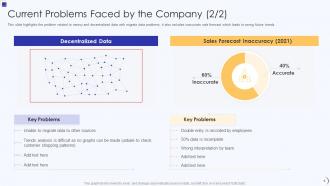
Slide 6: This is another slide continuing Current Problems Faced by the Company.
Slide 7: This slide illustrates the issues that trigger poor relationship with customers.
Slide 8: This slide displays Key Reasons for Not Incorporating CRM.
Slide 9: This slide highlights title for topics that are to be covered next in the template.
Slide 10: This slide showcases the CRM uses for organization which includes functionality data access, agent performance tracking, etc.
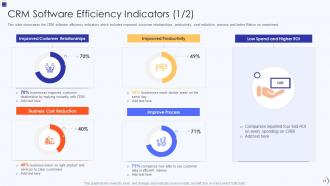
Slide 11: This slide showcases the CRM software efficiency indicators.
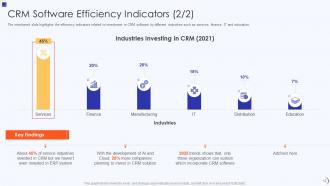
Slide 12: This is another slide continuing CRM Software Efficiency Indicators.
Slide 13: This slide highlights title for topics that are to be covered next in the template.
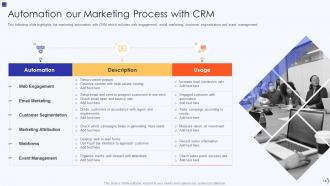
Slide 14: This slide represents Automation our Marketing Process with CRM.
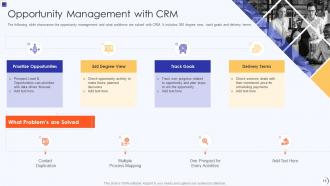
Slide 15: This slide displays opportunity management and what problems are solved with CRM.
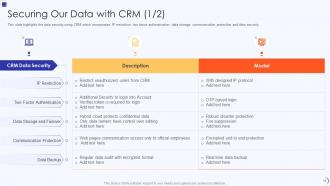
Slide 16: This slide highlights the data security using CRM which incorporates IP restriction.
Slide 17: This slide showcases CRM data security model which includes the user based, record sharing and login based security.
Slide 18: This slide shows remote work functionality of CRM and work from home statistics.
Slide 19: The slide showcase the order fulfilment process with CRM software.
Slide 20: This slide presents Mobile CRM uses and without mobile CRM uses in organization.
Slide 21: This slide highlights title for topics that are to be covered next in the template.
Slide 22: This slide represents On-Premise CRM Overview with Key Features.
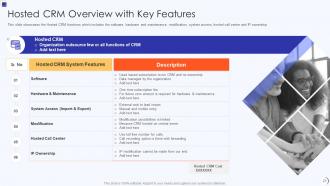
Slide 23: This slide showcases the Hosted CRM functions which includes the software, hardware and maintenance, modification, etc.
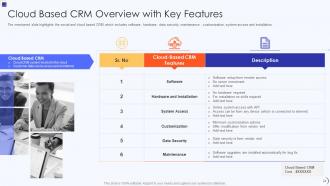
Slide 24: This slide shows Cloud Based CRM Overview with Key Features.
Slide 25: The mentioned slide showcases the CRM software comparisons.
Slide 26: This slide highlights the cloud based CRM as the best among all the option for business.
Slide 27: This slide highlights title for topics that are to be covered next in the template.
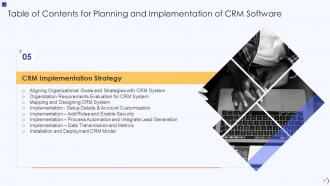
Slide 28: This slide shows Aligning Organizational Goals and Strategies with CRM System.
Slide 29: This slide presents Organization Requirements Evaluation for CRM System.
Slide 30: This slide displays Mapping and Designing CRM System.
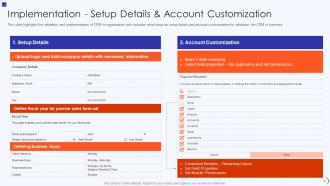
Slide 31: This slide represents Implementation Setup Details & Account Customization.
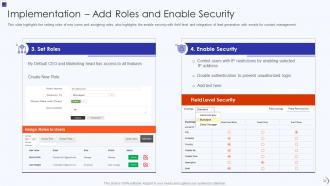
Slide 32: This slide showcases Implementation to Add Roles and Enable Security.
Slide 33: This slide shows Implementation for Process Automation and Integrate Lead Generation.
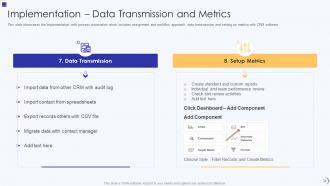
Slide 34: This slide presents Implementation with process automation.
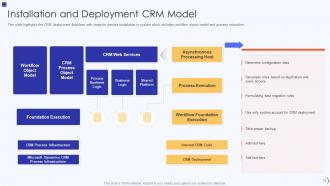
Slide 35: This slide displays CRM deployment flowchart with steps for precise installation.
Slide 36: This slide highlights title for topics that are to be covered next in the template.
Slide 37: This slide represents Challenges of CRM Implementing with Mitigation Strategies.
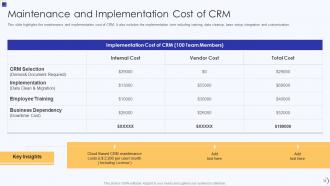
Slide 38: This slide showcases Maintenance and Implementation Cost of CRM.
Slide 39: This slide shows implementation time of CRM which includes the key tasks.
Slide 40: This slide highlights title for topics that are to be covered next in the template.
Slide 41: This slide presents CRM Training Program for Employees.
Slide 42: This slide highlights title for topics that are to be covered next in the template.
Slide 43: This slide displays Development Projections after Implementing CRM.
Slide 44: This slide highlights title for topics that are to be covered next in the template.
Slide 45: This slide represents automation of business process with CRM which includes levels, stages, conditions, etc.
Slide 46: This slide highlights title for topics that are to be covered next in the template.
Slide 47: This slide showcases CRM Implementation Dashboard with Sales Pipeline and Revenue by Products.
Slide 48: This slide shows CRM Implementation Dashboard with Customer Satisfaction and Marketing Expenses.
Slide 49: This slide displays Icons for Planning and Implementation of CRM Software.
Slide 50: This slide is titled as Additional Slides for moving forward.
Slide 51: This is About Us slide to show company specifications etc.
Slide 52: This is Our Mission slide with related imagery and text.
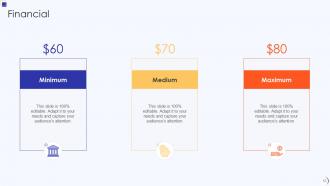
Slide 53: This is a Financial slide. Show your finance related stuff here.
Slide 54: This slide presents Roadmap with additional textboxes.
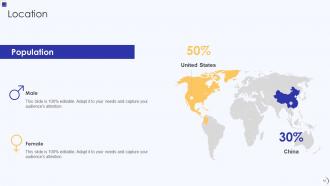
Slide 55: This is a Location slide with maps to show data related with different locations.
Slide 56: This slide provides 30 60 90 Days Plan with text boxes.
Slide 57: This slide depicts Venn diagram with text boxes.
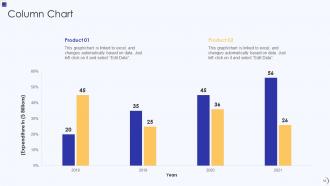
Slide 58: This slide displays Column chart with two products comparison.
Slide 59: This is a Timeline slide. Show data related to time intervals here.
Slide 60: This is a Comparison slide to state comparison between commodities, entities etc.
Slide 61: This is a Thank You slide with address, contact numbers and email address.
Planning And Implementation Of CRM Software Powerpoint Presentation Slides with all 66 slides:
Use our Planning And Implementation Of CRM Software Powerpoint Presentation Slides to effectively help you save your valuable time. They are readymade to fit into any presentation structure.





























FAQs for Planning And Implementation Of CRM Software
Key CRM implementation steps include needs assessment, software selection, data migration planning, user training, and phased rollout. These stages streamline adoption by ensuring proper customization, seamless data transfer, and comprehensive staff preparation, with many organizations finding that structured implementation reduces deployment time by 40% while maximizing user adoption and operational efficiency.
Determining the right CRM software involves evaluating your sales processes, customer data requirements, integration needs with existing systems, scalability potential, and budget constraints. Through careful assessment of features like automation capabilities, reporting tools, and user interface design, businesses streamline customer relationship management, enhance sales productivity, and ultimately deliver improved customer experiences while achieving measurable ROI.
Data migration plays a critical role in CRM implementation by transferring existing customer information, sales histories, contact details, and business records from legacy systems into the new platform. Effective management involves comprehensive data auditing, cleansing duplicate or outdated entries, mapping fields between systems, and conducting phased testing, with many organizations finding that structured migration approaches minimize disruption while ensuring data integrity and system reliability.
Businesses ensure CRM user adoption through comprehensive training programs, involving employees in selection processes, demonstrating clear value propositions, and providing ongoing support resources. Organizations like retail chains and financial services firms find success by appointing CRM champions, integrating systems with existing workflows, and showcasing early wins that highlight improved efficiency and customer insights.
Common CRM implementation challenges include user resistance, data migration issues, inadequate training, poor system integration, and unrealistic expectations. These obstacles can be overcome by securing executive sponsorship, conducting thorough data audits, providing comprehensive staff training, and establishing clear workflows, with many organizations finding that phased rollouts significantly improve adoption rates and long-term success.
Integrating CRM software with existing tools enhances functionality by centralizing customer data, automating workflows, and eliminating data silos across departments. Through seamless integration with email platforms, marketing automation, and financial systems, organizations streamline lead nurturing, accelerate sales cycles, and deliver personalized customer experiences, ultimately achieving greater operational efficiency and competitive advantage.
CRM implementation significantly enhances customer experience by enabling personalized interactions, faster response times, streamlined service delivery, and consistent communication across all touchpoints. Through centralized customer data and automated workflows, businesses achieve improved customer satisfaction, increased retention rates, and deeper engagement insights, with many organizations finding that strategic CRM deployment ultimately delivers competitive advantage and measurable revenue growth.
Employee training is critical for CRM implementation success, as it directly impacts user adoption, data quality, and system effectiveness across all departments. Comprehensive training programs enhance productivity, reduce resistance to change, and ensure consistent data entry practices, with many organizations finding that well-trained teams achieve faster ROI and improved customer relationship management outcomes.
Key CRM implementation metrics include user adoption rates, sales cycle reduction, customer acquisition costs, lead conversion rates, and customer retention improvements. These measurements enable organizations to track operational efficiency and revenue impact, with many companies finding that monitoring data quality scores, customer satisfaction levels, and sales team productivity ultimately delivers measurable ROI and competitive advantage.
Feedback from employees and customers improves future CRM implementations by identifying usability gaps, workflow inefficiencies, and integration challenges that impact adoption rates. Through structured surveys and user interviews, organizations streamline training processes, enhance interface design, and optimize feature configurations, while addressing specific pain points, ultimately delivering higher user satisfaction and better customer experiences across departments.
CRM customization best practices include mapping existing workflows, defining clear data fields, establishing user permissions, integrating essential tools, and creating automated processes. These approaches streamline operations by aligning system functionality with organizational needs, minimizing user resistance, and maintaining data consistency, with many companies finding that strategic customization ultimately delivers enhanced productivity and improved customer experiences.
Businesses can prepare data for CRM migration by auditing existing records, standardizing formats, eliminating duplicates, mapping data fields, and creating comprehensive backups. Through systematic data cleansing and validation processes, organizations streamline customer information, enhance data accuracy, and ensure seamless integration, ultimately delivering improved customer insights and operational efficiency in their new system.
Post-implementation CRM success requires dedicated user training programs, regular system updates, and scalable infrastructure planning to accommodate growth. Strategic partnerships with CRM vendors, continuous performance monitoring, and feedback-driven optimization enable organizations to maintain system effectiveness while expanding capabilities, with many companies finding that proactive support frameworks and modular architectures deliver sustained competitive advantage.
CRM software implementation supports sales and marketing alignment by centralizing customer data, standardizing lead qualification processes, and enabling seamless handoffs between teams. Through shared dashboards and automated workflows, organizations streamline communication, enhance lead nurturing campaigns, and track conversion metrics more effectively, ultimately delivering improved customer experiences and higher revenue growth across both departments.
Long-term CRM investment delivers enhanced customer retention, streamlined sales processes, improved data analytics, automated workflows, and scalable relationship management capabilities. These systems enable organizations to reduce operational costs, accelerate sales cycles, and deliver personalized customer experiences, with many businesses finding that comprehensive CRM platforms ultimately provide significant competitive advantages and sustainable revenue growth.
-
Excellent design and quick turnaround.
-
Great quality slides in rapid time.