

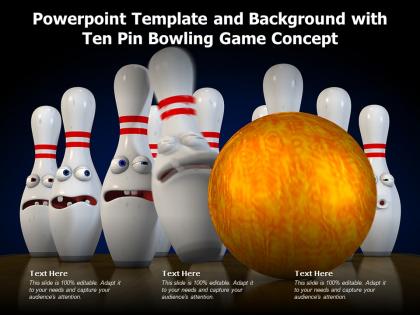
Powerpoint template and background with ten pin bowling game concept




Try Before you Buy Download Free Sample Product
 Impress Your
 Audience
 100%
100% Editable
 Save Hours
 of Time


The following Powerpoint Image slide titled Powerpoint Template And Background With Ten Pin Bowling Game Concept is an editable Powerpoint template available in Standard as well as Widescreen size. This slide has an image pasted strategically on a slide with sections for text that you can fill in. You can move and edit any element and paste your own image in place of this provided image if required.
People who downloaded this PowerPoint presentation also viewed the following :
Powerpoint template and background with ten pin bowling game concept with all 2 slides:
Use our Powerpoint Template And Background With Ten Pin Bowling Game Concept to effectively help you save your valuable time. They are readymade to fit into any presentation structure.
FAQs for Powerpoint template and background with ten pin
A Ten Pin Bowling PowerPoint template should include lane diagrams, pin arrangement configurations, scoring systems, basic techniques, and equipment specifications. These visual elements streamline presentation delivery by illustrating complex scoring rules, demonstrating proper form mechanics, and showcasing equipment variations, with many sports instructors and bowling centers finding that comprehensive templates enhance learning experiences while reducing instruction time.
A PowerPoint template enhances bowling technique understanding by providing structured visual frameworks for stance positioning, release mechanics, footwork patterns, and lane targeting strategies. Through organized slide layouts, bowling instructors and coaches can demonstrate proper form sequences, scoring calculations, and strategic pin combinations, ultimately delivering clearer educational content that accelerates skill development for players across all experience levels.
A Ten Pin Bowling PowerPoint template achieves visual appeal through dynamic action shots, vibrant lane imagery, clear bowling terminology graphics, customizable skill-level sections, and interactive scoring elements. These design features enhance presentations by accommodating diverse expertise levels, from beginner tutorials to advanced strategy sessions, while maintaining engaging visual consistency that resonates with bowling enthusiasts, instructors, and league organizers seeking professional presentation materials.
Graphics and animations in bowling presentations enhance audience engagement by creating visual interest, illustrating complex concepts like ball physics and lane dynamics, and maintaining attention through dynamic movement. These visual elements help transform static data into compelling narratives, with many presenters finding that animated strike sequences, scoring progressions, and technique demonstrations significantly improve comprehension and retention while delivering more memorable and impactful presentations.
Bar charts, pie charts, line graphs, performance dashboards, and comparison tables are most effective for presenting bowling statistics, enabling clear visualization of scores, strike rates, spare conversions, and game-to-game progress. These visual elements streamline data interpretation by highlighting trends, showcasing improvements, and comparing player performances, ultimately delivering engaging presentations that transform complex bowling data into actionable insights for leagues, tournaments, and coaching analysis.
Templates can be customized through color schemes, imagery, typography, and content structure to match specific bowling contexts and audiences. League-focused designs emphasize statistics, standings, and competitive elements with professional layouts, while recreational themes incorporate vibrant colors, casual graphics, and social elements, ultimately delivering targeted presentations that resonate with distinct bowling communities and enhance engagement.
High-energy bowling presentations benefit from bold color schemes like electric blue and orange, red and yellow combinations, neon green with black accents, or classic bowling alley colors of deep red and cream. These vibrant palettes create visual excitement while maintaining professional readability, with many sports organizations and entertainment venues finding that energetic color combinations significantly enhance audience engagement and presentation impact.
Speaker notes in the Ten Pin Bowling PowerPoint template provide detailed explanations, coaching cues, and technical demonstrations that complement each slide's visual content. These comprehensive guides enable instructors to deliver consistent, professional lessons covering stance fundamentals, release techniques, and lane reading strategies, while ensuring key concepts like spare conversion and scoring systems are thoroughly explained, ultimately enhancing student comprehension and skill development.
Common pitfalls include overcrowded slides with excessive text, poor color contrast that reduces readability, inconsistent fonts throughout the presentation, distracting animations that overshadow content, and cluttered layouts without clear visual hierarchy. These design mistakes significantly impact audience engagement and message delivery, with many presenters finding that streamlined templates with consistent branding, strategic white space, and focused content ultimately enhance communication effectiveness and professional credibility.
A Ten Pin Bowling template facilitates strategy discussions by providing visual frameworks for spare conversions, strike techniques, pin carry analysis, and scoring progression patterns. Through slide layouts featuring lane diagrams and scoring charts, teams can analyze approach consistency, ball placement strategies, and split management techniques, while demonstrating how strategic pin targeting ultimately delivers improved averages and competitive performance.
Font choice significantly impacts bowling presentation effectiveness by ensuring audience comprehension, maintaining visual hierarchy, supporting brand consistency, and complementing the sports theme without compromising professionalism. Strategic typography enhances readability across different viewing distances, creates emotional connection with the bowling atmosphere, and delivers clear messaging, with many presenters finding that balanced font selections ultimately streamline communication while preserving the presentation's competitive edge.
**INPUT**: How can you incorporate multimedia elements, like videos or sound clips, into a bowling PowerPoint presentation? **OUTPUT**: You can incorporate multimedia by using PowerPoint's Insert tab to add videos of bowling techniques, sound effects of strikes and spares, background music, and interactive audio narration. These elements enhance audience engagement through visual demonstrations, authentic bowling alley atmospherics, and dynamic storytelling, with many presenters finding that multimedia transforms static presentations into immersive experiences that significantly improve retention. [Word count: 57 words]
Interactive elements for Ten Pin Bowling PowerPoint templates include live polling, team-based scoring competitions, audience prediction games, Q&A sessions with bowling terminology, and virtual strike celebrations. These engagement strategies transform static presentations into dynamic experiences by encouraging participation, fostering friendly competition, and creating memorable moments, with many presenters finding that interactive bowling themes significantly boost audience retention and involvement.
Cultural differences influence Ten Pin Bowling PowerPoint template design through color symbolism, text direction preferences, imagery choices, and communication styles that resonate with diverse audiences. International organizations increasingly customize these templates by incorporating culturally appropriate visual elements, localized terminology, and region-specific design aesthetics, ultimately delivering more effective presentations and enhanced audience engagement across global markets.
Case studies can be integrated through dedicated slides showcasing league growth statistics, tournament success metrics, facility revenue improvements, and customer retention data from successful bowling centers. These real-world examples work particularly well when highlighting operational transformations, community engagement programs, and technology implementations like automated scoring systems, with many bowling businesses finding that documented success stories from similar venues significantly enhance credibility and demonstrate proven strategies for audience engagement.
-
Graphics are very appealing to eyes.
-
Excellent Designs.
-
Use of different colors is good. It's simple and attractive.
-
Easily Editable.