

Presentation outline template ppt background





Try Before you Buy Download Free Sample Product
 Impress Your
 Audience
 100%
100% Editable
 Save Hours
 of Time


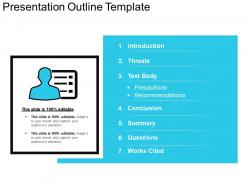
Get this Presentation Outline Template and provide a road map to a more successful business pitch. Organize your thoughts and ideas into main points and display it with this presentation outline template. With this PPT slide, your audience will get an idea of the titles and the main text from each slide. It includes all the critical elements of your presentation. This slide will give an overview of the topic covered in the presentation. Display all the key points through this presentation outline slide. Add a suitable icon or title in the box. The related contents like introduction, threats, conclusion, and summary will give a clear picture of the topics covered in the presentation. Use this template to deliver presentations conveniently. This will help you to create a comprehensive business plan without missing a detail. Download this slide now and design your business plan with this professionally designed PPT template.
People who downloaded this PowerPoint presentation also viewed the following :
Presentation outline template ppt background with all 5 slides:
Disclose your hand with our Presentation Outline Template Ppt Background. Convince them you have all the aces.

FAQs for Presentation outline
Start with something that hooks people immediately - boring openings kill presentations. Stick to 3-5 main points because honestly, nobody remembers more than that anyway. Add timing notes for each section or you'll end up racing through your last slides (learned this the hard way). Transitions matter more than you think - they keep people following along instead of zoning out. Write speaker notes for the complicated parts so you don't freeze up. End strong with what you want them to actually DO next. Also mark spots where you'll take questions. Simple structure beats fancy every time.
Look, a solid outline keeps people listening because they can actually follow what you're saying. Start with your intro, hit your main points, then connect them smoothly - otherwise you'll lose everyone when you start bouncing around randomly. Each section should flow into the next one naturally. It's kinda like binge-watching a show where every episode makes you want to see what happens next. Oh, and tell them upfront where you're going with this - people like knowing the roadmap so they can follow along without getting confused.
Dude, presentation templates are such a lifesaver. No more staring at blank slides feeling completely lost - which honestly happens to me way too often. They give you this structure that actually makes sense, so people can follow along instead of zoning out. You won't accidentally skip important stuff like your conclusion or whatever call-to-action you're going for. The whole thing just flows better. I used to wing it every time and my presentations were... not great. Templates basically hand you a roadmap that works.
Put your visual cues right in your outline - like "[SLIDE: sales chart]" next to the bullet point where you'll use it. Trust me, I learned this the hard way after fumbling through presentations! Match each visual to what you're actually explaining, not just random spots. Your slides should back up your message, not fight against it. Oh and definitely plan when you'll reference each one in your script. Makes everything way smoother than just winging it with props and hoping for the best.
Dude, storytelling totally changes how people absorb your presentation. Think about it - we're hardwired for stories since we were little kids. So instead of bullet points that make everyone's eyes glaze over, build your outline like a story arc. You know, problem → what happened → what you figured out. Way more engaging than just throwing data at people. Your brain naturally wants to follow that narrative thread. I always map my main points as story beats now - sounds weird but it works. Start with "here's what went wrong" and take them through the whole journey to your big takeaway.
Oh totally! You've gotta match your template to what you're trying to do. Informational stuff is pretty straightforward - intro, main points with data, wrap-up. Just "here's what you need to know" vibes. Persuasive presentations are trickier though. Problem, solution, why it works, then push for action. Sales decks do this really well. The whole thing comes down to your goal - are you teaching or convincing? Informational templates focus on getting info across clearly. Persuasive ones walk people through making a decision. Honestly, I'd figure out your main objective first, then pick whatever structure actually supports that.
Know your audience first - that's huge. Tech people want to see the data immediately, so hit them with metrics upfront. Healthcare crowds? They care about compliance and patient outcomes above everything else. Financial services types need you talking risk and ROI from minute one. I always creep on the company beforehand to figure out their vibe. Law firms want that buttoned-up, formal presentation style, but startups are way more chill about it. Here's what actually works though: ask your contact what problems are driving their team crazy right now. Then build your whole pitch around fixing exactly those things.
Figure out your one main message first - what do you absolutely need them to walk away with? I use this "must have, nice to have, ditch if needed" ranking system. Works every time. Learned this after bombing a presentation by cramming way too much in 20 minutes... anyway, stick to three main points max since people's brains just can't hold more than that. Your strongest stuff goes first and last - that's what sticks in their heads. Oh, and here's my test: if you suddenly only had 5 minutes, what would you keep? That's your real content right there.
Think in layers - main points as bullets, then just enough sub-bullets to keep you on track. I used to outline everything and it made my talks super stiff. Your outline should be detailed enough that someone else could follow your logic, but short enough that you're actually presenting, not reading. Keywords and phrases work way better than full sentences. Honestly, if your outline's longer than a page, you've probably overdone it. The goal is having enough structure without being robotic about it.
Ugh the worst thing you can do is stuff too much into your outline - you'll just race through everything. Jump around without transitions and people get lost. Make your points too vague? Same problem. I've watched so many presentations where someone clearly didn't think about who they're actually talking to, like explaining basic stuff to experts or vice versa. Oh and time estimates! Write those next to each section or you'll definitely run over. Stick to maybe 3-4 main points tops. Trust me on this one.
Honestly, go with bullet points. Your brain processes them way faster - you can scan the whole structure in seconds instead of digging through paragraphs hunting for your main ideas. I learned this the hard way after stumbling through presentations where I'd written everything out like an essay. You end up just reading it word for word, which defeats the whole point of having an outline. Bullets make you boil each thought down to what actually matters. Plus when you're up there presenting and need to quickly glance down? You'll instantly see what's next instead of squinting at a wall of text.
Share your outline with a few people you trust before diving into the actual slides. I learned this the hard way after building entire presentations that just... didn't land. Ask them if your main points make sense and if the flow works. Missing anything obvious? Their feedback helps you reorder stuff, add details, or cut the fluff. Way easier to make big changes now than later when you've already created everything. Oh, and try talking through it out loud with someone first - you'll catch weird gaps that look fine on paper but sound confusing when spoken.
Dude, you gotta try digital outlining - it's a total game changer. I've been using MindMeister for visual brainstorming and it's honestly amazing how fast you can map out ideas. Canva and PowerPoint both have these cool features that'll auto-generate slides from your bullet points. Super convenient. The drag-and-drop thing alone will save you hours of retyping stuff. Oh, and if you're working with others, the real-time editing is clutch. Start with something basic like Google Slides' outline view - I wish I'd discovered it sooner because I definitely wasted way too much time doing things the hard way!
Honestly, transition phrases are a game changer for this stuff. You want to connect your sections so people don't get lost. Try referencing what you just talked about, then hint at what's next - like "Now that we've seen the problem, here are three ways to fix it." Numbers work too ("First... Second... Finally") or you can use stuff like "Because of this..." The whole point is helping your audience follow along. Here's what I'd do though - read your outline out loud. If the transitions sound weird to you, they'll definitely sound weird to everyone else. Just write those connecting sentences right into your outline so you won't blank out mid-speech.
Your outline is basically like a GPS for timing. I always scribble rough time estimates next to each section beforehand - helps me know if I need to speed up or can dive deeper into something. You know those presentations that just go completely off the rails? Yeah, that used to be me all the time. Now I mark little checkpoints right on my outline, like "15 min: start section 3." Makes such a difference. You can actually glance down and see if you're behind without panicking or losing your place.
-
Nice and innovative design.
-
Great designs, really helpful.