

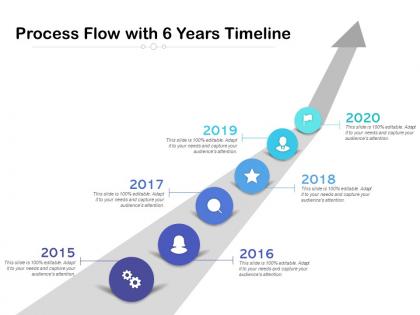
Process flow with 6 years timeline




Try Before you Buy Download Free Sample Product
 Impress Your
 Audience
 100%
100% Editable
 Save Hours
 of Time


Our Process Flow With 6 Years Timeline ensure the dialogue carries on. Folks find cause to continue discussions.
People who downloaded this PowerPoint presentation also viewed the following :
Process flow with 6 years timeline with all 2 slides:
Folks find cause to continue discussions due to our Process Flow With 6 Years Timeline. It ensures the dialogue carries on.
FAQs for Process flow with
You need milestones, deliverables, clear owners, and realistic buffers - that's your foundation. Map out the big phases first, then drill down into tasks and dependencies. I throw in at least 20% extra time because things always go sideways. Build in review stages and regular check-ins too. Oh, and don't forget approval cycles - those can drag forever. Keep everything visual where your team actually looks at it. Nobody uses those fancy project tools that cost a fortune but sit empty. Whatever platform people check daily, that's your winner. Short version: plan for chaos and make it dead simple to track.
Honestly, timeline process flows are game-changers for project management. They show your whole project visually from start to finish, so everyone knows what's happening. Bottlenecks become obvious before they wreck your schedule. Your team stays on the same page about what's coming up next. I always map out dependencies and critical path stuff first - saves so much headache later. List your big milestones, then work backwards to figure out timing. Stakeholders love them too since you can just point and say "we're here." Way better than those endless status emails nobody reads anyway.
So I've tried a bunch of these - Microsoft Visio and Lucidchart are solid choices. Draw.io is totally free and honestly pretty decent. PowerPoint actually works way better than you'd expect for simple stuff, which is kinda funny. Miro's great if you're working with a team since everyone can jump in and edit. Figma too, though I mainly think of it for design work. Some project management tools like Monday.com have timeline features built in. Really depends what you're doing - if it's just for yourself, start with draw.io. Complex team project? Maybe spring for Lucidchart.
Depends who's gonna be looking at it, honestly. Executives just want the big stuff - major milestones, key deliveries. Don't bog them down with every little task. Your project team though? They need the nitty-gritty so everyone knows what they're doing. I always start with the main phases first, then get specific around the risky parts or wherever teams have to hand stuff off to each other. That's where things usually fall apart anyway. Only add detail if it'll actually help someone decide something or take action - otherwise you're just making pretty charts that nobody uses.
Oh man, visual hierarchy is SO important for timeline stuff. Size, color, positioning - use all of that to make key steps stand out while keeping the less important bits quiet. Bold headers work great for major phases, and consistent icons help too. Progress bars are weirdly addictive when they're done right, people love watching them fill up. Without decent hierarchy though? Users get completely lost. I always map out the most critical moments first, then build everything else around those. Otherwise you'll have people missing steps left and right.
Honestly, the game-changer is building in real review points where people can actually change direction - not just nod along. I like putting these right after research wraps or before anything major launches. Buffer time is everything though, trust me on this one. Without it, one round of feedback tanks your whole schedule (been there!). Tell people exactly what kind of input you want and when you need it back. Oh, and don't overthink it - just pick your 2-3 make-or-break moments and plan backwards from there.
Dude, timeline flows are perfect for manufacturing and project management - software dev too. Construction companies swear by them, same with pharma and logistics. Basically anywhere timing matters. Healthcare uses them for patient stuff, which makes sense. Even marketing teams jumped on this trend for campaigns, though honestly that feels a bit overkill sometimes. Short version: if your work has dependencies or you need clear handoffs between teams, these will save your ass. No more "wait what's supposed to happen now?" panic moments. I'd start with whatever process is currently the biggest mess.
Honestly, timeline process flows are game-changers for seeing when you'll actually need people and resources. Bottlenecks become super obvious before they bite you. You can tell right away if someone's gonna be swamped or if you need extra hands. Way better than trying to decode those confusing Gantt charts (seriously, who has time for that?). The cool part is comparing what you planned vs what actually happened - makes you way better at guessing timelines for next time. Just map out your current project's resource needs on a basic timeline first. Trust me, everything clicks into place once you see it laid out like that.
Honestly, spacing is everything - keep it clean and don't cram text everywhere. I've seen timelines that look like someone threw up a novel on them, total disaster. Pick maybe two colors max, like one for done stuff and another for what's coming. Show which parts depend on each other so people get why X has to happen before Y. Oh, and always pad your dates with buffer time. Trust me on this one - you'll look like a hero when you're not frantically explaining why everything's behind schedule. Start broad, then dive into specifics if they want more detail.
Start with visual hierarchy - consistent colors, shapes, spacing to guide the eye. Break complex stuff into chunks with clear milestones. I swear, half the timelines I see look like someone threw spaghetti at a wall! Keep text concise but detailed enough so outsiders can follow along. Swim lanes work great when you've got multiple departments involved. Oh, and definitely test it with someone who wasn't part of creating it. They'll catch confusing parts you're totally blind to at this point.
Honestly, start simple with just 2-3 metrics that actually matter to your team's goals. Cycle time is huge - track how long each step takes and where stuff gets stuck (that's your bottleneck). Throughput's another good one - basically how much you're cranking out. Error rates matter too because nobody wants to do the same work twice, right? And here's something people forget - ask if your stakeholders actually like using the process. I've seen technically "perfect" workflows that everyone absolutely hated. Once you've got baseline numbers on a few key things, then you can get fancy with more metrics. But don't overcomplicate it from day one.
Dude, timeline process flows are seriously clutch for talking to stakeholders. You can point at any phase and be like "we're here, this comes next" - no more weird confusion about where things stand. Executives love them because they can spot bottlenecks without diving into all the messy details. When someone inevitably wants to add more stuff (and they always do), it's super easy to show how that messes with everything downstream. I swear, bringing one of these to your next stakeholder meeting will make conversations so much clearer. Way better than trying to explain everything verbally.
So linear timelines are basically the old-school waterfall approach - you finish step 1, then step 2, then step 3. Pretty rigid. Non-linear? You can bounce around, work on different phases at once, go back and change stuff. Real talk though - most projects end up messy and non-linear anyway, even when you try to keep them structured. Linear's awesome when you know exactly what you want and nothing's gonna change (rare!). But if stakeholders keep shifting requirements or it's a complex project, you'll want that flexibility to iterate. Just pick what fits your situation, don't overthink it.
Honestly, just focus on making it clear first - you can make it pretty later. I always tell people aesthetics are like seasoning, don't go overboard. Make sure the flow actually makes sense and people can follow it without getting lost. Then add your colors and icons, but only if they help users understand better. I've definitely seen some timelines that look amazing but are a total nightmare to use lol. Your design should guide people through the steps naturally. Oh, and test it with a friend! They'll catch stuff you missed since you've been staring at it forever.
Don't cram every tiny detail in there - you'll just confuse people and bury the actual story. Talk to your stakeholders first instead of guessing what they want (learned this the hard way). Focus on big milestones and the critical stuff. Build in extra time because something will definitely break. I see people making these gorgeous timelines that are impossible to edit later, which is kinda pointless since you'll be changing it constantly. Start basic and adjust as you go.
No Reviews